Instagram Link in Bio Builder: How to Use Inflowave Links (Better Than Linktree)
TL;DR
Inflowave's Links module is a full link-in-bio builder included in your plan — no separate subscription, no commission on sales, unlimited links, and built-in analytics that connect directly to your CRM. If you're paying for Linktree Pro or Later's link in bio, this replaces both.
The Problem With Linktree and Other Link-in-Bio Tools
Link-in-bio tools seem simple — but they have real costs:
- Linktree Pro: $9–$24/month for custom domains, analytics, and removing Linktree branding. They also take a percentage of transactions on commerce links.
- Later's Link in Bio: Only available on higher-tier plans, starts at $25/month.
- Milkshake, Beacons: Free tiers exist but limit customization, analytics, and monetization.
More importantly: none of these tools connect to your CRM. Someone clicks a link to your landing page, submits a form, and becomes a lead — but Linktree has no idea that happened, and neither does your DM automation.
Inflowave Links is different because it's connected to the same platform as your landing pages, DM workflows, CRM, and pipeline. Your bio link isn't just a directory — it's the front door to your entire lead generation system.
How to Set Up Your Inflowave Link in Bio Page
Step 1: Open the Links Module
- Go to Inflowave → Links in the left navigation
- Your link page dashboard shows your current links and click analytics
- Click Edit Page to customize your bio link page
Step 2: Configure Your Page Design
- Profile section: Add your photo, display name, and bio description
- Background: Solid color, gradient, or custom image
- Button style: Rounded, sharp corners, outlined — match your brand
- Font: Select from several clean options
- Custom domain: Connect
links.yourbrand.comso the page reflects your brand, not Inflowave
The design is intentionally minimal — no distraction from the links themselves.
Step 3: Add Your Links
Click Add Link to add:
- URL links — any external page, website, or booking tool
- Inflowave landing pages — link directly to pages you built in A.I. Websites (leads that submit forms flow directly into your CRM)
- Social profiles — Instagram, TikTok, LinkedIn displayed as icons
- Email / phone — tap to email or call
- Section headers — organize links into labeled groups
- Featured content — highlight a specific link with larger display
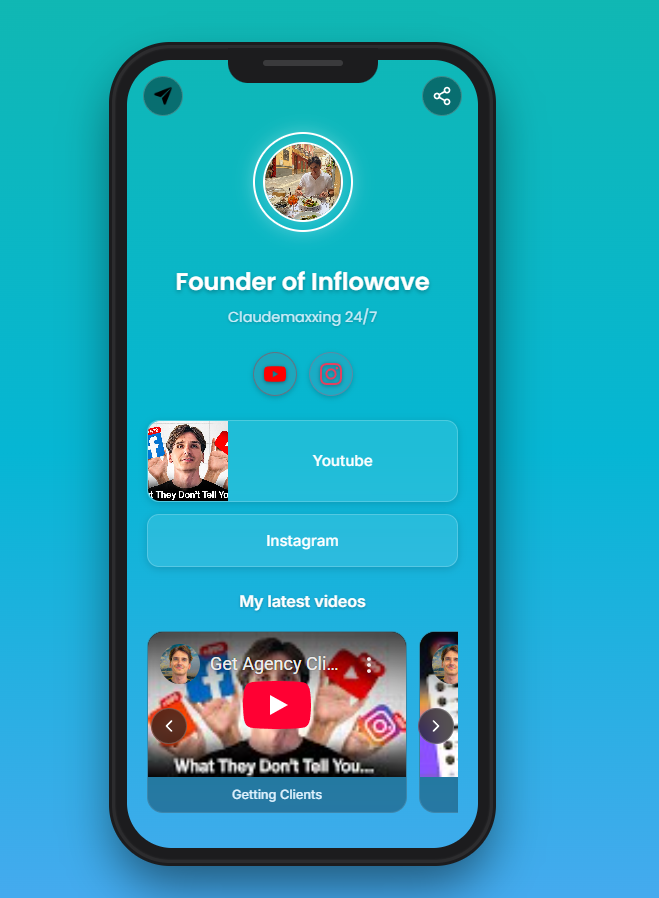 An Inflowave Links page on mobile — a clean, branded link-in-bio with custom styling, multiple link categories, and zero Inflowave branding on the published page.
Step 4: Update Your Instagram Bio
Once your link page is live at your custom domain:
- Go to your Instagram profile
- Edit profile → Website
- Paste your Inflowave link page URL
Step 5: Track Clicks
In the Inflowave Links dashboard:
- Total page visits — how many people visited your link page
- Total link clicks — how many total clicks across all links
- Click rate per link — which links are performing best
- Traffic source — how people are finding your link page
If a visitor clicks through to an Inflowave landing page and submits a form, that conversion is tracked all the way from the bio link click to the CRM contact to the pipeline card.
Link in Bio Strategies That Convert
The "One CTA" Page
Instead of 10+ links, feature one primary call-to-action:
- Your free lead magnet or guide (landing page with form)
- "Apply for coaching" or "Book a call" page
- Your current offer (product or program page)
One clear CTA converts better than a menu of options. Use it when you're actively running a campaign.
The "Resource Hub" Page
For content creators:
- "Free guides" section — link to each downloadable resource
- "Courses" section — your paid offerings
- "Latest reel" — link to your newest content
Use section headers to organize by category and guide visitors to the right place.
The "Agency Client" Setup
Each client gets their own Inflowave link page under their own branding and domain — all managed from your agency dashboard. No Linktree account per client, no separate billing, no Inflowave branding on client pages.
Inflowave Links vs. Linktree vs. Later
| Feature | Inflowave Links | Linktree Pro | Later Link in Bio |
|---|---|---|---|
| Unlimited links | ✅ | ✅ | ✅ |
| Custom domain | ✅ | ✅ | ✅ (paid) |
| Remove branding | ✅ | ✅ (paid) | ✅ (paid) |
| Click analytics | ✅ | ✅ | ✅ |
| Commerce / sales links | ✅ (0% commission) | ✅ (takes %) | ❌ |
| CRM integration (native) | ✅ | ❌ | ❌ |
| AI landing page builder | ✅ | ❌ | ❌ |
| DM automation connected | ✅ | ❌ | ❌ |
| Included in plan | ✅ | ❌ Separate | ❌ Separate |
The core difference: Linktree and Later link in bio are endpoints — someone clicks and leaves. Inflowave Links is a starting point in a tracked funnel — someone clicks, lands on your page, submits a form, becomes a CRM contact, enters a workflow, and gets added to your pipeline.
Frequently Asked Questions
Is Inflowave Links really included with no extra cost? Yes. The Links module is included in all Inflowave plans. Custom domain connection requires your own domain, but there's no additional Inflowave charge.
Does Inflowave take a commission on products I sell through my link page? No. Inflowave does not take a percentage of sales made through links on your bio page. Linktree charges commerce transaction fees on their lower-tier plans.
How does Inflowave link in bio compare to Linktree? Linktree is a polished, dedicated link-in-bio tool with a large user base and good analytics for link performance. For a pure link page with no backend needs, Linktree works well. Inflowave's advantage is the CRM and automation layer — every click can become a tracked lead and trigger a DM sequence automatically.
Can I use Inflowave Links without using the rest of the platform? Yes, but you'd be leaving significant value on the table. The power comes from connecting your bio link → landing page → CRM → DM automation in one closed loop.
Conclusion
Your Instagram bio link is one of the most-clicked spots on your profile — make it work harder than a Linktree page. Inflowave Links gives you a fully customizable bio link page at zero extra cost, with click analytics, custom domain support, and a direct connection to your CRM and DM automation.