How to Create a Landing Page with Inflowave A.I. (Step-by-Step Guide for 2025)
TL;DR
Inflowave includes a built-in AI landing page builder that generates a complete, conversion-ready page from a single chat prompt. Unlike GoHighLevel funnels, ManyChat landing pages, or Kommo web forms — there's nothing extra to connect. Your page, your CRM, your DM automation, and your analytics all live on one platform.
Watch: How to Create Websites & Funnels with Inflowave A.I.
What Is the Inflowave Landing Page Builder?
The Inflowave landing page (also searched as "Instawave landing page") is a module inside the A.I. Suite called A.I. Websites. It lets you generate a fully structured landing page using a conversational AI interface — no drag-and-drop, no templates to hack, no copy to write from scratch.
You describe your offer. The AI builds the page. You publish it on your custom domain. Leads that submit your form flow directly into your Inflowave CRM and trigger your DM workflows automatically.
This is different from what every other tool does:
- GoHighLevel has a funnel builder — but it's template-heavy, requires manual setup, and is built for broad multi-channel use, not Instagram-first businesses
- ManyChat has no landing page feature at all — you need a third-party tool
- Kommo includes web forms — but no AI builder, no analytics, no session replay
- Leadpages / Unbounce are standalone tools — disconnected from your CRM and DM flows
Inflowave's landing page builder is native. It was designed for Instagram businesses where the page, the DMs, the CRM, and the analytics are all part of one operating system.
Step 1: Access A.I. Websites Inside Inflowave
- Log in to your Inflowave account
- Click A.I. Suite in the left navigation
- Select Websites
- Your website project dashboard loads — this lists all pages you've created
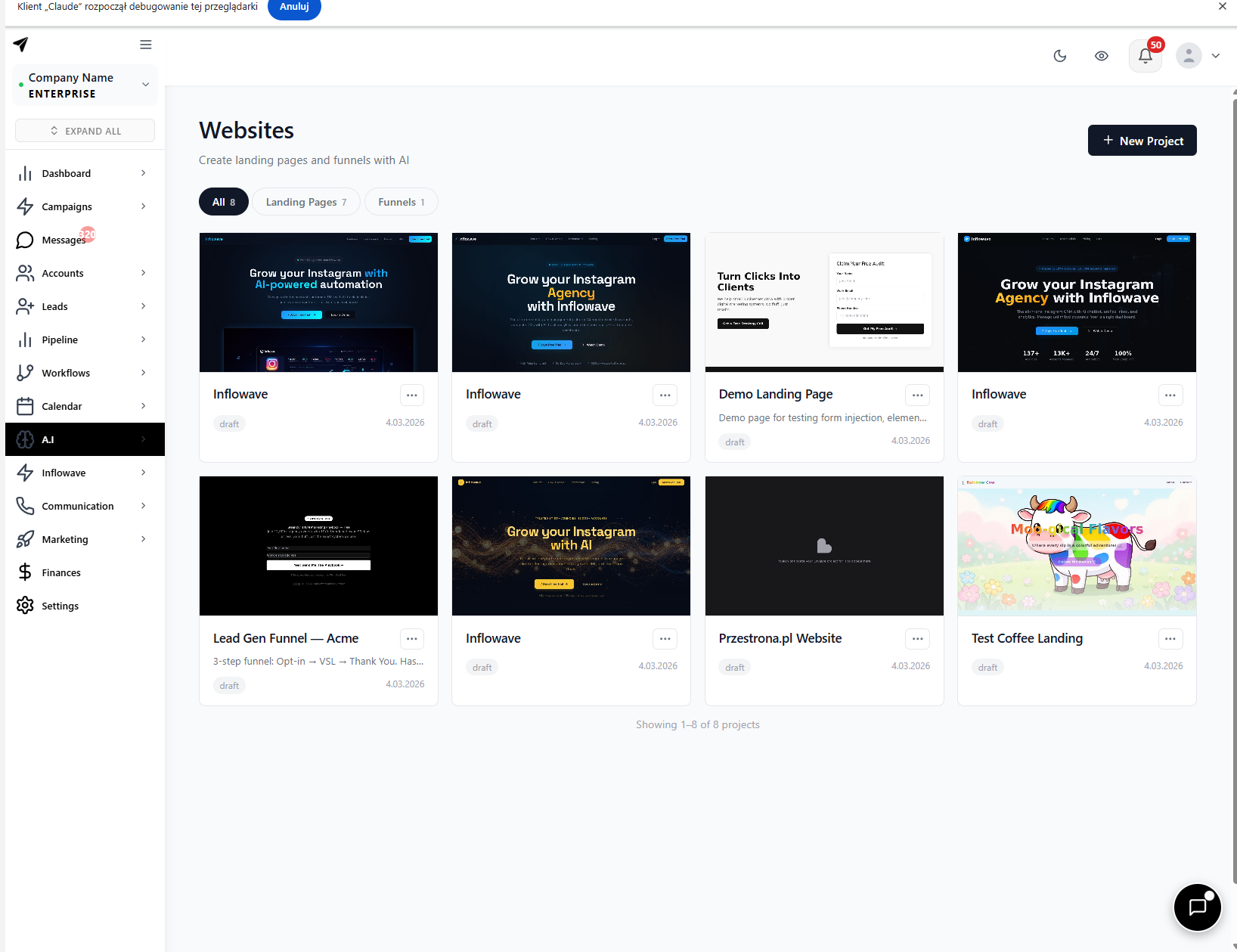
If you're starting fresh, click "Create New Website" to open the AI chat interface.
Step 2: Describe Your Landing Page in Plain English
This is where the Inflowave landing page process differs completely from everything else. No template. No placeholder text. Just type what you need into the AI chat interface.
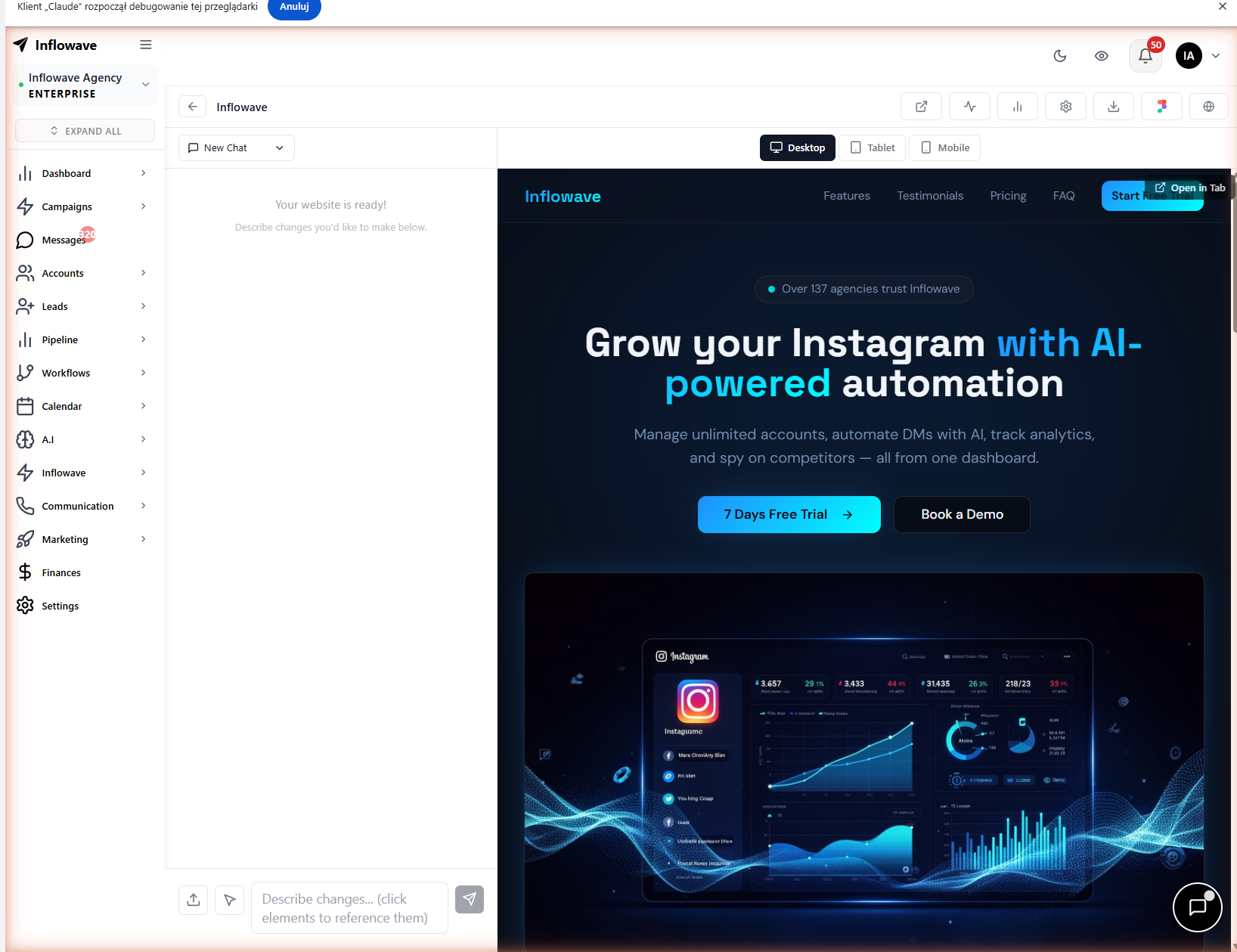
Example prompts:
"Create a landing page for my 1:1 Instagram coaching offer. Target audience is fitness entrepreneurs who want to grow to 10k followers in 90 days. Include a headline, bullet benefits, social proof section, lead capture form, and a strong CTA."
"Build a landing page for my social media agency. Show a hero section with a clear value proposition, a 3-column features block, a case study, pricing tiers, and a contact form."
"Generate a product page for my Instagram growth course. Include a countdown timer, testimonials, a video embed placeholder, and FAQ section."
The AI interprets your intent and returns a complete page layout with structured sections, headline copy, body text, and CTAs — ready to review.
Step 3: Edit and Brand Your Page
After generation, the Inflowave landing page editor lets you refine:
- Headlines and body copy — edit directly in the interface
- Button text and CTAs — adjust for your specific offer
- Brand colors and fonts — apply your visual identity
- Images — swap AI placeholders with your own photography or product shots
- Section order — reorder or remove sections that don't fit
Because you're editing a complete draft rather than building from zero, most users go from prompt to publishable page in under 30 minutes.
Step 4: Publish to Your Custom Domain
Under Settings > Domains in Inflowave:
- Add your domain (e.g.,
offer.yourbrand.com) - Verify via DNS record
- Map the domain to your website project
Your Inflowave landing page then goes live at your domain — no Inflowave branding, no third-party subdomain.
Step 5: Connect Your Form to the CRM and DM Automation
When a visitor submits your landing page form:
- They're automatically added to your Leads CRM in Inflowave — no Zapier, no webhook setup
- A Workflow can fire immediately — send a DM, assign to a pipeline stage, notify a team member, send a follow-up email
- Their full contact record appears across your inbox, pipeline, and reports
How to configure this:
- In the website editor, click your form element
- Open Workflows > Create Workflow
- Set the trigger: Form Submission
- Add your actions:
- Tag the lead (e.g., "landing page lead")
- Move them to a pipeline stage (e.g., "New Inquiry")
- Send an Instagram DM with a follow-up message
- Assign to a team member via Round Robin
No GoHighLevel CRM sync. No ManyChat to HubSpot Zap. The form submission is already inside the same system that runs your DMs, your pipeline, and your team assignments.
Step 6: Track Performance with Built-In Analytics
Every Inflowave landing page comes with a full analytics suite — included in your plan, no extra subscription.
Session Recordings
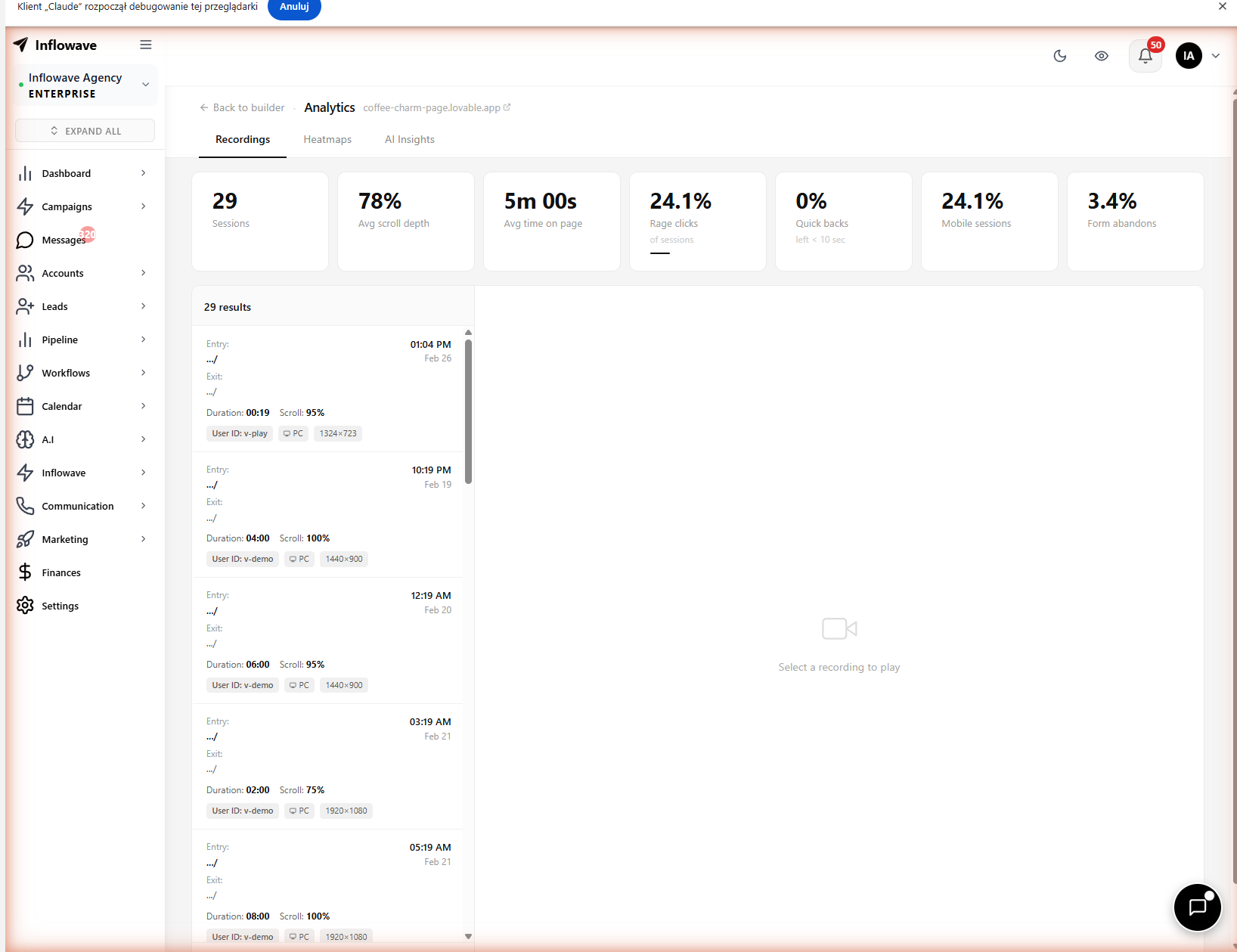
Sessions, unique visitors, average time on page, scroll depth, and conversion rate — all in one dashboard. Click any session row to watch the full replay.
Heatmap Viewer
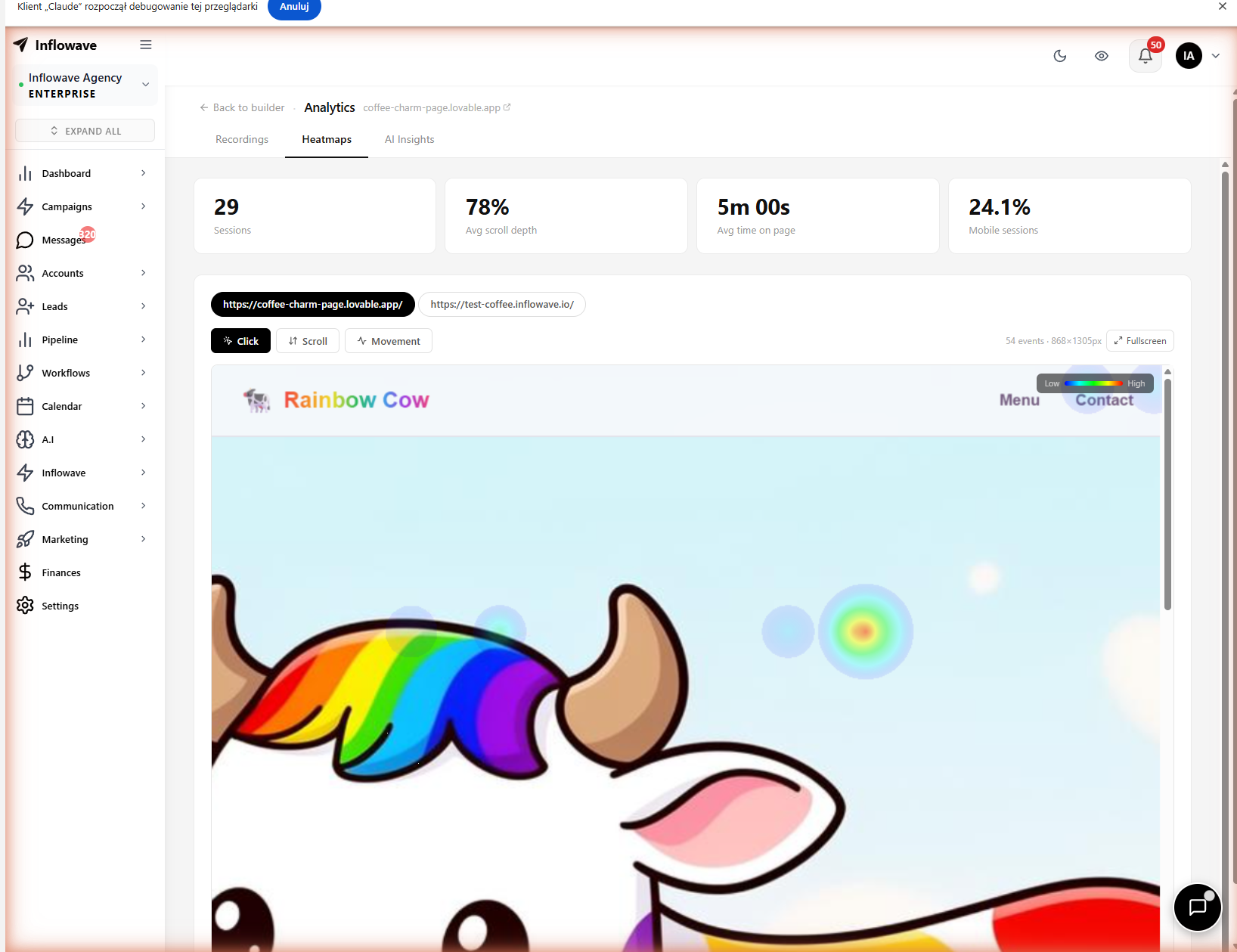
Visual click maps show exactly which sections attract attention and which are ignored. Know where to move your CTA before running a single ad.
Session Replay Player
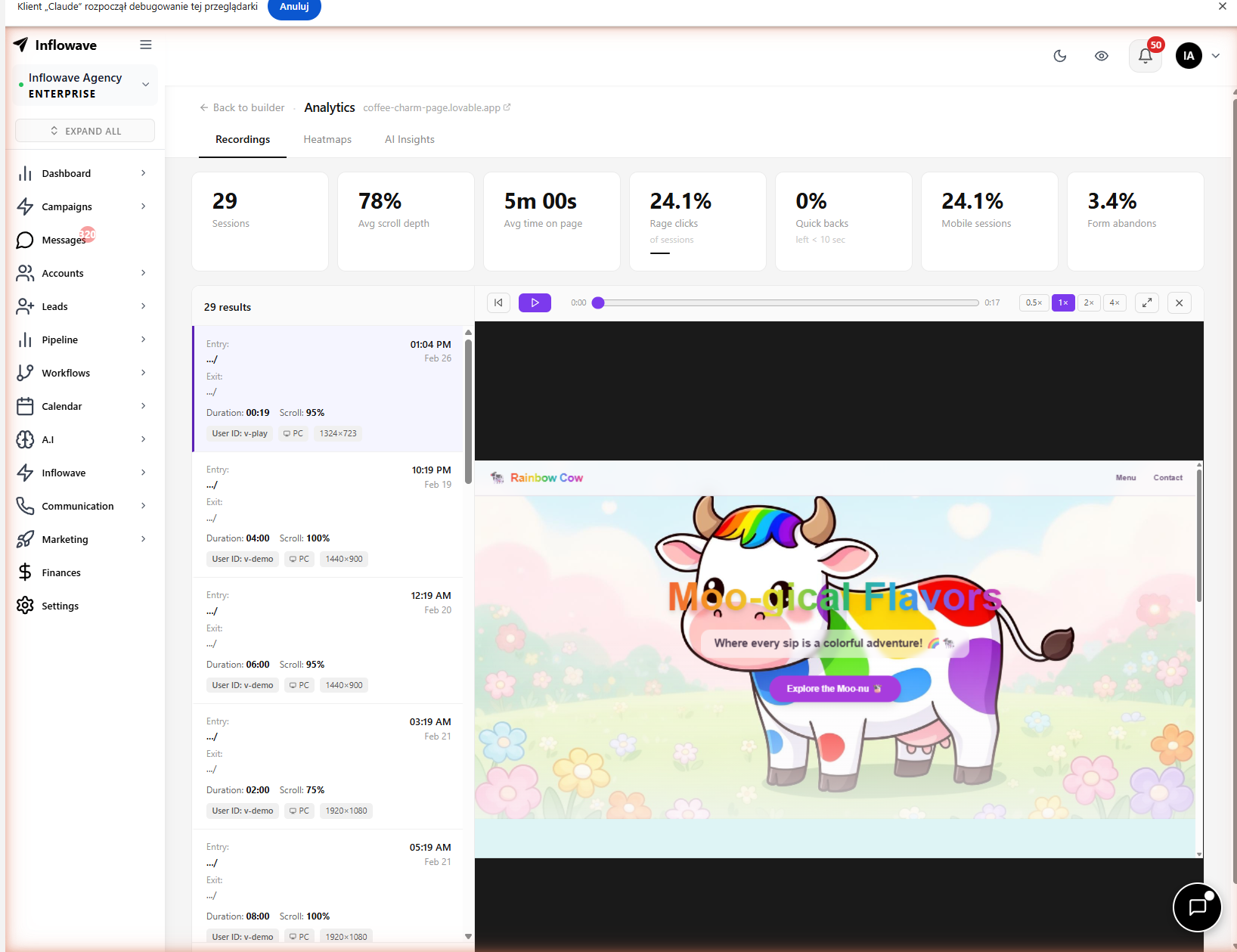
Watch recordings of real visitor sessions. See how they scroll, where they hesitate, what they read twice, and where they leave — without paying for a separate tool.
AI Insights
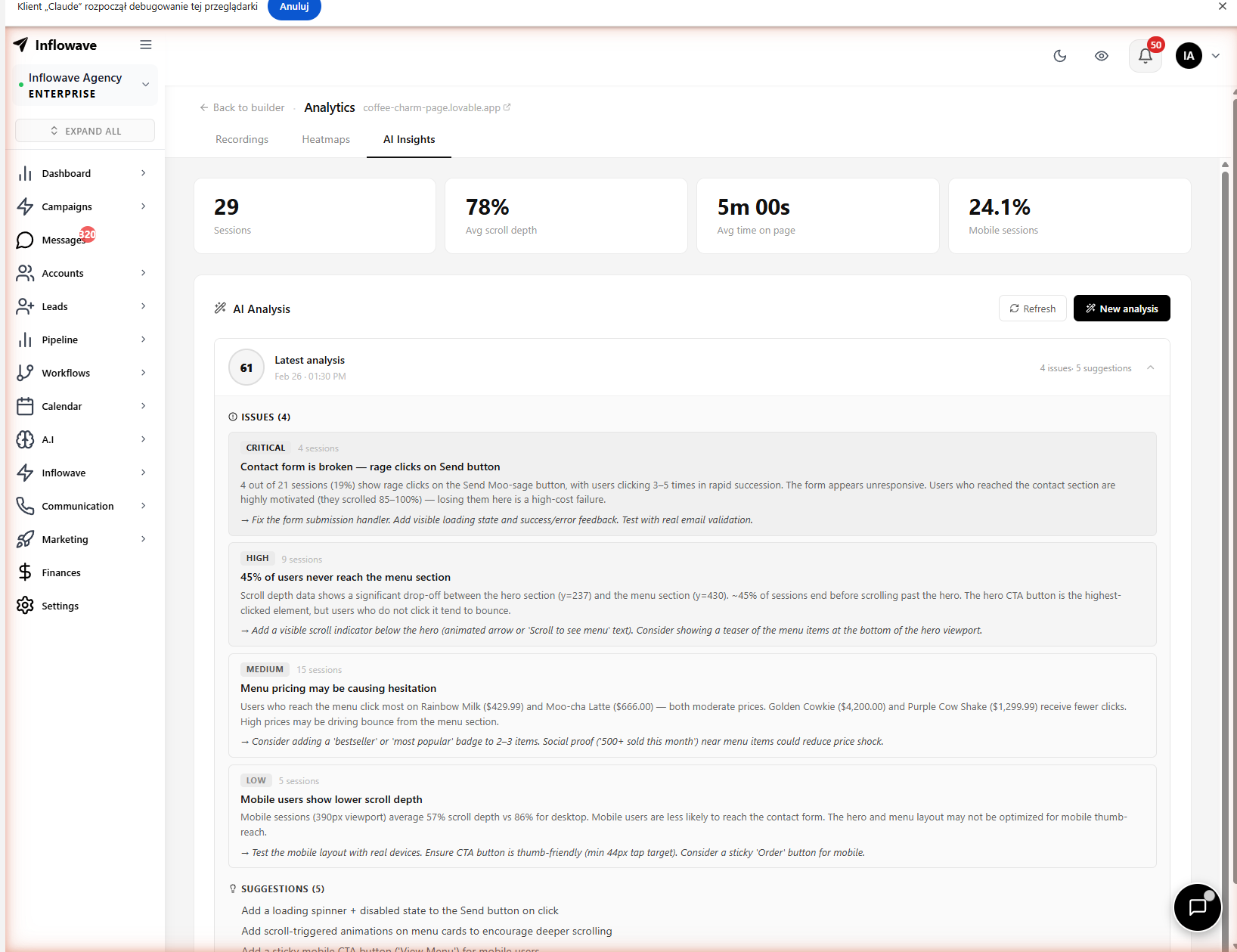
Instead of parsing raw data yourself, Inflowave generates actionable summaries: critical issues, UX problems, and prioritized fixes — all in plain English.
A/B Testing
Create two versions of your Inflowave landing page and split traffic between them. The platform tracks which version converts better and surfaces the winner automatically.
Step 7: Feed the Landing Page Into Your Instagram Funnel
The Inflowave landing page becomes most powerful when it's connected to your Instagram content strategy:
Story → Landing Page: Post Instagram Stories with a link sticker pointing to your Inflowave landing page. Viewers who click and convert enter your CRM automatically.
Bio Link: Use Inflowave's built-in Links module (link-in-bio with 0% commission, vs. Linktree's 9–12%) to send followers from your bio to your landing page.
DM Campaign → Landing Page: Run an Inflowave broadcast campaign sending your lead list a DM with your page link. When they convert, the follow-up workflow fires automatically — no manual follow-up needed.
Comment Trigger → Landing Page: "Comment GUIDE below" → auto DM with your landing page link → lead submits form → added to pipeline.
Inflowave Landing Page vs. Alternatives
| Feature | Inflowave | GoHighLevel | ManyChat | Kommo | Leadpages |
|---|---|---|---|---|---|
| AI page generation | ✅ Chat-to-page | ❌ Template only | ❌ No builder | ❌ Forms only | ❌ Template only |
| CRM integration | ✅ Native | ✅ (GHL CRM) | ❌ Needs Zapier | ✅ (Kommo CRM) | ❌ Needs Zapier |
| Instagram DM trigger | ✅ Native | Partial | ✅ (separate setup) | ❌ | ❌ |
| Heatmaps | ✅ Built-in | ❌ | ❌ | ❌ | ❌ |
| Session replay | ✅ Built-in | ❌ | ❌ | ❌ | ❌ |
| A/B testing | ✅ Built-in | ✅ | ❌ | ❌ | ✅ |
| AI insights | ✅ Built-in | ❌ | ❌ | ❌ | ❌ |
| Custom domain | ✅ | ✅ | ❌ | ❌ | ✅ |
| Included in base plan | ✅ | ❌ Extra | N/A | Limited | ❌ Separate |
Who Should Use the Inflowave Landing Page Builder?
Instagram coaches and consultants who need fast, conversion-optimized pages for 1:1 offers, group programs, or free lead magnets — without hiring a designer.
Social media agencies managing multiple client campaigns that each need a dedicated landing page — created and managed from one dashboard, connected to each client's CRM and DM workflows.
DTC brands driving Instagram Story traffic to product pages — with session replay and heatmaps to optimize conversions without paying for Hotjar or VWO separately.
Course creators selling to Instagram audiences — A/B test your headline, price anchor, and CTA from inside the same platform where your automations live.
Frequently Asked Questions
Is there an Instawave landing page builder? "Instawave" is a common alternate spelling of Inflowave. The Inflowave A.I. Websites module is the landing page builder — accessible inside A.I. Suite > Websites on your Inflowave dashboard.
Can I use my own domain for an Inflowave landing page? Yes. Inflowave supports custom domain publishing via DNS configuration. Go to Settings > Domains, add your domain, verify it, and map it to your website project.
Does Inflowave landing page work with Instagram DM automation? Yes — natively. Form submissions on your Inflowave landing page can directly trigger Workflow automations including Instagram DMs, pipeline updates, lead tagging, and team notifications. No external integrations needed.
How is this different from GoHighLevel landing pages? GoHighLevel has a funnel builder built for broad multi-channel marketing. The Inflowave landing page builder uses AI generation (prompt-to-page) and is deeply integrated with Instagram-specific features: DM automation, Instagram CRM, comment triggers, and Instagram analytics.
Does ManyChat have a landing page builder? No. ManyChat is a DM automation tool with no built-in landing page or website builder. You'd need a separate tool (Leadpages, Webflow, etc.) and a Zapier integration to connect it to your CRM.
Can I A/B test my Inflowave landing page? Yes. The A.I. Websites module includes a built-in A/B testing panel where you can create page variations and split incoming traffic between them, with automated winner detection.
Conclusion
The Inflowave landing page builder eliminates a category of tool that most Instagram businesses pay for separately. Instead of GoHighLevel for funnels, Hotjar for heatmaps, Zapier for CRM connections, and Leadpages for pages — you get all of it in one platform, generated from a single AI prompt, connected to your DMs and CRM from day one.