Instagram Comment Automation: How to Set Up Comment Triggers in Inflowave (2025)
TL;DR
Inflowave's comment trigger feature lets you automatically send DMs when someone comments on your Instagram post or reel with a specific keyword. It's one of the highest-converting lead capture tactics on Instagram — and it's built directly into your DM automation, CRM, and pipeline. ManyChat popularized comment triggers, but Inflowave does it natively without a separate platform or plan upgrade.
What Is Instagram Comment Automation?
When you post a reel with the caption "Comment GUIDE below to get the free download," and a follower comments "GUIDE" — comment automation handles everything after that automatically:
- Detects the keyword in the comment
- Sends a personalized DM to that commenter with the resource or offer
- Optionally: likes the comment, replies publicly, captures the contact in your CRM
- Starts a multi-step DM flow if they engage
The conversion rate for comment-triggered DMs is significantly higher than cold outreach — because the person opted in by commenting. They already showed intent.
ManyChat built its business on comment automation. But ManyChat is a standalone tool — your comment triggers don't connect natively to your pipeline or CRM. You need Zapier to push those leads anywhere useful.
Inflowave does comment triggers AND CRM AND pipeline AND DM automation — from one dashboard.
How to Set Up Comment Automation in Inflowave
Step 1: Create a New Comment Trigger Campaign
- Go to Campaigns in the left navigation
- Click New Campaign
- Select Comment Trigger as the campaign type
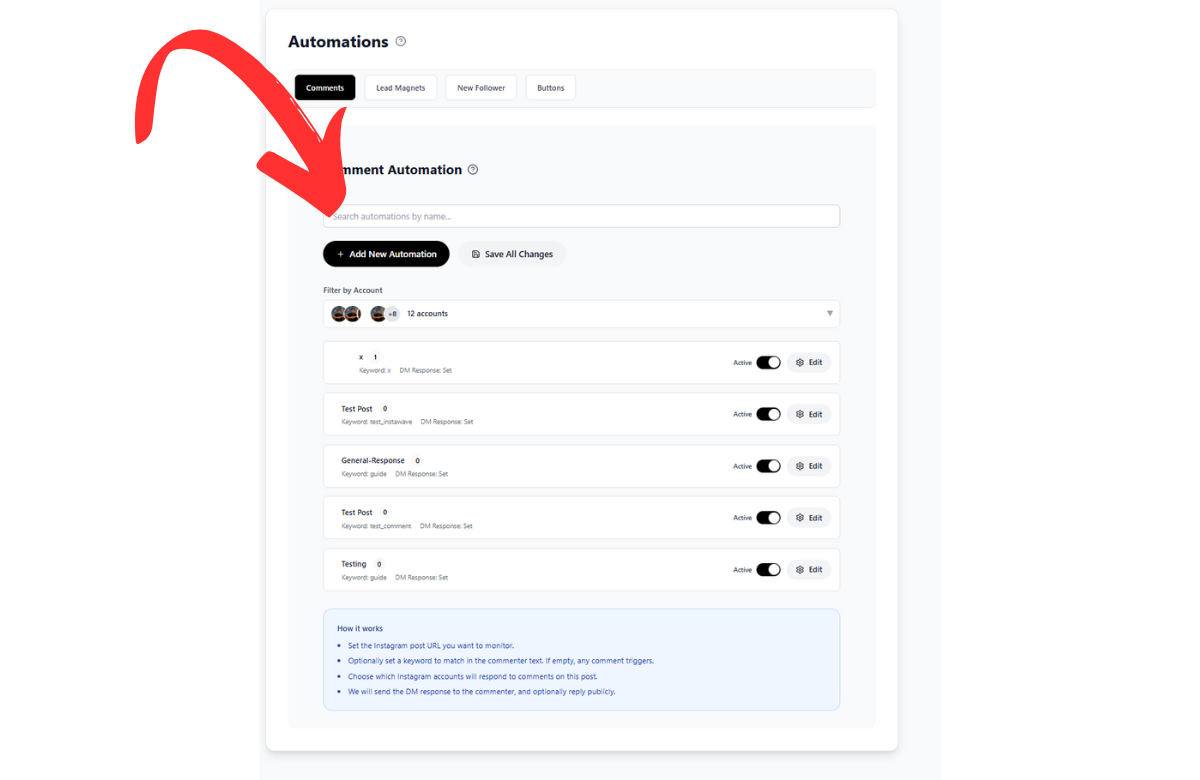 The comment automation dashboard lists all your active comment trigger campaigns — each showing the trigger keyword, connected post, and automation status.
Step 2: Configure the Trigger
- Post selection: Choose which Instagram post or reel to monitor. You can target a specific post or apply the trigger to all posts.
- Trigger keywords: Enter the words that will fire the automation (e.g., "GUIDE", "FREE", "PRICE"). You can add multiple keywords — any of them will trigger the flow.
- Exact match or contains: Choose whether the comment must be exactly your keyword, or just contain it.
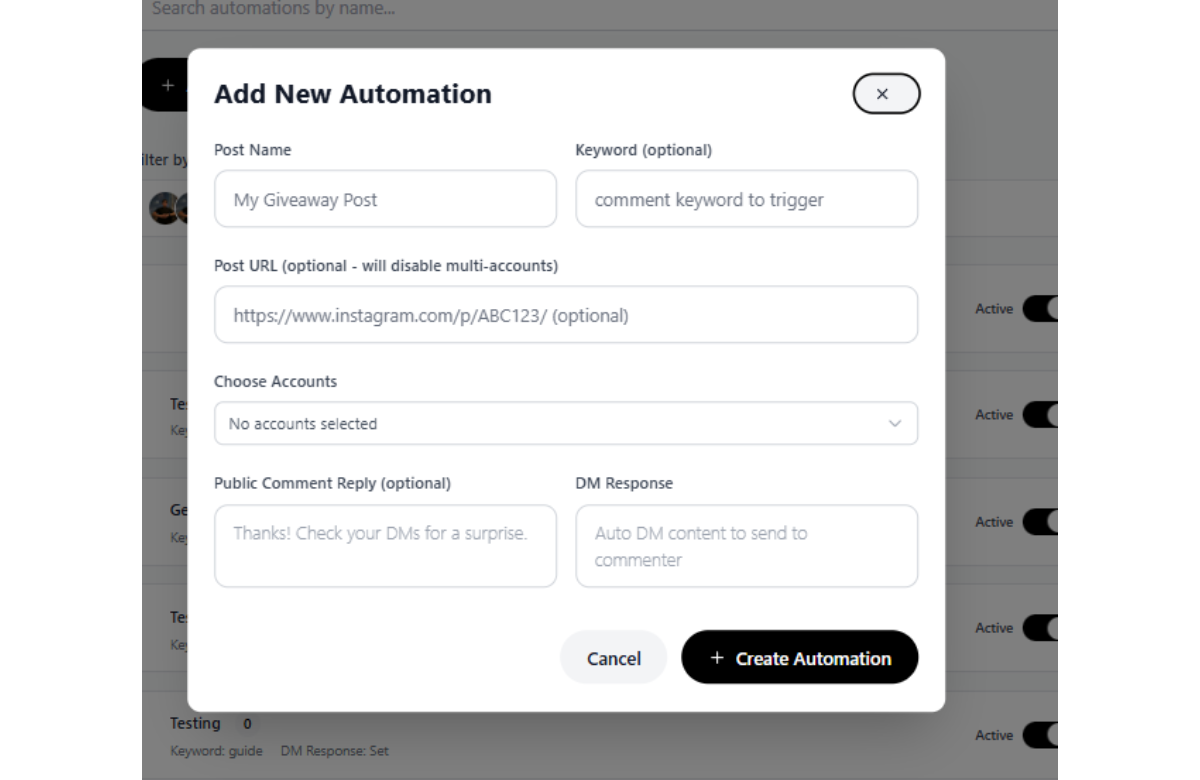 The trigger configuration form lets you set keywords, choose your target post, define the DM response, and enable auto-like and public reply options.
Step 3: Set the Comment Response
Choose what happens when the trigger fires:
- Like the comment — Inflowave auto-likes it (looks natural, improves social signal)
- Public reply — Optionally post a public comment reply (e.g., "Sent! Check your DMs")
- Send a DM — Build your DM message with personalization tokens:
{{first_name}},{{username}}, etc.
Step 4: Build the DM Flow
After the initial DM, you can build a multi-step conversation:
- Button replies: Add quick-reply buttons (e.g., "Yes, send it" / "Tell me more") so the follower can respond with one tap
- Conditional branches: If they tap "Yes" → send resource link. If no response in 24 hours → send a follow-up
- Lead capture: Ask for their email or phone number mid-conversation and save it directly to their contact record
Step 5: Connect to Pipeline and CRM
When someone engages with your comment trigger:
- Their Instagram profile is automatically saved as a contact in Leads
- A Pipeline card is created (e.g., "New Lead" stage)
- Tags are applied (e.g., "comment-lead", "reel-june")
- If they reach a certain step in the DM flow, they auto-move to "Qualified" in your pipeline
Comment Automation Tactics That Convert
The "Resource Drop" Tactic
Post a value-packed reel. Caption: "Comment DOWNLOAD for the free swipe file."
- Trigger: DOWNLOAD
- DM: "Here's your free Instagram caption swipe file: [link]. Save it — I update it monthly."
- Result: Hundreds of opted-in leads who are already engaged with your content
The "Reveal" Tactic
Post a results screenshot. Caption: "Comment REVEAL and I'll DM you exactly how we did this."
- Trigger: REVEAL
- DM: "Here's the exact 3-step process: [link to landing page]"
- Pipeline card created: "New Inquiry"
The "Waitlist" Tactic
Announce a new product. Caption: "Comment WAITLIST to be first to know when spots open."
- Trigger: WAITLIST
- DM: "You're on the list! I'll DM you 24 hours before anyone else."
- Tag: "waitlist-program-x"
- When ready to sell: send a broadcast DM to all "waitlist" tagged contacts
Inflowave Comment Automation vs. ManyChat
| Feature | Inflowave | ManyChat |
|---|---|---|
| Comment keyword triggers | ✅ | ✅ |
| Multiple keywords per campaign | ✅ | ✅ |
| Auto-like comment | ✅ | ✅ |
| Public comment reply | ✅ | ✅ |
| Multi-step DM flow | ✅ | ✅ |
| Native CRM capture | ✅ | ❌ Needs Zapier |
| Native pipeline integration | ✅ | ❌ |
| All posts trigger (not just one) | ✅ | ✅ (Pro plan) |
| Multi-account support | ✅ | ❌ |
| Included in base plan | ✅ | ❌ Paid plan |
ManyChat's comment triggers are battle-tested and work well. The limitation is that ManyChat is a DM tool — your comment leads don't go anywhere useful without external integrations. Inflowave keeps the entire journey — comment → DM → CRM → pipeline → follow-up — inside one system.
Frequently Asked Questions
Does Instagram allow comment automation? Yes, when done through Meta-approved integrations. Inflowave connects via the official Meta API. Comment triggers that use keyword detection are within Meta's terms of service when used responsibly.
Is ManyChat the only tool that does comment triggers? No. ManyChat was the first to popularize it, but several platforms now offer comment automation including Inflowave, Chatfuel, and others. Inflowave's advantage is that it's part of a full CRM and pipeline system.
How many comment trigger campaigns can I run? Inflowave supports multiple concurrent comment trigger campaigns across different posts simultaneously.
What happens if someone comments multiple times? Inflowave's deduplication logic prevents the same user from being DM'd multiple times for the same trigger within a configurable time window.
Conclusion
Comment triggers are one of the highest-ROI automations on Instagram. They turn passive viewers into active leads with a single comment — and Inflowave handles everything from that comment all the way through to pipeline and follow-up. No ManyChat, no Zapier, no patchwork of tools.