How to Set Up an Instagram AI Chatbot with Inflowave (No-Code Guide 2025)
TL;DR
Inflowave's AI-powered DM automation handles incoming Instagram messages 24/7 — answering questions, qualifying leads, collecting contact info, and routing hot prospects to your pipeline. Unlike ManyChat's AI add-on or Chatfuel's standalone product, Inflowave's AI chatbot is part of the same platform as your CRM, pipeline, and broadcast tools.
Watch: Inflowave AI Chatbot (JARVIS)
What Can an Instagram AI Chatbot Do?
A well-configured Instagram AI chatbot handles the conversations that currently fall through the cracks:
- After-hours inquiries: Someone DMs you at 2 AM asking about pricing. They get an instant, intelligent reply.
- Repetitive FAQs: "How much do you charge?" "Do you work with beginners?" "What's included?" — all answered automatically.
- Lead qualification: The chatbot asks qualifying questions and scores the lead before it ever reaches your inbox.
- Appointment booking: Collects availability preferences and links them to your calendar.
- Contact capture: Asks for name, email, and business type — populates your CRM automatically.
ManyChat AI uses a rule-based and AI hybrid approach. It works well for simple flows but requires an additional paid add-on. Chatfuel is a standalone chatbot builder — powerful but entirely separate from your CRM and pipeline.
Inflowave's AI layer is built into the same DM infrastructure as your workflows, pipeline, and contact records.
How to Set Up Your Instagram AI Chatbot in Inflowave
Step 1: Enable AI Replies in Your Inbox Settings
- Go to Settings → Inbox → AI Automation
- Toggle on AI Auto-Reply
- Set the response window: "Reply immediately" or "Reply if no human response within X minutes"
The second option lets the AI act as a backup — if your team doesn't respond within 10 minutes, the AI picks up the conversation.
Step 2: Configure Your AI Knowledge Base
This is what makes the chatbot intelligent about your specific business:
- Go to A.I. → Knowledge Base
- Add your:
- Business description — who you are, what you do, who you serve
- Services and pricing — what you offer and at what price points
- FAQs — the 10–15 questions you get most often in DMs
- Booking link — so the AI can send it when someone asks to book a call
- Out-of-scope rules — topics the AI should not answer (escalate to a human instead)
The richer your knowledge base, the more accurately the AI responds.
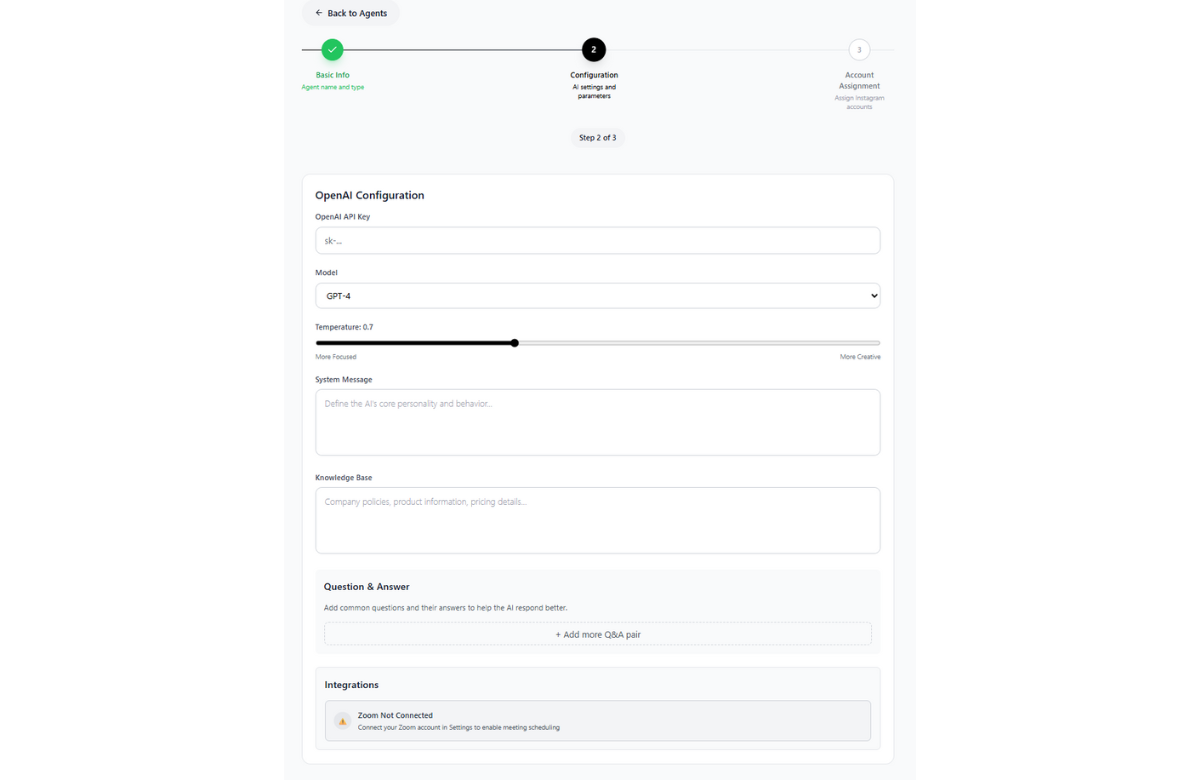 The AI agent configuration connects to your OpenAI integration and lets you define the chatbot's persona, knowledge base, and escalation rules — all from a single settings panel.
Step 3: Set Up a Lead Qualification Flow
Instead of just answering questions, configure your AI to qualify leads mid-conversation:
- Go to Campaigns → New Campaign → AI Flow
- Build a qualification sequence:
- "What's your main goal with Instagram right now?"
- "How many followers do you currently have?"
- "Are you currently working with a coach or agency?"
- "What's your budget range for this type of support?"
Based on their answers, the AI can:
- Tag them as "qualified" or "not-qualified"
- Create a pipeline card in the appropriate stage
- Send them a booking link if they're qualified
- Start a nurture sequence if they're not yet ready
Step 4: Handle Escalation to Human
Set conditions for when the AI should hand off to a human team member:
- If the contact says "I want to talk to a real person"
- If the lead is tagged "qualified" (hot lead, needs personal attention)
- If the conversation has been going for more than 5 exchanges
- If any specific keyword is detected ("urgent", "refund", "complaint")
Go to Settings → AI Escalation Rules → configure your conditions → assign to team member or round-robin.
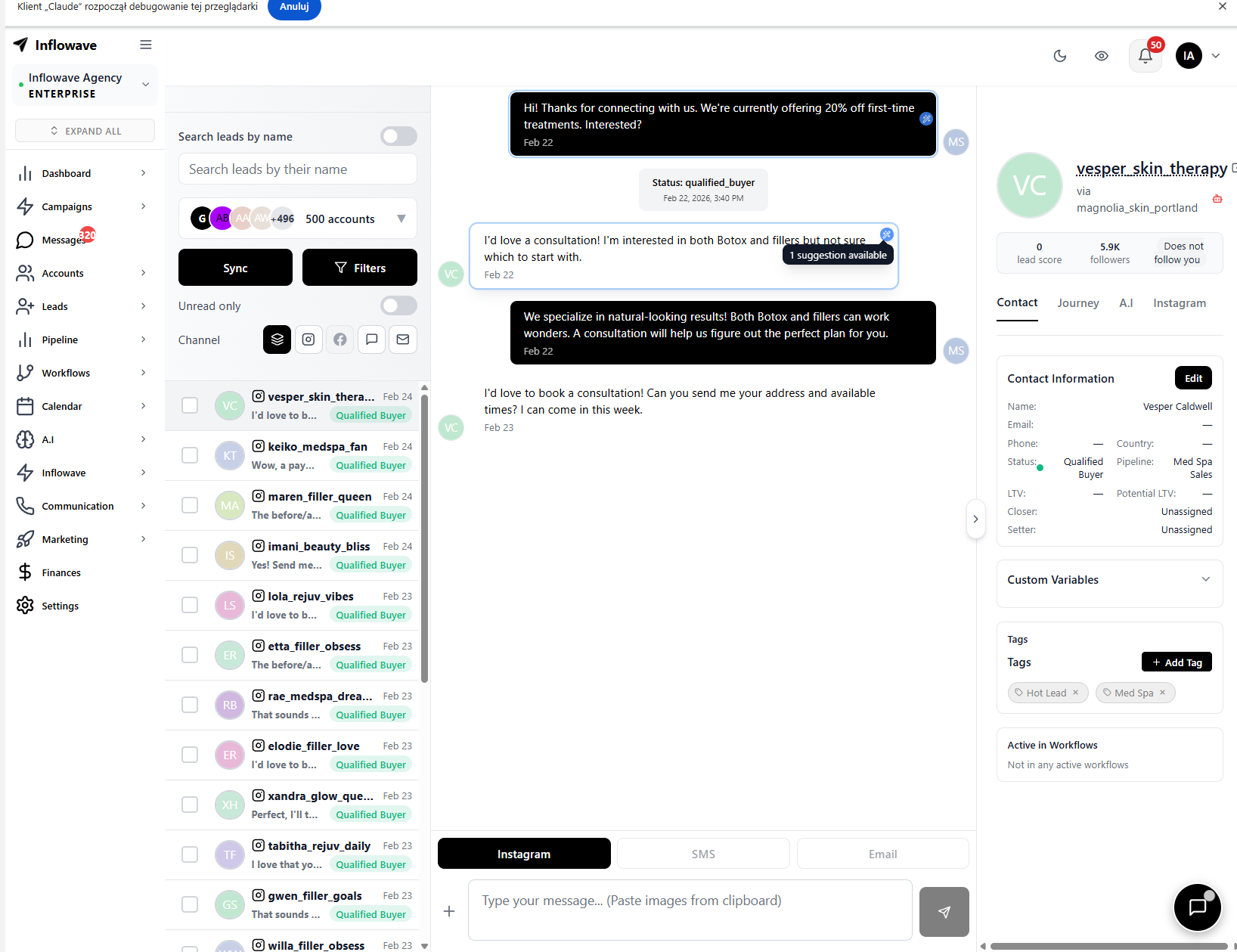 When a conversation is flagged for human review, the AI surfaces reply suggestions directly in the unified inbox — your team sees context from the full AI conversation and can take over with one click.
AI Chatbot Response Examples
FAQ Response:
User: "How much does it cost?" AI: "Great question! Our pricing starts at $97/month for the Starter plan. It includes DM automation, CRM, and pipeline management. Want me to send you the full pricing breakdown?"
Qualification:
User: "I'm interested in growing my Instagram for my coaching business." AI: "Love it! A couple quick questions to see how we can best help. How many followers do you currently have, and what's your main goal — more leads, more engagement, or both?"
Escalation:
User: "I really need to speak with someone today." AI: "Of course! I'm flagging this to our team now. Someone will reach out within the next hour. In the meantime, here's our direct booking link if you'd like to get something on the calendar: [link]"
Inflowave AI Chatbot vs. ManyChat AI vs. Chatfuel
| Feature | Inflowave | ManyChat AI | Chatfuel |
|---|---|---|---|
| AI-powered replies | ✅ | ✅ | ✅ |
| Custom knowledge base | ✅ | Limited | ✅ |
| Lead qualification flows | ✅ | ✅ | ✅ |
| Native CRM capture | ✅ | ❌ | ❌ |
| Pipeline integration | ✅ | ❌ | ❌ |
| Human escalation rules | ✅ | ✅ | ✅ |
| Multi-account support | ✅ | ❌ | ❌ |
| Included without add-on | ✅ | ❌ Paid add-on | ❌ Separate tool |
ManyChat AI requires upgrading to their AI add-on plan. Chatfuel is a full separate product — your chatbot data doesn't live in the same ecosystem as your CRM and pipeline. Inflowave includes AI chatbot capabilities in the base platform.
Frequently Asked Questions
Is the AI chatbot compliant with Instagram's terms? Yes. Inflowave's AI chatbot uses the official Meta Messaging API. Auto-replies to initiated conversations (where the user DM'd first) are fully within Instagram's terms of service.
Can I train the chatbot on my own content? Yes. The knowledge base accepts text, FAQs, pricing tables, and business descriptions. You can also upload documents to train the AI on your specific offers and processes.
What language does the AI chatbot support? Inflowave's AI replies in the same language the user is writing in — so if someone DMs in Spanish, the AI responds in Spanish.
Can the chatbot book appointments? Yes. You can connect your Inflowave calendar and configure the AI to send your booking link or use natural language to collect scheduling preferences.
Conclusion
An Instagram AI chatbot running 24/7 is the closest thing to hiring a full-time DM assistant — without the salary. Inflowave's AI chatbot handles replies, qualifies leads, and feeds your pipeline automatically. Unlike ManyChat AI (a paid add-on) or Chatfuel (a separate tool), it's built into the same platform as everything else.