Instagram Scheduling Tool: How to Schedule Posts Inside Inflowave (2025)
TL;DR
Inflowave includes a built-in Instagram content scheduler inside the Calendar module. Plan and schedule your posts, reels, and stories alongside your DM campaigns, pipeline, and CRM — so your content strategy and sales automation run from the same platform. If you're currently paying separately for Later, Buffer, or Hootsuite, Inflowave replaces that subscription.
Why Scheduling Through Your CRM Platform Matters
When your content scheduler and your CRM are separate tools, you have a disconnect: you post a reel, it drives DMs, but you can't easily see which post drove which leads.
With Inflowave's scheduler inside the same platform as your CRM and automation:
- You post a reel → the associated comment trigger is already configured → leads flow directly into your pipeline → analytics show exactly how many leads that reel generated
This closed loop — from post to DM to CRM — is what tools like Later, Buffer, and Hootsuite cannot provide because they're content-only platforms with no CRM or automation layer.
How to Schedule Instagram Content in Inflowave
Step 1: Open the Calendar Module
- Go to Calendar in the left navigation
- The calendar shows a monthly/weekly view of scheduled and published content
- Click any date/time slot to create a new post
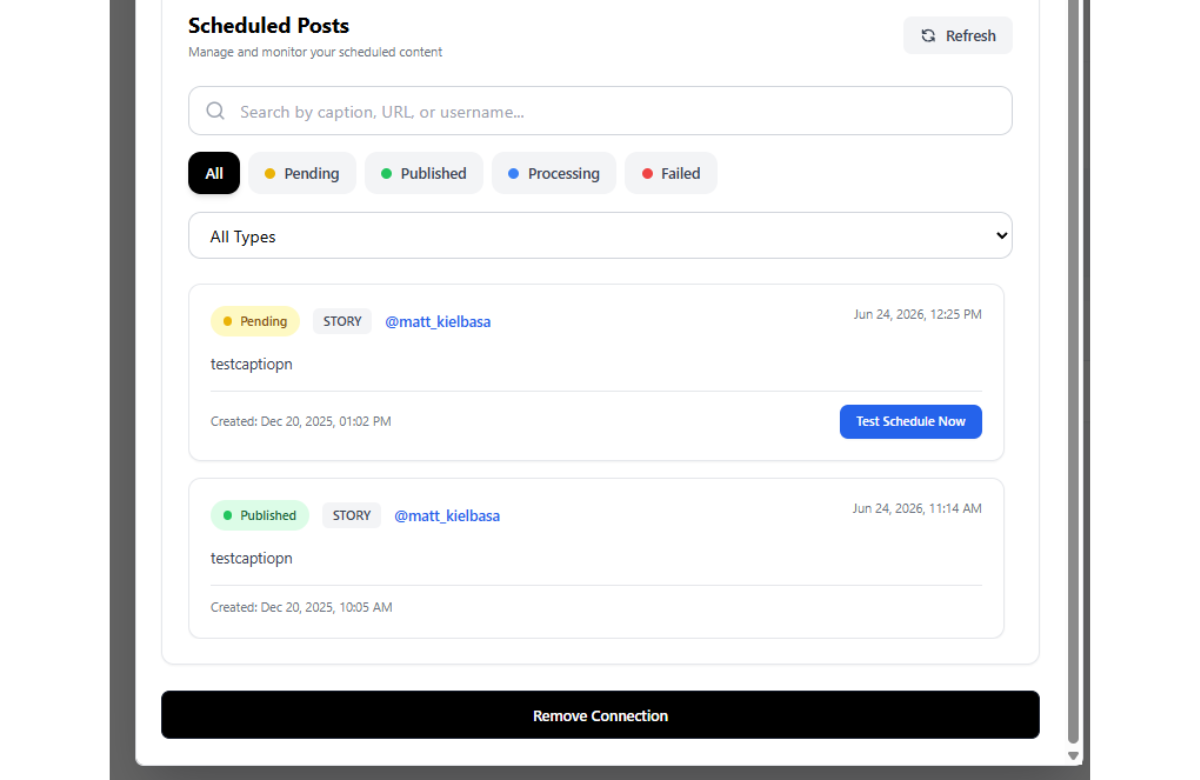 The scheduled posts list shows all upcoming and published content across your Instagram accounts — with status badges (Scheduled, Published, Pending) and post details at a glance.
Step 2: Create a New Post
- Upload your media — image, carousel, reel, or story
- Write your caption — use Inflowave's AI caption assistant to generate or refine
- Add hashtags — Inflowave suggests relevant hashtags based on your niche
- Set the first comment (for hashtag stacking strategy)
- Select the Instagram account to post from (if you manage multiple)
Step 3: Attach a Comment Trigger (Optional)
This is the key feature that separates Inflowave from standalone schedulers. When creating a post, you can directly attach a comment trigger campaign:
- In the post creation panel, click Attach Automation
- Select an existing comment trigger campaign or create a new one
- When the post goes live, the comment trigger activates automatically
Now your content calendar isn't just for posting — it's a lead generation machine. Every reel you schedule can have an automation attached that captures and qualifies leads automatically.
Step 4: Schedule the Post
- Select date and time
- Use Inflowave's best time recommendation — based on your account's historical engagement data
- Confirm and schedule
The post appears on the calendar with a "Scheduled" badge. You can edit, reschedule, or delete it at any time before it publishes.
Content Planning Features
Content Queue
Build a queue of evergreen content — posts that rotate on a schedule without you needing to set individual dates. Useful for maintaining a consistent posting cadence during busy periods.
Bulk Upload
Upload a full month of content at once using CSV and media files. Useful for agencies managing multiple client accounts who want to batch-schedule everything at the beginning of the month.
Caption Templates
Save caption formats you use repeatedly (call-to-action formats, sales post structures) as templates. Apply them to new posts with one click and customize from there.
Inflowave Scheduler vs. Later, Buffer, and Hootsuite
| Feature | Inflowave | Later | Buffer | Hootsuite |
|---|---|---|---|---|
| Instagram post scheduling | ✅ | ✅ | ✅ | ✅ |
| Reels scheduling | ✅ | ✅ | ✅ | ✅ |
| Story scheduling | ✅ | ✅ | ✅ | ✅ |
| Multi-account | ✅ | ✅ (paid) | ✅ (paid) | ✅ (paid) |
| AI caption assist | ✅ | ✅ | ✅ | ✅ |
| Best time suggestions | ✅ | ✅ | ✅ | ✅ |
| Attach comment trigger automation | ✅ | ❌ | ❌ | ❌ |
| Native CRM integration | ✅ | ❌ | ❌ | ❌ |
| Lead analytics per post | ✅ | ❌ | ❌ | ❌ |
| Included with DM automation | ✅ | ❌ Separate | ❌ Separate | ❌ Separate |
Later is the best dedicated Instagram scheduling tool — great media management, strong content analytics. But it doesn't touch your DMs, pipeline, or CRM.
Buffer is clean and simple but limited for power users and agencies. No automation, no CRM layer.
Hootsuite is the enterprise option — powerful but expensive and not Instagram-native. Starts at $99/month for a meaningful feature set.
If you're already paying for DM automation and CRM, consolidating into Inflowave eliminates the scheduling subscription entirely.
Frequently Asked Questions
Can Inflowave schedule reels with audio? Yes. Inflowave supports reel scheduling with audio tracks sourced from Instagram's music library. Standard Meta API limitations apply to audio rights.
Does the scheduler support carousel posts? Yes. You can upload multiple images to create a carousel and schedule it like any other post type.
Is Later better than Inflowave for scheduling? Later has more advanced content analytics — best hashtag performance, optimal time data, media library management. If scheduling and content analytics are your primary need, Later is excellent. If you need scheduling as part of a broader Instagram automation and CRM system, Inflowave covers both in one platform.
Can I manage multiple client Instagram accounts from one calendar? Yes. Agency users can see all client accounts in a single calendar view, filter by account, and schedule content for each from the same interface.
Conclusion
Scheduling Instagram content shouldn't require a separate subscription. Inflowave's calendar gives you everything Later and Buffer offer — plus the ability to attach lead generation automations to every post, track the leads each post drives, and manage it all alongside your DM automation and pipeline.