
Search "Instagram CRM" and you get two kinds of page: general CRMs claiming an Instagram integration, and chat tools claiming to be a CRM. Neither tells you what actually happens between someone sending you a DM and that person appearing as a contact record you can follow up, report on and hand to a team member.
This page covers the mechanics. What an Instagram CRM is, how a message becomes a record, which Meta permissions a vendor has to hold to do it, exactly what Meta's API permits and forbids, and the questions worth asking before you pay. It is written for people running client work on Instagram, where the cost of a lost conversation is a lost retainer rather than an untidy inbox.
About this article. Written and maintained by the Inflowave editorial team, who build and run an Instagram-first CRM used by agencies to manage client DMs, so the permissions, review process and rate limits below are ones we work inside daily. Every platform fact is sourced to Meta's own developer documentation, linked at the end. Last checked against that documentation on 15 September 2026.
What an Instagram CRM actually is
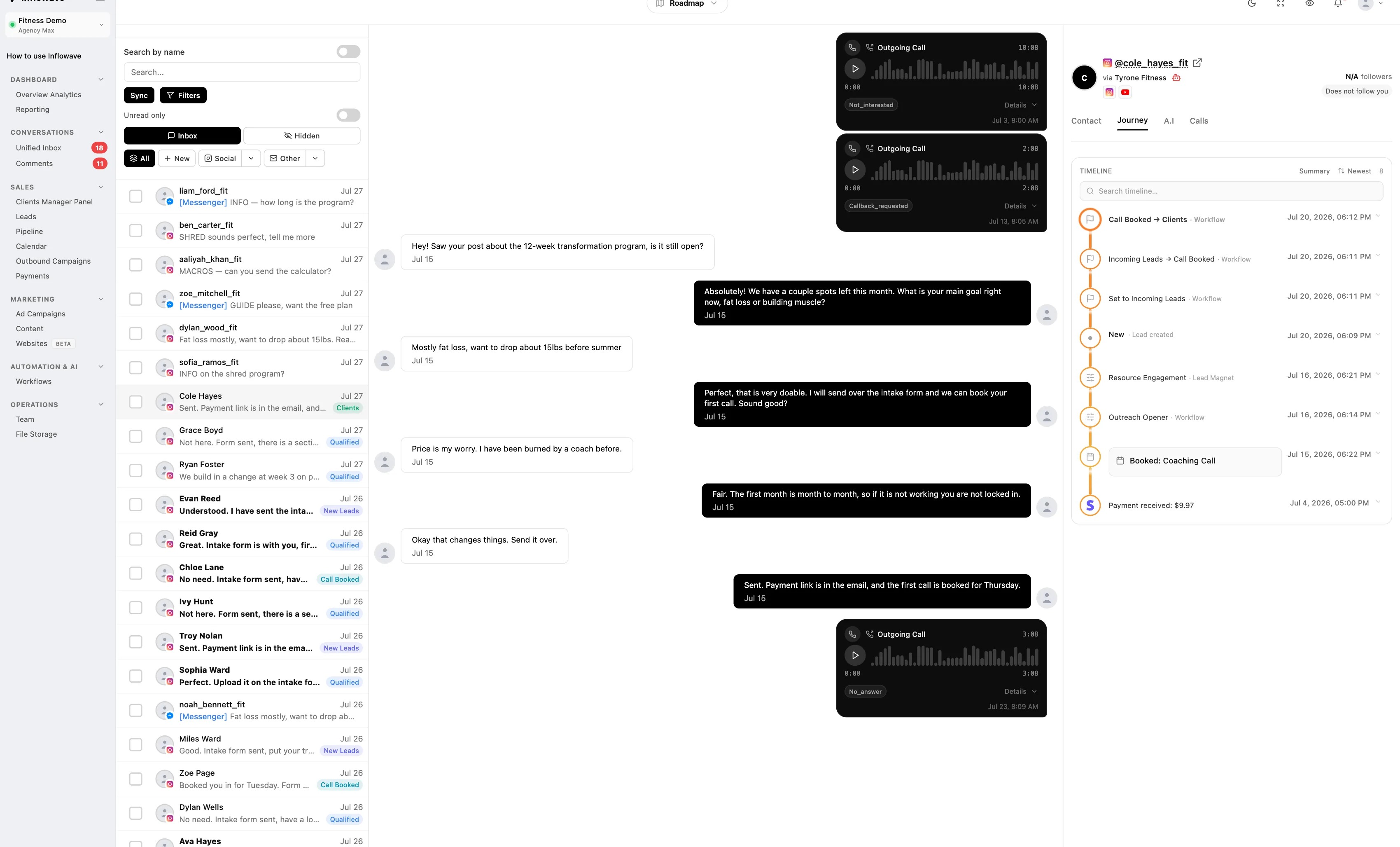
A CRM is a database of people plus the history of your dealings with them. An Instagram CRM is one where Instagram is a first-class source of both: the contact is created from Instagram activity, and the message history lives in the record rather than in a separate chat app.
That definition rules more tools out than you would expect. A general CRM with an "Instagram integration" is usually pulling a follower count onto a contact you created by hand. A social inbox shows you conversations but has no concept of a deal, a stage or a value. A chatbot builder automates the first reply and then hands you nothing durable. All three are useful. None of them, on their own, is what the phrase describes.
The practical test is simple. If someone DMs you tonight and nobody touches anything, is there a contact record tomorrow morning with that conversation attached to it? If yes, you have an Instagram CRM. If no, you have Instagram plus a spreadsheet.
The permissions question, which decides everything else
Before any feature comparison, ask what a vendor's Meta app is actually allowed to do. Instagram messaging is not an open API. Access is granted per named permission, and each one has to survive Meta's App Review.
There are two ways a tool can reach Instagram, and the permission names differ.
Instagram API with Instagram Login. The scopes are instagram_business_basic, instagram_business_manage_messages, instagram_business_manage_comments and instagram_business_content_publish. A CRM that creates contacts from DMs needs at least the first two. Without instagram_business_manage_comments it cannot see comment threads, which means comment-to-lead capture does not exist regardless of the marketing copy.
Instagram API with Facebook Login. The older route, used when the Instagram account is linked to a Facebook Page. The relevant permissions are instagram_basic, instagram_manage_messages, pages_messaging, pages_manage_metadata and pages_show_list, usually alongside business_management for agencies administering accounts they do not own.
Two more entities belong on the shortlist:
- The
human_agentfeature, which is reviewed separately from the messaging permissions and is what allows a reply outside the standard window. - Advanced Access. Meta grants Standard Access by default, and Standard Access only works for accounts that have a role on the app itself. Serving Instagram accounts you do not own, which is the entire agency use case, requires Advanced Access. Meta is explicit that Advanced Access must be approved per permission through App Review, and that Business Verification is required to get it. Consumer apps additionally have to be in Live Mode before they can request Advanced Access permissions from users without a role on the app.
So "has this app passed App Review, for which permissions, and at which access level?" is one question with a factual answer, and it is the single best filter on a shortlist. A vendor operating on Standard Access can run a convincing demo on its own test account and cannot onboard your client.
How a DM becomes a contact record
Four things have to happen, and each one is a place where tools quietly differ.
1. The account has to be a professional account. Meta's Instagram Platform documentation is explicit that app users must have an Instagram professional account, for a business or a creator. A personal account cannot be connected, full stop. If a client insists on keeping a personal account, no tool on the market will fix that for you.
2. The tool has to subscribe to webhooks. Meta pushes events to a subscribed app rather than letting it poll for everything. The available Instagram webhook fields include messages, message_reactions, message_echoes, comments, live_comments, mentions, messaging_postbacks, messaging_referral, messaging_seen, messaging_optins, messaging_handover, standby, story_insights, messaging_policy_enforcement and response_feedback. An app subscribes by posting the fields it wants to /me/subscribed_apps.
Two consequences follow. A tool only captures what it subscribed to, so if it never subscribed to mentions it will never create a lead from a story mention no matter what the marketing page says. And the subscription only starts working from the moment it is made.
3. The event has to be turned into a person, not a thread. This is the part vendors gloss over. A webhook gives you an Instagram-scoped sender ID. Making that into a contact means deciding whether this person already exists, which is straightforward when they reply in an existing thread and much harder when the same human comments on a post, DMs from a second account, fills in a form with their email and later books a call. Ask specifically how a tool merges those, because the answer determines whether your pipeline count is real.
4. The record has to be stored on your side. Meta's webhook documentation states plainly that you cannot query historical webhook event notification data, and that you should capture and store any payload content you want to keep. A CRM that renders Instagram data live and stores nothing looks identical on a demo and is empty when you cancel.
What Meta's API permits, and what it does not
Most disappointment with Instagram CRMs is not a product failure. It is a platform limit that nobody mentioned during the sale. These are the ones that change how you work.
You have 24 hours to reply, and that window is a rule, not a guideline. Meta's messaging policy states that businesses have up to 24 hours to respond to a user, and that messages sent inside that window may contain promotional content. Outside it, standard messaging is restricted and you need a permitted mechanism instead. For an agency this is the single most important operational fact on this page, because it means response time is not a nicety. It is the difference between being able to send a follow-up at all and not.
The human agent tag buys you seven days, for support only. Meta's Human Agent feature reference allows a human agent to respond using the human_agent tag within seven days of a user's message, and frames it for cases where a user's issue cannot be resolved inside the standard window. It is not a licence to send promotional follow-ups for a week. Any tool implying otherwise is describing a policy risk as a feature. Meta also states that the feature requires successful App Review and business verification before an app can access live data with it.
You can only read the 20 most recent messages in a conversation. The Conversations API documentation is unusually blunt about this: you can only get details about the 20 most recent messages in a conversation, and querying an older message returns an error saying the message has been deleted. This is why switching Instagram CRMs does not carry your history across. Whatever a new tool shows you on day one is what it captured from day one, plus at most the last 20 messages per thread.
Conversations in the Requests folder go stale. The same documentation notes that conversations in the Requests folder which have not been active for 30 days are not returned in API calls. Cold outbound replies that sat unaccepted for a month are not retrievable.
Rate limits are tied to your activity, not your plan. For standard Instagram endpoints, Meta's stated limit is 4800 multiplied by the number of impressions your content received in the last 24 hours, calculated over a 24-hour period. Messaging has its own limits: two calls per second per professional account for the Conversations API, 100 calls per second for messages containing text, links, reactions and stickers, 10 calls per second for messages containing audio or video, and 750 calls per hour per account for private replies to comments on posts and reels.
The impressions-based formula has an awkward implication for agencies. A client account with low reach has a small API budget, so the accounts most in need of aggressive automation are the ones least able to support it.
Where Instagram CRM setups usually break
Nobody owns the reply clock. With a 24-hour window and a shared inbox, "someone will get to it" is a policy breach waiting to happen. Assignment has to be explicit and measurable per person.
Client accounts bleed into each other. If every connected Instagram account lands in one contact pool, you will eventually send one client's lead a message referencing another client's offer. Separation has to exist at the data layer, not as a filter in the interface. The test is whether a team member added to one client can query another client's contacts at all, not whether the interface hides them.
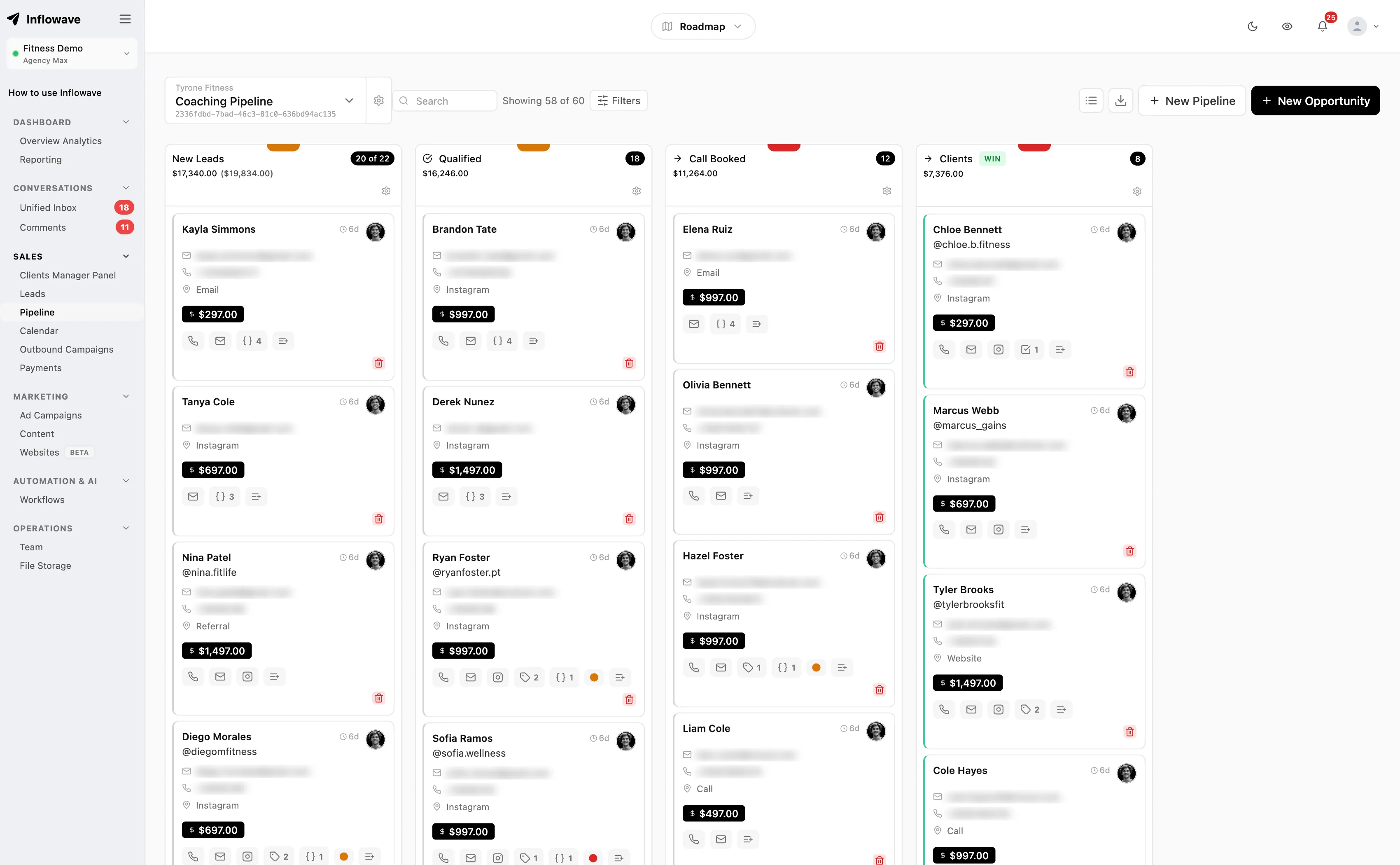
The pipeline is decorative. A board with stages but no values tells you nothing you could not get from the inbox. Stages need amounts attached, because the only question a client asks at renewal is what the work was worth.
Attribution stops at "social". If Instagram leads land in the same undifferentiated bucket as everything else, you cannot show that Instagram produced revenue, which is the entire commercial case for the channel.
Instagram CRM against the adjacent categories
Against a general CRM. A general CRM is stronger on reporting, permissions and integrations with finance tooling. It is weaker on Instagram because DMs arrive through a connector maintained by a third party, which means the Meta permissions and the App Review sit with that third party rather than with your vendor. Worth reading alongside our comparison of CRMs for marketing agencies if you are weighing this trade-off.
Against a chatbot builder. A chatbot answers first and fastest, which is genuinely valuable given the messaging window. It does not hold a customer history, does not price a deal and does not survive the handover to a human. Most agencies end up wanting both. Our breakdown of Instagram chatbots covers what that layer does well.
Against a social inbox. The right tool if your job is responding, the wrong one if your job is forecasting.
Against marketing automation. A different problem entirely. Marketing automation sends; a CRM remembers. The distinction is set out in CRM versus marketing automation.
Questions to ask before you buy
These are the questions that separate tools that work from tools that demo well.
- Which Meta permissions does your app hold, by name, and has it been granted Advanced Access after App Review and Business Verification? Standard Access cannot serve accounts you do not own.
- Which webhook fields do you subscribe to? Name them. If
mentionsandcommentsare missing, story-mention and comment leads will not exist. - Do you store message content on your side, or render it live from the API? Ask what happens to it when the subscription ends.
- How do you handle the 24-hour window? Is there a visible countdown, and does the tool prevent a send that would breach it?
- Do you use the
human_agenttag, and for what? An honest answer is "support replies only". - How do you deduplicate a person who appears as a DM, a comment and a form submission?
- How are two client accounts kept apart at the database level, not in the UI?
- What exactly is exported if I leave? Contacts only, or contacts with message history and stage changes?
- Can a client be given a view of their own leads without seeing yours?
- What happens when an account is disconnected and reconnected? Do records survive, or do you get duplicates?
Ask one, nine and ten in writing. They are the three most commonly answered optimistically.
The extra requirements for multi-client agencies
Running one Instagram account is a tooling choice. Running twelve is an operations problem, and it adds four requirements that solo tools rarely meet.
Per-account rate budgets. Because limits are per professional account and scale with impressions, a single automation applied across twelve accounts will hit ceilings unevenly. You want a tool that fails gracefully on one account rather than stalling the queue for all of them.
Workspace-level separation. Contacts, pipelines, tags and templates should be scoped so that a new team member added to one client cannot see another. A dropdown filter is not separation.
Per-client reporting that a non-technical person can read. Response time, leads created, deals won and the value attached. Not API call counts.
A handover path. VAs and setters rotate. The record has to be legible to the next person without a briefing, which in practice means the conversation, the stage history and the notes sit in one place.
One commercial caveat belongs here rather than in a feature table. Almost every vendor in this category prices by connected social account and by client workspace, so the number of client accounts you can run is a plan decision, not a technical one. Read the per-plan cap before you compare anything else, and treat a page that claims no cap at all as a page to check twice.
Our guides on Instagram CRMs for agencies and on why GoHighLevel was not built for Instagram go further into the agency-specific gaps.
Consent and data protection
Storing DM content means storing personal data, and that has obligations attached independent of what Meta allows.
Under the UK and EU GDPR you need a lawful basis for processing, set out in Article 6. For a person who has messaged you asking about a service, legitimate interests or steps taken at the request of the data subject prior to entering a contract will usually be the relevant bases, but the assessment is yours to make and document. The ICO's guide to lawful basis is the clearest free explanation of how to choose one.
Three practical points follow for agencies. First, you are usually the processor and your client is the controller when you handle their leads, so your client contract needs to say so. Second, a data subject asking for deletion means deletion from your CRM, not just from Instagram. Third, Meta's Platform Terms govern what you may do with data obtained through their APIs, and those obligations sit on top of, not instead of, data protection law.
Migrating without losing what you have
Given the 20-message read limit you cannot migrate Instagram history in any meaningful sense, so make the cut clean instead. Start the new tool's webhook subscription before you stop using the old one and run both for a fortnight. Export contacts, stages and notes while you still have a login, not after cancelling. Screenshot anything load-bearing, such as an agreed price in a DM.
Then set the reply clock on day one. Everything else in an Instagram CRM is optional; the 24-hour window is not.
Frequently asked questions
Which Meta permissions does an Instagram CRM need?
For the Instagram Login route, the working set is instagram_business_basic plus instagram_business_manage_messages, with instagram_business_manage_comments if you want comment and story-mention capture and instagram_business_content_publish if you want to post. For the Facebook Login route it is instagram_basic, instagram_manage_messages, pages_messaging, pages_manage_metadata and pages_show_list, usually with business_management. Replying outside the standard window additionally requires the human_agent feature, which is reviewed separately.
Does the vendor need Meta App Review, or is that only for big platforms?
It applies to every app handling accounts it does not own. Meta grants Standard Access by default, which only covers accounts with a role on the app. Serving client accounts requires Advanced Access, and Meta states that Advanced Access is approved per permission through App Review and that Business Verification is required to get it. For consumer apps, Meta adds that the app must be in Live Mode before it can request Advanced Access from users without a role on it. Ask a vendor for the access level and the approved permission list, not for a screenshot of a working inbox.
Can an Instagram CRM import my existing DM history?
No, not meaningfully. Meta's Conversations API returns details for only the 20 most recent messages in a conversation, and older messages return an error. Any tool promising a full historical import of Instagram DMs is either mistaken or describing a screen-scrape. Plan a migration around a clean cutover instead, running the old and new subscriptions in parallel for a couple of weeks.
What actually happens if I reply after 24 hours?
Meta's policy gives businesses up to 24 hours to respond, and standard messaging with promotional content is confined to that window. Past it, a reply needs a mechanism Meta specifically permits: the policy names message tags for approved use cases, one-time notifications and sponsored messages, and the human_agent tag covers genuine support cases within seven days. Meta's policy overview sets out what is permitted rather than how a non-compliant send is handled at the API level, so treat the window as a rule to design around rather than a backstop the platform will enforce for you. This is why response time is an operational metric in an Instagram CRM rather than a vanity one, and why per-person assignment matters more than inbox features.
How do I connect a client's Instagram account to Meta business tooling?
The account must be a professional account, for a business or a creator, as Meta's Instagram Platform documentation requires. It is then linked inside Meta's business settings and permissions are granted to the app that needs them. The client has to perform the connection themselves, because they are authorising access to their own messages. Build that step into onboarding with a named owner on the client side, because it is the most common place a launch stalls.
Can one CRM handle several client Instagram accounts without them mixing?
Technically yes, but verify two separate things. First, that separation is enforced in the data layer rather than by an interface filter, so a team member scoped to one client cannot query another's contacts. Second, that your plan permits the number of connected accounts and client workspaces you need, since this category is almost universally priced on those two counts. Rate limits are also per professional account, so one busy client cannot consume another's budget.
What happens to my Instagram data if I cancel?
That depends entirely on whether the tool stored messages or rendered them live. Meta does not let an app query historical webhook data, so anything the vendor did not persist is gone and cannot be re-fetched by you or by your next tool. Before signing, ask for a sample export and check it contains message bodies, stage history and notes rather than a contact list with names and handles.
Is automating Instagram DM replies against Meta's rules?
Automated replies are permitted within the policy, and the constraint is the messaging window and the content rules rather than automation as such. What is not permitted is using the human_agent tag, which exists for a human resolving a support issue within seven days, as cover for promotional follow-ups. If a vendor's differentiator is week-long automated sequences after the 24-hour window closes, you are being sold policy risk.
Sources
- Instagram Platform overview, Meta for Developers - professional account requirement and rate limits
- Instagram API with Instagram Login, Meta for Developers -
instagram_business_*permission scopes - Graph API access levels, Meta for Developers - Standard versus Advanced Access, per-permission App Review, Business Verification, and the Live Mode condition for consumer apps
- Meta permissions reference -
instagram_basic,instagram_manage_messages,pages_messaging,pages_manage_metadata,pages_show_list,business_management - Instagram Platform webhooks, Meta for Developers - webhook field list, subscription requirement, no historical queries
- Conversations API, Meta for Developers - 20 most recent messages, 30-day Requests folder limit
- Messenger Platform and IG Messaging API policy overview, Meta for Developers - 24-hour standard messaging window
- Human Agent feature reference, Meta for Developers - seven-day human agent tag, App Review and business verification requirement
- Send Messages, Instagram API with Instagram Login - sending rules
- Graph API rate limiting, Meta for Developers - how platform rate limits are calculated
- Meta Platform Terms - obligations attached to data obtained through Meta APIs
- Article 6 GDPR, lawfulness of processing - lawful bases for processing personal data
- ICO guide to lawful basis - choosing and documenting a lawful basis
