
An auto dialer is software that places outbound calls from a list without a person pressing the digits, determines whether a human or a machine answered, and connects the live line to an available agent. That is the whole category. Products differ in how many lines they open per agent, where the call data is written afterwards, and how much of the compliance burden they hand back to you.
The term covers five distinct dialling behaviours with very different risk profiles, and treating them as one thing is what makes the category confusing.
The short answer
| Question | Answer |
|---|---|
| What is an auto dialer? | Software that places outbound calls from a list, detects whether a human or a machine answered, and connects live answers to an available agent. |
| How many types are there? | Five behaviours: preview, power, progressive, predictive and voice broadcast. |
| Which is lowest risk? | Preview, then power or progressive: one line per agent, so an agent is waiting when a person answers. |
| Which is most regulated? | Voice broadcast, then predictive dialling, because both can connect people to nobody or to a recording. |
| What is the main US abandonment rule? | No more than 3 percent of calls answered live may be abandoned, measured over 30 days per campaign. |
| Does it find the right people to call? | No. It only speeds up calling a list you already have the right to call. |
| What should I compare when buying? | Answering machine detection, voicemail drop, disposition codes, callbacks, reporting and where the call data lands. |
The rule that matters most: a dialer speeds up whatever list you point it at. Point it at people who asked to hear from you and it saves time. Point it at strangers and it burns your caller reputation faster.
The five types of auto dialer
Preview dialer. The agent sees the record, decides whether to call, and clicks. One line, one agent, no automation in the dialling decision itself. Used where each call is expensive and context matters: high-value B2B, recruitment, renewals.
Power dialer. One line per agent, opened automatically the moment the previous call ends. No prediction, no queueing of the called party. The agent is always waiting when the line opens.
Progressive dialer. Often used interchangeably with power dialer. Where vendors distinguish them, progressive means the system presents the record and dials it automatically once the agent is marked available, again at roughly one line per agent.
Predictive dialer. Opens several lines per available agent and uses a statistical model of answer rates and call durations to predict when an agent will free up. Connect rates rise. So does the chance that someone answers and no agent is available, which is the abandoned call the regulator cares about.
Voice broadcast. No agent at all. A recorded or synthesised message plays to whoever answers. This is the behaviour most tightly regulated.
How the types compare
| Type | Lines per agent | Agent waiting at connect | Typical use | Abandonment exposure |
|---|---|---|---|---|
| Preview | 1, agent-initiated | Always | Complex, high-value calls | Effectively none |
| Power | 1, automatic | Normally | Small and mid-size sales teams | Low |
| Progressive | About 1, automatic | Normally | Same as power | Low |
| Predictive | More than 1 | Not guaranteed | Large contact centres | The main reason the 3% rule exists |
| Voice broadcast | None | Never | Notifications, reminders | Highest regulatory risk |
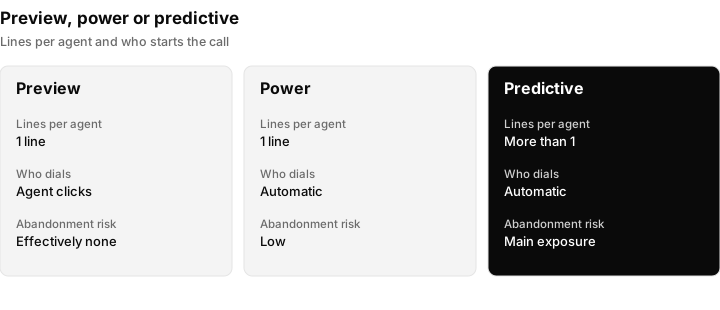
Three of the five types side by side. The more lines per agent, the higher the abandonment exposure.
How an auto dialer works, step by step
The mechanics are broadly the same across products.
1. The list is assembled. Either as a static import or as a saved query against a CRM. A saved query re-evaluates, so new records that match the criteria join the queue without a re-import. A static export cannot, which is how an imported call list goes stale.
2. Numbers are screened. Suppression lists, previously-called flags, calling-window checks against the called party's local time, and attempt caps are applied before the call is placed.
3. The call is placed with answering machine detection requested. This is a telephony-layer feature rather than a CRM one. Twilio, for example, documents that with MachineDetection=DetectMessageEnd a human verdict is returned immediately, while an answering machine is only reported at the end of the greeting. The verdict arrives as one of human, machine_end_beep, machine_end_silence, machine_end_other, fax or unknown, along with how many milliseconds detection took.
Twilio's own documentation is candid that the engine measures speech and silence intervals and can read a very short voicemail greeting as a human. Detection is a probability, not a fact. When comparing products, ask whether the raw verdict and the detection duration are stored against the call record, because that is what lets you audit accuracy later instead of accepting a vendor's claim.
4. The outcome is routed. On a human verdict the call connects to an agent, ideally with the record already on screen. On a machine verdict the agent is not interrupted and a voicemail may be dropped, either as a pre-recorded file or as text to speech.
5. The result is written back. Disposition codes, call duration, recording, transcript, and any follow-up object such as a callback or a pipeline stage change. This step is where dialers differ most, and it is the one that decides whether the tool is worth owning.
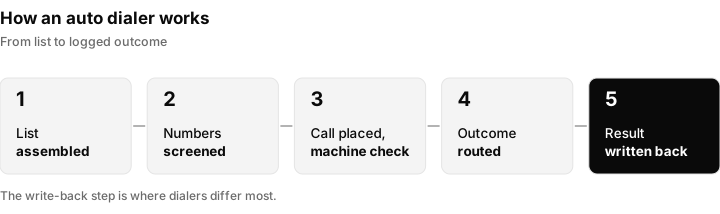
The five steps behind every dialled call. Step five decides whether the tool is worth owning.
Power vs predictive dialer: where the compliance line runs
None of this is legal advice, and the rules below are United States federal rules. Several states are stricter, and other countries differ.
Under 47 CFR 64.1200(a)(7), a telemarketer may not abandon more than three percent of all telemarketing calls answered live by a person, measured over a rolling 30-day period for a single calling campaign. A call counts as abandoned if it is not connected to a live sales representative within two seconds of the called person's completed greeting. The same section, at (a)(6), forbids disconnecting an unanswered telemarketing call before at least 15 seconds or four rings.
To see what the cap means in practice, here is a simple piece of arithmetic. If a campaign has 1,000 calls answered live by a person in a rolling 30 day period, three percent is 30. The 31st abandoned call in that period is over the limit. Because the cap is measured on calls answered live, not on all calls dialled, a campaign with a low answer rate has fewer answered calls to spread the allowance across. Check the rule text and the FCC and FTC guidance for how your campaign is measured.
Predictive dialing is the configuration that makes breaching that cap likely, because opening more lines than agents is the entire point of it. Power and preview dialing make it far less likely, since the design opens one line for one waiting agent. It is not a structural impossibility, though: an abandoned call can still occur if answering machine detection misclassifies and delays the bridge past two seconds, if an agent goes unavailable between dial and answer, or if a transfer fails. Treat one-line-per-agent as a large reduction in exposure, not as an exemption, and keep the same call-disposition records you would need for a predictive campaign.
Other rules that apply regardless of dialer type:
- Calling hours. No telephone solicitation to a residential subscriber before 8 a.m. or after 9 p.m. in the called party's local time.
- Do Not Call. Numbers on the national registry must be honoured indefinitely, until the consumer cancels the registration or the administrator removes the number. An internal suppression list, where a platform offers one, is an addition to the registry obligation and not a substitute for it.
- Consent for automated calls. Prior express written consent means a signed written agreement that clearly authorises the seller to deliver telemarketing messages using an automatic telephone dialing system or an artificial or prerecorded voice, names the number, and discloses that signing is not a condition of purchase.
- What counts as an automatic telephone dialing system. In Facebook v. Duguid (2021) the Supreme Court held that to qualify, a device must have the capacity either to store a telephone number using a random or sequential number generator, or to produce a telephone number using a random or sequential number generator. A dialer working through a stored list of customers who provided their numbers is generally outside that definition. That is a meaningful protection and not a licence to ignore the abandonment cap, calling hours or the registry, none of which depend on the ATDS question.
The FTC publishes its own compliance guide for the Telemarketing Sales Rule, which covers seller and telemarketer obligations sitting alongside the FCC rules. Read both before running a cold list.
Auto dialer features worth checking before you buy
- Answering machine detection, and whether the raw verdict is stored
- Voicemail drop, pre-recorded and text to speech
- Local presence or per-campaign caller ID, plus the carrier registration the provider requires
- Call recording and transcription, and whether they are included or metered
- Fixed disposition codes, and whether a disposition can trigger a tag, a stage change or a follow-up task
- Callback scheduling as a real object with an owner and a time, rather than a note
- Calling windows by timezone, retry limits, and an internal suppression list
- Reporting that reaches conversion, not only dials per hour
- Whether call data lands in the same record as the contact's other messages, or in a second system that has to be reconciled
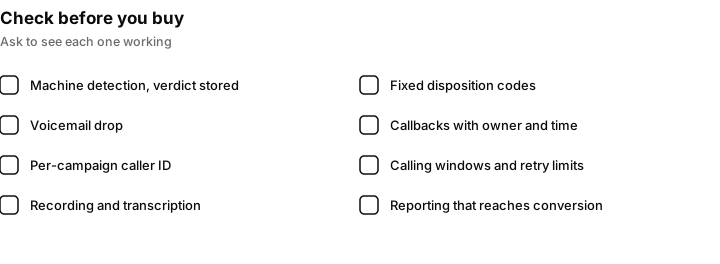
Eight things to check on every demo. Ask to see each one working, not described.
That last point is the main architectural decision, and it maps onto the three shapes products come in.
The three shapes auto dialers come in
Prices below were checked on the vendors' own pricing pages on 15 September 2026. Pricing changes often, so re-check before deciding.
A dedicated dialer. PhoneBurner is the clearest example. Its pricing page lists Standard at $165 per user per month billed monthly or $140 per user per month billed annually, Professional at $195 billed monthly or $165 billed annually, and Premium at $215 billed monthly or $183 billed annually, all per user per month. This is the right purchase when calling volume is the whole job and you already have a CRM you intend to keep. The trade is that call data lives in one system and deal data in another, and somebody has to keep them in agreement.
A phone system or contact centre platform. RingCentral and Genesys sell far more than a dialer. RingCentral's plans page lists Conversational Intelligence, the component that analyses what was said on a call, as a paid add-on, but publishes a starting figure with no billing unit next to it, so there is no way to tell from the page whether it is per user, per month or per account. No price is quoted here for that reason; ask RingCentral for the unit before you budget it. These platforms are stronger than anything else discussed here at large-scale inbound routing, queueing, workforce management and uptime commitments. If you run a fifty-seat call centre with shift patterns, this is your category.
A CRM with a dialer inside it. Close is the clearest comparison. Its pricing page lists Solo at $19 per user per month billed monthly, Essentials at $49, Growth at $109 and Scale at $149, all per user per month billed monthly, with lower billed-annually rates of $9, $35, $99 and $139. The power dialer sits on Growth and above; the predictive dialer is exclusive to Scale. Recording, summarising and transcription are a separate Call Assistant add-on at $50 per month per organization, plus $0.02 per minute of usage. Close is a mature product and strong at single-team dialling ergonomics.
Multi-client agencies should also price the tenancy layer, not just the seat. Close includes one free secondary organisation on Growth and Scale, with additional organisations at $50 per month each billed monthly. An agency separating eleven clients into eleven organisations therefore runs its base organisation, one free secondary, and nine paid ones: nine times $50, or $450 per month on top of every seat licence. GoHighLevel does not bill per sub-account: its pricing page lists Starter at $97 per month billed monthly with 3 sub-accounts, its Unlimited tier at $297 per month billed monthly with unlimited sub-accounts, and Agency Pro at $497 per month billed monthly, which adds SaaS Mode, automated sub-account creation and rebilling with markup. Sub-account count stops being the constraint at the $297 tier; what to compare there is which capabilities are included and which are separately billed, since several add-ons are billed per sub-account.
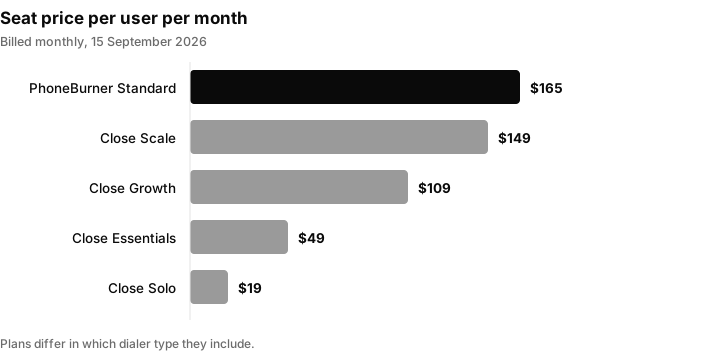
Seat prices per user per month, billed monthly, as listed on the vendors' pricing pages on 15 September 2026. Plans differ in what dialer they include.
Telephony is billed on top of all three. Twilio's US voice pricing page lists outbound local calls at $0.0140 per minute and inbound local at $0.0085 per minute.
Which type fits which team
| Your situation | Likely best fit | Why |
|---|---|---|
| A few salespeople calling inbound leads | Power dialer | One line per agent, fast follow-up, low abandonment exposure |
| High value B2B calls where research matters | Preview dialer | The agent chooses each call with the record on screen |
| A large contact centre with shifts and inbound queues | Phone system or contact centre platform | Routing, queueing and workforce tools matter more than the dial itself |
| An agency calling for several clients | CRM with a dialer and separate client workspaces | Calls, recordings and caller IDs must stay with the right client |
| Appointment reminders or notifications | Voice broadcast or messaging | No agent is needed, but consent rules are strictest |
| You are not sure outbound calling works for you | Start with a power dialer on a small list | Lowest cost and lowest risk way to learn |
For a closer comparison of the two most common choices, see power dialer vs predictive dialer and what a predictive dialer is. If you are comparing products, the best auto dialer software and CRMs with a built-in power dialer list the options.
Setting up a first campaign safely
- Choose the list carefully. Start with people who made an enquiry, booked a call or asked for a quote. Avoid purchased lists.
- Check the legal basis for each region. Calling hours, registries and consent rules differ by country and state. Check the current rules at the regulator's site, such as the FCC and FTC in the United States, or the equivalent authority where your contacts live.
- Set the calling window in the contact's local time, and set a cap on attempts per contact.
- Load a short script and a voicemail message that says who you are, why you called and how to reach you. A guide to cold calling scripts can help with the wording.
- Turn on answering machine detection and store the verdict, so you can audit accuracy later.
- Dial a small batch first, for example one agent for one hour, and listen to the recordings.
- Review dispositions and outcomes, then adjust the script and the list before scaling.
- Keep a record of consent and suppression requests, and honour them straight away.
Mistakes teams make with auto dialers
- Buying the biggest tool for a small team. Predictive dialling suits large teams with enough agents to keep the model accurate.
- Treating machine detection as certain. It is a probability. A short greeting can be read as a human.
- Calling outside local hours because the list was sorted by company time, not the contact's time.
- Ignoring suppression. An internal list does not replace the national registry.
- Letting call data live in a second system that nobody reconciles.
- Judging success by dials per hour. Conversations, meetings and revenue are the numbers that matter.
- Dropping voicemails on everyone. A drop on every attempt trains people to ignore you. Use it deliberately.
What an auto dialer will not fix
Dialling faster only helps if the people being called still want to hear from you. Pointed at a fresh inbound list, a dialer compresses the delay between a form submission and a conversation. Pointed at a purchased list of strangers, it mostly accelerates the rate at which a caller reputation burns and numbers get flagged as spam.
It will not write the script, and it will not replace an agent on a complicated call. If the goal is for software to hold the conversation rather than open the line, that is a different product category: an AI voice agent that dials, qualifies and books, or automated cold calling for the opener on a list. Those sit alongside a dialer rather than replacing one. If you are still deciding whether outbound calling belongs in your mix at all, start with what cold calling is and when it still works.
Where Inflowave fits
Inflowave's power dialer is the CRM-native shape, built for the case where one team dials on behalf of several clients and each call has to land in the right client's records with the right caller ID. It is one line per agent, with answering machine detection, voicemail drop, fixed disposition codes, scheduled callbacks, and recording and transcription included rather than metered.
The following are first-party descriptions of our own implementation and cannot be independently verified from outside the product, so treat them as claims to test in a trial rather than as established facts: queues are built from saved CRM filters so they can be topped up as new leads match; the raw answering machine verdict and detection duration from the telephony provider are stored against the call record; transcripts are diarised by speaker; and sessions, queue items, call logs, scripts, voicemail templates, calling windows and blocked numbers each carry a workspace identifier, which is how one agency dials for multiple clients without lists, recordings or caller IDs crossing between them.
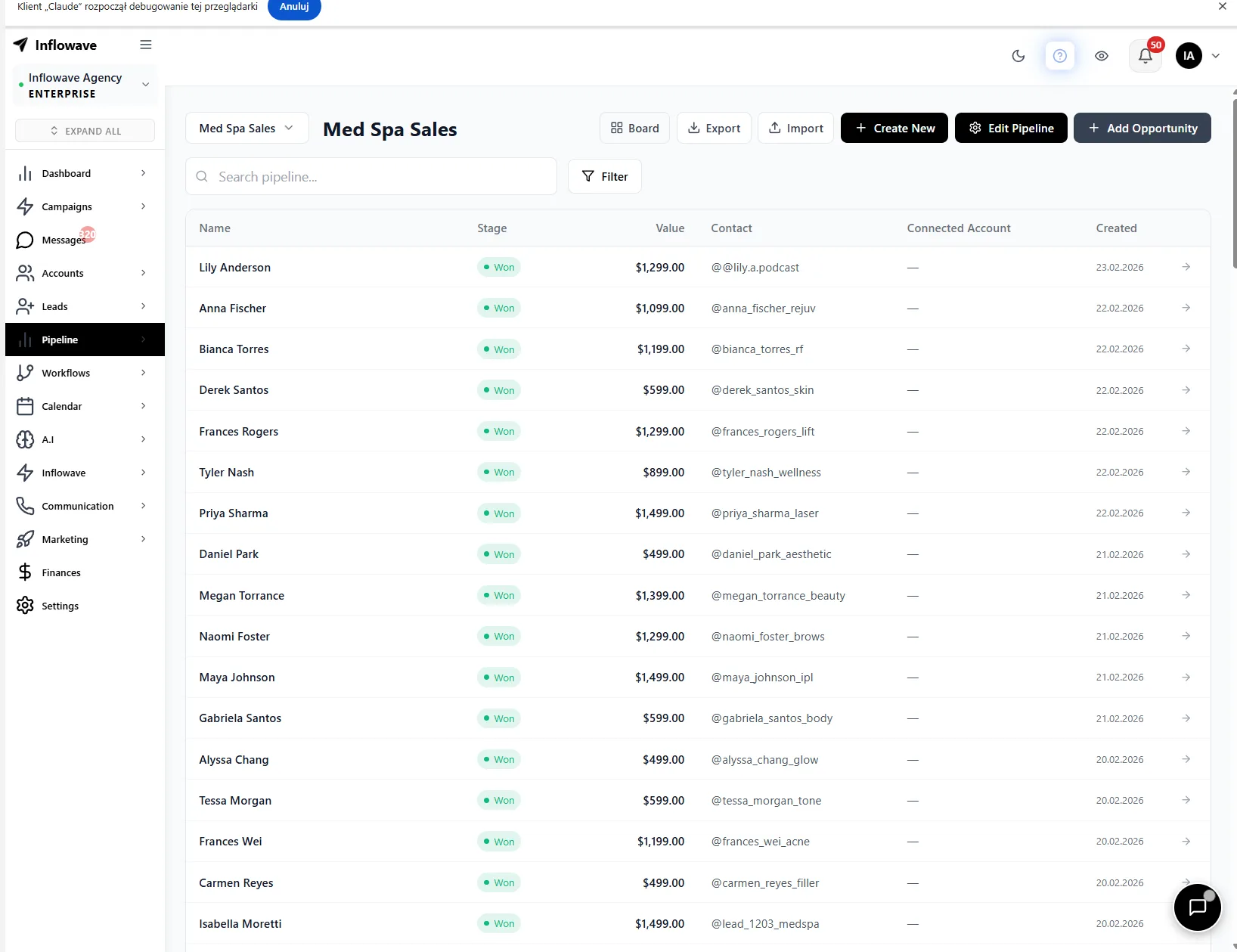
Calls appear in the same unified inbox timeline as the same person's Instagram DMs, emails and texts, and a booked meeting creates or advances a pipeline opportunity, from which workflows can fire on the outcome. Plan limits apply and are published on the pricing page: connected social accounts and client workspaces are 1 on Business at $149, 10 on Pro at $297 and 50 on Max at $497.
Questions people ask
What does an auto dialer do?
It places outbound calls from a list without anyone dialling the digits, detects whether a human or an answering machine picked up, and connects a live answer to an available agent. Depending on the product it also drops pre-recorded voicemails on machines, records and transcribes the conversation, logs the outcome against the contact record, and advances to the next number automatically.
Are auto dialers illegal?
No, but specific behaviours are regulated. In the United States, 47 CFR 64.1200 caps abandoned telemarketing calls at three percent of calls answered live, measured per campaign over 30 days, and defines abandoned as not connected to a live representative within two seconds of the completed greeting. Calling hours, the national Do Not Call registry and written consent for automated or prerecorded calls all apply. One line per agent, dialling a list of people who gave you their number, is the lowest-risk configuration.
Is there a free autodialer?
There are free mobile redial apps, but they redial a single number rather than working a list into a CRM. Any dialer placing real calls incurs carrier costs: Twilio's US voice pricing page lists outbound local calling at $0.0140 per minute, checked 15 September 2026. Where a business dialer advertises a free tier, check whether it is a trial with a calling credit rather than an ongoing free plan.
How much does an autodialer cost?
There are two layers. The seat licence, where PhoneBurner publishes $165 per user per month billed monthly for Standard and Close lists its power dialer on the Growth plan at $109 per user per month billed monthly, with the predictive dialer exclusive to Scale at $149 per user per month billed monthly. Then telephony, billed per minute, which Twilio lists at $0.0140 per minute for US outbound local calls. All prices checked 15 September 2026. Recording and transcription may be a separate add-on, so confirm whether they are included before comparing headline prices.
What is the best auto dialer?
There is no single answer, because the three shapes solve different problems. A dedicated dialer is best when calling volume is the entire job. A contact centre platform is best at scale, with shift management and inbound routing. A CRM-native dialer is best when the call needs to sit next to the contact's other messages and the deal record. Pick the shape first, then compare products inside it.
How do I set up an auto dialer?
Four steps in any product. Get a phone number and complete the carrier registration your provider requires. Build the call list, ideally as a saved CRM filter rather than a static export, so it refreshes. Configure the dialling behaviour: answering machine detection, voicemail drop, calling window and retry limits. Then set what happens after the call, meaning which disposition applies which tag, moves which pipeline stage and triggers which follow-up.
What is the difference between a power dialer and a predictive dialer?
A power dialer opens one line per agent as soon as the previous call ends, so an agent is always waiting when someone answers. A predictive dialer opens more than one line per agent and uses a model to guess when an agent will be free. That raises connect rates and also the chance that a person answers when no agent is available.
Can an auto dialer leave voicemails automatically?
Yes, many can. They use answering machine detection to decide a machine picked up, then play a pre-recorded file or a text to speech message. Detection is a probability, so check whether the product stores the raw verdict, and use the drop deliberately instead of on every attempt.
Do I need consent to use an auto dialer?
It depends on the country, the type of call and the equipment. In the United States, automated or prerecorded telemarketing calls need prior express written consent, and calling hours and the Do Not Call registry apply regardless. This is not legal advice, so check the current FCC and FTC guidance or ask a lawyer.
Can an auto dialer be used by an agency for several clients?
Yes, but only if lists, recordings, scripts and caller IDs are kept separate per client. That is why the tenancy layer matters when you price and choose a tool. If client data crosses between workspaces, you have both a privacy problem and a compliance problem.
