Booking that closes, not just books
Leads book from your DMs or a link. The right closer gets the call, bad fits never take a slot, and when the meeting ends the invoice and contract go out in one click.
A calendar that knows what happens either side of the appointment.
Get Started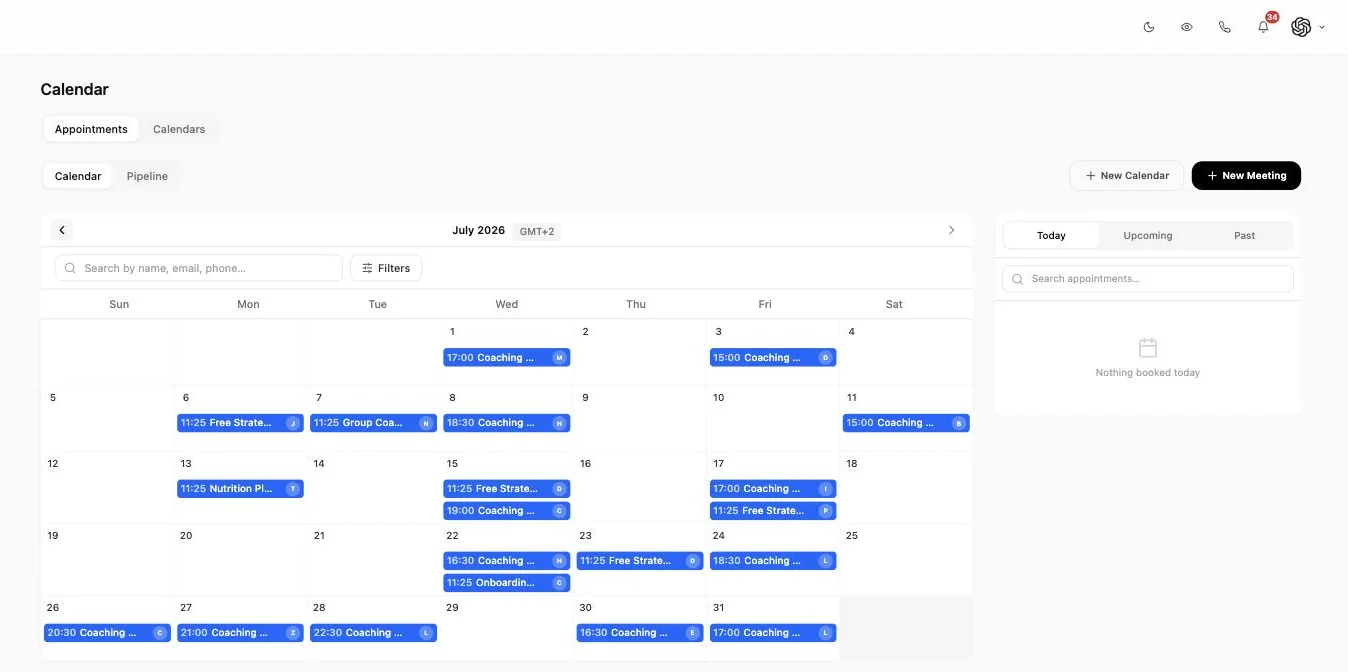
When the call ends, press one button
The half hour after a good sales call is where deals are lost. The closer has six more calls, the quote takes until Friday, the contract needs somebody else to draft it, and by Monday the buyer has cooled off or spoken to a competitor.
So mark the meeting complete and everything you decided should follow, follows. One action, then the closer moves on to the next call.
The invoice goes out
Generated and sent while the buyer is still thinking about the call, not on Friday afternoon.
The contract goes for signature
Sent as a document to sign, so the yes on the call becomes something binding within the hour.
The deal moves
The opportunity advances a stage, so your pipeline is accurate without anyone maintaining it by hand.
Follow-up starts itself
A sequence across DM, email or SMS begins, with separate paths for won, still thinking, and no-show.
The transcript is on the record
Connect Fireflies and what was actually said sits against the booking, so a workflow can branch on it and the next person does not need a handover call.
A no-show is a trigger too, which is the one most teams forget to build. The paths are set up in workflows, and native recording plus transcription for phone calls is covered in call recording.
The short version
- Leads book from a DM, a link, or a widget on your site.
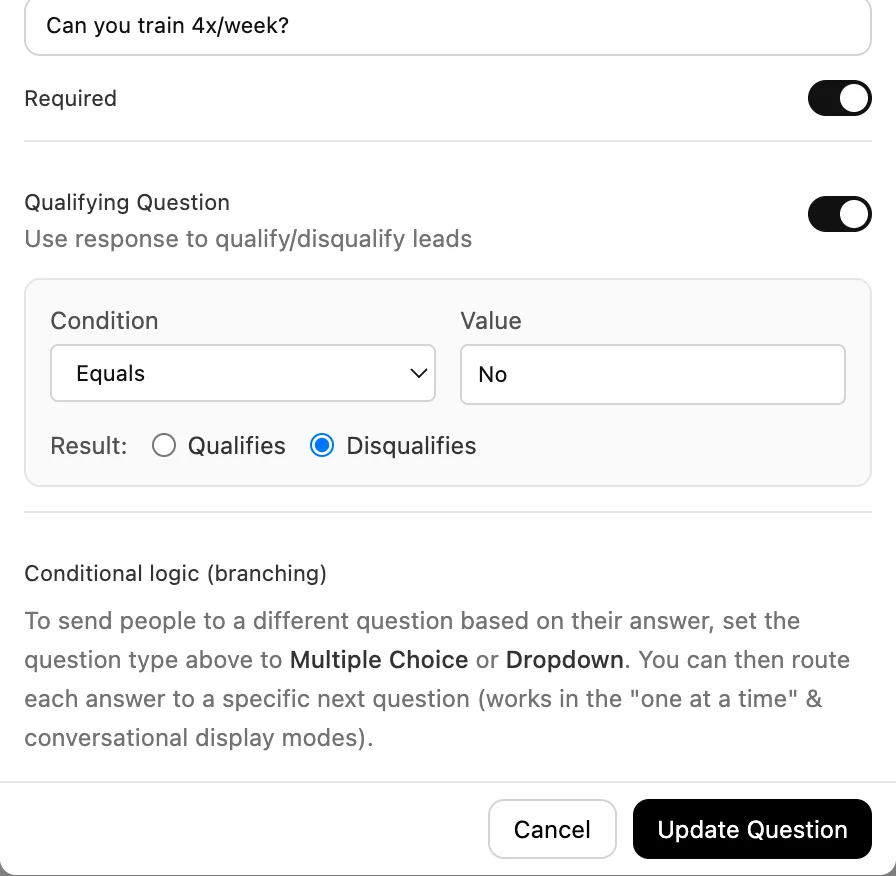
- Bad fits are disqualified on the form and never take a slot.
- Half-finished forms are still captured, so you can follow up.
- Bookings distribute to your team by load, by turn, or by capacity.
- Or the lead picks the person they want to speak to.
- Phantom slots let a quiet calendar look in demand.
- A funnel view shows exactly where people drop out of booking.
- Reminders go out on the channel the person actually uses.
- Recurring appointments and group events with a seat cap both work.
- You can import your own HTML and CSS design and we host it.
- A booking can fire a server-side conversion event for your ads.
- Marking a meeting complete can invoice, contract and follow up on its own.
Qualify before they take a slot
An open calendar link invites anybody to take thirty minutes of your closer time. Two of those a day is a day and a half a week gone.
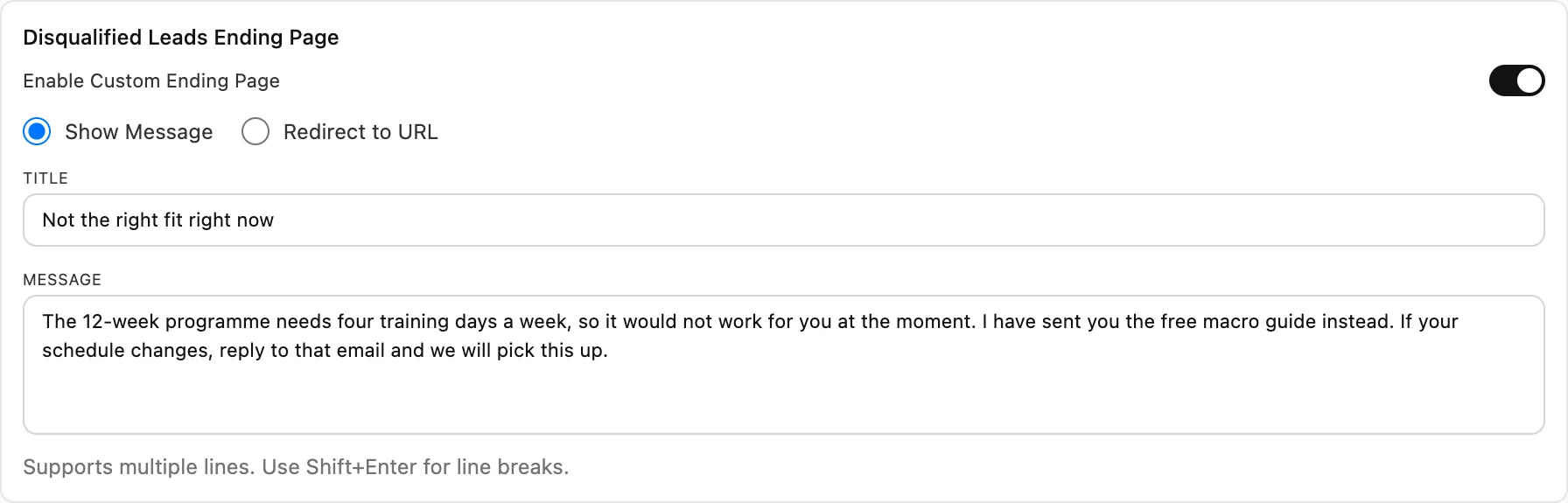
So the form carries disqualification rules. Answer in a way that rules you out and you never reach the slot picker, which means the slot is still there for somebody who can buy. You define what disqualifies, because it is different for every business: budget, country, team size, whether they are already under contract elsewhere.
Disqualified is not deleted. They are still a contact, still tagged, and can go into a nurture sequence or a self-serve path instead. Plenty of people who are wrong this quarter are right next year.
Partial submissions are captured too. Somebody who filled in three fields and then closed the tab is a real person with a real problem who got distracted, and in most tools they simply do not exist. Here you can see them and follow up.
The form builder, including custom fields and logic, is forms, and what a lead does before booking feeds the score in the CRM.
Who gets the booking
Round-robin sounds like one feature until you run a real team, at which point the difference between the three ways of doing it becomes an argument in your Monday meeting.
Least busy
The next booking goes to whoever has the lightest load. Keeps a team of closers roughly even without anybody managing it, which is what you want when everyone sells the same thing equally well.
Rotate
Strict turns, in order. Harder to argue with than least busy, because nobody can claim the system quietly favored someone. That matters more than it sounds when closers are on commission.
Weighted
Per-host capacity. Your best closer takes forty calls a week and the new hire takes ten, deliberately, until the new hire is ready for more. This is the one most teams actually need, and the one a basic round-robin cannot express.
Or hand the choice to the lead and let them pick who they speak to. That works when your team has visible specialisms, and it is the polite option for an existing client who wants the person they already know rather than whoever the algorithm picked.
Every strategy respects each person working hours and time zone, so distributing across a team in three countries does not book somebody a call at six in the morning.
Phantom slots
A calendar showing forty free slots tells a buyer nobody wants this. A calendar showing three tells them to move.
So you can display a share of your slots as unavailable, either as a percentage or a fixed number per day, with whatever label you want on them. New calendars and new hires benefit most, because that is exactly when a wide-open week does the most damage.
Worth being straight about what this is: it changes what a visitor sees, not what you can accept. Use it to avoid looking empty, not to invent a waiting list you do not have.
Where bookings leak
Booking is a funnel, not an event. People land on the page, some start the form, fewer finish it, fewer pick a slot, fewer turn up.
A breakdown of those stages tells you which problem you actually have. Heavy drop-off on the form means you are asking too much too early. Drop-off at the slot picker usually means your availability is too thin or too far out. No-shows after a confirmed booking are a reminder problem, not a demand problem. Three different fixes, and they look identical from a booking count.
It sits alongside the rest of your reporting.
The setter books it, the closer takes it
In most stacks a booking arrives as a calendar invite with a name and an email on it. The closer joins knowing nothing and spends the first five minutes asking questions the setter already asked.
Here the appointment carries the whole story: every message across every channel, the internal notes the setter wrote, the form answers, the lead score, and which lead magnet or ad brought them in. The closer reads it in thirty seconds and opens with something relevant.
That is the difference between a booked call and a good call, and it is why booking is part of the same product as the inbox rather than an integration with a scheduler.
The conversation history comes from the shared inbox, the deal stage from the pipeline, and if setting is a full-time role on your team there is a breakdown of how appointment setters work in Inflowave.
Bring your own design
Most booking tools give you a logo slot and a color picker. If you have ever tried to make one match a real brand, you know how that ends.
So build the page yourself instead. Any HTML, any CSS, any animation you like, written against a small set of data attributes that mark where availability and the form belong. Then import it. Generate it with an AI coding tool if that is faster, since it is only markup and styles.
We host it and inject the runtime when it is served, so live availability, timezones, the booking itself and bot protection all keep working inside your design. You are not reimplementing a booking engine, you are restyling ours.
Two details worth knowing. Scripts are stripped when you import, so no third-party JavaScript runs on the page, which is what makes this safe to offer at all. And the design stays owned by your code rather than becoming something people edit in a dashboard: to change it, change your files and re-import. A validator tells you before you apply whether the required hooks are present.
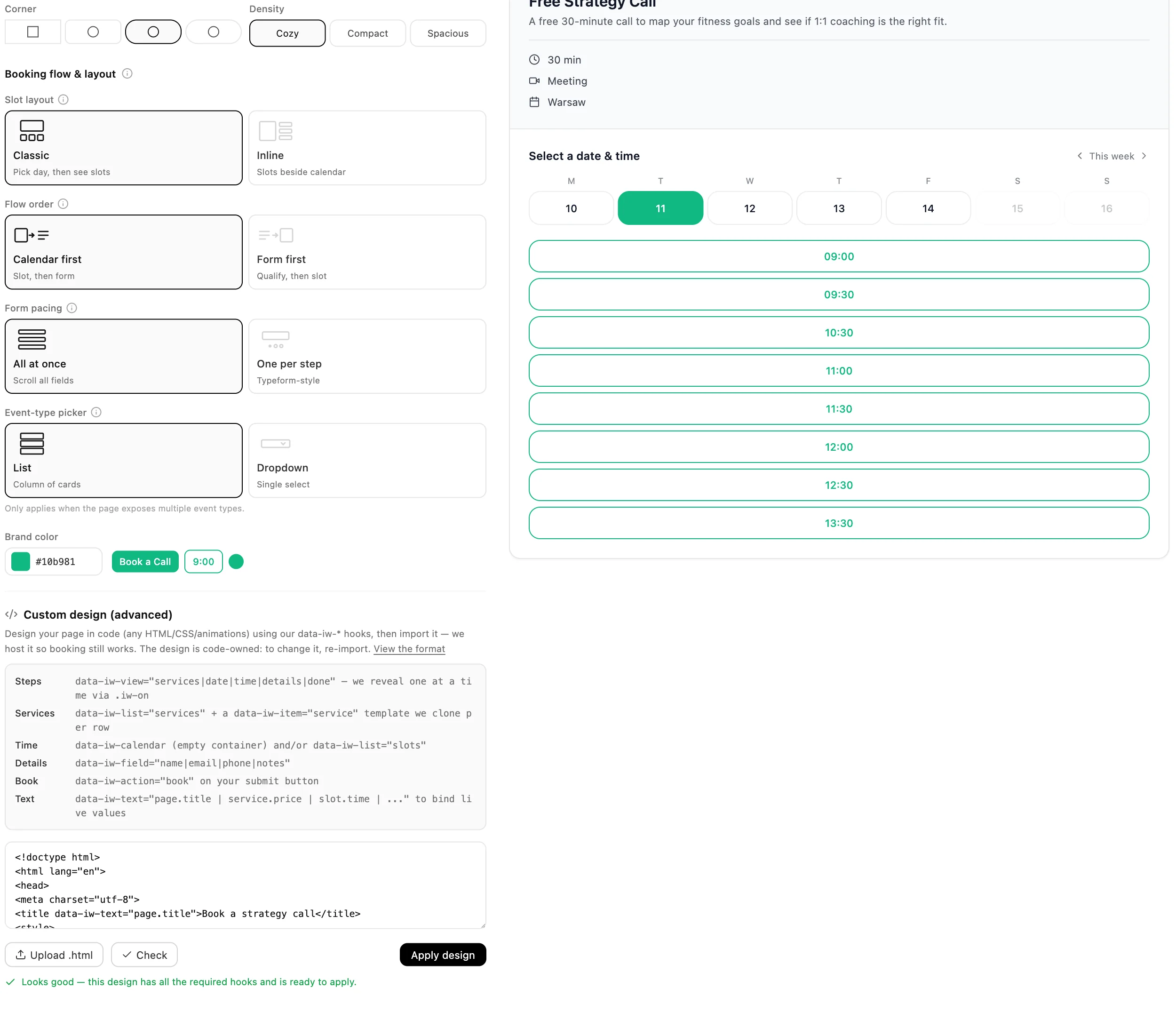
If you would rather not write any of it, the standard page has real choices too: calendar first or form first, the whole form at once or one question at a time, and event types as a dropdown or a list. Those move conversion more than color does.
The unglamorous parts that decide whether you keep using it
Nobody buys software for these. Everybody abandons software that lacks them.
Conversion tracking that survives the hop
A booking can fire a server-side conversion event, so the platforms buying your traffic optimize towards booked calls instead of clicks and page loads. If you spend money on ads this is probably the highest-value item on this page, because it changes what the algorithm aims at rather than just what you can see.
Widgets and embeds
Drop booking into your own site as a widget, or send people to a hosted page. Either way the booking carries its source, so the ad, post or page that produced the call stays attached to the record instead of being lost at your website boundary.
Duplicate instead of rebuild
Copy an event type or a whole booking page and change the two things that differ. An agency spinning up a fifth client this month should not be rebuilding a qualification form from scratch, and the version rebuilt by hand is the version with a mistake in it.
Recurring and group bookings
Weekly coaching blocks and check-ins as recurring appointments, workshops and classes as group events with a seat cap. Both live on the same calendar as your one-to-one discovery calls, so a coach does not need a second tool for the delivery half of the business.
Reminders where they get read
Reminders send on the channel the person actually uses, which for a lead who came from Instagram is a DM and not an email. They work as SMS or email as well. Most of what a no-show rate measures is which channel you reminded people on.
Reschedules and cancellations
Both come back into the conversation rather than only into a calendar, so the follow-up is part of an ongoing thread instead of a task somebody has to notice and remember.
Who this is built for
Agencies running setter and closer sales teams
This is the case the whole page is built around. Setters qualify and book, bookings distribute to closers by load or capacity, the closer arrives with the full history, and the paperwork fires when the call ends. The two places these teams lose money are unqualified calls and the gap after a yes, and both are handled here rather than left to discipline.
Agencies with coaching and consulting clients
Discovery calls at the front, recurring sessions at the back, both on one calendar. A lead magnet brings somebody in, the form filters out the people who cannot afford the client's program before they take a slot, and the recurring block for a signed client sits beside the sales calls. Payment and contract go out from the call that closed them.
Agencies booking for clients
A separate booking setup per client, each with its own branding, hosts and qualification, all under one login. Duplicate a working configuration for the next client rather than rebuilding it. Per-client funnel reporting answers the question every client eventually asks, which is how many calls you booked and what happened to them.
More in the agency use case and what we build for agencies.
Agencies running small-business clients, including local and service trades
Salons, clinics, studios, trades, dealerships, run by small agencies of three people. The enquiry arrives as an Instagram DM asking whether the client has anything Thursday. Sending real availability into that message closes it in one exchange instead of four, and the reminder that prevents the no-show goes to the same place.
The reason an agency this size ends up here rather than on a scheduling link is that a small team cannot afford five subscriptions and the glue between them. One person is doing the replying, the booking, the invoicing and the chasing for a client, usually on a phone, usually between other work. So the round-robin is turned off, one calendar is connected, one event type is built, and the value is that a DM at nine in the evening becomes a confirmed appointment with a deposit taken before anyone opens a laptop. When a second person joins, distribution is already there waiting.
The two numbers that move for an agency this size are no-shows and time to first reply. Reminders and deposits handle the first. Availability inside the thread handles the second, because the enquiry never has to survive a redirect to a booking page to become a booking.
See how small businesses use Inflowave and what it costs for a small team.
Setting it up
1. Connect the calendars
Each person connects their own calendar so real busy time is respected and nothing double-books. Set working hours and time zone per person, not per company, because a distributed team sharing one set of hours is how you end up with a six in the morning call.
2. Build one event type properly
Duration, buffers, how far ahead people can book, and the form with its qualifying questions. Get one right and duplicate it for the rest, rather than half-building six.
3. Decide who gets what
Pick a distribution strategy, or let leads choose their host. If one closer is measurably better than the others, weighted is the honest answer and least busy is the polite one.
4. Build the after, not just the before
This is the step teams skip and the one that pays. Decide what happens on a completed meeting, on a no-show and on a cancellation. Invoice, contract, stage change, follow-up. Set it once and stop relying on anybody remembering at five on a Friday.
5. Read the funnel after two weeks
Then fix the stage that is actually leaking rather than the one you assumed. Most teams guess wrong about whether the form, the slot picker or the reminder is costing them calls.
Against Calendly and Cal.com
These are the two tools people actually weigh this against, so here is an honest read. Both are better than us at the narrow job of putting a time on a calendar.
| Capability | Inflowave | Calendly | Cal.com |
|---|---|---|---|
| Real availability sent inside a DM thread | Yes | No | No |
| Disqualify a lead before they take a slot | Yes | Partly | Yes |
| Weighted distribution by host capacity | Yes | Partly | Yes |
| Lead chooses which host they speak to | Yes | Yes | Yes |
| Recurring and group bookings | Yes | Yes | Yes |
| Show a calendar as busier than it is | Yes | No | No |
| Import your own HTML and CSS design, vendor-hosted | Yes | No | Partly |
| Booking funnel breakdown by stage | Yes | Partly | Unclear |
| Send the invoice when the meeting is marked complete | Yes | No | No |
| Send a contract for signature after the call | Yes | No | No |
| Conversation history attached to the booking | Yes | No | No |
| Server-side conversion event on booking | Yes | Partly | Unclear |
- Real availability sent inside a DM thread: Calendly and Cal.com are link-first products: you send a booking link, the lead leaves the conversation to use it. Neither has a messaging inbox to send availability into.
- Disqualify a lead before they take a slot: Calendly does this with routing forms, but only dropdown and radio questions can drive the logic, only admins can publish a form, and routing is gated to Teams and above.
- Weighted distribution by host capacity: Cal.com fully supports this and documents the algorithm. Calendly optimises for equal distribution and priorities rather than true per-host capacity, and hides a host once they are ahead.
- Show a calendar as busier than it is: Calendly does hide slots, but to enforce equal distribution between hosts, not to manage how in-demand the calendar looks.
- Import your own HTML and CSS design, vendor-hosted: Cal.com is open source, so you can self-host and change anything, which is arguably more powerful. The difference is that you then run the infrastructure. Calendly offers branding options, not your own markup.
- Booking funnel breakdown by stage: Calendly reports on bookings and conversion but does not expose the page-to-form-to-slot-to-attended drop-off as stages. We could not confirm either way for Cal.com.
- Send the invoice when the meeting is marked complete: Neither is a billing product, so this is a difference in scope rather than a shortcoming. GoHighLevel does do this, see below.
- Conversation history attached to the booking: Both integrate with a CRM to write the booking somewhere. Neither owns the message history, so the closer cannot read the thread on the appointment itself.
- Server-side conversion event on booking: Calendly documents that marketing attribution is lost when the booking happens on their hosted pages, which is the specific problem this solves.
Where the others are stronger. Cal.com matches us on weighted distribution, documents the algorithm more openly than we do, and is open source, so if you want to self-host and own the whole thing they are the better answer. Calendly has a more mature routing product and far more integrations, and for a team that only needs to put a time on a calendar it is the simpler tool and probably the right one. GoHighLevel also automates post-appointment invoicing and contracts through workflows, so that chain is not unique to us either.
What is genuinely different here is that booking is not a separate product. Availability sends into the DM the lead already started, the conversation history and setter notes travel with the appointment so the closer opens the call informed, half-finished forms are still captured as leads, and the funnel tells you which stage is leaking. If you only need a scheduling link, buy a scheduling link. This is for teams where the booking is one step in a sales process.
Tool by tool
The table is the evidence. This is the verdict, one competitor at a time, with the case for choosing them stated first because sometimes it is the right one.
Inflowave vs Calendly
Buy theirs when: Calendly has a more mature routing product, far more integrations, and if what you need is to put a time on a calendar it is the simpler tool and probably the right one. For a solo consultant sending a link, we are overkill.
Buy ours when: Two rows decide it. Calendly is link-first, so the lead has to leave the conversation to book, and Calendly documents that marketing attribution is lost on their hosted pages. If your bookings come out of DMs and you need to know which campaign paid for them, that is the gap.
Inflowave vs Cal.com
Buy theirs when: Cal.com matches or beats us on weighted distribution and documents the algorithm more openly than we do. It is open source and self-hostable, so if you want to own the whole thing and change anything, they are the better answer, and it is not close.
Buy ours when: The trade is that you then run the infrastructure. Beyond that it is scope: Cal.com is not a messaging or billing product, so availability does not send into the DM thread, the conversation history does not travel with the appointment, and the invoice does not fire when the call is marked complete.
Inflowave vs GoHighLevel
Buy theirs when: GoHighLevel already automates the post-appointment chain through workflows, including Appointment Status Changed to Send Invoice and Document Signed to Create Invoice. So the invoice-and-contract sequence is not unique to us, and if you are already on GoHighLevel it is not a reason to move.
Buy ours when: The difference is depth on the conversation side rather than whether the automation exists: Instagram-native availability inside the thread, setter notes and full history on the appointment, phantom slots, and the page-to-form-to-slot-to-attended funnel as stages.
Taken from each vendor own documentation, checked 30 July 2026. They ship changes constantly, so verify any row that decides your choice.
Common questions
How is this different from Calendly or Cal.com?
Those tools are very good at the narrow job of putting a time on a calendar, and if that is all you need they are the simpler choice. The difference here is everything either side of the slot: the lead is qualified before they can take one, routed to the right closer, arrives with their full message history attached, and when the call ends the invoice and contract go out from the same place. A standalone scheduler hands you a booking and stops.
Can leads book straight from a DM?
Yes, and it is how most of our customers use it. Real availability sends into the conversation on Instagram, WhatsApp, Telegram, SMS or email, the lead picks a slot without leaving the thread, and the booking attaches to the same contact record as the conversation. No pasting a link and hoping.
How do I stop unqualified people taking my calendar slots?
Disqualification rules sit on the booking form. If somebody answers in a way that rules them out they never reach the slot picker, so the slot stays free for somebody who can actually buy. You decide what disqualifies, because it differs by business: budget, location, team size, whether they are already under contract elsewhere.
Can the lead choose which person they speak to?
Yes. Per booking page you can let them pick a specific host, or let the system distribute automatically. Letting people choose works well when your team has visible specialisms, or when an existing client wants the person they already know.
What are phantom slots?
A way to show a calendar as busier than it is. Set either a percentage of slots or a fixed number per day to display as unavailable, with a label of your choosing. A page showing three slots left converts better than one showing forty, because forty free slots reads as nobody wants this. Use it honestly: it changes what is displayed, not what you can accept.
Does it handle recurring and group bookings?
Both. Recurring appointments for coaching blocks or weekly check-ins, and group events with an attendee cap for workshops, webinars and classes. The cap is per event type, so a one-to-one discovery call and a twenty-seat workshop can live on the same calendar.
Can I use my own design for the booking page?
Yes, and more thoroughly than most tools allow. Build the page in whatever HTML and CSS you like against a small set of data attributes that mark where availability and the form go, then import it. We host it and inject the runtime at serve time, so live availability, timezones, booking and bot protection all keep working. Scripts are stripped on import, so no third-party JavaScript ends up running on the page.
What happens automatically after a call?
Whatever you decide. A completed meeting, a no-show and a cancellation are each a trigger, so you can send an invoice, send a contract for signature, move the deal, start a follow-up sequence, or notify somebody internally. Most teams set up one path for won and one for no-show and never touch it again.
Do I get transcripts of the calls?
For meetings, connect Fireflies and the transcript lands against the booking, where a workflow can act on it. Phone calls are recorded and transcribed natively. Worth being precise about the difference: we do not sit in your video calls ourselves, we read the transcript from the tool that does.
Can I embed booking on my own site?
Yes, as an embedded widget or as a hosted page. Bookings from an embed carry the same tracking as everywhere else, so the source that produced the call stays attached to the record instead of being lost at the boundary of your website.
Does it track conversions for ad platforms?
A booking can fire a server-side conversion event, so the platforms optimizing your ads learn from booked calls rather than from clicks. If you buy traffic this is usually the highest-value thing on this page, because it changes what the algorithm is aiming at.
What does it cost?
Booking is part of the platform rather than a separate add-on, so it comes with every plan. What changes between plans is seats and the number of client workspaces. Compare the plans.
Stop losing the half hour after the call
Qualify before the slot, route to the right closer, and let the invoice and contract go out while the buyer is still warm.
Get Started