
Client reporting is the part of agency work that generates no revenue, takes a full day a month, and decides whether the retainer renews. That combination is why so much of it is bad. For what the dashboard itself should show, client by client, see client dashboards for agencies.
This is what reporting software actually has to do for an agency, how the categories differ, and the questions that separate a tool that saves you a day from one that adds a subscription.
The short answer
| Question | Answer |
|---|---|
| What does agency reporting software have to do? | Collect results from many different channels, show them in a form a non-marketer understands, and deliver them on time under your brand. |
| What are the main categories? | Live dashboard tools, scheduled report builders, platform-native exports, and CRM or pipeline reporting. |
| Which one do most agencies actually need? | A scheduled report with written commentary, because it arrives in the client's inbox without effort. |
| What proves the work paid off? | Outcomes: bookings, opportunities and revenue, which come from a CRM rather than from ad platforms. |
| How often should a report go out? | Monthly for most retainers, on a fixed date, automatically. |
| What is the cheapest improvement? | Two sentences of human commentary at the top of the next report. |
| Do I need to white label it? | If reports go out under your brand, yes, including the email address and the document footer. |
The reporting rule: a report should answer the question the client is really asking, which is whether the work made them money. Everything else is supporting detail.
Why agency reporting is a different problem
Reporting for one business is a dashboard. Reporting for fifteen clients is an operations problem, and the difference is not volume.
Every client has different channels. One runs Meta ads and email. Another is organic social and a booking system. A third has paid search, a CRM and a call tracking number. A tool that reports beautifully on one stack and not at all on another solves a third of your problem.
Every client cares about a different number. A dentist wants booked appointments. An ecommerce brand wants ROAS. A B2B consultancy wants qualified enquiries. A template that shows all three to all three looks generic to everyone.
The report is read by a non-marketer. The person deciding whether to keep paying you often does not know what CPM means and will not ask. A report they cannot interpret reads as an invoice with charts attached.
It has to happen on time, every month, forever. This is the one that breaks agencies. Any process depending on someone remembering will eventually slip, and a late report is read as a bad month.
The categories, and what each is actually for
Dashboard tools
Connect data sources, build a live dashboard, give the client a link.
Good when the client is engaged and checks in. Genuinely bad when they are not, because a dashboard nobody opens is worse than an email nobody reads: at least the email arrived.
The honest test is whether your clients actually log in. Most will look once in month one and never again.
Scheduled report builders
Build a template, connect the accounts, have a PDF sent on the 1st.
This is what most agencies actually need, because it matches how clients want to receive information: arriving, in their inbox, without effort.
The limitation is that a scheduled PDF cannot explain a bad month. Which is why every one of these needs a commentary field, and why you should use it.
Platform-native reporting
Meta's exports, Google Analytics, the native reporting inside whatever tool you already pay for.
Free, accurate, and fragmented. Fine at two or three clients. At ten you are spending a day a month assembling exports, which is the exact cost you are trying to remove.
CRM and pipeline reporting
Reporting on what the marketing produced rather than what it reached. Leads created, pipeline stages moved, deals closed, revenue attributed.
This is the category most agencies skip and the one clients care about most, because it is the only one that answers "did this make money."
It also requires that the data exists. If enquiries are not being captured into anything, no reporting tool can invent them.
Comparing the four categories
| Category | Best for | Weak at | Who does the work |
|---|---|---|---|
| Dashboard tool | Engaged clients who like checking in | Clients who never log in | You build it once, the client has to visit it |
| Scheduled report builder | Most retainers, delivered on a fixed date | Explaining a bad month without commentary | The tool sends it, you write the commentary |
| Platform-native reporting | One to three clients, free and accurate | Combining channels into one view | You, by hand, every month |
| CRM and pipeline reporting | Showing bookings, deals and revenue | Channels where nothing is captured | The CRM, if enquiries are recorded |
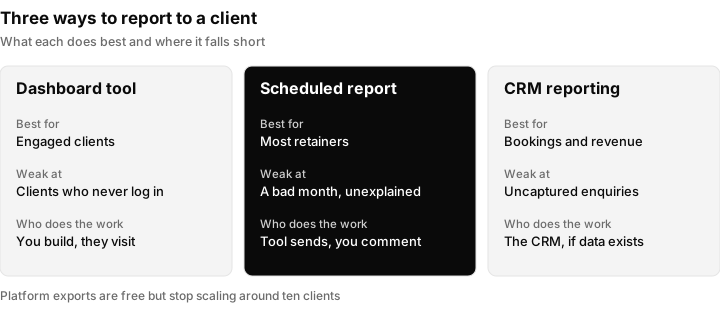
Three of the four reporting categories side by side. Platform-native exports are the free starting point that stops scaling around ten clients.
What to ask before you buy
Does it connect to every channel my clients actually use? Check the awkward ones, not the obvious ones. Everyone connects Meta and Google. Ask about the booking system, the call tracking, the email platform.
Can I white label it? If reports go out under your brand, this is not optional. If they arrive branded as a third-party tool, you have told the client the reporting is outsourced and invited them to buy it directly.
How long does client number eleven take to set up? The first client is always easy in a demo. Ask how much of the setup is reusable. If every client is built from scratch, the tool scales linearly with your headcount, which is the thing you were trying to avoid.
Can a non-marketer read the output? Open a sample report and imagine a plumber reading it. If the first page is acquisition channel breakdowns, it fails.
What happens when a connection breaks? Tokens expire, clients revoke access, platforms change APIs. The question is whether you find out from an alert or from a client asking why their report is empty.
Can I add commentary? A number without an explanation generates a phone call. Two sentences of context prevents it.
The mistake that matters more than the tool
Most agencies report on reach and activity because those export in one click, and skip outcomes because those do not.
A report with three parts survives a renewal conversation:
What went out. Posts, ads, emails, the work. Everyone reports this, and it is the least persuasive part, because it describes effort.
What came back. Enquiries, conversations, calls, form fills, response times. Far fewer agencies report this, and it is the part that proves the work reached real people.
What it was worth. Bookings, opportunities, revenue where you can attribute it honestly. Almost nobody reports this, and it is the only section that answers the question the client is actually asking.
The third part is hard because it needs data from outside the ad platforms. It requires that enquiries were captured, attributed to a source, and tracked to an outcome. That is a CRM function rather than a reporting function, which is why agencies serious about proving value tend to run a CRM built for agencies underneath the reporting rather than bolting a dashboard onto ad accounts and hoping.
If you can only do part of it, do it roughly and say so. "Nine calls booked, six we can trace to the campaign, three we cannot" is more persuasive than a clean number nobody believes.
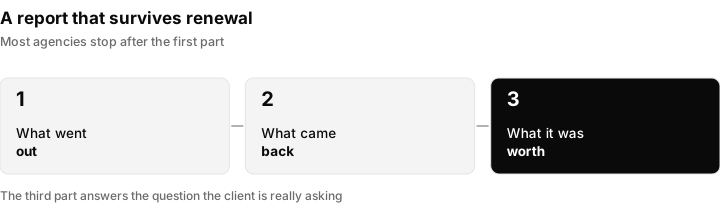
The three parts of a report that survives a renewal conversation. The last one is the one that answers the client's real question.
A worked example of the three parts
Here is how one month might read for a local dental client. The numbers are an illustration of the format, not a benchmark.
| Part | What the client sees | Why it matters |
|---|---|---|
| What went out | Eight posts, two ad sets live, one email to past patients | Shows the work happened |
| What came back | 31 enquiries, 24 answered within the hour, 7 after the next morning | Shows real people were reached, and how fast you replied |
| What it was worth | Nine calls booked, six traced to the campaign, three we cannot trace | An honest partial number the owner can believe |
| Commentary | "Enquiries rose after the new offer. Seven were answered late, so we are adding a text auto-reply. We need the new price list by the 12th." | Interpretation and a request, in three sentences |
What good looks like in practice
For an agency running ten to twenty clients:
- One template per client type, not per client. A dentist template, an ecommerce template, a local services template.
- Automated delivery on a fixed date, with a commentary block written by a human before it sends.
- Every report includes one outcome number, even a rough one.
- A named person owns reporting for all clients, not each account manager separately. Distributed reporting is how it slips.
- Broken connections alert you, not the client.
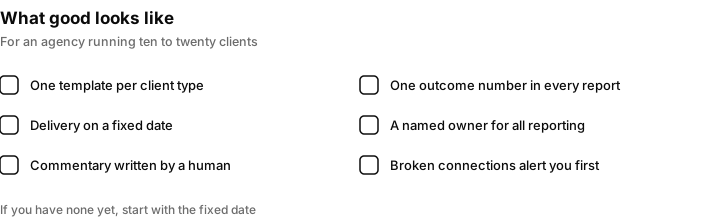
The five habits from this section. If you have none of them yet, start with the fixed date and the outcome number.
Setting it up in 30 days
| Week | What to do | Done when |
|---|---|---|
| 1 | List every client, their channels and the one number each owner cares about | You have a single sheet of clients, channels and numbers |
| 2 | Build one template per client type, with the three parts and a commentary block | Each client type has a template reviewed by someone outside marketing |
| 3 | Connect accounts, check that the numbers match the platforms, and set the send date | A test report for one client matches what the platform shows |
| 4 | Name the person who owns reporting and write the process in a short document | Anyone on the team can send the next report from the document |
The cheapest improvement available
Before changing tools, add two sentences of commentary to the top of the next report you send. Not an explanation of the numbers, an interpretation: what happened, what you are doing about it, what you need from them.
Clients who receive interpretation stay longer than clients who receive data. If adding that is hard because you do not know what the numbers mean either, that is the actual problem, and no software fixes it.
Common reporting mistakes and the fix
| Mistake | What it looks like | Fix |
|---|---|---|
| Reporting only reach | Impressions, followers and clicks, with no result | Add enquiries and one outcome number |
| Sending data without interpretation | A PDF of charts and nothing else | Add two sentences: what happened, what you are doing, what you need |
| Different definitions per account manager | Two clients' "leads" mean different things | Write down one definition per metric |
| Late reports | Sent when someone remembers | Automate the send date and name an owner |
| Third-party branding | A tool's logo in the footer | Check the PDF, the sending address and the login page |
| An unexplained bad month | A falling line with no context | Pair the number with what changed and what you did |
| Silent broken connections | An empty chart nobody notices | Alerts to you, not to the client |
Reporting outcomes with Inflowave
Inflowave is a CRM built for agencies, which means it sits underneath the reporting rather than replacing a dashboard tool. Enquiries, conversations, pipeline stages and deals live in one record per lead, so the third part of the report above, what the work was worth, has data behind it instead of a guess. That is the part ad platforms cannot give you, because they only know about clicks and impressions.
In practice, an agency using Inflowave for reporting would use the CRM to capture enquiries from each channel, move them through a pipeline, and use analytics to see results per client. The honest limit is the same as for any tool: it can only report what has been captured, so the work starts with getting enquiries into the system. Check the analytics feature page for what is reported today before you plan a client template around it. For what the client-facing view should show, see client dashboards for agencies.
SEO client reporting, and why it is the hardest one to automate
SEO is the discipline clients ask for reports on most often and the one where a
generic dashboard helps least. Paid media reports almost write themselves, because
spend, clicks and conversions all live in one account with one definition. SEO
pulls from four or five places that disagree: Search Console for impressions and
clicks, a rank tracker for positions, a crawler for technical health, and a
backlink index that will not match any other backlink index you compare it to. If SEO is most of what you sell, the reporting problem sits inside a bigger one, which is why we also compared the best CRM for SEO agencies.
Three things make SEO client reporting different in practice.
The numbers move for reasons you did not cause. An algorithm update, a competitor
relaunch or a seasonal swing can halve a traffic chart in a month where your work
was good. A report that shows only the line going down invites the wrong
conversation, so the useful version pairs the trend with what changed and what you
did about it.
Rankings are not one number any more. The same keyword ranks differently by city,
by device and by whether an AI Overview took the top of the page, so a single
average position hides more than it shows. Report the queries that actually drive
the clicks and say which ones you are targeting next, rather than a tracker
screenshot of two hundred keywords nobody reads. This is why 66% of digital PR agencies now track AI citations.
The lag is long and the retainer is monthly. Technical fixes and new content can
take weeks to show in traffic, which means early reports have to show leading
indicators such as pages published, issues cleared, links earned and impressions moving,
or the first three months look like nothing happened. This is the single most
common reason a good SEO engagement gets cancelled before it works.
White label SEO reporting is the version of this an agency resells under its own
brand, where the client never sees a third-party tool name. If you are reselling,
the thing to check is whether the branding holds all the way through: logo on the
dashboard is easy, while the PDF footer, the sending email address and the login
page are where unbranded tooling tends to leak.
Questions people ask
What is the best agency management software?
There is no single best, because agencies differ on the one thing that matters: whether your bottleneck is publishing, reporting, or tracking what the work produced. Tools that excel at dashboards are often weak at scheduled delivery, and platform-native reporting is accurate but fragmented across accounts. Decide which of those three problems costs you the most hours, then choose for that rather than for feature count.
What makes a good marketing dashboard for agencies?
That it gets read. A dashboard the client never opens is worse than an emailed report, because at least the email arrived. The practical test is whether your clients actually log in; most look once in month one and never again. If that describes your clients, a scheduled report with written commentary will outperform any live dashboard regardless of how good the dashboard is.
Can you white label client reporting?
Most tools built for agencies support it, and if reports go out under your brand you should treat it as a requirement rather than a nice-to-have. A report arriving branded as a third-party product tells the client that reporting is outsourced and invites them to buy that tool directly. Check whether white labelling covers the email delivery and the domain as well as the document itself.
How often should agencies send client reports?
Monthly for most retainers, on a fixed date, automatically. Weekly reporting sounds attentive but usually produces noise, because most channels do not generate a meaningful signal in seven days. What matters more than frequency is that the date never slips, since a late report is read as a bad month even when it is not.
What should be in a client report?
Three parts: what went out, what came back, and what it was worth. Most agencies send only the first, which describes effort rather than outcome. The second covers enquiries, conversations and response time. The third covers bookings, opportunities and revenue where you can attribute it honestly. An honest partial number with its limits stated is more persuasive than a clean total nobody believes.
Do you need a CRM as well as reporting software?
Only if you want to report on outcomes. Reporting tools pull from the channels you connect, so they can tell you what was reached but not what it produced. Enquiries, pipeline stages and closed revenue live in a customer record, which is a different system. If you can only report reach, that is usually a data problem rather than a reporting tool problem.
How do I report to a client who does not understand marketing?
Lead with the outcome in plain words, such as the number of enquiries and booked appointments, and leave terms like CPM and CTR for an appendix. Add two sentences that say what happened and what you plan to do next. If a term must appear, explain it once in a line the client can read in five seconds.
How long should a client report be?
Short enough to read in a few minutes. A one-page summary with the three parts and your commentary, with supporting charts behind it, is enough for most retainers. A long report that nobody finishes is worse than a short one that gets read.
Should I send reports weekly or monthly?
Monthly for most retainers, because most channels do not produce a meaningful signal in seven days. If a client is in a launch phase or running a time-limited campaign, a short weekly note can help, but keep the full report monthly and on a fixed date.
What should I do when the numbers are bad?
Say so early, explain what you think caused it, and say what you will change. Clients are far more forgiving of a bad month that comes with a plan than of a good-looking report that hides a problem. Pair the number with the reason and the next step.
What is the difference between a dashboard and a report?
A dashboard is a live view the client has to visit, and a report is a document that arrives on a schedule. Dashboards suit clients who check in regularly, and reports suit clients who want information to come to them. Many agencies send a report and keep a dashboard link as a reference.
