Lead capture forms that keep the people who did not finish
Most of the people who start your form never submit it. The moment somebody types an email or a phone number here, they are a real contact in your pipeline, whether or not they ever press the button.
A form that hands you a lead, not a row in a table.
Get StartedThe people who almost filled it in
Somebody clicks your ad, lands on the form, types their email, gets as far as the third question, and then a child shouts, or the train arrives, or they decide to think about it. They close the tab.
You paid for that click. That person had a problem, went looking, found you, and started telling you who they were. In almost every form tool on the market they now do not exist. There is no record, no name, nothing to follow up. The money is spent and the intent is gone.
Here, the instant a reachable contact detail appears in the form, that person becomes a contact. No save button, no submit point to configure, no plan tier that unlocks it. It happens on every form, and it happens whether or not they ever come back.
What actually happens
- The email or phone is matched against your existing people, so a customer you already know does not become a duplicate.
- They are placed in the first stage of your pipeline and flagged as a partial fill.
- A started-the-form trigger fires once, and only once, no matter how many characters they type after that.
- Where they came from travels with them: the campaign, the source, the referring page, the ad click identifier.
- If they later submit properly, the real submission reconciles onto the same person. One human, one record.
- If they never give a contact detail, nothing is created at all. A record you cannot reach is not a lead.
Use it like a grown-up
This means you are holding contact details somebody typed and did not submit. Say so in your privacy policy, and treat a partial as permission for one useful message rather than an addition to a broadcast list. The thing that works is a short note that answers the question they were probably stuck on. The thing that gets you reported is a newsletter they never asked for.
How the others do this
They are not ignoring the problem, they solve a narrower version of it. Typeform collects partial responses, but you have to place a partial submit point and the respondent has to click past it, which their own documentation describes as the respondent consenting to be recorded. There is one such point on the lower plans, and partials count against your response quota.
Jotform has Save and Continue Later, which is opt-in per form and requires the respondent to press Save. Their drafts expire after two months, and for genuine abandonment their own support directs people at webhooks, the API or custom JavaScript. GoHighLevel captures partials on surveys; on forms it is still an open request.
The pattern is the same in all three: partial capture is a feature you turn on and the visitor participates in. The person who closed the tab in frustration does not press Save and does not click past a submit point. That is precisely the person worth catching.
The short version
- A half-finished form is still a contact, automatically.
- A submission arrives in a pipeline stage, not a submissions tab.
- People are matched on email or phone, so you do not collect duplicates.
- Every answer becomes a reusable field on the person.
- Qualifying rules route bad fits to a different ending, with the reason recorded.
- Terms, data processing, email and SMS consent are four separate flags.
- Submitting fires a workflow. So does starting.
- A server-side conversion event goes to the pixel, within the consent you were given.
- One question at a time, all at once, or conversational.
- Eight themes, full styling control, and an AI that restyles it by chat.
- Write a form as a file, import it, export it, re-import to update in place.
- Bot defense with no CAPTCHA, and a domain allowlist for embeds.
- No submission quota, and partials do not consume one.
What happens in the second after somebody submits
This is the part that separates a form builder from a form that is part of a CRM, and it is almost impossible to see in a demo because it all happens at once and none of it is visual.
Six things happen, in this order, and none of them is an integration you have to build or a Zap that can quietly stop running on a Tuesday.
The person is matched, not created
The email or phone is matched against the identity everything else uses, so a customer who has already messaged you on Instagram and booked a call last year does not become a third contact. This is the step that quietly decides whether your database is worth anything in two years.
They land in a pipeline stage
Not a spreadsheet tab called submissions. If your form has qualifying rules and they passed, they go to your qualified stage where it exists, otherwise the first stage of your pipeline. Either way somebody can work them.
The answers become fields on the person
Every answered question is written onto the contact as a reusable field, created automatically the first time it is seen. So the answer to what is your monthly budget is available later to a workflow condition, a filter, or a message template, instead of being locked inside one submission.
Consent is recorded per channel
Terms, data processing, email marketing and SMS marketing are four separate flags on the person, not four checkbox answers in a blob. That distinction is the one an SMS carrier asks about.
A workflow starts
Submission is a trigger, and so is starting the form. Send the confirmation, notify the closer, start a sequence, move a stage, wait three days and try a different channel.
The conversion is reported to the platform that paid for it
A server-side event goes to the pixel attached to that form, deduplicated against the browser fire, and only within the consent you were given.
A retried submission is deduplicated on an idempotency key, so a shaky mobile connection and an impatient second tap do not produce two leads and two welcome emails. The stage it lands in comes from your pipeline, and what fires next is built in workflows.
From that point the person is a thread rather than a row. Whatever you send them, and whatever they say back, lands in the same place as their Instagram messages and their emails in the shared inbox. And the two consent flags the form just set decide what you are allowed to send: email and SMS are covered in messaging.
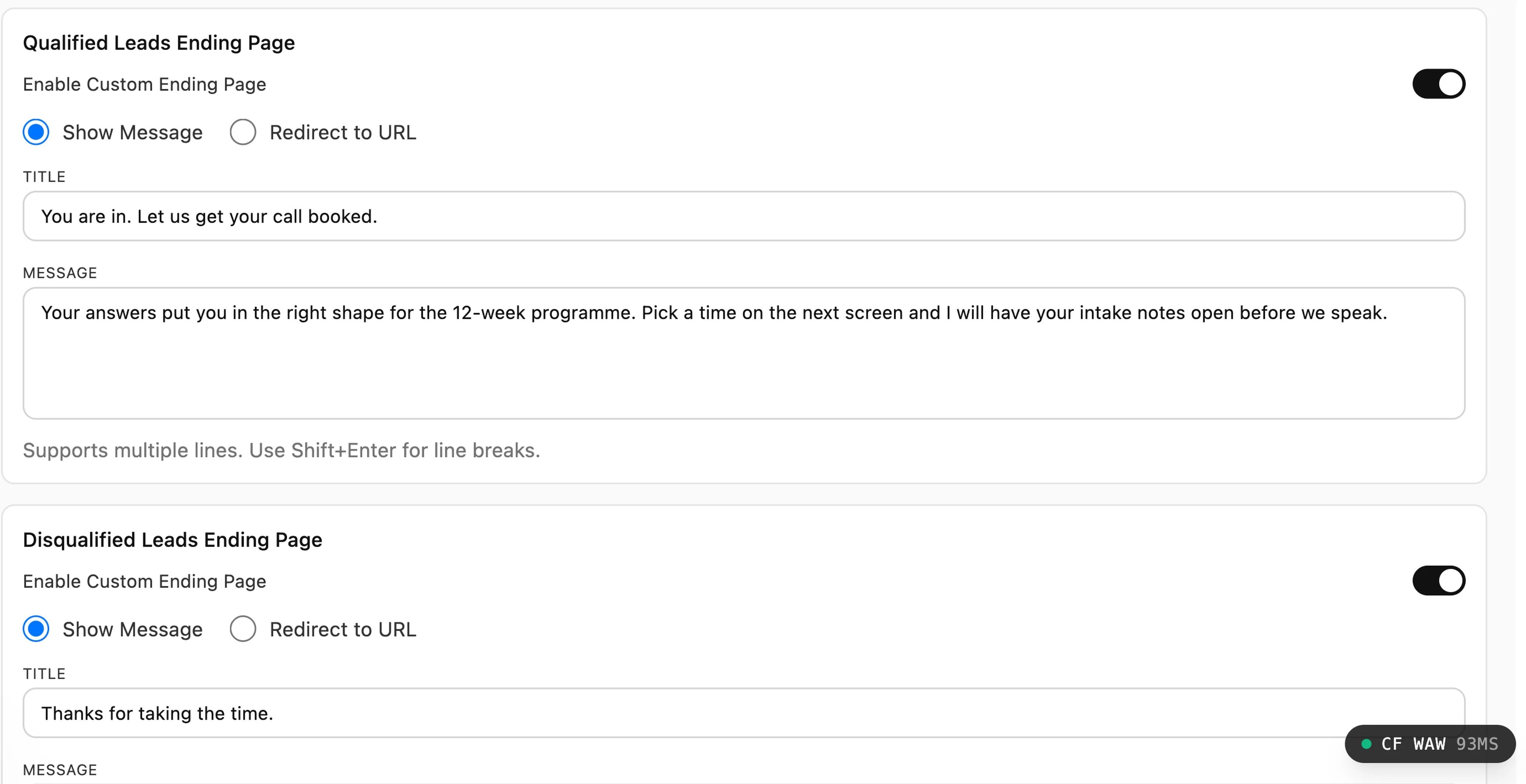
Sorting good fits from bad, on the form
Mark any question as qualifying and say what a passing answer looks like: equal to, not equal to, contains, more than, less than. Somebody who fails never reaches your qualified path.
There are two endings, and each can be a message or a redirect. So a qualified lead gets a booking link and a disqualified one gets sent to a self-serve product, a cheaper package, or a genuinely helpful article, rather than a page that says thank you and then nothing ever happens.
Disqualified is not deleted. They are still a contact, still tagged, still reachable when their situation changes. Most people who are wrong for you this quarter are simply early.
The detail that matters more than it sounds: the record carries the reason in plain language, written for the person reading it rather than for a developer. It says budget must be more than 5000, not rule 3 failed. Six weeks later, when somebody asks why this lead was parked, the answer is on the card.
Branching, and its honest limit
In the step and conversational modes a multiple choice or dropdown answer can decide which question comes next, or jump straight to the end, so somebody who says they are a solo founder is never asked how many people are on their procurement team. What does not exist is field-level show and hide inside a single page. If that is the requirement, say so early, because GoHighLevel and Jotform both do it and we do not.
Describe the form to an AI, then import it
Building a twenty-question form by clicking add question twenty times is the least enjoyable job in marketing software, and it is exactly the sort of job a language model is good at.
So the form has a published file format. It is a versioned, plainly readable document listing the questions, their types, their options, the wording and the styling. You can write it by hand, generate it with Claude or any other coding assistant, or have our own assistant produce one. Paste it into the importer and you have a working form.
That works in the other direction too. Export a form you like, hand the file to somebody, and they get your exact form including the theme. It is the difference between a screenshot of your onboarding questionnaire and the questionnaire itself.
Nothing is trusted on the way in
A file from an AI is untrusted input and is treated as such. Field types are checked against what the renderer actually understands, so a hallucinated field type is rejected rather than producing a broken form. Question and option counts are capped. Any image or video is fetched, checked that it is genuinely an image, and copied onto our own storage rather than left pointing at a server we do not control. And if validation fails you get a list of exactly which field was wrong and why, which is what makes the fix a ten-second edit.
Re-importing updates, it does not duplicate
An exported form remembers which form it came from, so importing it again edits that form in place. The public link does not change, so every embed and every link in bio keeps working. The question identities do not change, so workflow conditions and branching rules keep pointing at the right questions. And the operational settings are taken from the live form rather than the file, which means a content update can never accidentally switch a form off, detach its pixel, or wipe the list of domains allowed to submit it.
The same format is what our assistant integration emits, so you can ask for a form in a chat and get one. The tools are documented in the forms tool reference. Imported forms arrive switched off, so nothing goes live until you have looked at it.
How it looks, and how it asks
Two separate decisions that people tend to collapse into one. How the form is styled matters less than how it paces the questions, and the second one is free to change.
All at once
Every question on one screen. Right for three or four fields, and right when somebody arrived ready to convert and just wants to be done. Adding steps to a short form makes it feel longer, not shorter.
One at a time
One question per screen with an optional progress bar. Right when you need eight or more answers, because a long list of fields on one page is the most reliable way to lose somebody before they start.
Conversational
The same one-at-a-time pacing with the tone of a conversation rather than a document. Works well for anything that arrived from a DM, where a formal form is a jarring change of register.
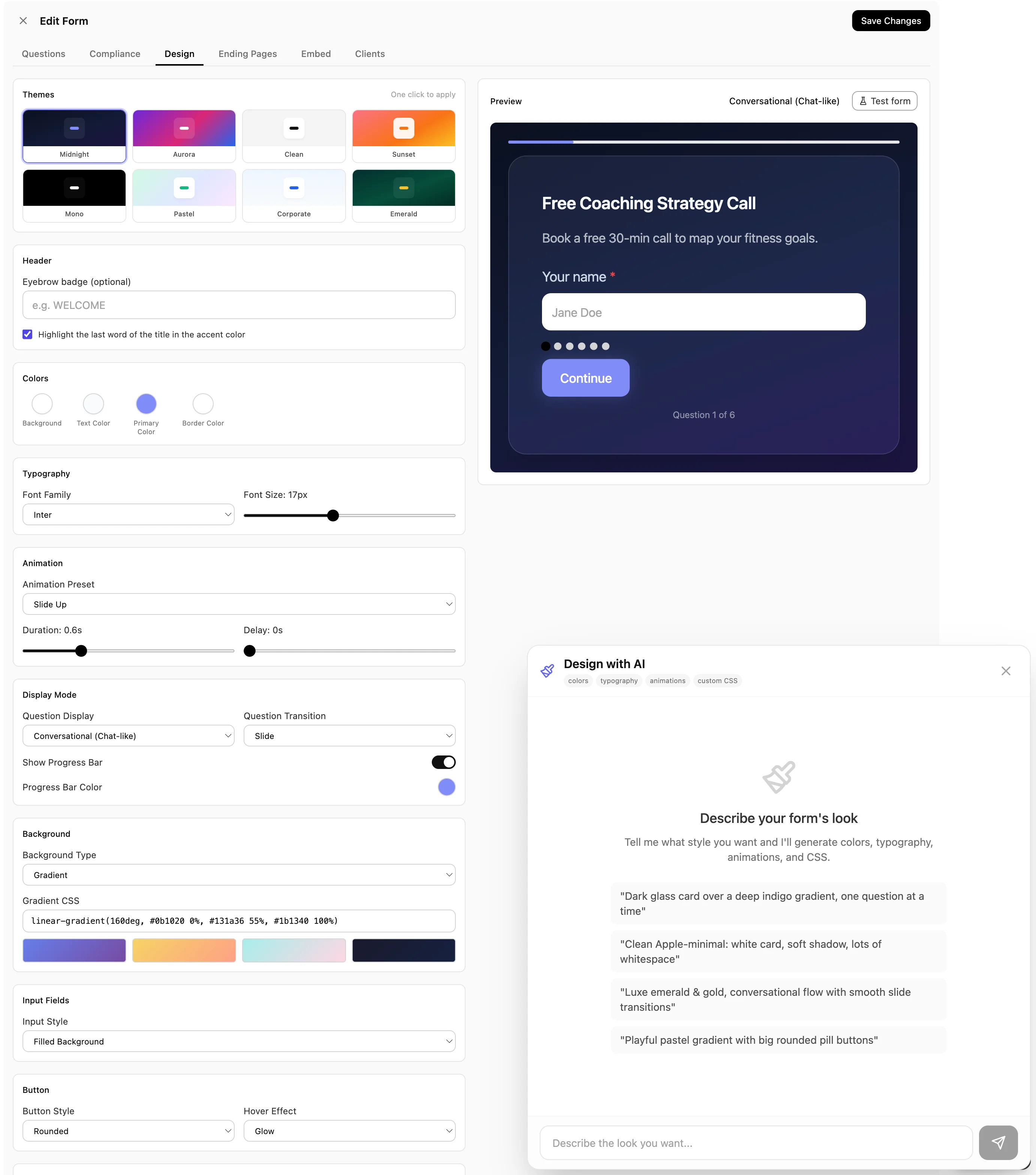
Eight themes, then everything underneath
Start from one of eight themes and it already looks finished. Underneath that is the full set: colors, typography, background as a solid, a gradient or an image, input and button styles, borders, shadows, spacing, one to three columns, entrance animations, per-question transitions, and your own CSS if you want it.
Choice questions can be plain radio buttons or cards with an emoji, an image and a line of description under each option, which changes a boring qualifying question into something people quite enjoy answering.
Or just describe it
There is a design chat that takes an instruction like make it dark with a serif headline and less rounded corners, and applies it. It can see the form it is restyling, so it knows which questions are on it, and you can keep going in the same conversation until it is right. Bring your own OpenAI key if you have one, or use ours.
Consent as four flags, not one checkbox
In most builders a consent checkbox is a checkbox: another answer in the pile, indistinguishable from what size shirt do you wear. That is fine right up until somebody asks you to prove that a specific person agreed to receive text messages on a specific date.
So there are four distinct consent field types, and each writes to its own flag on the person: agreement to your terms, consent to process their data, consent to email marketing, and consent to SMS marketing. Separately, because they are separate permissions and are asked about separately when it matters.
Your policy links, filled in once
Company name, privacy policy and terms links live in one place and pull into the consent wording on every form. Save them as your defaults and the next form already has them. An agency doing this per client saves the ten minutes and, more importantly, stops shipping a form with the wrong company name in the small print.
The data itself
Email addresses and phone numbers are encrypted where they are stored. Being clear about the boundary: that protects the data at rest, it does not make a badly-worded consent question legal. The wording is still yours to get right, and it is worth ten minutes with a lawyer if you operate in Europe.
If you plan to text people in America
The SMS consent checkbox on your form is one of the things American carriers look at when they review your registration, and a form without it is one of the most common reasons a registration is rejected. It is not the only thing they check: your privacy policy has to contain a specific clause about mobile data, your sample messages have to include the opt-out wording, and the business details on your site have to match what you registered.
The full A2P 10DLC checklist, including the exact privacy policy wordingTelling the ad platform what it bought
If you buy traffic, the single most valuable thing a form can do is report back accurately, because that is what the algorithm learns from. A browser-only pixel misses a meaningful share of conversions to blockers, privacy settings and people who close the tab a moment too early.
So a submission also fires a conversion event from our servers to the pixel attached to that specific form, sharing an identifier with the browser event so it is counted once rather than twice. Where the answers contain useful matching signals such as city or country, they go too, which raises the share of conversions the platform can attribute at all.
The part worth reading twice is what happens when consent is missing. If your form asks for data-processing consent and does not get it, the identifying details are not sent. If they accepted your terms, an anonymous count goes so your reporting still sees the conversion. If they accepted nothing, nothing is sent. That behavior is not a setting somebody can leave switched off by accident.
Where they came from, kept
The campaign, source, medium, content, term, referring page and ad click identifier all travel onto the person and stay there. So months later you can answer which ad produced the customer, not merely which ad produced the click, and that answer survives the person changing device or taking three weeks to buy.
Joined to the site visit
If our own site pixel is on the page, the anonymous visitor is bound to the person at the moment they fill the form. Everything they read before submitting becomes part of their history, and every later visit lands on their timeline instead of vanishing into an aggregate.
The reporting that comes out of all this lives in analytics, where form submissions are one stage of the funnel, and the site-visit history is in tracking.
Keeping bots out without a CAPTCHA
A CAPTCHA works. It also costs you real submissions, from people on old phones, people in a hurry, and people who fail it twice and give up. You never find out how many, because those people leave no trace.
So there is no CAPTCHA here. There are four quieter layers instead, and a rule about how they fail.
A field only a robot can see
Hidden from people, irresistible to automated form fillers. Anything that completes it is shown a cheerful success message and quietly discarded, because telling a bot it was caught is how it learns to stop being caught.
Proof the form was actually opened
Viewing the form issues a short-lived signed token that is required to submit it, and it is tied to that form. Posting straight at the address without ever loading the page does not work, which removes most casual scripted abuse.
Three ceilings
A limit per form view, a looser one per network so a shared office connection is not punished for having twelve people on it, and a daily ceiling per form as a brake against a flood spread over thousands of addresses.
A domain allowlist
Say which sites are allowed to submit a given form. Somebody copying your embed code onto their own page cannot then post into your CRM, which matters most for agencies whose embed codes are visible on every client site they build.
The rule underneath all four
Every one of these fails open. If the system that counts submissions is having a bad minute, the checks let people through rather than blocking them. The reasoning is simple arithmetic: a handful of spam entries costs you a minute of deleting, and a form that silently rejects genuine customers during an outage costs you the customers, and you would never know it happened.
What this does not do
An earlier version of this page listed several of the following as though we had them. We do not, and finding that out after buying something is a bad way to start a relationship.
- No field-level show and hide logic. Branching between questions in step mode, yes. Fields appearing and disappearing on one page, no.
- No file upload, e-signature or payment field. Jotform is the better answer if you need any of those on the form itself.
- No progressive profiling. We do not ask a returning visitor different questions based on what we already know. HubSpot does this well, on their Professional tier and above.
- No split testing of form variants. If you want to test two versions properly, send traffic to two forms and compare.
- No per-field drop-off report and no time-to-completion metric. You get views, unique views, submissions, conversion rate and views by day, and you can filter submissions by any answer.
- No exit-intent, scroll-triggered or slide-in embeds. A hosted link, an inline embed and a popup on a button.
- Not a survey tool. There is no cross-tabulation, no weighting, no statistical reporting. It is built to produce leads, and a research questionnaire wants Typeform.
- A template library of a handful rather than thousands. The trade is that a form here is finished when the answers are wired into a pipeline, not when the layout looks right.
Who this is built for
Agencies running paid traffic for clients
This is the case the page is built around, because the arithmetic is brutal. If a client pays four pounds a click and three quarters of the people who start the form never finish it, the client is paying full price for three quarters of nothing. Catching even a third of those as contacts changes the cost per lead more than any headline rewrite will.
The server-side conversion event matters just as much, because it changes what the algorithm is optimizing towards. That side is covered in ads reporting.
Agencies with coaching and consulting clients selling by conversation
An application form in front of a discovery call does two jobs: it filters out the people who cannot afford the client's program, and it gives the client something to open with. Both need the answers on the record rather than in a notification email, and both need the disqualified path to be a helpful redirect rather than silence.
Agencies running forms for other people
A form per client, in that client workspace, with that client company name and policy links in the consent wording and that client pixel attached. The exportable file format is the part agencies end up using most: build the qualification form you are proud of once, keep it as a file, and start every new client from it rather than from an empty screen.
More in the agency use case and what we build for agencies.
Agencies running small-business clients, including local and service trades
Salons, clinics, studios, trades, dealerships, a firm of four people. The enquiry form on a client's website is usually the oldest thing on it, and it usually sends an email to an address one person checks. Everything on this page is really one idea for a client that size: the enquiry should arrive as a person to ring back, with a note of what they asked about, and it should do that at nine on a Saturday night.
The partial capture is worth more to a small business than to anybody else, because the volumes are small enough that individual leads are visible. An agency losing sixty abandoned fills a month sees a percentage. A dental practice losing six sees six people who wanted an appointment, and one of those pays for the software several times over.
Keep it to four questions. Name, phone, what they need, and roughly when. Ask nothing you would not ask on the phone. The qualifying rule most local businesses actually want is a location question that politely redirects people outside the area, which saves a call that was never going anywhere and leaves the person with a better impression than being ignored.
See how small businesses use Inflowave and what it costs for a small team.
Setting it up
1. Ask for the contact detail first
Put the email or the phone number near the top rather than at the end. This is ordinary good practice everywhere, and here it is the thing that decides whether an abandoned fill is a lead or nothing, because capture starts the moment that field has something in it.
2. Add the two questions that change your reply
Not the ones that would be interesting. The ones where a different answer means a different response from you. Everything else can be asked in the conversation, where people answer far more willingly than they do in a field.
3. Decide who is not a fit, and where they go instead
Mark the qualifying question and write the disqualified ending properly. A redirect to something genuinely useful is worth building; a page that says thank you and ends the relationship is not.
4. Build the follow-up before you publish
Two workflows, not one. What happens on a submission, and what happens on a partial. The second is the one everybody forgets, and it is the one that pays for itself, because nobody else is messaging that person at all.
5. Attach the pixel and restrict the domains
Two minutes each and both are annoying to retrofit. Without the pixel your ad reporting is guessing, and without the allowlist your embed code works on any site that copies it.
6. Export it once it works
Keep the file. It is your starting point for the next campaign, the next client and the next country, and it is a backup of a thing that would otherwise take an afternoon to rebuild from memory.
Against Jotform, Typeform and GoHighLevel
Read the rows where we say no first, because they are the useful ones. Two of these are better form builders than we are, and one has better logic.
| Capability | Inflowave | Jotform | Typeform | GoHighLevel |
|---|---|---|---|---|
| Captures an abandoned fill with no action from the visitor | Yes | Partly | Partly | Partly |
| Abandoned fill becomes a real contact record, not just a row | Yes | No | No | Partly |
| Every submission lands in a pipeline stage in the same product | Yes | No | No | Yes |
| Answers deduplicate onto an existing person across channels | Yes | No | No | Partly |
| Disqualify on the answers, with a stated reason | Yes | Partly | Partly | Yes |
| Field-level show and hide logic | No | Yes | Yes | Yes |
| File upload, e-signature and payment fields | No | Yes | Partly | Yes |
| Progressive profiling: ask returning people different questions | No | No | No | No |
| Server-side conversion event on submit, consent-aware | Yes | No | No | Partly |
| Consent captured as first-class, separately per channel | Yes | Partly | Partly | Partly |
| Import a form written outside the builder, and export it back | Yes | Partly | Partly | No |
| Bot defence without showing anyone a CAPTCHA | Yes | Partly | Partly | Partly |
| Restrict which domains may submit the form | Yes | Partly | Unclear | Unclear |
| Field library, templates and integration count | No | Yes | Yes | Partly |
- Captures an abandoned fill with no action from the visitor: This is the row the page is built on. Ours fires the moment a reachable contact is typed, with nothing for the visitor to click and no plan gate. Jotform needs Save and Continue Later switched on and the respondent to press Save, and its drafts expire after two months. Typeform needs a Partial Submit Point and the respondent to click past it, which their documentation describes as consent to record, and partials count against your response quota. GoHighLevel has it for surveys; for forms it is still an open feature request.
- Abandoned fill becomes a real contact record, not just a row: A partial here is deduplicated against the person’s existing record, placed in the first pipeline stage and flagged as a partial, so a follow-up sequence can reach them. Jotform and Typeform are not CRMs, so the draft stays in their table. GoHighLevel creates a contact on partial survey completion.
- Every submission lands in a pipeline stage in the same product: Jotform and Typeform both integrate with a CRM. The difference is a hop that can fail, lose the attribution, or create a second copy of a person who already exists.
- Answers deduplicate onto an existing person across channels: Matching is on email or phone against the same identity the inbox, calls and DMs use, so the fifth form a customer fills in does not become a fifth contact.
- Disqualify on the answers, with a stated reason: All four can branch a bad fit somewhere else. The part we have not seen elsewhere is the plain-language reason travelling with the lead, so the record says budget must be more than 5000 rather than leaving somebody to work out why.
- Field-level show and hide logic: We do not have this and it is a real gap. Ours is branching between questions in the step and conversational modes plus qualify or disqualify rules. GoHighLevel Conditional Logic v2 is the strongest of the four here: show/hide, redirect, message, disqualify, field and slide jumps, AND/OR chaining.
- File upload, e-signature and payment fields: Not in our field list at all. If your form needs a signed document or a card payment on the form itself, we are the wrong tool and this row is not close.
- Progressive profiling: ask returning people different questions: None of these four. HubSpot does, with queued progressive fields on Marketing or CMS Hub Professional and above, and it is the reason to choose them over any of us for a long nurture.
- Server-side conversion event on submit, consent-aware: Submission fires a server-side Lead event to the form’s own pixel, deduplicated with the browser fire. If the form asks for data-processing consent and does not get it, the event drops to an anonymous count or is skipped entirely rather than sending anything identifying.
- Consent captured as first-class, separately per channel: Terms, data processing, email marketing and SMS marketing are four distinct field types writing to four distinct columns on the person, which is what an SMS carrier audit asks to see. Elsewhere a consent checkbox is usually just another checkbox answer.
- Import a form written outside the builder, and export it back: A versioned, hand-authorable bundle that round-trips, and re-importing updates the form in place, preserving its id, public link and question ids so embeds and automations keep pointing at the right things. Jotform and Typeform both have creation APIs, which is the same idea with more work and no update-in-place contract.
- Bot defence without showing anyone a CAPTCHA: Honeypot, a signed short-lived token issued when the form is viewed, and three rate limits. Every one fails open, so an infrastructure problem never blocks a real customer. The others offer CAPTCHA, which works and costs you conversions.
- Restrict which domains may submit the form: An allowlist per form, so a copied embed on somebody else’s site cannot post into your CRM.
- Field library, templates and integration count: Jotform and Typeform are far ahead and it would be silly to pretend otherwise. Thousands of templates, dozens of field types, hundreds of integrations. We have about a dozen field types chosen for lead capture.
Where the others are stronger. Jotform and Typeform are better form builders than we are and it is not close. They have more field types, thousands of templates, file uploads, e-signature, payment fields and hundreds of integrations, and Typeform in particular gets people through long forms in a way a plainer layout does not. If the job is to build a beautiful survey, an application with a document upload, or an order form that takes a card, buy one of them. GoHighLevel has richer conditional logic than we do, with field-level show and hide, jumps, redirects and AND/OR chaining, so if intricate branching is the requirement they are ahead. And HubSpot has progressive profiling, which asks a returning visitor the questions it does not already have answers to; nobody else in this table has it, including us.
What is different here is what happens to the answers. The moment somebody types an email or a phone number they exist as a contact, deduplicated against every other conversation you have had with them, whether or not they ever press submit. A completed submission arrives in a pipeline stage with its consent flags set per channel, its answers stored as reusable fields on the person, a workflow already running, and a server-side conversion event sent to the pixel that paid for the visit. A standalone form builder makes a better form and then hands you a row in a table, and everything above has to be rebuilt out of integrations that quietly break.
Tool by tool
The table is the evidence. This is the verdict, one competitor at a time, with the case for choosing them stated first because for a lot of readers it is the right one.
Inflowave vs Typeform
Buy theirs when: Typeform is the best-looking form on this list and the one people finish. If the form itself is the product, a long survey, a research questionnaire, an application, buy Typeform. Their conversational layout is genuinely better than ours and they have spent a decade on it.
Buy ours when: Partial responses are the difference. Theirs need a Partial Submit Point that the respondent clicks past, they are limited to one point on the lower plans, and they consume your response quota. Ours fire automatically on the first reachable contact and become a real person in a pipeline stage. Typeform then hands the completed response to your CRM through an integration, where ours already is the CRM.
Inflowave vs Jotform
Buy theirs when: Jotform has the deepest field library of anything here, thousands of templates, file uploads, e-signature and payments on the form. For an intake form, a booking request with attachments, or anything a clinic or a law firm needs, it is the better tool and cheaper than a CRM seat.
Buy ours when: Their answer to abandonment is Save and Continue Later, which the respondent has to switch on by pressing Save, and the drafts expire after two months. Their own support directs people to webhooks or custom JavaScript for genuine abandonment tracking. Beyond that it is scope: a Jotform submission is a row you then have to move somewhere, and the moving is where attribution and duplicate contacts go wrong.
Inflowave vs GoHighLevel
Buy theirs when: GoHighLevel has better conditional logic than we do, and we are not going to pretend otherwise: show and hide at field level, jump to a field or a slide, redirect, message, disqualify, chained with AND and OR, and a Between operator for numbers and dates. They are also a CRM, so the submission lands in a pipeline the same way. If you are already on GoHighLevel, forms alone are not a reason to move.
Buy ours when: Partial capture on forms is still an open request on their roadmap; they have it for surveys. Ours is on every form by default. The other gaps are the consent-aware server-side conversion event, per-channel consent as separate fields on the person, and the portable bundle you can generate outside the builder and import.
Inflowave vs HubSpot forms
Buy theirs when: HubSpot has progressive profiling, which nobody else here does. Queued fields mean a returning visitor is asked what you do not already know instead of the same five questions, and over a long nurture that builds a fuller record than any single form can. If you are running content marketing at scale on Marketing Hub Professional or above, that is the right answer.
Buy ours when: Two caveats worth knowing before you count on it: progressive fields need Professional or above, and the logic reads a cookie rather than looking the contact up in the CRM, so it only knows what that browser submitted before. Our answer to the same problem is different in kind, capturing the person the moment they type a contact rather than shortening the form, which works on a first visit from a phone where there is no cookie to read.
Taken from vendor documentation, checked 30 July 2026. They ship changes constantly, so verify any row that decides your choice.
Common questions
What is a lead capture form?
A lead capture form is a short form on a website, landing page or link in bio that collects enough contact information to follow somebody up, usually a name and an email or phone number, plus one or two questions that tell you whether they are worth following up. It differs from a contact form in that the answers are meant to feed a sales process rather than an inbox, so the useful ones are connected to whatever you use to work leads.
How do you make a lead capture form?
Decide the one thing you need in order to follow up, which is nearly always an email address or a phone number, and ask for that first. Add at most two questions that would change how you respond, such as budget, timeline or location. Then connect it to wherever you actually work leads, so a submission arrives as somebody to contact rather than a notification email. In Inflowave you add the questions, mark any of them as qualifying, and publish it as a hosted link or an embed.
What is an example of lead capture?
A gym runs an ad offering a free trial week. The ad points at a four-question form asking name, phone, which location and which class they are interested in. Somebody fills it in on a Saturday night. The phone number is enough to reach them, the class answer tells the front desk what to say, and a text goes out within a minute rather than on Monday. That is lead capture: the exchange of a small amount of information for something worth having, ending in a conversation.
What happens if somebody starts the form and leaves?
As soon as they have typed an email address or a phone number, they exist as a contact, flagged as a partial, sitting in the first stage of your pipeline. You can see them, message them, and put them in a follow-up sequence. If they come back and finish properly, the completed submission reconciles onto the same person rather than creating a second one. If they never type a contact detail, nothing is created, because a record with no way to reach anybody is just noise.
Does the visitor have to click anything for that to work?
No, and that is the whole difference. There is no save button, no partial submit point to place, no plan tier that unlocks it. It happens on every active form. Worth being straight about the trade: this means you hold contact details somebody typed but did not submit, so say so in your privacy policy and treat those people gently. A partial is a reason for one helpful message, not a reason to add somebody to a broadcast list.
Can I import a form that Claude or another AI wrote?
Yes. There is a documented, versioned form format that is plain readable JSON, so you can describe the form you want to an AI coding tool, paste what it produces into the importer, and get a real working form. Everything is validated on the way in: field types are checked against what the renderer understands, counts are capped, and any image or video is fetched, checked and copied onto our own storage rather than being hot-linked. If something does not validate you get the specific reason for each field, not a failure.
If I re-import a form, do I lose the live one?
No. An exported form carries its own identity, so importing it again updates that form in place rather than making a duplicate. The public link stays the same, the question identities stay the same so workflow conditions and branching keep pointing at the right questions, and the operational settings are taken from the live form rather than the file: whether it is switched on, which pixel it uses, which domains may submit it. A content re-import can never silently take a live form offline.
Is there a CAPTCHA?
No, deliberately. There is a hidden field that only automated software fills in, a signed short-lived token issued when the form is viewed and required to submit it, and three layers of rate limiting: per form view, per network, and a daily ceiling per form. All of them fail open, so if our infrastructure has a bad minute a real customer still gets through. A CAPTCHA would catch slightly more and cost you real submissions, and you cannot measure the ones it turned away.
Can I disqualify people on the form?
Yes. Mark any question as qualifying and set what a passing answer looks like: equal to, not equal to, contains, more than, less than. Somebody who fails sees your disqualified ending, which can be a message or a redirect to somewhere more appropriate. They are still saved as a contact, and the record carries the reason in plain language, so it reads as budget must be more than 5000 rather than leaving the next person to work out what happened.
Can I embed it on my own website?
Yes, in three ways: a hosted link you can put anywhere including a link in bio, an inline embed that renders in the page, and a popup embed attached to a button. You can also restrict which domains are allowed to submit it, so a copied embed on another site cannot post into your CRM.
Does it work with Meta ads tracking?
Yes. Attach a pixel to the form and a submission fires a server-side conversion event to that specific pixel, sharing an event identifier with the browser event so Meta counts it once. Where the form asks for data-processing consent and does not receive it, the event either drops to an anonymous count or is skipped entirely rather than sending anything that identifies the person. More on ads reporting.
Does it have conditional show and hide logic?
Not at field level, and it is the clearest gap on this page. What exists is branching between questions in the one-at-a-time and conversational modes, where the answer chosen decides which question comes next or jumps straight to submit, plus qualifying rules that decide which ending somebody sees. If your form genuinely needs a field to appear and disappear based on another field, GoHighLevel and Jotform both do that and we do not.
Can I upload files or take a payment on the form?
No. There is no file upload, e-signature or payment field. The field set is deliberately the lead-capture set: short text, long text, email, phone, Instagram handle, single and multiple choice, dropdown, rating, number, date, a media block and the consent types. If your form needs an attachment or a card, Jotform is the better tool and it is not a close call. Payments and contracts here happen after the conversation, from the deal. See the pipeline.
What analytics do I get on a form?
Views, unique views, submissions and conversion rate, plus views by day so you can see a campaign start and stop. Being precise, because the previous version of this page was not: there is no per-field drop-off report and no time-to-completion metric. What you can do instead is filter submissions by any answer, which is usually the question you actually had.
Can a form be used for bookings?
Yes. A booking page carries a form, and those entries arrive in the same submissions list marked as coming from a booking, so a qualifying question you wrote once applies whether somebody is requesting information or taking a slot. See appointment booking.
Is the SMS consent checkbox enough for carrier registration?
It is the part carriers check on your form, and it is a real field type rather than a checkbox you have to remember to add. American SMS registration also inspects your privacy policy wording, your sample messages and whether the business details on your site match your registration, which is a separate job we walk you through. The A2P 10DLC checklist.
What does it cost?
Forms are part of the platform rather than a per-form or per-response add-on, so there is no submission quota to run out of and a partial capture does not consume anything. What changes between plans is seats and the number of client workspaces. Compare the plans.
Stop paying for the people who did not finish
Build a form where a typed email is already a lead, the answers land in a pipeline stage, and the conversion goes back to whoever sold you the click.
Get Started