Every CRM has contacts and deals. Almost no business only has contacts and deals.
Policies, properties, vehicles, cohorts, shipments, licenses, machines. Define the record type yourself, give it typed fields, link it to the customer it belongs to, and let automations act on it.
The half of your business currently living in a spreadsheet nothing else can see.
Get StartedThe short, checkable version
Five statements from this page that stand on their own, with where each one comes from. The first two are the comparison most buyers want and rarely get stated plainly.
HubSpot custom objects require an Enterprise subscription and are capped at 10 custom objects per account, with additional objects and records sold separately.
HubSpot, Create and edit custom objects
GoHighLevel makes custom objects available on every subscription tier including Starter, capped at 10 per location.
GoHighLevel, Custom Objects In All Plans + Higher Limit
Inflowave custom objects require the MAX plan and allow 25 object types, 200 fields per object and 100,000 records per object, rising to no limit on Enterprise.
Inflowave product
A lookup field on an Inflowave custom object can point at a contact, at another custom object, or at an entire client workspace, and the record author chooses whether a deletion cascades or clears the link.
Inflowave product
Inflowave rejects a write to a custom object that contains a field which was never defined, and rejects values that do not match the declared field type.
Inflowave product
Competitor claims taken from each vendor own published documentation and checked on 30 July 2026. Products in this category change often, so verify anything that decides a purchase.
The spreadsheet nobody admits to
Almost every business running a CRM also runs a spreadsheet beside it. It has the policies, or the properties, or the vehicles, or the cohorts. Somebody owns it, it is usually the person who least wants to, and it is the actual operational record of the business.
It persists because the CRM had no shape for the thing. So people improvise. The three common improvisations are a note on the contact, a pile of numbered fields, or a tag, and all three fail the same way: none of them can hold two of something, and none of them can be acted on.
There is a clean test for whether you need this. Have you ever created a field called policy 2 start date? Then you needed a second record, not a second field, and everybody in the building already knows it.
It cannot hold two
One contact with three policies has three renewal dates, three premiums and three reference numbers. Fields on a contact can express one of something. Everything after that is numbered fields and regret.
Nothing can act on it
A date in a spreadsheet is a date somebody has to notice. A date on a record is a date that can send a message, move a deal or create a task on its own, ninety days out, every time, without anybody remembering.
It drifts
A spreadsheet accepts anything, so eventually it contains Active, active, ACTIVE and a blank, and the report everybody relies on has quietly been wrong for a year. Nothing warns you, because nothing is checking.
What you actually define
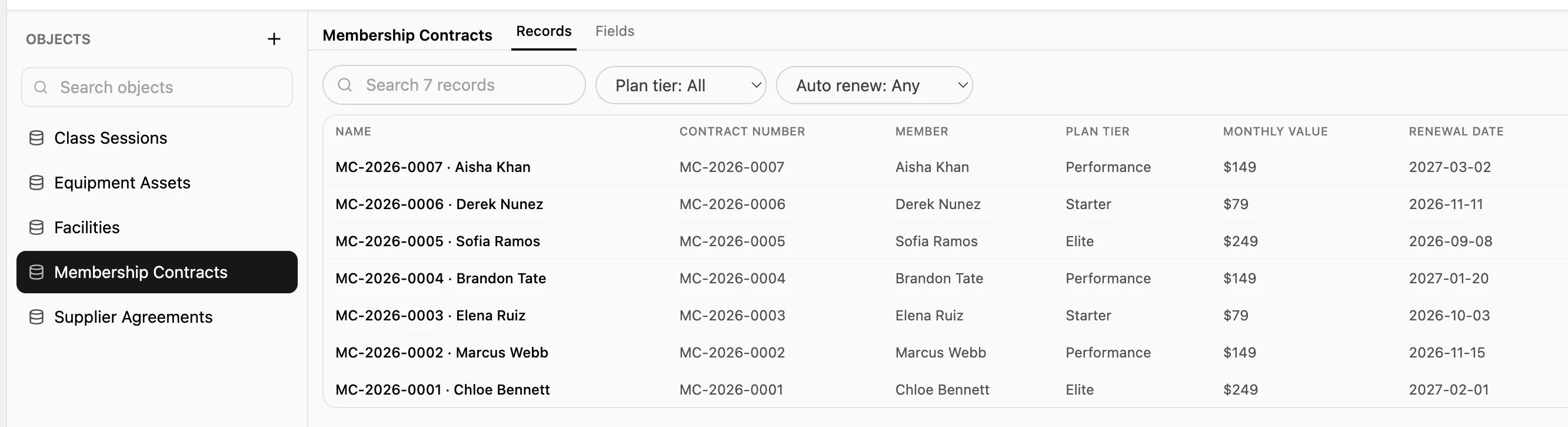
An object is a name, a plural, an icon, and a set of fields. It takes about ten minutes and no technical knowledge, and the only decision that needs care is the type of each field.
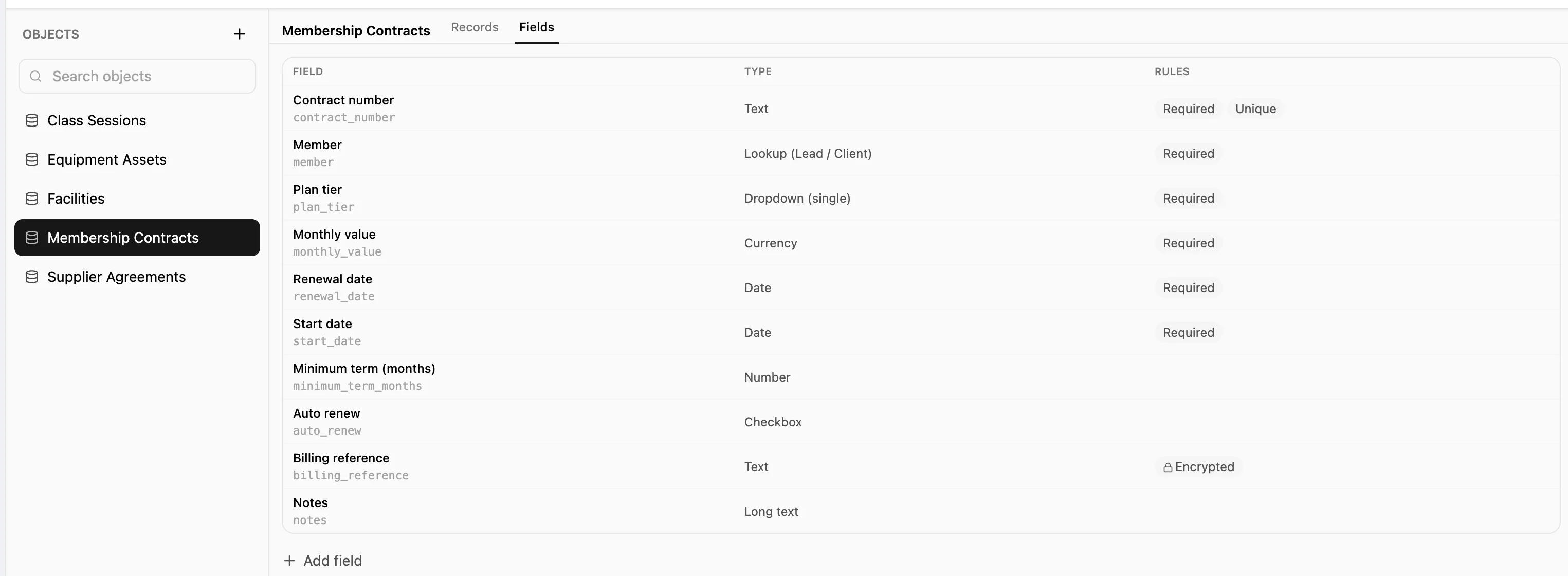
Text and long text
A short line or a paragraph. The default for anything you have not decided the shape of yet, and the one to avoid using for everything, because a text field holding a number is how a report becomes impossible.
Number and currency
Stored as numbers rather than strings, so they add up, sort correctly and can be compared in a workflow condition. Currency is separated because money is the field people most often want totalled.
Date and date with time
The field that turns a record into an automation. A renewal date, an expiry, a service due date, a cohort start. Something has to hold the date before anything can act on it.
Yes or no
A real boolean rather than the word yes typed into a text box, which is the single most common reason a filter returns nothing on an inherited spreadsheet.
Choose one, or choose several
A fixed list of options. Anything not on the list is refused, which is what keeps you from ending up with Active, active, ACTIVE and Actve as four different statuses.
Email, phone and web address
Checked on the way in. An email field will not accept something that is not an address, and a web address field will not accept a sentence.
Lookup: a link to something else
The field that stops this being a spreadsheet. It points at a contact, at a client workspace, or at another object of yours, and you decide what happens to the record if the thing it points at is deleted.
Required, unique, or hidden
Any field can be made compulsory, forced to be unique so you cannot enter the same reference twice, or marked sensitive so the value is encrypted where it is stored and shown as dots on screen. Use the last one for the fields you would not want in a screenshot.
Two things you cannot change later
The internal name and the field type. Labels, options, order and whether something is required are all editable whenever you like, but a type change would mean reinterpreting every value already stored, and there is no honest way to do that automatically. So it refuses, and you add a new field and move across instead.
The link is the entire point
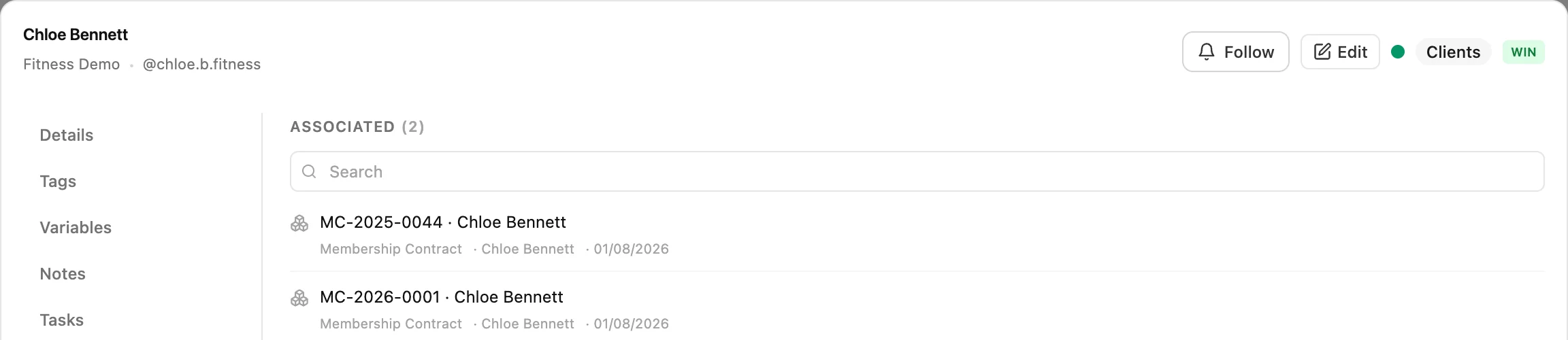
A table of policies is a spreadsheet with better validation. A table of policies where each one knows whose policy it is becomes something else entirely, because now every fact about the policy is also a fact about the customer.
A lookup field can point at a contact, at another object of yours, or at a whole client workspace. That third one is what an agency needs, because the thing being tracked usually belongs to the client rather than to one named person at the client, and modeling it against a person breaks the day that person leaves.
You also decide what a deletion means. If the contact goes, the record can go with them, or the link can simply be cleared and the record kept. Those are genuinely different intentions and most tools pick one for you.
Being honest about the shape of it: a lookup points at one target, and there are no named relationships. If you need the same two records related in three different ways, with each direction labeled, GoHighLevel and Salesforce both model that properly and this does not.
The contact it links to is the same record the whole system uses, so it carries their deal and timeline and their conversation history.
The bit that pays for it
Modeling your data is satisfying and does not, by itself, make you any money. What makes money is that the model can now act.
Creating a record, updating one, deleting one and linking one are all triggers. Creating, finding and updating records are all actions. So a workflow can react to your data, and can maintain it.
The event knows who it is about
This is the detail that makes the difference and it is easy to miss. When a record is linked to people, the trigger fires once per linked person rather than once for the record. So the action that follows has a human to act on: it can send that customer a message, not merely log that something changed. Without it, a record-level automation can update a field and nothing else.
Workflows can keep the data current
Because finding and updating a record are actions, the object does not depend on somebody remembering to maintain it. A won deal can create the enrolment. A payment can mark the policy active. A form submission can update the vehicle. The data stays true because keeping it true is not left to a person to remember.
What that looks like in practice
A broker defines a Policy object with a renewal date, a premium and an encrypted policy number, and links each one to the customer who holds it. One workflow watches the renewal date and, ninety days out, messages the customer on whichever channel they last replied on and creates a task for the person who sold it.
That is the whole thing, and it replaces a spreadsheet, a calendar reminder and somebody being conscientious in December. Same shape for a garage and a service date, a training company and a cohort start, a landlord and a tenancy end.
The triggers and actions are built in the workflow builder, and the message that goes out can be a DM, an email or a text.
Why it is still usable in two years
Anybody can offer a flexible data model. The difference between one that is still trustworthy after two years of a real team using it and one that is not comes down to what it refuses.
It refuses the wrong type
A number field will not accept text, an email field will not accept a sentence, a web address field will not accept a name, and a choose-one field will not accept an option that is not on the list. Every one of those is a report that keeps working.
It refuses fields you never defined
Send data with a field nobody created and the write is rejected with the offending name. It sounds pedantic until an integration invents a field for six months and nobody notices, at which point you have two sources of truth inside one record.
It refuses a stale edit
An update can say which version it was based on, and is refused if the record moved in the meantime. The second person gets told rather than silently winning, which is the difference between a conflict and a mystery.
It encrypts what you mark
A sensitive field is encrypted where it is stored and masked on screen. Being clear about the boundary: that protects the value at rest, it is not a permission system, and deciding who should see a record at all is a coarser control here than in Salesforce.
What you get, and what this does not do
On MAX: twenty-five object types, two hundred fields on each, and a hundred thousand records per object. On Enterprise: no limit on any of the three. For comparison, HubSpot allows ten custom objects on their Enterprise tier and roughly half a million records across all of them combined, and GoHighLevel allows ten per location.
The honest list of what is missing:
- It needs MAX or Enterprise. GoHighLevel puts custom objects on every plan including their entry tier, and that is a better offer than ours.
- No many-to-many or named relationships. A lookup points at one target. GoHighLevel supports labeled pairs like Buyer and Seller and multiple relationship types between the same two objects; we do not.
- Two hundred fields per object, against a thousand properties per object on HubSpot.
- No custom interfaces and no code. If you want to build an application on top of your data model, that is Salesforce.
- No per-record permission model. Encryption on a field is not the same as deciding who may open the record.
- It is not a general-purpose database. Airtable has better views and is the better home for a project tracker that has nothing to do with customers.
Who this is built for
Agencies running clients where the thing sold has a lifecycle
Insurance, property, vehicles, equipment, memberships, tenancies, licenses. The pattern is always the same: the customer is one thing, but the thing they bought has its own dates, its own status and its own reference, and it renews or expires on its own schedule. That schedule is where repeat revenue for a client lives, and in most businesses it is guarded by a spreadsheet and one conscientious person.
The renewal reminder itself is built in workflows.
Agencies with a delivery model, not just a pipeline
Retainers, deliverables, ad accounts, campaigns as things you own rather than lines in a proposal. The lookup pointing at a client workspace rather than a person is the reason this works for an agency: the retainer belongs to the client, and it should survive the marketing manager changing job.
More in the agency use case and what we build for agencies.
Agencies with coaching and course-business clients
A cohort is a thing with a start date, a capacity and a list of people in it, and it is not a deal. Modeling it properly means an agency can see who is enrolled in what, message one cohort rather than everybody, and start the onboarding sequence when the enrolment is created instead of when somebody notices.
Agencies running small-business clients, including local and service trades
Garages, clinics, installers, lettings, equipment hire. This is the group with the most to gain and the least appetite for configuring anything, so the honest advice is to model exactly one thing and stop. The boiler, the vehicle, the treatment plan, the machine. Not five objects, one.
And model it because of a date, not because it would be tidy. A boiler with a service date that texts the customer eleven months later is worth real money every year and takes an afternoon to set up. A beautifully structured record of equipment nobody automates against is a spreadsheet with extra steps.
The plan requirement is worth saying plainly here: it needs MAX, which is not the tier most agencies this size start on. If the renewal or service cycle is where repeat revenue for a client comes from, it pays for itself quickly. If it is a nice-to-have, wait.
See how small businesses use Inflowave and what it costs for a small team.
Setting it up without regretting it
1. Model one thing
Open the spreadsheet you already keep and model that. It is the thing your business actually runs on, it already has the fields, and it already has the data. Resist designing the whole model on day one, because the objects you invent before you have used one are always slightly wrong.
2. Spend the two minutes on field types
This is the only irreversible decision on the page. Dates as dates, numbers as numbers, statuses as a fixed list rather than free text. Making everything a text field works for a week and then quietly ruins every report you build on it.
3. Add the lookup before you add the records
Decide whether the record belongs to a person or to a client workspace and wire that first. Importing four hundred records and then working out who each one belongs to is a worse afternoon than it sounds.
4. Build one automation immediately
Before you import everything, before you tidy anything. Take the date field and build the reminder. It proves the model works end to end, and it is the only part of this that produces money rather than order.
5. Then let workflows maintain it
Anything that a person would otherwise update by hand should be an action on a workflow instead. A model that depends on human diligence decays at exactly the speed the spreadsheet did, and you will have gained nothing.
Against HubSpot, GoHighLevel and Salesforce
The first two rows are the two we lose, and they are the two a buyer checks first. Read them before anything else.
| Capability | Inflowave | HubSpot | GoHighLevel | Salesforce |
|---|---|---|---|---|
| Available without buying the top tier | No | No | Yes | Partly |
| How many object types you can define | Yes | Partly | Partly | Yes |
| Fields per object | Partly | Yes | Partly | Yes |
| Records per object | Yes | Partly | Partly | Yes |
| Relate a record to a contact in the CRM | Yes | Yes | Yes | Yes |
| Named relationships, many-to-many | No | Yes | Yes | Yes |
| Relate a record to a client workspace, not just a contact | Yes | No | Partly | Partly |
| Field-level encryption on sensitive values | Yes | Partly | No | Partly |
| Rejects data that does not match the field you defined | Yes | Partly | Partly | Yes |
| Protects against two people overwriting each other | Yes | Unclear | Unclear | Yes |
| Records trigger and are acted on by automations | Yes | Yes | Yes | Yes |
| A record event reaches the contact it belongs to | Yes | Partly | Partly | Partly |
| A real application platform | No | Partly | No | Yes |
- Available without buying the top tier: GoHighLevel wins this outright: since their October 2025 release custom objects are on every tier including Starter. Ours needs MAX, and HubSpot needs Enterprise, which is the most expensive answer of the four.
- How many object types you can define: Twenty-five on MAX and unlimited on Enterprise, against ten for both HubSpot and GoHighLevel. Ten sounds like plenty until you model a business properly and find you have spent six of them before lunch.
- Fields per object: Two hundred here. HubSpot allows a thousand properties per object, which is five times more and genuinely useful for a large data model. This is a row we lose.
- Records per object: One hundred thousand per object on MAX, unlimited on Enterprise. HubSpot documents roughly half a million records TOTAL across all custom objects, with increases sold separately. GoHighLevel caps linked records per association label at a thousand a side.
- Relate a record to a contact in the CRM: Everybody does this and it is the point of the feature.
- Named relationships, many-to-many: GoHighLevel supports labelled associations, including a pair like Buyer and Seller so each side reads correctly, with up to ten labels between any two objects. Ours is a lookup field pointing at one target. If your model needs the same two records related in three different ways, we are the wrong tool.
- Relate a record to a client workspace, not just a contact: A lookup can target a lead OR a client, which is what an agency needs when the thing being tracked belongs to the client rather than to one person at the client.
- Field-level encryption on sensitive values: Mark a field sensitive and the value is encrypted where it is stored and masked in the interface. Salesforce sells this as Shield Platform Encryption, an add-on. It matters the moment somebody models a policy number, a licence or a medical reference.
- Rejects data that does not match the field you defined: A field you never defined is refused rather than quietly stored, and each type is checked on write: a number field will not take text, an email field will not take something that is not an address, a single-select will not take an option that is not on the list. This is the difference between a data model and a bag of strings.
- Protects against two people overwriting each other: An update can carry the version it was based on and is refused if the record moved underneath it. Nobody advertises this, and everybody who has lost an edit cares about it.
- Records trigger and are acted on by automations: Created, updated, deleted and linked are all triggers here, and workflows can create, find and update records. GoHighLevel has the equivalent three cross-object actions.
- A record event reaches the contact it belongs to: When a record is linked to leads, the trigger fans out one event per linked lead, so an action that messages somebody actually has a person to message. Without that, a record-level automation cannot text the customer whose renewal just changed.
- A real application platform: Salesforce has code, custom UI, an app marketplace and a development lifecycle around this. Nothing else in the table is attempting that and we are not either.
Where the others are stronger. GoHighLevel beats us on the two things a buyer checks first. Their custom objects are on every plan including Starter while ours need MAX, and their relationship model is richer than ours: labelled associations, a pair of labels so a link reads as Buyer and Seller rather than just linked, many-to-many, and association fields you can use as columns, in filters, in smart lists and in exports. HubSpot allows a thousand properties per object against our two hundred, which is five times the room for a large model, although it costs an Enterprise subscription to get any of it. And Salesforce is the real answer if what you actually need is an application platform with code, custom interfaces and a marketplace, because that is what it is and nothing here competes with it.
What is different here is that the object is wired into a working sales system rather than sitting beside one. A record can point at a lead or at a whole client workspace, a field can be marked sensitive and is then encrypted and masked, data that does not match the field you defined is refused instead of quietly stored, and an update that was based on a stale copy is rejected rather than silently winning. Then the useful part: when a record changes, the automation that fires knows which human it concerns, because a record linked to leads fans out one event per linked person. That is the difference between a database that reports and one that can text the customer whose renewal date just moved.
Tool by tool
The table is the evidence. This is the verdict, one at a time, with the case for choosing them stated first because on this page it is frequently the right one.
Inflowave vs GoHighLevel
Buy theirs when: Custom objects on every tier including Starter, which is a materially better offer than ours, and a relationship model with more in it: labelled associations so a link reads as Buyer or Seller, many-to-many, up to ten labels between any two objects, and association fields usable as list columns, filters, smart lists and exports. If you are on GoHighLevel already, this is not a reason to move.
Buy ours when: Ten objects per location against twenty-five on MAX and unlimited on Enterprise, and a thousand linked records per association side. Past that it is the data-integrity layer: encrypted sensitive fields, refusal of values that do not match the field type, refusal of fields you never defined, and rejection of an update based on a stale copy. Those matter when the object holds a policy number rather than a nickname.
Inflowave vs HubSpot
Buy theirs when: A thousand properties per object against our two hundred, a mature data model, and the whole HubSpot ecosystem around it. For a large company modelling something genuinely complicated, that headroom is real and we do not match it.
Buy ours when: It is Enterprise only, capped at ten custom objects and roughly half a million records across all of them combined, with more sold separately. We give twenty-five objects and a hundred thousand records per object on MAX, and unlimited on Enterprise. The other gap is scope: a HubSpot custom object lives in HubSpot, whereas here the record can relate to a client workspace and its changes can message the person it concerns.
Inflowave vs Salesforce
Buy theirs when: Salesforce is the reference implementation and it is not close. Custom objects, code, custom interfaces, a development lifecycle and an app marketplace: if you need an application platform, buy the application platform. Anyone telling you a CRM feature replaces Salesforce is selling something.
Buy ours when: Almost nobody reading this needs an application platform, they need to track the four things their business actually runs on without hiring someone to configure it. This is a smaller idea on purpose: define the object, add the fields, relate it to a customer, and have automations act on it the same afternoon.
Taken from vendor documentation, checked 30 July 2026. Limits in this area change often, so verify any row that decides your choice.
Common questions
What is a custom object?
A record type you define yourself. Every CRM ships with contacts and deals because every business has them, but almost no business only has them. An insurance broker has policies, an estate agent has properties, a garage has vehicles, a training company has cohorts and enrolments. A custom object lets you add those as first-class things with their own fields, rather than either cramming them into a note or keeping them in a spreadsheet that nothing else can see.
How is this different from just adding custom fields to a contact?
Custom fields describe the person. Custom objects describe the things the person has, and the difference shows the moment somebody has two of them. A customer with three policies cannot be modelled with policy fields on the contact, because there is one contact and three policies, each with its own renewal date. The test is simple: if you have ever named a field policy 2 start date, you needed an object. Custom fields on a contact.
Which plans have it?
MAX and Enterprise. On MAX you get twenty-five object types, two hundred fields on each, and a hundred thousand records per object. On Enterprise all three are unlimited. Worth being straight that this is a genuine gap against GoHighLevel, who put custom objects on every plan including their entry tier. Compare the plans.
Can a record be linked to a customer?
Yes, and it is the point. A lookup field points at a contact in the CRM, at a whole client workspace, or at another one of your objects. The client option is the one agencies need, because a thing being tracked often belongs to the client rather than to one named person at the client. You also choose what happens when the target is deleted: the record goes too, or the link is simply cleared.
Can a workflow do something when a record changes?
Yes. Created, updated, deleted and linked are all triggers, and a workflow can create, find and update records as actions. The part that makes it useful rather than merely possible is that when a record is linked to people, the trigger fires once per linked person, so an action that sends a message actually has somebody to send it to. A renewal date moving can text the customer whose renewal it is. See workflows.
What happens if somebody types the wrong thing?
It is refused rather than stored. A number field will not take text, an email field will not take something that is not an address, a choose-one field will not take an option that is not on the list, and a field you never defined is rejected outright instead of quietly appearing in the data. That last one sounds pedantic and is the reason the object is still usable in two years.
Can I store something confidential in it?
Mark the field sensitive and the value is encrypted where it is stored and shown as dots in the interface. Use it for the fields you would be uncomfortable seeing in a screenshot: policy numbers, license numbers, reference numbers issued by somebody else. It is not a substitute for deciding who on your team should see a record at all, which is a coarser control here than it is in Salesforce.
What if two people edit the same record?
An update can carry the version it was based on, and it is refused if the record moved underneath it. So the second person is told the record changed rather than silently overwriting the first. Nobody puts this on a feature list and everybody who has lost twenty minutes of edits cares about it.
Can I rename or change a field later?
You can change the label, whether it is required, its options and its order at any time. What you cannot change is the internal name and the field type, because changing a type is destructive: every value already stored would have to be reinterpreted, and there is no honest way to do that automatically. Add a new field and migrate to it instead. Spend two minutes on the type when you create it.
Can I do this through the API or an assistant?
Yes. Objects, fields and records are all available programmatically, including describing an object so a tool can discover its shape rather than having it hard-coded. That means you can ask an assistant to list, search, read, create and update records in plain language once the object exists. The assistant tool reference.
Is this a replacement for Airtable or a spreadsheet?
For the part of your spreadsheet that describes customers, yes, and that is the part worth moving. Airtable is a better general-purpose database with better views, and if what you have is a project tracker it should stay there. The thing that makes moving worthwhile is the link: a row in Airtable does not know who the customer is, so nothing can act on it, and somebody has to notice the renewal date by hand.
What does it not do?
No many-to-many or named relationships: a lookup points at one target, so if you need the same two records related in three different ways, GoHighLevel and Salesforce both model that and we do not. No custom interfaces or code. No per-record permission model. And it is MAX and above, which is the honest headline limitation.
Retire the spreadsheet that runs your business
Model the thing, link it to the customer, and let the renewal date do the chasing instead of a person in December.
Get Started