One unified inbox, every client kept apart
Instagram, Facebook, WhatsApp, Telegram, Whop, iMessage, SMS, email and X in a single shared inbox. One customer, one history, no matter how they reached you.
Built for agencies running setters and closers for their clients.
Get Started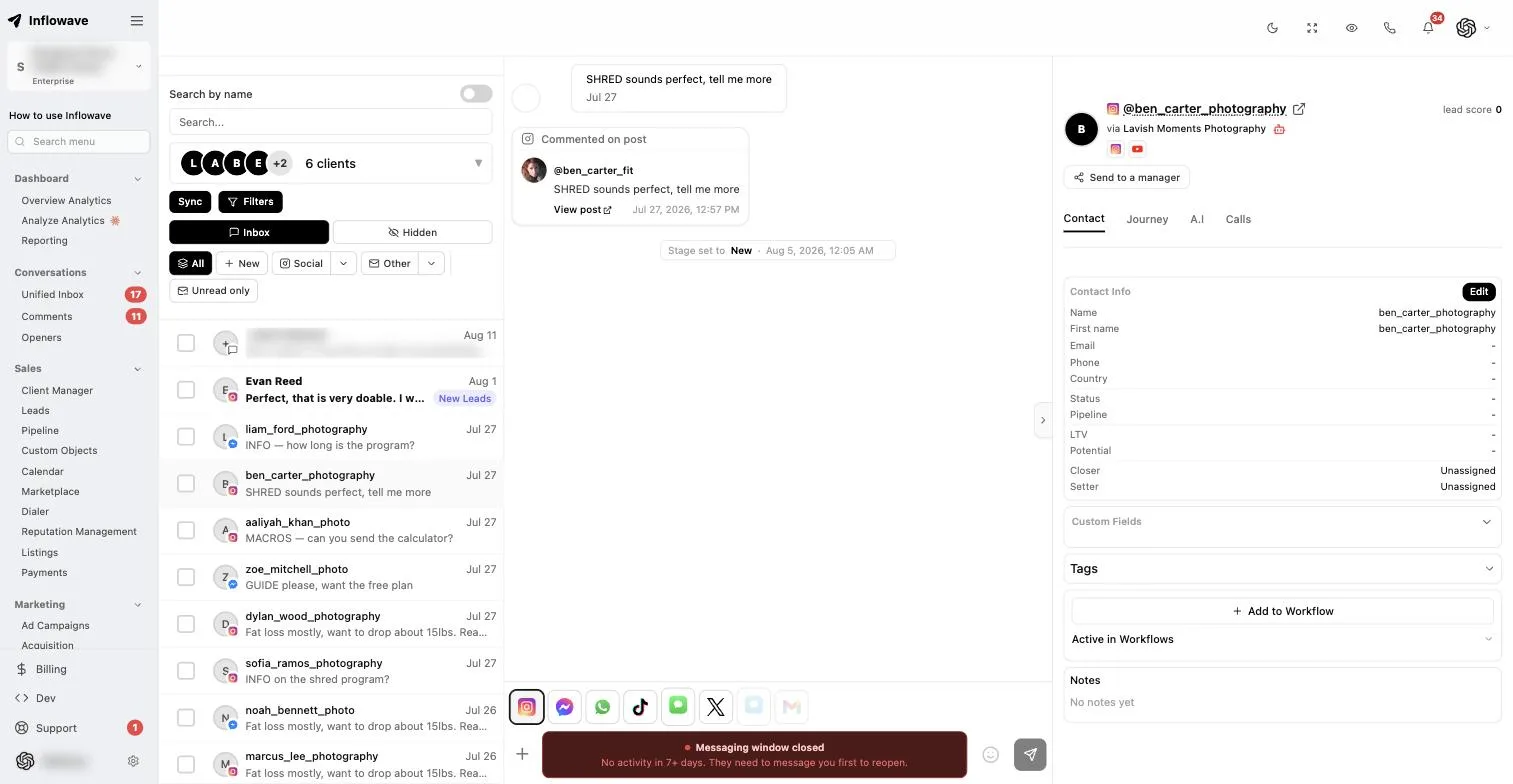
What it actually does
The whole thing, without the sales language.
- Messages from nine channels arrive in one list.
- One person has one history, even if they switch channels.
- Comments, ad comments and mentions sit next to the direct messages.
- Each conversation has an owner, so nobody double-replies.
- A setter can hand a qualified lead to a closer without losing context.
- Rules send the first answer while your team sleeps.
- You can see which opening message earns replies and which does not.
- Tracking links, booking links and payment requests send from the thread.
- Leads are scored on what they did, so the list sorts itself.
- Every connected account in your plan shows up in one combined view.
- Filter by account, channel, client, status or tag, with AND and OR logic.
- Messages translate in the thread, so foreign-language leads still get answered.
- The iPhone app carries the same inbox, notifications and lead context.
- Agencies keep each client in a separate workspace under one login.
Nine channels, one list
Every channel behaves slightly differently, so here is what actually arrives from each one. All of it lands in the same conversation list, attached to the same person.

Direct messages, story replies, comments on posts and reels, and mentions all land against the person who sent them. A comment on a reel can trigger a DM automatically, so people who engage publicly end up in a private conversation without anyone sitting and watching the notifications tab.

Messenger conversations plus comments on page posts and on paid ads. Ad comments matter more than people expect. Someone asking the price under a live ad is the warmest lead you will get that day, and they usually go unanswered because nobody is watching the ad itself.

Connected through the official WhatsApp Business API, so you get approved template messages for first contact, full media support, and a number that belongs to you. Outside the US this is the channel most customers actually prefer, and it sits in the same list as everything else.

SMS
Two-way texting on a registered number, so replies come back into the thread instead of disappearing into a handset nobody checks. It earns its place on the follow-up after a booking, where a text gets read and an email does not.

Full email threads on your own sending domain, with more than one mailbox per client if you need it. An agency can run two separate client addresses from one inbox without ever logging into either account.

Telegram
Telegram conversations land in the same list as everything else. If you sell into crypto, trading, coaching communities or anywhere in eastern Europe, this is frequently the channel the buying conversation actually happens on, and it is the one most competing inboxes do not cover at all.

iMessage
Blue-bubble messages to iPhone users, rather than falling back to plain SMS. Higher open rates, read receipts, and it does not look like a marketing blast, which matters when the message is a genuine follow-up from a person.

Whop
Whop DMs land in the same inbox as everything else, which as far as we can tell no other shared inbox covers. If you sell memberships, communities or cohorts through Whop, the conversation and the payment finally sit in one place instead of you cross-referencing a Whop dashboard against a CRM to work out who actually joined.

X
Direct messages, in the same list as the rest. Lower volume than the other channels for most businesses, which is exactly why it gets ignored and why the occasional serious enquiry sits there for a week.
Scheduling outbound content across the same accounts is handled separately in post scheduling, and if you are still working out a posting calendar there is a guide on how to schedule social media posts.
Voice calls are logged against the same contact as the messages, so a lead you spoke to on the phone does not become a separate record. That is covered in call recording and transcription.
A shared inbox for agencies, not one merged stream
Most shared inboxes assume one brand and merge everything into a single stream, which is exactly what you do not want when you answer for ten or fifty different clients. Inflowave scopes the inbox to a client workspace instead, so a reply is written inside one client context and cannot land on another client by accident.
One inbox per client, not one merged stream
Each client workspace holds its own conversations, contacts and history. Switch clients in a click rather than logging out, and nothing from one account appears inside another.
The reply is scoped before you type it
Because a conversation belongs to a workspace, the account it sends from is already decided. That removes the wrong-account reply, rather than a color-coded label asking your team to be careful.
People are assigned to the clients they work on
Roles put a junior on their two accounts and a lead on everything. Every conversation has an owner, so an unanswered message belongs to someone instead of to nobody.
AI replies, configured per client
Switch on an AI agent per client, trained on that client's own message history and offer, to answer the repetitive questions and hand over when it is out of depth. Tone, automations and saved replies are configured per workspace, so one client never leaks into another.
Reporting comes out per client
Reply times, message volume, lead volume and pipeline value are already split by account, because the data was never mixed in the first place. Show one client their numbers without showing them anybody else's.
White-label workspaces on Max
Your domain and your branding on the client portal, so the people you report to log into your brand rather than ours.
Every account in one view
Connecting the channels is the easy part. What decides whether a shared inbox survives contact with a real team is whether it stays usable once there are twenty accounts and four thousand conversations in it.
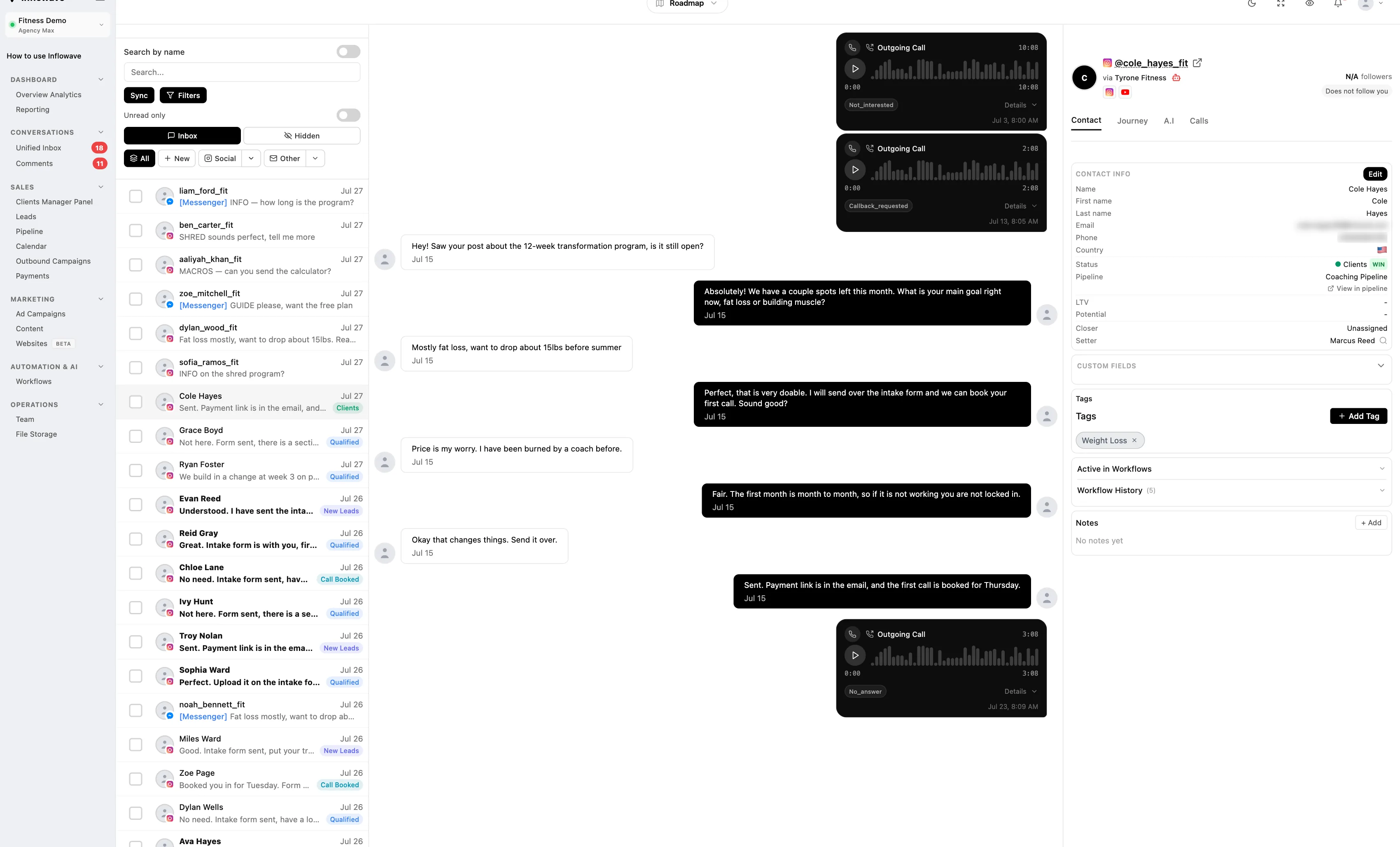
Up to 50 accounts, one list
Connect as many accounts as you want, across as many channels as you want, and see them all in a single view. Ten Instagram accounts, three WhatsApp numbers and a handful of mailboxes read as one inbox rather than sixteen logins.
There is no per-account tab-switching and no logging out to check a different brand. You can work the combined list when you want throughput, or narrow to one account when a client asks what is happening on theirs.
Replies go out from the account the message arrived on, automatically. Nobody has to remember which brand they are speaking as, which is the mistake that costs an agency a client.
Filtering that actually narrows things down
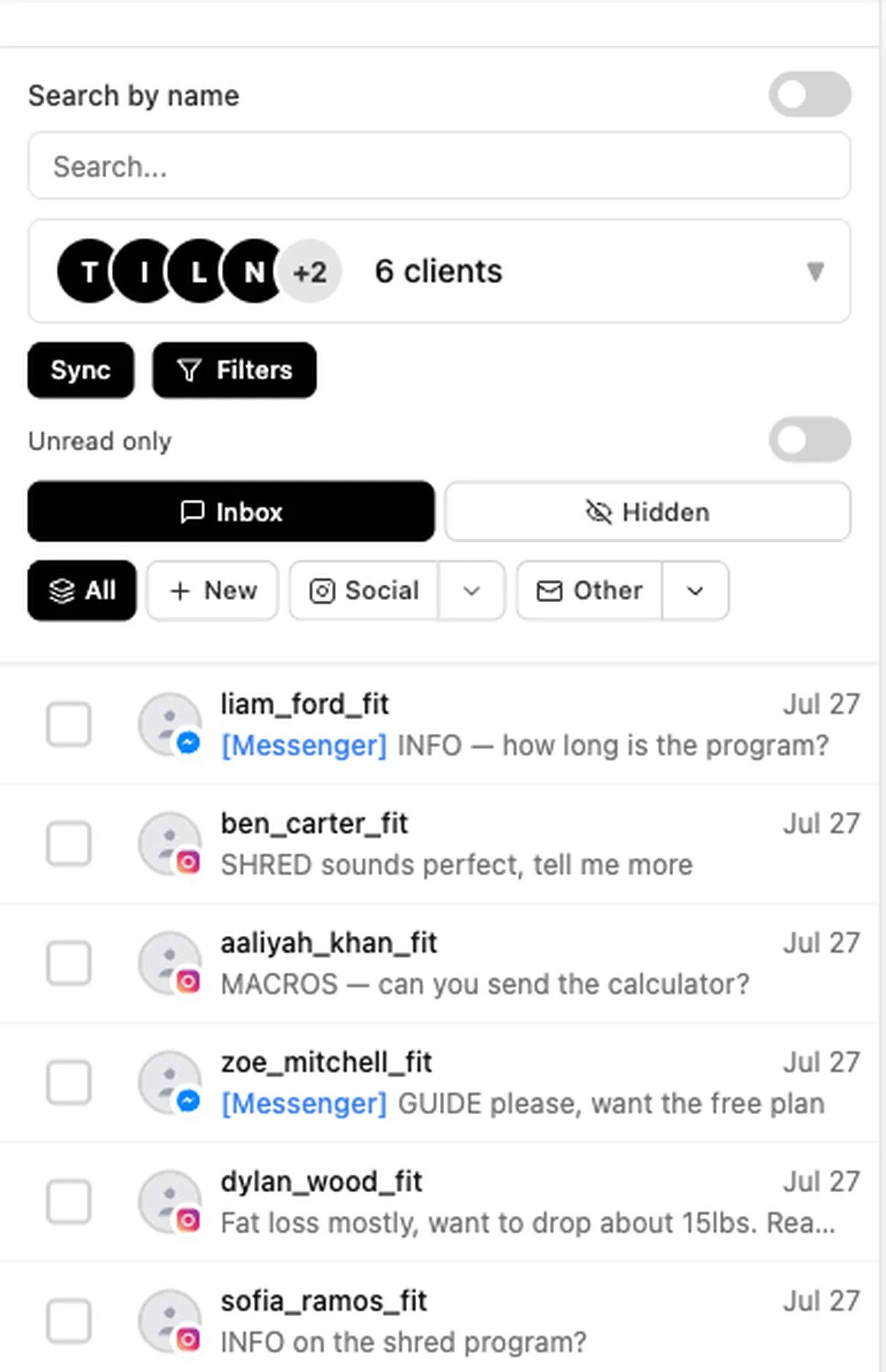
Filter by account, by channel, by client, by conversation status, by tag, or by any combination of those at once, then search inside the result.
Tag filters take AND or OR logic, which is the part most inboxes skip. Everyone tagged hot AND trial-expired is a different list from everyone tagged hot OR trial-expired, and if your tool only does one of those you end up working the wrong queue.
In practice this is how a setter starts the day: unanswered, high score, this client, minus anyone already booked. One list, no scrolling.
Translation built in
Messages translate inside the thread, so a lead writing in Spanish or Polish is not a lead you quietly stop replying to. Translate what they sent, read it, and answer.
The original stays visible next to the translation, because a translated message is evidence of what somebody meant, not a replacement for what they actually typed.
For anyone running ads in more than one country this is the difference between a real market and a folder of messages nobody on the team can read.
A real mobile app
The iPhone app carries the same inbox, the same assignment and the same push notifications. Not a cut-down companion that only lets you read.
Download Inflowave on the App Store
Setters and closers working from a phone see the same threads, the same lead score and the same notes as anyone on a laptop, and can book a call or send a quote from there.
That matters because speed of first reply decides most of these conversations, and the person who can answer at nine in the evening is rarely sitting at a desk.
Find any conversation again
Search runs across every channel and every connected account at once, so you do not need to remember whether that conversation happened on Instagram in March or over email in May.
Combined with tags and saved filters, that is usually how a returning customer gets recognized as a returning customer instead of being treated as a brand new enquiry.
The setter to closer handoff, handled
Most inboxes treat a conversation as a thread. If you run a sales team, a conversation is a relay. Somebody opens, somebody qualifies, somebody closes, and the moment the baton drops you lose the deal.
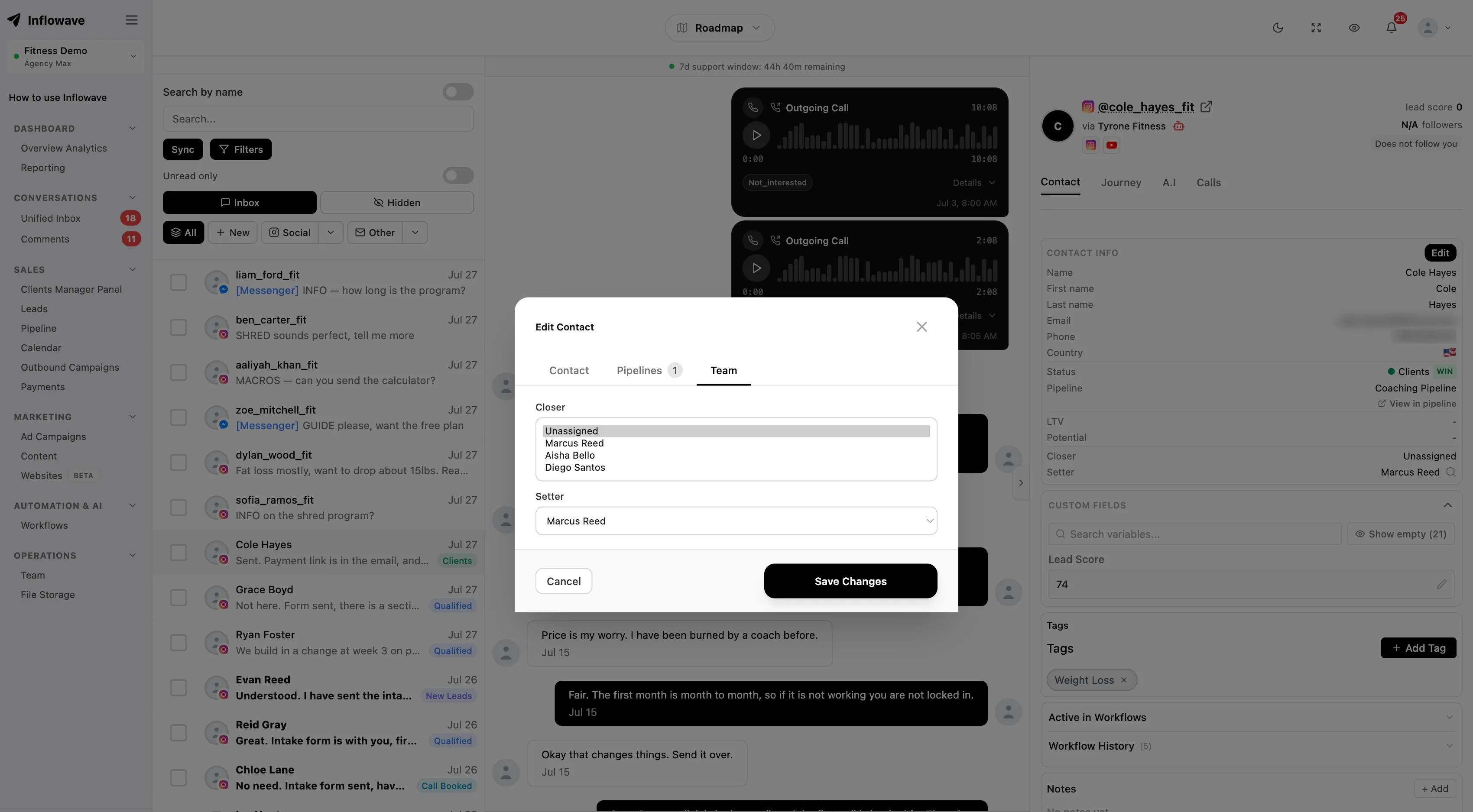
So the handoff is a real step here, not a copy and paste into another tab. Reassign the conversation and the next person inherits the full message history across every channel, the internal notes, the lead score, the deal stage, and whatever the customer already told the setter.
Internal notes stay internal. A setter can write down that the lead mentioned a competitor, or that budget is tight, and the closer reads it before saying anything. That context is the difference between a call that opens with a real question and one that opens by asking what the customer does for a living.
Because ownership is explicit, you can also see where the relay stalls. If leads sit unassigned every evening, or one closer has forty open threads while another has four, that shows up as a fact rather than as something you eventually infer from missed targets.
We built this for agencies running setters and closers for their clients. Every rough edge in the handoff is one our customers hit first, which is also why the notes, the score and the history travel with the conversation instead of living in a spreadsheet next to it.
Deal stages and lead ownership live in the sales pipeline, so moving a deal forward in the inbox moves it on the board too. If setting is somebody whole job on your team, there is a breakdown of how appointment setters use Inflowave.
Know which opener actually works
Most teams pick a first message because it felt right, send it ten thousand times, and never find out whether a different one would have done better.
Every opener you send is tracked by how many people answered it, per channel. The reporting names your top performing opener instead of leaving you to remember which version you were using in March. When a new opener beats the old one you find out in days rather than at the end of the quarter.
Lead magnets are tracked the same way. You see how many people asked for the guide, how many actually opened it, and how many of those went on to book. A magnet with a high request rate and a low open rate is a headline problem. One with a high open rate and no bookings is a content problem. Those are different fixes, and without the numbers they look identical.
Reply rate is the honest measure here, not messages sent. A team can double its volume and go backwards, and a dashboard that only counts sends will happily call that growth.
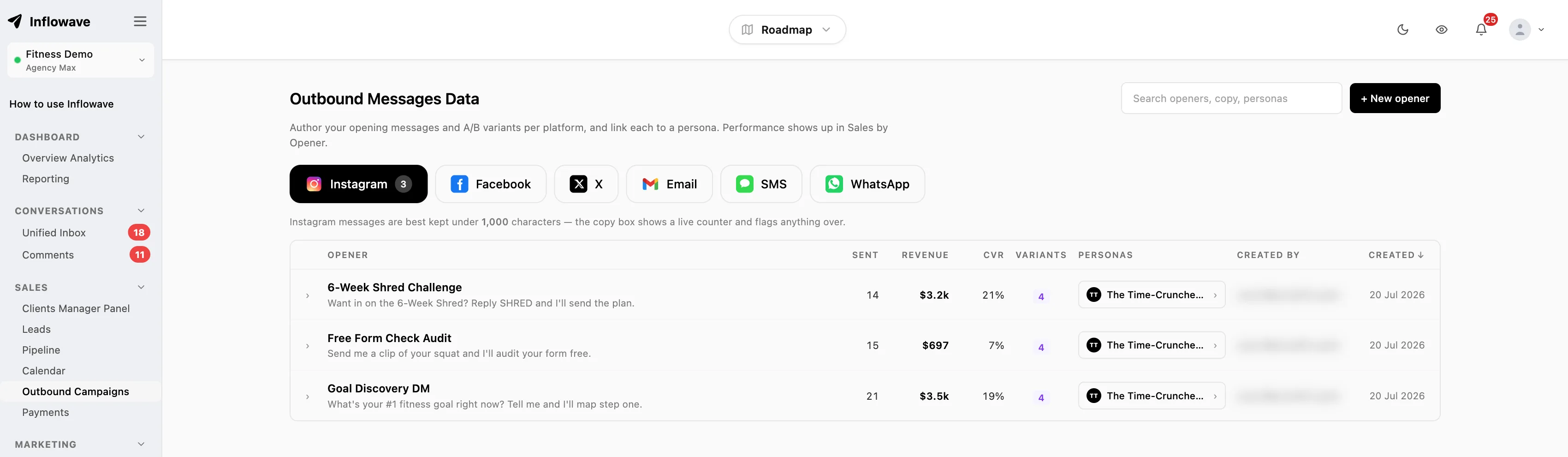
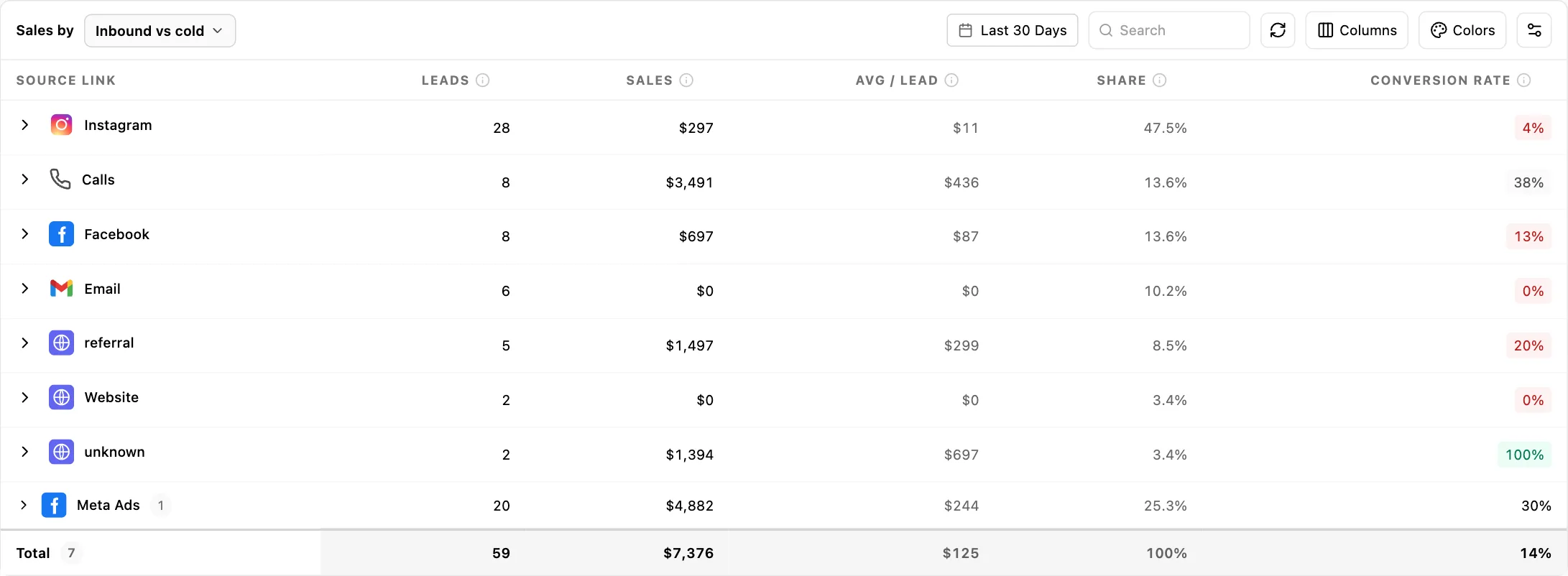
The full breakdown lives in analytics and reporting. If you are still writing your first opener, the cold DM generator is free and gives you a few versions to test against each other.

Tracking links in two clicks
Build a tracked link from inside the conversation. No switching to another tool, generating a link, copying it back, and hoping you pasted the right one into the right chat.
Because the link is created in the thread it is attributed to that person automatically. You see who clicked, when, and how many times, against their name rather than as an anonymous number in a dashboard.
That changes the follow-up. Somebody who opened the pricing page three times last night is a different conversation from somebody who never clicked, and most teams currently send both the same message asking whether they had any more questions.
There is more on tracking links and click attribution, and if you send people to a link in bio rather than one page, that is link pages.
Lead scoring that sorts the list for you
An inbox sorted by newest first treats a tyre-kicker and a ready buyer as equally urgent. Leads here are scored on what they actually did.
Clicking the pricing link twice, opening the lead magnet, replying with a real question, asking about availability: those move the score. A one-word reply does not. The score sits in the thread, so whoever picks it up knows what they are looking at before reading a word of history.
You set what counts. A gym cares that somebody asked about class times, an agency cares that somebody asked for a proposal, a coach cares that somebody watched the whole webinar. Scoring every business on the same generic signals is how you end up ignoring the score.
Score can also route. High scores go straight to a closer, everybody else stays with the setter, and nobody has to make that judgement call manually forty times a day.
Scoring, custom fields and the contact record are part of the CRM, and the signals often start from a form somebody filled in before they ever messaged you.
Booking without the back and forth
Asking what time suits costs you two days and half your bookings. Send real availability instead, straight from the conversation, and let the lead pick a slot while they are still reading your message.
The slot lands on the right calendar. With several closers, bookings distribute between them and respect each person working hours and time zone, so nobody wakes up to a call booked at six in the morning.
Reminders go out on their own, on the channel the person actually uses. A reminder by DM or text gets read. The same reminder by email frequently does not, which is most of what a no-show rate really measures.
When somebody reschedules or does not turn up, that comes back into the thread as well, so the follow-up is part of the conversation rather than a task somebody has to remember.
Calendars, event types and round-robin rules are covered in meeting scheduling.
Get paid in the conversation
The gap between somebody saying yes and actually paying is where a surprising number of deals quietly die. Every hour in that gap is another hour for them to reconsider, get busy, or talk to a competitor.
So send the quote or the invoice from the thread, while they are still typing. No switching to billing software, no exporting details, no waiting until you are back at a desk.
You see when it is viewed and when it is paid, in the same place as the conversation. A quote opened four times without payment is a specific problem you can act on, and it looks nothing like a quote nobody has opened.
Stripe, Whop and Shopify payments are all recognized, and the provider shows against the payment in the conversation. If you sell memberships or communities through Whop, those payments land beside the thread that produced them rather than in a separate dashboard you check on Fridays.
For agencies it also means client billing and client conversations are not in two unrelated systems, which is usually how an unpaid invoice survives three friendly catch-up calls without being mentioned.
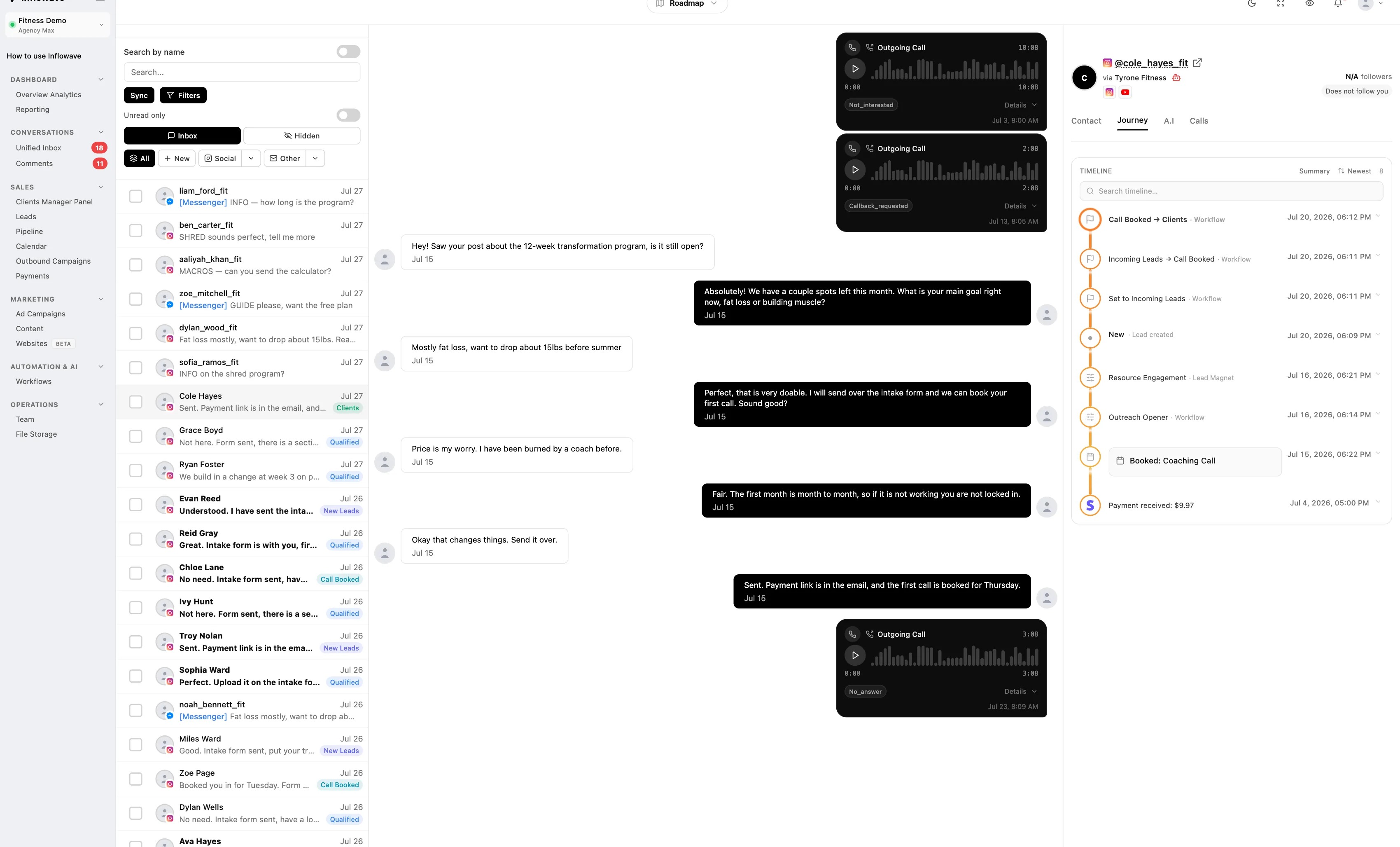
Who this is built for
Agencies
Each client gets its own workspace with its own connected accounts, its own team and its own reporting, all under one login. Assign a setter to three clients and a closer to one. People only see the workspaces they are assigned to, which is what makes working with contractors practical.
Reporting is per workspace, so you can show a client their numbers without showing them anybody else, and you can answer the question every client eventually asks about how many leads came in and what happened to them. You can white-label the whole thing so it carries your brand rather than ours.
More on running this as an agency in the agency use case, with seats and pricing on the agency plan, or a wider overview of what we build for agencies.
Agencies running small-business clients
A small-business client usually has one or two people covering every channel between doing the actual work. The failure mode is not that messages get bad answers. It is that a message arrives on the channel nobody checks and sits unread for two days, by which point the person has booked somewhere else.
One list fixes that, and rules answer the repeat questions about price, opening hours and whether the client takes walk-ins. What reaches a human is then worth a human. For a lot of these clients that is the difference between replying in four hours and replying in four minutes, on the same amount of effort from the agency.
See how agencies use it and agency pricing.
Agencies with coaching and consulting clients
The pattern is consistent across these clients: a lead magnet brings somebody in, the qualifying happens in the DMs, and a call needs booking while interest is still high. Every hour of delay costs the client, because the person arrived on an impulse and the impulse fades.
So the inbox tracks which magnet brought them, scores them on what they engaged with, books the call without leaving the thread, and takes the payment in the same place. When a client sells programs rather than products the conversation is the sales process, and splitting it across four tools is what makes it leak.
See how agencies run this for every client on the agencies page.
Setting it up
1. Connect your channels
Authorise Instagram, Facebook, WhatsApp, Telegram, Whop, iMessage, SMS, email or X. Connections run on Meta's official APIs, so nothing logs in on your behalf and nothing depends on your password. Add as many accounts per channel as you need. Most teams start with the two channels that actually bring leads and add the rest later.
2. Put your team on it
Invite setters and closers and assign them to workspaces. People only see the clients and accounts they are assigned to. Decide who owns new conversations by default, because an unowned inbox is the one that goes unanswered at the weekend.
3. Let rules take the easy questions
Answer the predictable questions automatically and route everything else to a person. The AI agent can hold the conversation until somebody is free, then hand over mid-thread without the customer starting again. Longer sequences and follow-up chains are workflows.
4. Add the things that close
Turn on booking so availability sends from the thread, set what moves a lead score, and connect payments so a quote can go out the moment somebody agrees. This is the part teams skip, and it is the part that shortens the time between first message and money.
5. Watch what converts and cut what does not
After a couple of weeks the reply rates tell you which opener, which lead magnet and which channel are worth your time. Drop the rest. Most teams find one channel produces the majority of real conversations, and that they had been spreading effort evenly across all of them.
Channel coverage against the alternatives
Most shared inboxes cover Instagram, Facebook, WhatsApp, SMS and email. The differences show up at the edges, and the edges are usually where your particular market lives.
| Channel | Inflowave | ManyChat | Respond.io | GoHighLevel | HubSpot |
|---|---|---|---|---|---|
| Instagram DMs | Yes | Yes | Yes | Yes | Add-on |
| Facebook Messenger | Yes | Yes | Yes | Yes | Yes |
| Yes | Yes | Yes | Yes | Add-on | |
| Telegram | Yes | Yes | Yes | No | Add-on |
| Whop DMs | Yes | No | No | No | No |
| X direct messages | Yes | No | No | No | No |
| SMS | Yes | Yes | Yes | Yes | Add-on |
| Yes | Yes | Yes | Yes | Yes | |
| Voice calls | Yes | No | Yes | Yes | Add-on |
- Instagram DMs: HubSpot has no native Instagram channel - it needs a third-party connector.
- WhatsApp: HubSpot WhatsApp requires Marketing or Service Hub Professional or Enterprise.
- Telegram: GoHighLevel has no native Telegram channel. HubSpot needs a third-party connector.
- Whop DMs: No other platform in this table supports Whop DMs at all, natively or through a connector.
- SMS: HubSpot SMS requires Marketing Hub Professional or Enterprise plus the SMS add-on.
- Voice calls: HubSpot calling requires Sales or Service Hub Professional or Enterprise.
Where the others are stronger. Respond.io covers LINE, Viber, WeChat and TikTok natively and we do not, so if your market is Japan, Taiwan or China they are the better tool. ManyChat also covers TikTok. GoHighLevel and HubSpot both have native pipelines and payments, so the gap there is Instagram depth rather than whether the feature exists at all.
What we would actually claim: X direct messages and Whop DMs are ours alone here, Telegram is covered natively rather than through a connector, and none of our channels are gated behind a higher tier or a paid add-on. Beyond channels, the inbox is not a separate product from the pipeline, the lead scoring, the booking and the invoicing, which is the reason a conversation can go from first DM to paid without leaving the thread.
One at a time, then
People rarely search for a capability matrix. They search for a name, so here is the straight answer per tool, including the case for buying theirs.
Inflowave vs ManyChat
Buy theirs when: ManyChat covers TikTok and we do not, and for pure Instagram comment-to-DM automation it is the category default with the biggest template library. If your need is one flow on one account, it is cheaper and faster to stand up.
Buy ours when: ManyChat caps lower tiers at any three channels, so the price you compare is rarely the price you pay once you add WhatsApp and SMS. None of our channels are gated behind a tier or an add-on, and X and Whop DMs are not available there at all.
Inflowave vs Respond.io
Buy theirs when: Respond.io covers LINE, Viber and WeChat natively and we do not. If your market is Japan, Taiwan or China, they are the better tool and this is not a close call. They also cover TikTok.
Buy ours when: For Western markets the coverage inverts: X direct messages and Whop DMs are ours alone in this table. The larger difference is that the inbox is not a separate product from the pipeline, the scoring, the booking and the invoicing.
Inflowave vs GoHighLevel
Buy theirs when: GoHighLevel has native pipelines and payments too, plus a whole agency stack around it. If you are already running your business on it, the honest answer is that the gap is Instagram depth rather than whether the feature exists.
Buy ours when: It has no native Telegram channel, and no Whop or X DMs. The rest is depth on the Instagram side, which is where our product started and where most of our customers get their conversations.
Inflowave vs HubSpot
Buy theirs when: HubSpot is a far bigger CRM than we are, with reporting, marketing automation and an ecosystem we cannot match. For a company that already lives in HubSpot, the sensible move is usually to stay.
Buy ours when: Its social messaging is the weak part: Instagram and Telegram are third-party connectors only, WhatsApp needs Professional or Enterprise, SMS needs Professional plus an add-on, and calling needs Professional. Four of the channels in this table cost extra there and two are not native at all.
Vendor capabilities taken from their own documentation and pricing pages, checked 30 July 2026. Competitors ship changes constantly, so check the current docs before making a decision on one row. For a full ranking rather than channel coverage, see our Instagram CRM comparison.
Common questions
What is a unified social media inbox?
A unified inbox pulls messages from every channel you use into one screen, so a customer who sends an Instagram DM on Monday and a WhatsApp message on Friday shows up as one person with one history. Inflowave brings in Instagram, Facebook, WhatsApp, Telegram, Whop, iMessage, SMS, email and X. Instead of opening six apps and guessing whether somebody already replied, your team works one list.
Which channels can I connect?
Instagram DMs, story replies and comments, Facebook Messenger and page and ad comments, WhatsApp through the Business API, Telegram, Whop DMs, iMessage, SMS on a registered number, email on your own domain, and X direct messages. Voice calls are logged against the same contact. You can connect as many accounts per channel as you need, which is the point for agencies running messages for several clients at once.
Can several people work the same inbox without stepping on each other?
Yes, and this is the part most tools get wrong. Conversations are assigned to a person, so two people never send the same reply. When a setter qualifies somebody and passes them to a closer, the closer opens the thread with the full history, the internal notes and the lead score already there. Nobody re-asks questions the customer already answered.
How many accounts and clients can one workspace handle?
It depends on plan: 1 client workspace on Business, 10 on Pro, 50 on Max, and more on Enterprise. Agencies run a separate workspace per client, each with its own accounts, team members and reporting, and switch between them from the same login. A client workspace only shows the people assigned to it, which matters when your team includes contractors.
How do I know which opening message actually works?
Every opener you send is tracked by reply rate, so you can see which first message earns answers and which gets ignored. The same applies to lead magnets and tracking links. Your reporting names the top performing opener per channel rather than leaving you to guess from memory.
Does replying through a tool put my account at risk?
Inflowave connects through the official Meta APIs as an approved Meta tech provider, so messages send the same way they would from the native app. There is no logging in on your behalf and no unofficial access.
Can I automate the first reply and still handle the rest myself?
That is the normal setup. Rules answer the predictable questions, price, hours, where to book, in seconds. Anything a rule does not match lands in the inbox for a person. You can also hand a conversation from the AI agent to a human mid-thread without the customer starting again.
Can I take payment without leaving the conversation?
Yes. Send a quote or an invoice from the thread and see when it is viewed and when it is paid, without opening separate billing software. Stripe, Whop and Shopify payments are all recognized against the conversation. The gap between somebody saying yes and actually paying is where a lot of deals quietly die, so it is worth keeping that gap short.
What happens to comments and mentions, not just DMs?
They sit in the same list. Instagram post and reel comments, Facebook page comments and comments on your paid ads all arrive alongside the direct messages, and a public comment can trigger a private DM automatically. Ad comments are usually the highest intent messages a business receives and the ones most often missed.
Does it work on mobile?
Yes. The iPhone app has the same inbox, the same assignment and the same push notifications. Setters and closers working from a phone see the same threads and the same lead context as anyone on a laptop, and can book a call or send a quote from there.
Can I manage several accounts from one screen?
Yes, up to 50 accounts on the Max plan. Connect them across every channel and work them as one combined list, or narrow to a single account when you need to. Replies send from whichever account the message arrived on, so nobody has to remember which brand they are speaking as.
Can it translate messages from leads in other languages?
Translation is built into the thread. Translate an incoming message, read it next to the original, and reply. If you run ads in more than one country this is the difference between a real market and a folder of messages nobody on the team can read.
How good is the filtering?
You can filter by account, channel, client, conversation status and tag, combine those, and search inside the result. Tag filters support AND as well as OR logic, so everyone tagged hot AND trial-expired is a different queue from everyone tagged hot OR trial-expired. Most inboxes only offer one of the two.
What does it cost?
Pricing depends on whether you are a single business, a team, or an agency reselling to clients, mostly because the number of workspaces and seats differs enormously between them. Compare the plans side by side.
How does this compare to other Instagram CRM tools?
We benchmarked 14 other Instagram CRMs against Inflowave, including Kommo, HubSpot, ManyChat, GoHighLevel, NetHunt, Respond.io, Tidio and Folk. The ranking covers honest pricing, native versus integrated message support, channel coverage and multi-account features for agencies. Read the full Instagram CRM ranking for 2026.
How is a shared inbox for agencies different from a normal shared inbox?
A normal shared inbox assumes one brand and merges everything into a single stream, which is the wrong shape when you answer for several clients. Inflowave scopes conversations to a client workspace, so a reply is written inside one client context and cannot land on another client by accident. Each workspace keeps its own contacts, automations, AI agent and reporting.
Can I stop a team member seeing every client?
Yes. People are assigned to specific client workspaces with a role, so a junior on two accounts sees two inboxes, and a team lead sees everything. Assignment is also how a conversation gets an owner, so you can tell who is answering rather than discovering nobody was.
Put every channel in one inbox
Connect your accounts, bring your team, and stop losing leads in the gap between two apps.
Get Started