A social scheduler that tells you what actually worked, across every client account
Posts, reels and stories across Instagram, Facebook, TikTok, YouTube, LinkedIn and X, with a tournament that narrows twenty variants down to the five that actually earn attention.
Then the replies land in your inbox as leads, not notifications.
Get Started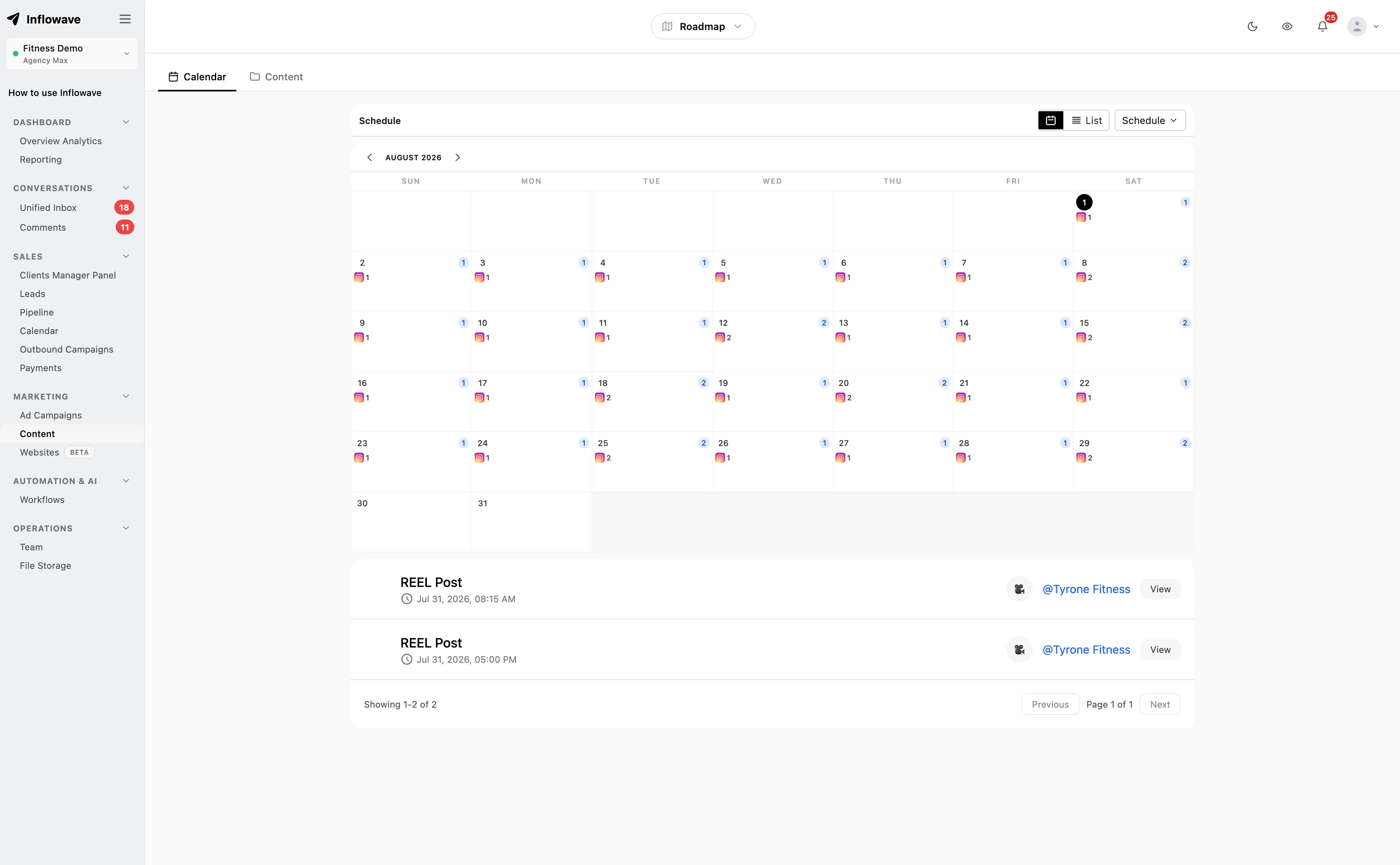
Stop guessing which version works
Everyone tells you to test your content. No scheduling tool actually helps you do it, so what happens instead is you post one version, it does fine, and you never learn whether a different hook would have tripled it.
So run a tournament. Start with up to twenty variants of the same idea, different hooks, thumbnails, opening lines, captions. Performance narrows the field to fifteen, then ten, then five. What survives is what earned attention, and you keep it.
The part that matters is what it ranks on. Likes, comments, shares, saves and reach are all in there, but so are hook rate and retention, and those two tell you the truth. A post can collect likes from followers who already like you while being scrolled past by everyone else. Hook rate catches that. Likes do not.
Six platforms, one queue
Write once, adapt per platform, schedule from the same calendar. What each one accepts differs, so here it is plainly.
| Platform | What you can schedule |
|---|---|
 Instagram Instagram | Posts, reels, stories, carousels |
 Facebook Facebook | Posts, reels, stories, carousels |
 TikTok TikTok | Video |
 YouTube YouTube | Video and Shorts |
 LinkedIn LinkedIn | Posts and images, personal profile or company page |
 X X | Posts, images, video |
What you get
- One calendar for Instagram, Facebook, TikTok, YouTube, LinkedIn and X.
- Posts, reels, stories, carousels, video and Shorts.
- A tournament that narrows twenty variants to five on real performance.
- Ranking on hook rate and retention, not just likes.
- Posting times from your own audience activity, hour by hour.
- Client or manager approval before anything goes live.
- Three AI caption drafts when you are stuck on the wording.
- Per-post metrics attached to the content, not a separate dashboard.
- Comments on a published post can trigger a workflow.
- Replies land in the same inbox as your DMs, as leads.
- Tracked links in captions, so clicks attach to a person.
- Conversions and conversion value, not only views and comments.
- Revenue broken out by campaign, channel, workflow and day.
- Story-level views, replies, exits and taps forward and back.
- Fall-off rate per frame, so you see exactly where people leave.
- Influencer partnerships run as campaigns, with revenue attributed per creator.
- Accounts grouped per client, with the calendar filtered to one at a time.
When your audience is actually on
Published best-time charts are worthless to you specifically. They are an average of everybody, and you do not sell to everybody.
So the recommendation comes from an hourly heatmap of when your own followers engage and message you. If your audience is nurses on night shifts or bartenders, the generic Tuesday morning advice is actively wrong, and your own data says so immediately.
Every serious scheduler does some version of this now, so treat it as table stakes rather than a reason to switch. It is here and it works.
Approvals that hold
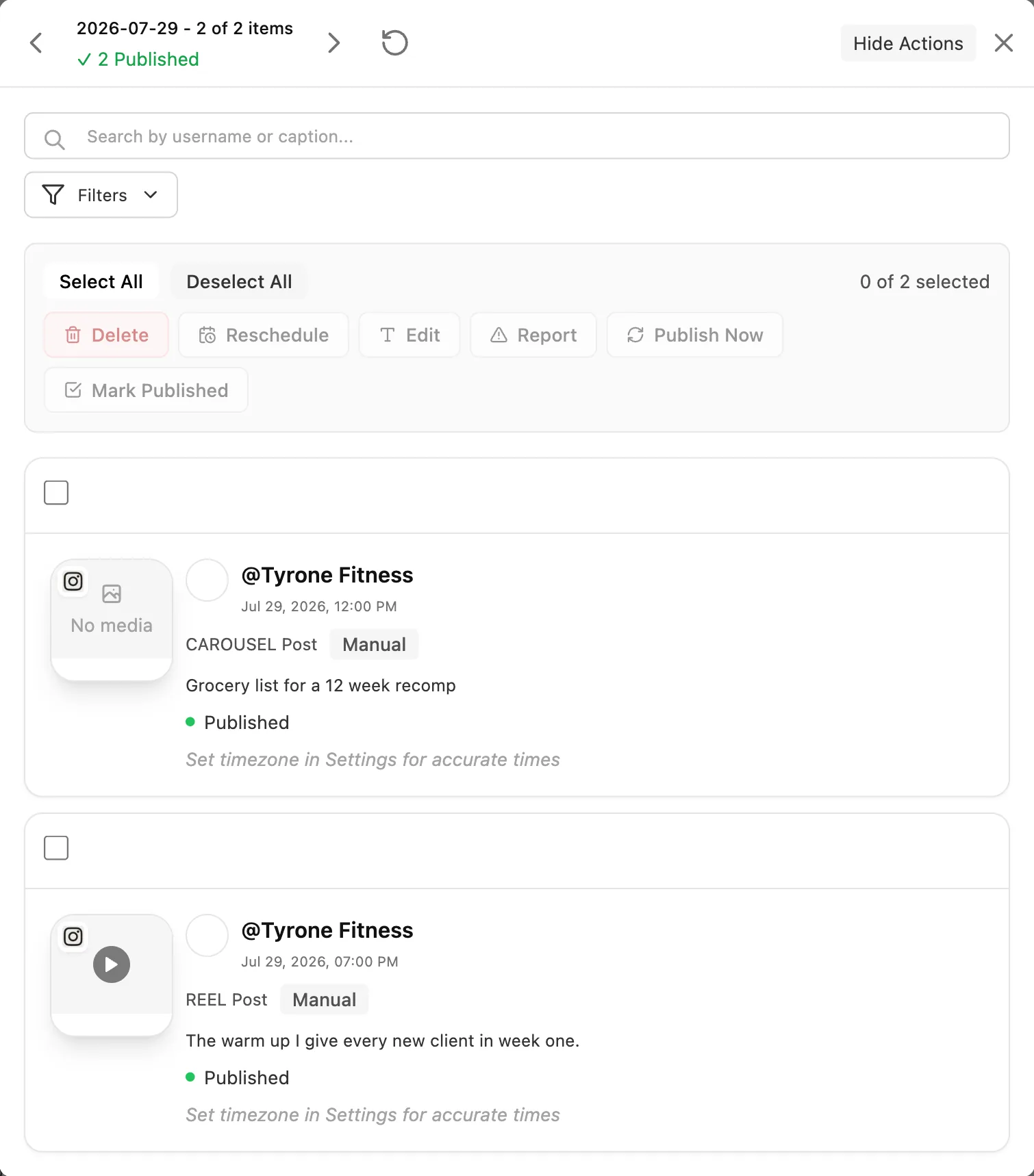
Content sits pending until a named approver approves or rejects it. Only then does it schedule and publish. Rejected content comes back with the reason attached rather than vanishing.
It is per workspace, which is the part that matters for agencies: one client approving their queue does not touch another client queue, and a client only ever sees their own content.
Build two or three days of buffer into your calendar for this. Approval queues are where content calendars quietly die, and no tool fixes a client who reviews on Fridays.
A post is the start, not the deliverable
Publishing tools finish when the post goes out and hand you a reach number. That is a fine product if reach is what you sell. If posting exists to produce conversations, the interesting part starts after publication.
Metrics on the content, not in a silo
Per-post numbers sit against the post itself and feed the tournament, so the next round starts from evidence. The wider view is in analytics.
Your own numbers only ever tell you what worked for you, which is a small sample and a narrow one. What the rest of your field is posting, paid and organic, comes from the competitor research.
A comment can start a workflow
Somebody commenting on a published post or reel is a trigger, so it can send a DM, tag them, or start a sequence without anybody watching notifications. Built in workflows. This is how a reel with two hundred comments becomes two hundred conversations instead of a notification badge.
Replies become leads
Comments and replies arrive in the same place as your DMs, attached to a contact record with history, so the person who asked the price under your reel is a lead you can work rather than a notification you clear. That is the shared inbox.
Trackers on the links you post
Use a tracked link in a caption or your link in bio and clicks attach to a person rather than piling into an anonymous total. Combined with the comment trigger, a viewer becomes a scored lead across tracking links and the CRM.
Down to the money, not just the likes
Every scheduler will show you views, likes and comments. None of those pay anybody. The question that matters is which content produced money, and almost nothing in this category will answer it.
Because posting, the inbox, the pipeline and the invoicing are one product here, the chain stays joined up: a reel gets a tracked link or belongs to a campaign, the click becomes a lead, the lead becomes an opportunity, the opportunity gets paid, and the revenue reports back against the thing that started it.
Conversions and conversion value
Not just that something converted, but what it was worth. A reel that brings ten leads worth thirty pounds each is a different result from one that brings two worth two thousand, and reach reports them identically.
Revenue by campaign, channel and workflow
Money is broken out by campaign, by channel, by workflow and by day, plus revenue per lead and per visitor. Put a reel behind a campaign or a tracked link and you can say what that content earned, in currency, rather than guessing from engagement.
Stories, at story level
Views, replies, exits, and taps forward and back. Taps back is the one worth watching, because it means somebody went back to re-read a frame, and it is a far better signal of interest than a view. A story with a tracked link or swipe-up attributes its revenue like anything else.
Fall-off rate, frame by frame
Drop-off percentage and drop-off from the previous frame, alongside watch time as a share of the whole. This is how you find out that your hook is fine and people leave at second nine, which is a script problem, not a thumbnail problem. Averages hide that completely.
Influencer partnerships you can actually settle up on
Paying a creator is normally an act of faith. They post, you get a screenshot of their story views, and nobody can tell you whether it produced a single sale. So you renew on vibes, or you stop because you cannot justify it.
Run the partnership as its own campaign instead. The creator promo carries its own tracked link, the traffic it sends is attributed to that campaign, and the revenue those leads eventually produce reports back against it. You can then compare what you paid the creator with what the collaboration earned, per creator, and renew the ones that work.
It works in both directions: a creator promoting a business, and a business promoting through creators. Either way both sides can see the same number instead of arguing about screenshots.
Attribution runs as a multi-touch chain with configurable windows, so a lead who saw a reel, clicked a story link three days later and then replied to a DM is credited sensibly instead of everything going to the last click. The full picture is in analytics and reporting.
Against Later, Buffer and Hootsuite
These are the tools you are actually choosing between, so here is a straight read, including the rows where they win.
| Capability | Inflowave | Later | Buffer | Hootsuite |
|---|---|---|---|---|
| Approval workflow before a post goes live | Yes | Partly | Yes | Yes |
| Best posting time from your own audience data | Yes | Yes | Yes | Yes |
| Publish to Instagram, Facebook, TikTok, YouTube, X and LinkedIn | Yes | Yes | Yes | Yes |
| Tournament split-test that narrows 20 variants to 5 | Yes | Unclear | Unclear | Unclear |
| Rank variants on hook rate and retention, not just likes | Yes | Unclear | Unclear | Unclear |
| Replies to a scheduled post land in a sales inbox | Yes | No | No | Partly |
| The commenter becomes a scored lead in a pipeline | Yes | No | No | No |
- Approval workflow before a post goes live: Table stakes in 2026, not a differentiator. Later is marked partial only because its collaboration features are consistently described as lighter than Buffer or Sprout.
- Best posting time from your own audience data: Also table stakes. All of these moved AI auto-scheduling to default during 2025-2026. Anyone still selling you a fixed best-time chart is behind.
- Tournament split-test that narrows 20 variants to 5: Marked unclear rather than no: 2026 comparison reviews report that none of these offer true split-testing of post variants and recommend a manual four-week method instead, but that is a third-party claim and not something we found in vendor documentation.
- Replies to a scheduled post land in a sales inbox: Hootsuite has an inbox. Buffer and Later are publishing tools without one, so this is a difference in scope rather than a shortcoming.
- The commenter becomes a scored lead in a pipeline: None of the three is a CRM. If your posting exists to produce sales conversations rather than reach, this is the row that matters.
Where the others are stronger. Buffer is the fastest way to get a post out and costs a fraction of anything else, so for one person posting to three platforms it is the sensible choice and we are overkill. Later remains better for visual planning if your feed aesthetic is the product, because the drag-and-drop grid preview is genuinely nicer than ours. Hootsuite has far more integrations and social listening, which we do not do at all. All three also have years more polish in the pure publishing workflow.
The difference is what a post is for. These tools treat publishing as the finished product and measure whether it got reach. Here a post is the top of a sales process: the tournament finds which version actually earns attention, the replies arrive in the same inbox as your DMs, and the person who commented becomes a scored lead you can book a call with. If you post to build an audience, buy a publishing tool. If you post to start conversations that turn into revenue, that gap is the whole point.
Tool by tool
Rows are hard to read a decision out of, so here is the verdict per tool. Each one starts with why you might buy theirs instead, because on a lot of these you should.
Inflowave vs Later
Buy theirs when: Later is the better tool if the feed itself is the product. The drag-and-drop grid preview is nicer than ours, the visual planning workflow has years more polish, and for a brand whose Instagram aesthetic is genuinely part of the offer that is worth paying for on its own.
Buy ours when: The gap opens after the post publishes. Later has no sales inbox, so a comment that reads like a buying signal stays a notification. Here it becomes a conversation and a scored lead, and the tournament tells you which version of the post earned the attention in the first place.
Inflowave vs Buffer
Buy theirs when: Buffer is the fastest and cheapest way to get a post out, and for one person publishing to three platforms we are honestly overkill. It also beats Later on approvals. If your requirement is "queue posts, do not think about it", buy Buffer and spend the difference on making the content.
Buy ours when: Buffer measures whether a post got reach, and stops there. If your posting exists to produce sales conversations, the rows that matter are the inbox and the pipeline, and Buffer is not in that business. It is a scope difference, not a defect.
Inflowave vs Hootsuite
Buy theirs when: Hootsuite has far more integrations than we do and does social listening, which we do not do at all. It also has an inbox, so it is the closest of the three to how we work. For a large team that needs brand monitoring across channels it remains the more complete social suite.
Buy ours when: Hootsuite's inbox is a social inbox rather than a sales one: the commenter does not become a scored lead in a pipeline you can book a call from. That, and the tournament ranking variants on hook rate and retention rather than likes, are the two rows to check if revenue is the point.
Category baselines and competitor capabilities from published 2026 comparisons and vendor material, checked 30 July 2026. Where our only source was a third-party review rather than vendor documentation the cell says Unclear rather than No. Verify any row that decides your choice.
Who this is built for
Agencies posting for clients
Accounts grouped per client, a calendar you can filter to one brand, and approvals that stay inside that client workspace. The tournament is also the easiest thing to put in a monthly report: here are the twenty things we tried, here is what won, here is what we are doing more of. That is a better conversation than a reach chart.
More in the agency use case and what we build for agencies.
Creators who sell something
If your content exists to sell a product, a program or your time, reach is a vanity number and the tournament is the point. Find the hook that actually stops the scroll, then let the comments become conversations instead of a notification pile you clear on Sunday.
B2B teams posting on LinkedIn
Schedule to a personal profile and a company page, which matters because the founder account almost always outperforms the brand one and you need both. Comments on a LinkedIn post are frequently the highest-intent inbound a B2B company gets, and here they arrive somewhere a person can actually work them.
Small and medium businesses posting between jobs
Batch a fortnight of content on a Sunday, let it publish at the hours your customers are actually awake, and have the replies land in the same inbox as everything else. The failure mode for an SMB is not bad content, it is a three-week gap because the week got busy.
This is the case the calendar and the queue exist for. Nobody at a five-person company is going to sit down at eleven on a Tuesday to post a reel. So you write six of them while you have the energy, the AI rewrite gives you the caption in the right register for each platform instead of the same block of text everywhere, and the queue drips them out over three weeks. The account keeps moving on a week where you never opened the app.
The part that matters more than the scheduling is that a small business usually cannot tell which post brought in work. Everything is anecdote. Put a tracked link in the bio and in the posts that sell something, and revenue starts attaching to content rather than to a hunch, so the next fortnight of batching is aimed at whatever actually paid. That is a bigger deal at this size than at any other, because there is no budget to waste on posting into a void.
See how small businesses use Inflowave and what it costs for a small team.
Setting it up
1. Connect the accounts you actually post to
Not all six. Most teams pay for eight channels and actively post to three, and the three are what matter. Add the rest when you genuinely have content for them.
2. Set who approves what
Name the approver per workspace and build two or three days of buffer into the calendar before the publish date. Approval queues are where content calendars die.
3. Run one tournament properly
Take your best-performing idea and build variants of the hook rather than the whole post. Changing everything at once tells you which post won but not why, which is useless next month.
4. Wire up the comments
Set a workflow on post comments so engagement turns into a conversation automatically. This is the step that separates posting from selling, and it is the one people leave until last.
5. Let the heatmap move your slots
After a few weeks of real data, stop posting at the times you assumed and post at the times the heatmap shows. It is the cheapest improvement available and it costs nothing but changing a default.
Common questions
Can you schedule posts on Instagram?
Yes. Instagram lets you schedule from the app itself, and third-party tools like this one schedule feed posts, reels, stories and carousels in advance across several accounts at once. The practical difference is that the native option handles one account at a time from your phone, with no approvals, no team, no queue and no reporting on what worked afterwards. Scheduling through a tool is what you want the moment more than one person is involved or more than one account is being posted to.
Can you schedule an Instagram post with a regular personal account?
Not through any third-party scheduler, including this one. Meta only allows publishing through its API for professional accounts, meaning Business or Creator, and it has to be connected to a Facebook Page. That is a platform rule rather than a limitation of any particular tool, so every scheduler you compare will tell you the same thing. Switching a personal account to Creator takes about a minute in your Instagram settings and does not change how your profile looks to anybody.
Why can I suddenly not schedule Instagram posts anymore?
Usually one of four things, and none of them is the scheduler breaking. The account got switched back to personal, or lost its connection to the Facebook Page. The Page needs Page Publishing Authorization completed, which Meta gives no way for a tool to detect in advance, so it fails silently until somebody goes and does it. Two-factor authentication on the Page has not been satisfied. Or the account has hit Meta cap of 100 posts published through the API in a rolling 24 hours. Reconnecting the account fixes the first two more often than anything else.
Where do scheduled Instagram posts go before they publish?
They sit in the queue in the tool that scheduled them, not on Instagram. Worth understanding, because Instagram API does not actually schedule anything: every scheduler, this one included, holds the post itself and publishes it at the target moment. That is why a post scheduled in one tool is invisible in another, and why your content calendar lives where you scheduled it. Here that is the calendar, which you can filter to one client or one account.
Can you schedule reels, stories and carousels, or only feed posts?
All of them. Feed posts, reels, stories and carousels, and beyond Instagram the same calendar covers Facebook, TikTok, YouTube including Shorts, LinkedIn on both a personal profile and a company page, and X. One Meta limit worth knowing: a carousel can hold up to ten items and counts as a single post against the daily publishing cap.
Which platforms can I schedule to?
Instagram, Facebook, TikTok, YouTube, LinkedIn and X. Posts, reels, stories, carousels, video and YouTube Shorts, depending on what each platform supports. LinkedIn covers both a personal profile and a company page, which matters if you sell B2B and the founder account outperforms the brand one.
What is the split-test tournament?
A bracket that starts with up to twenty variants of a piece of content and narrows them to the top fifteen, then ten, then five, based on how they actually performed. Instead of guessing which hook works you post several and let the numbers eliminate the weak ones. It ranks on hook rate and retention as well as the obvious likes and comments, because a post that gets scrolled past after two seconds can still collect likes from your existing followers.
How does it decide the best time to post?
From an hourly heatmap of when your own audience is actually active, not a published chart of industry averages. Those charts were obsolete the moment every platform started personalizing delivery. Your audience is not the average audience, and if you sell to nurses or bartenders it is not close.
Can a client approve posts before they go live?
Yes. Content sits as pending until a named approver approves or rejects it, and only then is it scheduled and published. Approvals are standard in this category now, so we are not going to pretend it is remarkable, but it works and it is per workspace, so one client approving does not touch another client queue.
Does the AI write captions?
It generates three caption variants from a prompt, which is a useful starting point and pairs naturally with the tournament, since you then have three things to test rather than one. It is a drafting aid, not a replacement for knowing how your audience talks.
What happens after a post publishes?
The part most schedulers treat as somebody else problem. Per-post metrics land against the content, comments on the post can trigger a workflow, and replies arrive in the same inbox as your DMs, so the person who commented becomes a contact you can follow up rather than a notification you clear.
Can I manage several clients or brands?
Yes. Accounts are grouped per client and the calendar filters to one client at a time, so an agency running twelve brands is not reading one combined feed and hoping nothing goes out under the wrong name.
Can I see how much money a piece of content made?
Yes, through the campaign or tracked link the content used. Revenue is broken out by campaign, channel, workflow and day, alongside conversions and conversion value and revenue per lead. So a reel behind a campaign or a tracked link can be tied to what it earned rather than judged on views. Being precise: there is no per-post revenue column that works without a campaign or a tracked link, because the money has to be joined to the content by something.
Can I measure whether an influencer partnership paid off?
Run the collaboration as its own campaign. The creator promo carries a tracked link, the traffic is attributed to that campaign, and the revenue those leads produce reports back against it, so you can compare what you paid the creator against what the partnership earned. It works whether a creator is promoting a business or a business is promoting through creators.
Do I get fall-off rate on video?
Drop-off percentage, drop-off from the previous frame, and watch time as a share of the whole. That is how you tell a hook problem from a script problem: if people stay past three seconds and leave at nine, the thumbnail is fine and the middle is not.
How is this different from Later or Buffer?
Honestly: for pure publishing they are more polished and Buffer is far cheaper. The difference is what happens either side of the post. They finish when the post goes out and report on reach. Here the tournament tells you which version earned attention, and the replies become leads in a pipeline. If you post to build an audience, buy a publishing tool. If you post to start sales conversations, that gap is the whole point.
Can I track clicks from a post?
Put a tracked link in the caption or in your link in bio and you get click counts tied to a person rather than an anonymous total, which is how a follower turns into a lead you can score. How tracking links work.
Is scheduling a separate cost?
No, it is part of the platform rather than a separate product, so it is included on every plan. If all you need is a scheduler and nothing else, a dedicated tool will be cheaper and we would rather say so than sell you the wrong thing. Compare the plans.
Post less, learn more
Schedule six platforms from one calendar, find the version that actually works, and turn the replies into conversations.
Get Started