Track Every Click from Instagram
Create trackable links for every campaign, DM, and post. Know exactly which message, post, or story drove each click — and which drove actual conversions. Attribution that actually works on Instagram.
Link Analytics That Tell the Real Story
From first click to CRM entry — trace exactly how each lead found you
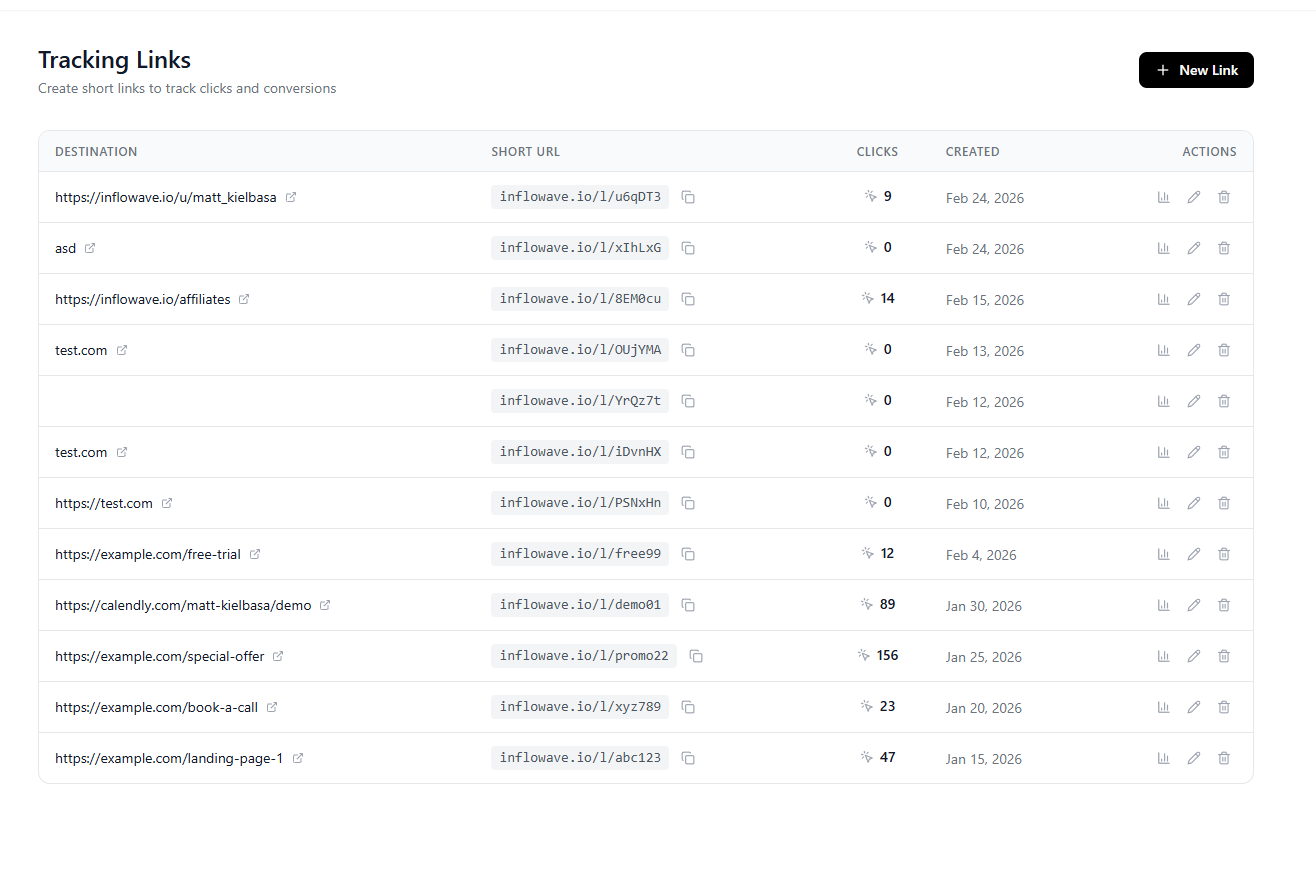
Attribution That Works on Instagram
Know exactly which content, DMs, and campaigns drive real leads and revenue
Trackable Short Links
Create branded short links for any URL. Every link tracks clicks, unique visitors, referrers, and geographic data.
Campaign Attribution
Tag each link with a campaign, source, and medium. Attribute every click and conversion back to its exact origin.
Real-Time Click Tracking
See clicks as they happen. Monitor link performance in real-time with live dashboards.
UTM Parameter Management
Automatically append UTM parameters to every link. Keep your analytics consistent without manual URL building.
Geo & Device Analytics
See where clicks come from by country, city, device type, and browser. Understand your audience at a deeper level.
CRM Lead Attribution
When a tracked link click leads to a form submission or DM, that conversion is attributed back to the exact link in your CRM.
Link Expiry & Redirects
Set expiry dates on links. Redirect expired links to a fallback URL automatically.
From Click to Conversion — Fully Attributed
Every click on a tracking link is logged with a timestamp, referrer, device, and location. When that visitor later submits a form or sends a DM, Inflowave connects the dots — giving you full attribution from first touch to conversion.
- Click → form submission attribution
- Click → Instagram DM attribution
- See which posts and DMs drive the most leads
- Attribution visible directly in each lead's CRM record
Why Tracking Links Matter for Instagram
Instagram's built-in analytics don't show you which posts drive actual leads — Inflowave does
Know what's actually working
Stop guessing which posts and DMs drive results. Every click tells you exactly where your leads come from.
Clean, branded short links
Professional short links that don't look like spam — branded to your domain for higher click trust.
Campaign tracking with UTM tags
Automatic UTM parameter management keeps your analytics consistent across every channel and campaign.
Real-time click dashboards
See clicks as they happen. Monitor campaign launches and content performance in real-time.
Geo and device breakdown
Know where your Instagram audience clicks from — by country, city, device, and browser.
CRM attribution built-in
Conversions traced back to the exact tracking link — visible directly in your lead's CRM profile.
How It Works
Create a Tracking Link
Paste any URL and Inflowave generates a unique tracking link. Add a campaign name, source, and medium to organize your links by campaign.
Use the Link in Your Content
Add the tracking link to your Instagram bio, DMs, stories, captions, or email campaigns. Each placement can have its own tracking link so you know exactly which one drove the click.
Track Clicks in Real-Time
As clicks come in, Inflowave logs each one with referrer, device, location, and timestamp. View your live dashboard to monitor campaign performance.
See Attribution in Your CRM
When a click leads to a form submission or Instagram DM, Inflowave connects the two events. The lead's CRM record shows exactly which tracking link brought them in.
Use this attribution data to double down on content and DM scripts that actually convert — and cut what doesn't work.
Frequently Asked Questions
How do tracking links work?
You create a tracking link by pasting any destination URL into Inflowave. Inflowave generates a unique short URL that records every click — including referrer, device, location, and timestamp — before redirecting to the destination.
Can I use tracking links in Instagram DMs?
Yes. Tracking links are ideal for DMs because you can see exactly how many people clicked your link from a specific outreach message. This lets you measure DM campaign performance beyond just replies.
How does CRM attribution work?
When a visitor clicks a tracking link and then submits an Inflowave form or sends a DM that creates a lead, Inflowave matches the two events using browser fingerprinting and session data. The lead's CRM record shows the originating tracking link.
Can I use custom domains for short links?
Yes. Connect your own domain to use branded short links like go.yourdomain.com/campaign. Custom domain links have higher click-through rates and look more trustworthy than generic short URLs.
Do tracking links work with Instagram Stories?
Yes. Add tracking links to your story swipe-up links (for eligible accounts) or share them in your bio. Each placement gets its own tracking link so you can compare performance between stories and bio.
Can I set link expiry dates?
Yes. Set any tracking link to expire after a specific date or after a set number of clicks. Expired links automatically redirect to a fallback URL you specify — useful for time-limited campaigns.
Know What's Actually Driving Your Instagram Results
Create tracking links for every campaign and message. See exactly which content converts — and invest more in what works.