AI Workflows & Multi-Channel Automation
Build powerful automations with 34+ triggers and 50+ actions. Describe what you want in plain English and let AI build it, or use the visual drag-and-drop canvas. Span Instagram DMs, email, SMS, voice, and CRM — all in one workflow. No code required.
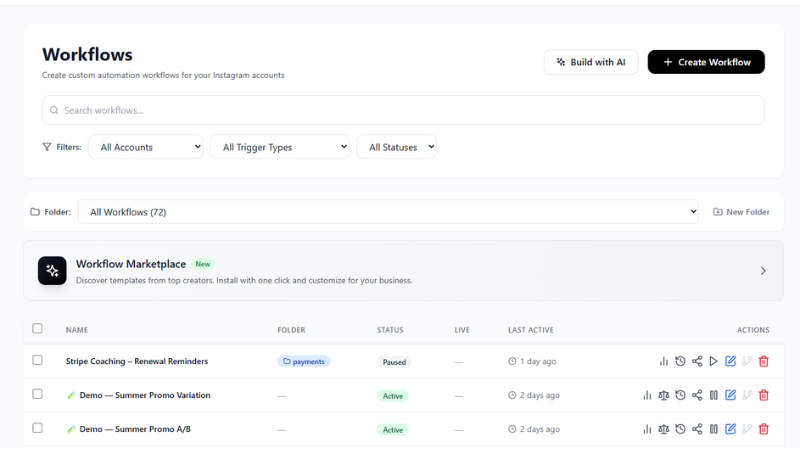
Visual Workflow Builder
Drag-and-drop canvas with branching logic, conditions, and multi-channel actions
Everything You Need to Automate
A complete automation engine with 34+ triggers, 50+ actions, AI generation, and multi-channel orchestration
34+ Smart Triggers
Instagram DMs, comments, story replies, live comments, ad clicks. Plus email opens, SMS received, form submissions, payment events, appointment bookings, and CRM changes.
50+ Powerful Actions
Send DMs with media and buttons, reply to comments, send emails and SMS, generate AI voice messages, create pipeline deals, book appointments, send invoices, and call webhooks.
AI Workflow Builder
Describe your automation in plain English and AI builds the entire workflow. "When someone comments on my post, DM them a discount code and add to my pipeline."
Visual Drag-and-Drop Canvas
Build complex workflows visually with branching logic, A/B split testing, wait conditions, and timeout handling. No code required.
Multi-Channel Orchestration
One workflow can span Instagram DMs, email, SMS, voice messages, and CRM actions. Reach customers on every channel automatically.
Conversation AI Engine
AI-powered multi-turn conversations that understand context, handle objections, and guide leads through your sales process automatically.
A/B Split Testing
Test different message variants, paths, and timing. AI optimizes for the best performing route automatically so you always get the best results.
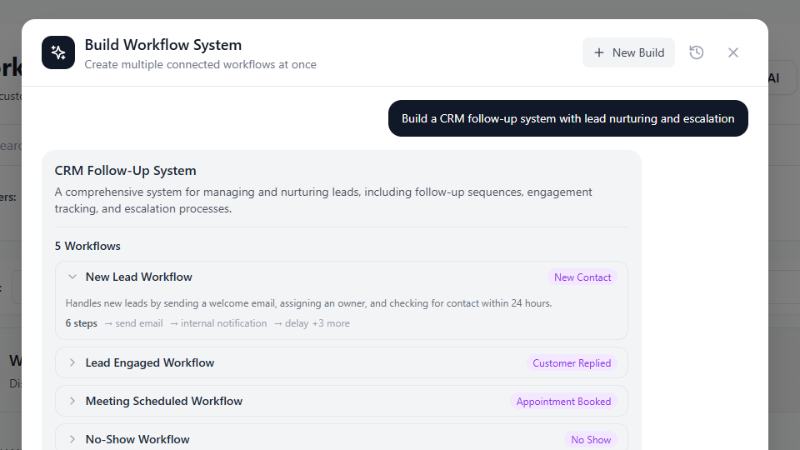
Tell AI What You Want. It Builds the Workflow.
Simply describe your automation in plain English. Our AI understands your intent and generates a complete workflow with the right triggers, conditions, and actions. Edit and refine visually, or let AI handle the whole thing.
- "When someone comments PRICE on my post, DM them the pricing link"
- "If a lead doesn't reply in 24 hours, send a follow-up email"
- "When a payment succeeds, send a thank-you DM and update CRM"
- "A/B test two different welcome messages and pick the winner"
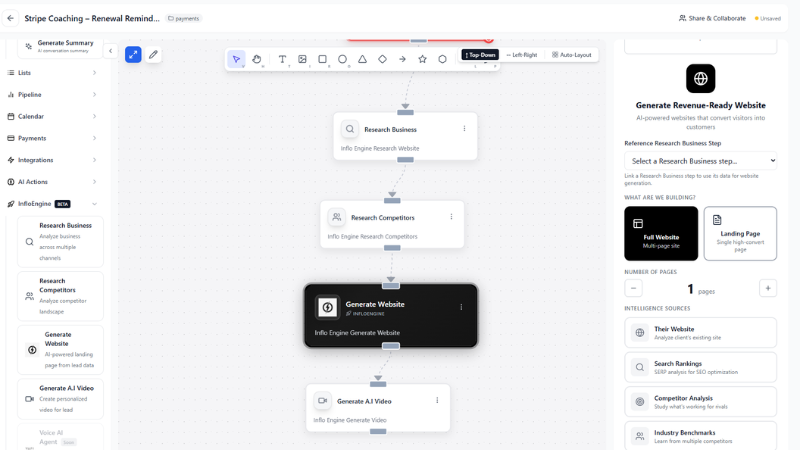
Example: Comment-to-DM Automation
When someone comments on your Instagram post, your workflow fires instantly. It can send a personalized DM, add them to your pipeline, tag the lead, and trigger a follow-up email sequence — all automatically.
- Trigger on specific keywords in comments
- Send personalized DMs with media and buttons
- Add leads to CRM pipeline automatically
- Follow up across email and SMS in the same workflow
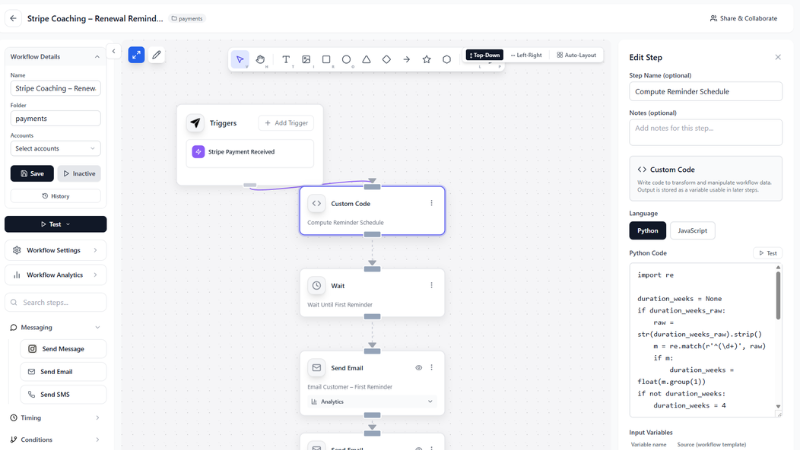
Example: Multi-Step Lead Nurture
Build complete lead nurture sequences that span days or weeks. Wait conditions, intelligent branching based on whether a lead replies, and timeout fallbacks ensure every lead gets the right follow-up at the right time.
- Time-based wait steps between messages
- Branch based on reply, no-reply, or specific keywords
- Timeout fallbacks after 24h, 48h, or custom intervals
- Move leads through CRM stages automatically
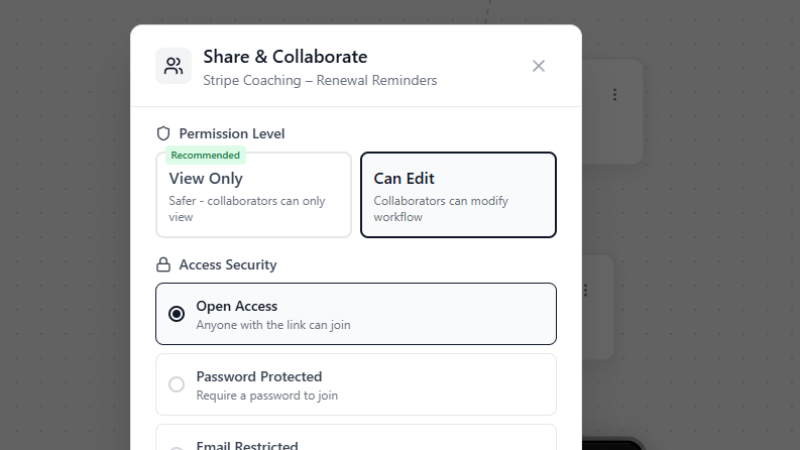
Collaboration Mode for Teams
Work on workflows together with your team in real-time. See who's editing, leave comments, and publish changes without stepping on each other's work. Perfect for agencies managing multiple client automations.
- Real-time collaborative editing
- Role-based access control per workflow
- Publish and version workflows safely
- Audit log of all changes and activations
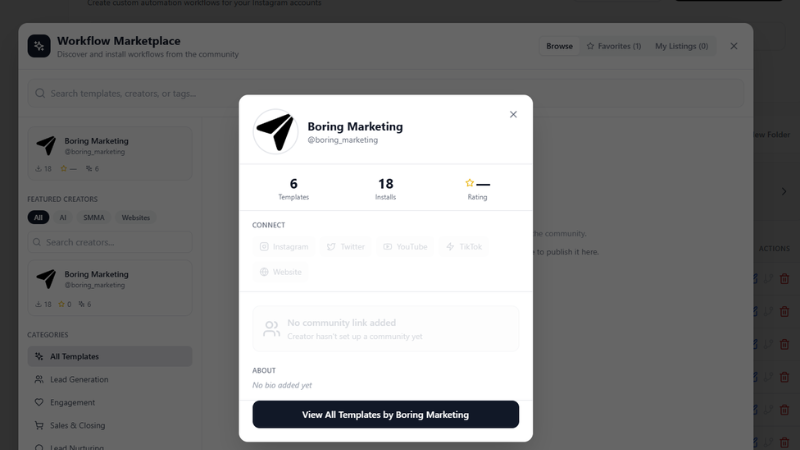
Workflow Marketplace
Browse pre-built workflow templates from the community, or publish your own. Share proven automation recipes with other Inflowave users, or offer premium templates on the marketplace.
- Browse 100+ pre-built workflow templates
- One-click import into your account
- Publish and sell your own workflow templates
- Templates for every industry and use case
Why Teams Choose Inflowave Workflows
The most powerful Instagram automation engine — and the easiest one to use
Build in minutes, not weeks
AI generates complete workflows from a plain English description. No flow-chart experience needed.
34+ triggers spanning every channel
Instagram, email, SMS, payments, forms, and CRM events — all available as workflow triggers.
Multi-channel in one workflow
DM, email, SMS, and voice all handled by a single workflow. No stitching tools together.
A/B split testing built-in
Test message variants and timing automatically. AI picks the winner and routes traffic accordingly.
Branching logic and conditions
Route leads down different paths based on their replies, tags, CRM stage, or any custom condition.
Real-time workflow analytics
See exactly how many leads entered each step, where they dropped off, and which paths convert best.
How It Works
From idea to live automation in four simple steps
Describe or Design Your Workflow
Type what you want in plain English and let AI generate the workflow, or drag triggers and actions onto the canvas yourself. Both approaches produce the same powerful result.
You can combine AI generation with manual editing — let AI create the skeleton, then customize specific steps to fit your exact process.
Connect Your Channels
Link your Instagram accounts, email domains, SMS phone numbers, and any other channels your workflow needs. Connections are reusable across all your workflows.
Test with Real Data
Use the built-in workflow simulator to test every branch and condition before going live. See exactly what message gets sent at each step without contacting real leads.
Activate and Watch It Run
Activate your workflow and it starts processing leads instantly. Monitor progress in real-time, see which steps are firing, and get alerts for errors or unusual patterns.
Workflows handle thousands of leads simultaneously with no performance degradation. Scale from 10 leads a day to 10,000 without changing anything.
Frequently Asked Questions
What triggers are available?
Inflowave Workflows supports 34+ triggers: Instagram DM received, comment posted, story reply, live comment, reel mention, ad click, email opened, SMS received, form submitted, payment succeeded/failed, appointment booked, CRM stage changed, and more. New triggers are added regularly.
What actions can a workflow perform?
Workflows support 50+ actions: send DM with text/media/buttons, reply to a comment, send email, send SMS, generate AI voice message, create pipeline deal, book appointment, send invoice, assign lead to team member, add/remove tag, update custom field, call webhook, wait for a set time, and more.
Do I need to know how to code?
No. You can describe your automation in plain English and AI builds the workflow, or use the visual drag-and-drop canvas. No programming knowledge is required.
Can one workflow span multiple channels?
Yes. A single workflow can send an Instagram DM, then an email 24 hours later, then an SMS if there's no reply — all chained together in one flow. Multi-channel orchestration is a core feature, not an add-on.
How does A/B split testing work?
Add a split node to your workflow and define the variants (different messages, timing, or entire branches). Inflowave automatically routes leads to each variant and tracks conversion rates. You can let AI pick the winner automatically or choose manually.
How many workflows can I run simultaneously?
As many as you need. Workflows run concurrently and handle thousands of leads in parallel. There is no limit on active workflows — only the limits of your subscription plan apply.
Start Automating Your Instagram Growth
Build your first workflow in minutes. Describe what you want in plain English, let AI generate it, and activate it with one click.