Visual Sales Pipeline
Manage every Instagram lead through a clear, visual pipeline. Drag deals between stages, see AI-suggested next actions, and close more deals with less manual work.
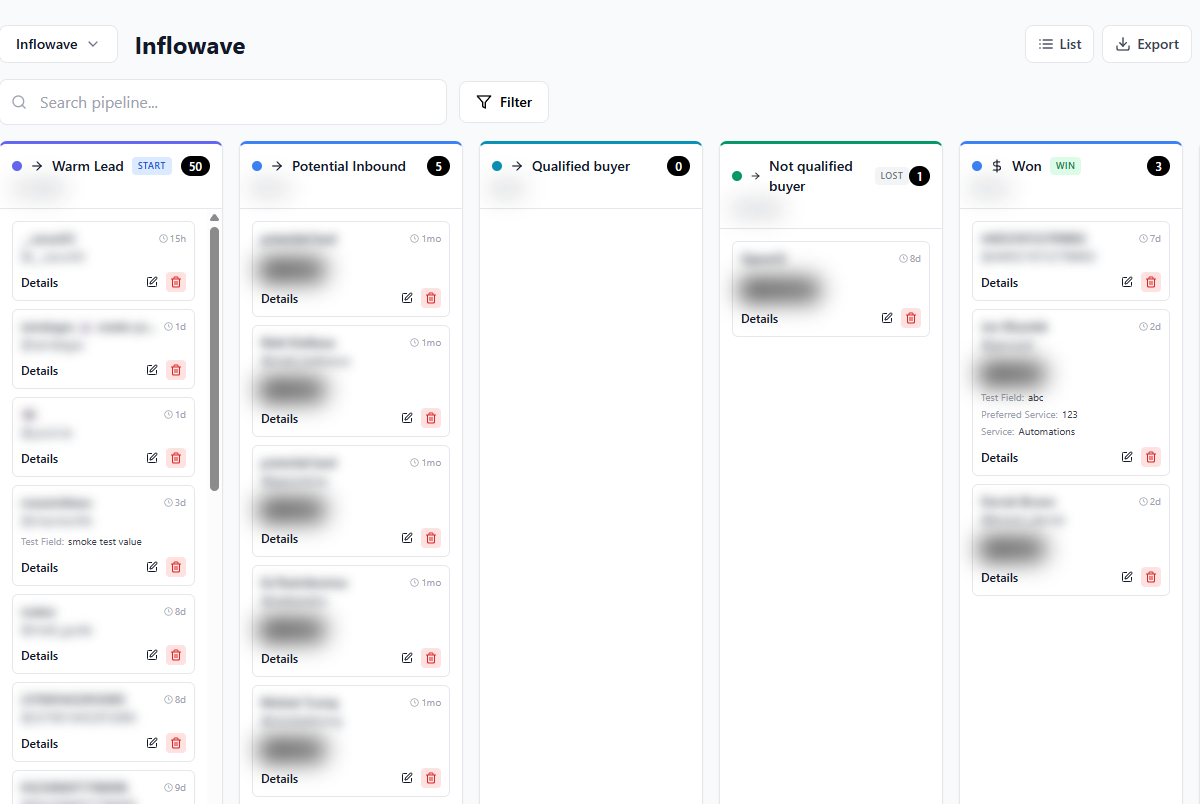
Your Entire Pipeline at a Glance
Every deal, every stage, every next action — visible in one place
Everything You Need to Close More Deals
A pipeline that does more than organize — it actively helps you move deals forward
Drag-and-Drop Kanban Board
Move deals between stages with drag-and-drop. Customize stages to match your exact sales process.
AI Next-Action Suggestions
AI analyzes each deal and suggests the best next step — follow-up message, price quote, or scheduled call.
Deal Value Tracking
Assign deal values to each opportunity. See your total pipeline value and revenue forecast at any stage.
Team Assignment
Assign deals to team members. Each person sees their queue with full conversation history and context.
Automation Triggers
Moving a deal to a new stage can automatically trigger workflows — emails, DMs, SMS, or internal notifications.
Pipeline Analytics
Track conversion rates, deal velocity, average close time, and revenue by stage. Know where deals stall.
Custom Fields & Tags
Add any custom fields to your deals — product interest, deal source, budget, or any other data point.
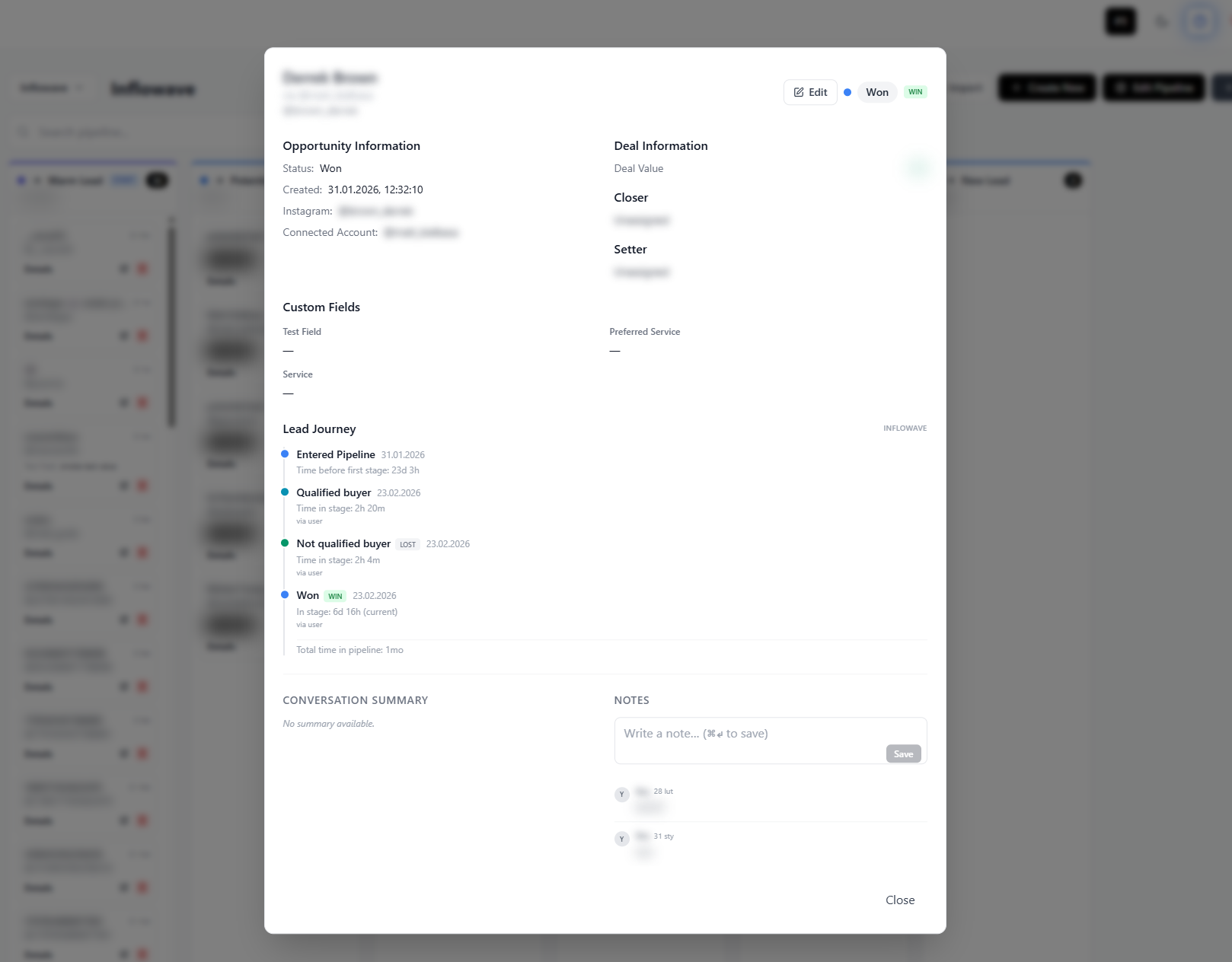
Every Deal, Fully Detailed
Click any deal to see the complete picture: the full Instagram conversation history, contact details, deal value, assigned team member, tags, custom fields, and AI-generated insights about the lead's intent and best next action.
- Full Instagram conversation history inline
- AI-generated lead summary and intent score
- Deal value, close probability, and next action
- Activity log: every touch point and status change
Why Agencies Use Inflowave Pipeline
The only sales pipeline built around Instagram lead generation
Visual Kanban — see everything instantly
Every deal at every stage, visible at a glance. No spreadsheets, no digging through DMs.
AI tells you what to do next
For every deal, AI suggests the highest-value next action so you never waste time on the wrong priorities.
Stage changes trigger automations
Moving a deal forward automatically kicks off the right follow-up — email, DM, or internal task.
Revenue forecasting built-in
See your pipeline value, weighted close probability, and projected revenue for any time period.
Team pipeline management
Assign deals, set access levels, and see team-wide performance without extra tools.
Know where deals stall
Pipeline analytics show exactly which stage loses the most deals and how long deals sit before moving.
How It Works
Leads Enter Your Pipeline Automatically
Every Instagram DM conversation, form submission, or manual entry flows into your pipeline automatically. Leads arrive pre-enriched with Instagram data and an AI-generated lead score.
Move Deals Through Your Stages
Drag deals from stage to stage as you qualify, propose, and close. Each move is logged with a timestamp and triggers any automations you've connected to that stage.
Follow AI Next-Action Suggestions
At each stage, AI analyzes the conversation and deal data to suggest the best next step. Whether it's sending a follow-up DM, scheduling a call, or sending a proposal — AI keeps deals moving.
Close and Analyze
Mark deals as won or lost. Review your win rate, average deal size, and time-to-close by stage. Use pipeline analytics to refine your process and train your team.
Lost deals automatically enter re-engagement workflows to recover revenue over time.
Frequently Asked Questions
How do leads get into the pipeline?
Leads enter your pipeline from Instagram DMs (automatically), form submissions, manual entry, or CSV import. Each lead is enriched with their Instagram profile data and scored by AI before they appear in your pipeline.
Can I customize pipeline stages?
Yes. Create as many stages as you need with custom names and colors. Common setups: New Lead → Contacted → Qualified → Proposal Sent → Negotiating → Closed Won / Closed Lost.
Can a stage change trigger a workflow?
Yes. Moving a deal to a specific stage can automatically trigger any Inflowave workflow — send a follow-up email, DM the lead, notify a team member via SMS, or start a multi-step nurture sequence.
How does team assignment work?
Assign any deal to any team member manually, or create automatic assignment rules (e.g., all leads from a specific niche go to a specific team member). Assigned users see their deals prioritized in their personal pipeline view.
Does the pipeline work with multiple Instagram accounts?
Yes. Manage separate pipelines per Instagram account, or view a unified pipeline across all accounts. Ideal for agencies managing multiple clients.
What analytics are available?
Pipeline analytics show: total deals per stage, average time per stage, conversion rate stage-to-stage, total pipeline value, weighted revenue forecast, team performance by deal count and value, and deal source attribution.
Stop Losing Deals in Your Instagram DMs
Move every lead into a managed, scored, visual pipeline. See exactly where each deal stands and let AI tell you what to do next.