
Once the concept is clear, the useful next question is which one fits your situation. CRM for small business covers the simplest case, CRM for marketing agencies the multi-client one, and Inflowave CRM is the product this site is built around.
A CRM (Customer Relationship Management) system is software that stores and organizes everything about your customers and prospects - their contact details, every conversation, every deal, and every interaction - in one place, so your team can manage relationships and close more business. If you have ever lost a lead because it was buried in someone's inbox or a sticky note, a CRM is the fix.
This is a plain-English guide to what a CRM actually is: what the acronym stands for, what a CRM does day to day, the different types, real examples, the numbers behind why companies adopt one, and how it differs from a spreadsheet. No jargon, no sales pitch.
TL;DR
- CRM stands for Customer Relationship Management.
- A CRM is a central database of your contacts plus every interaction and deal tied to them.
- Three main types: operational (automates sales/service), analytical (insights from data), and collaborative (shares info across teams).
- It replaces scattered spreadsheets, inboxes, and notes with one source of truth.
- Independent research pegs CRM returns at roughly $3-$8 for every $1 spent, and 91% of companies with 10+ employees now run one.
- Examples range from Salesforce and HubSpot to niche tools built for specific channels like Instagram DMs.
CRM by the numbers
CRM is not a niche category - it is the single largest segment of enterprise software, and the data on why companies adopt it is well documented:
- Market size. Grand View Research values the global CRM market on track to reach $163.2 billion by 2030 (14.6% CAGR), while Fortune Business Insights sizes it at $126.2 billion in 2026, growing to $321 billion by 2034. (The firms define "CRM" differently, so treat these as a range, not a single number.)
- Adoption. Roughly 91% of companies with 10 or more employees use a CRM, versus about 50% of businesses under 10 employees - and 87% of CRMs are now cloud-based, up from just 12% in 2008.
- Return on investment. Analyst firm Nucleus Research has tracked CRM returns for over a decade. Its most-cited 2014 study found CRM returned $8.71 for every $1 spent; its updated analysis revised that to a more conservative $3.10 per $1 as the market matured.
- Retention. Aberdeen Group research is widely cited for the finding that CRM can lift customer retention by up to 27% - the compounding payoff of never letting a relationship go cold.
"Even with an average return of $3.10 per dollar spent, organizations are still achieving notable value from their CRM solution."
The catch every one of these studies agrees on: the returns only materialize if the tool actually gets used. An estimated 55% of CRM implementations fail to meet their objectives, and the usual culprit is poor adoption - not the software. That is the single best argument for choosing a CRM that fits how your team already works (more on that below).
What does CRM stand for?
CRM stands for Customer Relationship Management. The term refers both to the strategy of managing your relationships with customers and prospects, and to the software that makes that strategy practical at scale. When people say "we use a CRM," they mean the software - a system that keeps every customer's information and history in one organized place.
What does a CRM actually do?
At its simplest, a CRM does four things:
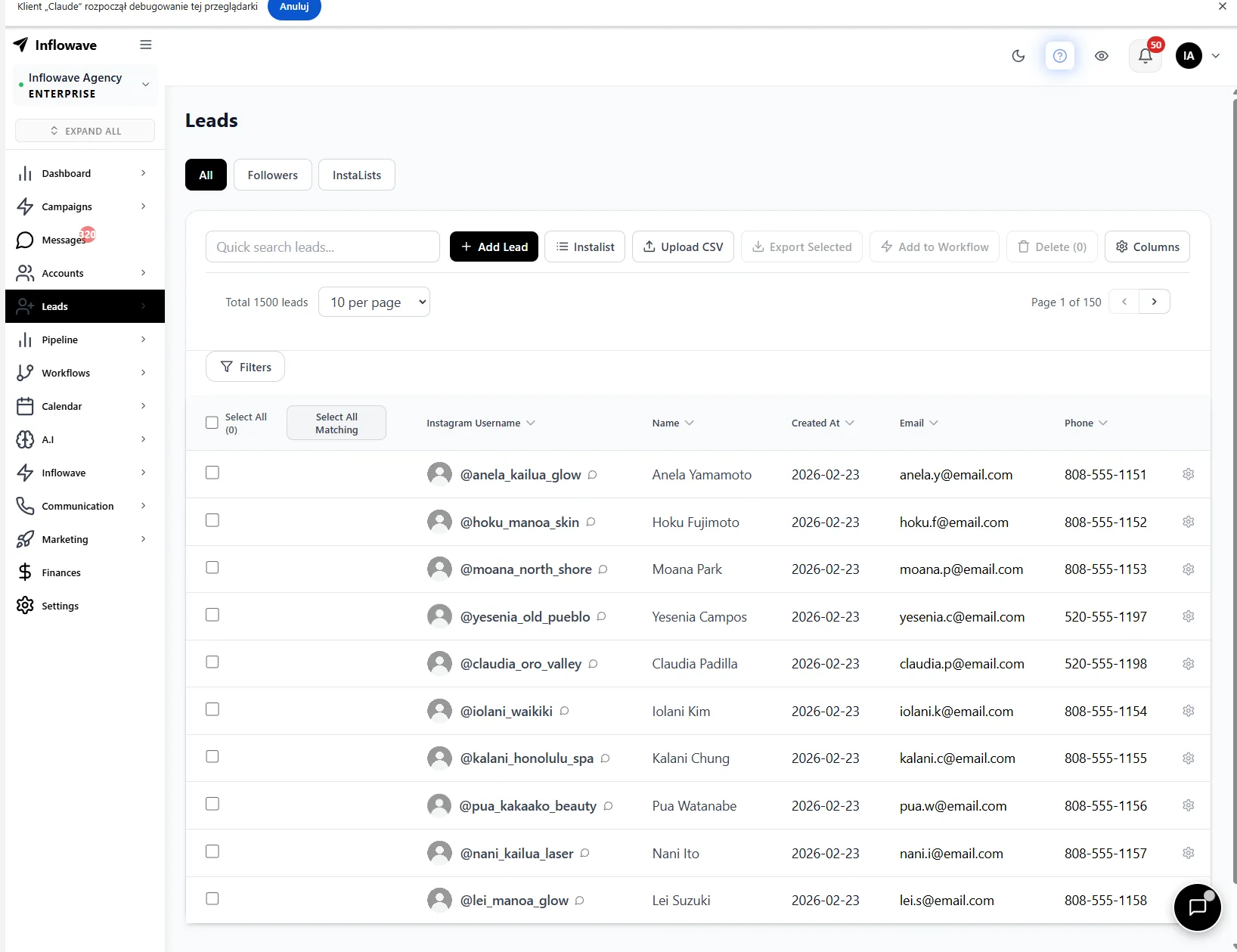
- Stores contacts. Every lead, prospect, and customer with their details in one database, not scattered across inboxes, phones, and spreadsheets.
- Tracks every interaction. Calls, emails, messages, meetings, and notes are logged against each contact, so anyone on the team can see the full history instantly.
- Manages the pipeline. Deals move through stages so you always know where every opportunity stands. If you are starting from zero, building a structured sales pipeline means agreeing those stages before you automate anything. (New to the concept? See what a sales pipeline is.)
- Automates the busywork. Follow-up reminders, sequenced emails, lead routing, and data entry that would otherwise eat your day.
The result is that nothing falls through the cracks, every team member has context, and you can see exactly what is working.
The 3 types of CRM
Most CRMs blend these, but understanding the categories helps you choose:
- Operational CRM. Automates and streamlines day-to-day sales, marketing, and service tasks - lead capture, follow-up sequences, pipeline management, ticketing. This is what most small businesses mean when they say "CRM."
- Analytical CRM. Analyzes the data the CRM collects - customer behavior, sales trends, forecasting - so you can make better decisions. More relevant as you grow.
- Collaborative CRM. Shares customer information across teams (sales, marketing, support) so everyone works from the same picture. Closely related is the social CRM, which pulls social and DM conversations into that shared view.
CRM examples
CRMs span a wide range:
- Enterprise generalists: Salesforce, Microsoft Dynamics, SAP - built for large, complex organizations.
- SMB-friendly all-in-ones: HubSpot, Zoho, Pipedrive - popular with small and mid-sized businesses.
- Industry and channel-specific CRMs: tools built for a particular workflow - real estate CRMs, or CRMs built for businesses that sell through Instagram and social DMs rather than email and phone. A channel-specific CRM often fits better than a generalist when most of your sales happen in one place. See our guides on the best Instagram CRM tools, the best CRM for marketing agencies, and why generic CRMs fail Instagram sellers.
The "best" CRM is not the biggest one - it is the one that matches where your customers actually are and how you actually sell.
A real-world ROI example
Cross-market averages are useful, but vendor-specific returns show how wide the range runs. In Nucleus Research's analysis, companies on Microsoft Dynamics 365 averaged a return of $16.97 for every $1 spent - far above the cross-market $3.10 - largely because tight integration with tools the team already used drove fast adoption.
That is the pattern worth internalizing: the return tracks adoption, and adoption tracks fit. As a representative example, an Instagram-first agency drowning in DMs typically does not need a heavier enterprise CRM - it needs one that captures leads where they already happen. That is the whole premise behind a channel-native Instagram CRM: the contact is created the moment someone replies to a story or comments a keyword, so reps adopt it because it removes work instead of adding a data-entry chore. (Curious how long payback takes? See our CRM ROI timeline.)
Who needs a CRM?
You probably need a CRM if any of these are true: you are losing track of leads or follow-ups, customer information lives in multiple disconnected places, you cannot quickly answer "what's the status of that deal," more than one person touches a customer, or you are spending hours on manual data entry and reminders. Solo operators with a handful of contacts can sometimes get by with a spreadsheet, but the moment volume or team size grows, a CRM pays for itself in deals saved. If you run several brands or client accounts, that tipping point comes even sooner - see managing multiple Instagram accounts at scale.
CRM vs spreadsheet: what is the difference?
A spreadsheet is a static list. A CRM is a living system. The key differences: a CRM automatically logs interactions (a spreadsheet relies on manual entry), a CRM enforces a pipeline and triggers follow-ups (a spreadsheet just sits there), a CRM connects to your email, calendar, and channels (a spreadsheet does not), and a CRM gives every team member a shared, real-time view. You can start a contact list in Excel, but it cannot remind you to follow up, send a sequence, or tell you which deals are stalling.
A CRM is also different from email marketing software, which the two are often confused: the CRM is your source of truth about customers and deals, while email marketing is one channel for reaching them. We break that distinction down in CRM vs marketing automation.
How to choose a CRM
Briefly, since this is a definitional guide: match the CRM to your channel (where do your customers actually talk to you?), your team size, and your real workflow - not to a feature checklist you will never use. A simple tool you actually adopt beats a powerful one your team abandons - which, given that 55% adoption-failure rate, is the whole game. For channel-specific guidance, see our comparisons of the best Instagram CRM tools and the best CRM for marketing agencies.
FAQ
What is a CRM in simple terms?
In simple terms, a CRM is a smart address book for your business. It stores everyone you do business with - every customer and potential customer - along with a complete history of your interactions with them: every call, email, message, and deal. Instead of that information living in scattered inboxes and spreadsheets, it is all in one place, so you never lose a lead and everyone on your team knows what is going on with each customer.
What does CRM stand for?
CRM stands for Customer Relationship Management. It refers to both the business strategy of managing relationships with customers and prospects, and the software that makes that strategy practical - a central system that organizes your contacts and every interaction with them so you can sell more effectively and keep customers happy.
What is an example of a CRM?
Well-known examples include Salesforce, HubSpot, Zoho, Microsoft Dynamics, and Pipedrive. There are also channel-specific CRMs built for particular workflows, such as real estate CRMs or CRMs designed for businesses that sell through Instagram and social DMs. The right example for you depends on your size and where you sell: a large enterprise might use Salesforce, while a small business selling through Instagram is often better served by a CRM built for that channel.
How much does a CRM cost, and is it worth it?
CRMs range from free tiers (HubSpot, Zoho) to enterprise contracts costing thousands per month. On the return side, independent analysis from Nucleus Research puts the cross-market average at around $3.10 returned per $1 spent, with well-adopted, well-fit deployments running far higher. The deciding factor is not price - it is adoption: a cheaper CRM your team uses every day beats an expensive one they ignore.
Is Excel a CRM? Can I build a CRM in Excel?
Excel is a spreadsheet, not a true CRM, though many businesses start with one. You can build a basic contact list in Excel, but it cannot automatically log interactions, trigger follow-ups, enforce a sales pipeline, or connect to your email and calendar - the things that make a CRM valuable. Excel works for a handful of contacts, but as soon as you have real volume or a team, a dedicated CRM saves the deals a spreadsheet quietly lets slip.
What are the main types of CRM?
There are three main types. Operational CRM automates day-to-day sales, marketing, and service tasks like follow-ups and pipeline management. Analytical CRM focuses on analyzing customer data to surface insights and forecasts. Collaborative CRM focuses on sharing customer information across teams so sales, marketing, and support all work from the same picture. Most modern CRMs combine elements of all three.
What are the top CRMs?
Among the most widely used are Salesforce and Microsoft Dynamics at the enterprise end, and HubSpot, Zoho, and Pipedrive for small and mid-sized businesses. Beyond these generalists, there are strong channel-specific CRMs built for how a particular business sells - for example, tools designed around Instagram and social DM sales rather than traditional email and phone. The best CRM for you is the one that fits your channel, team, and workflow, not simply the largest brand.
Do I really need a CRM, or is it overkill for a small business?
If you are a solo operator with a handful of contacts, a spreadsheet might be enough for now. But most small businesses outgrow that fast. The moment you are losing track of follow-ups, juggling customer info across multiple places, or adding team members who all need context, a CRM stops being overkill and starts paying for itself in saved deals and recovered time. Many CRMs have free or low-cost tiers built specifically for small businesses.
How is a CRM different from email marketing software?
A CRM manages relationships and the sales process - contacts, interactions, deals, and pipeline - while email marketing software focuses specifically on sending and automating emails to lists. They overlap and increasingly integrate, and some platforms do both, but their core jobs differ: the CRM is your source of truth about customers and deals, while email marketing is one channel for communicating with them. We cover the overlap in CRM vs marketing automation.
Sources
- Nucleus Research - CRM pays back $8.71 for every dollar spent and the revised CRM returns $3.10 per dollar spent
- Grand View Research - Customer Relationship Management Market Report
- Fortune Business Insights - CRM Market size and forecast
- Aberdeen Group - customer-retention research, aberdeen.com
Related reading
- Best Instagram CRM tools
- Best CRM for marketing agencies
- What is a sales pipeline?
- CRM vs marketing automation
- Why generic CRMs fail Instagram sellers
Explore More
- What Is a Sales Pipeline? Stages, Examples & How to Build One - What a sales pipeline is, the typical stages, how it differs from a sales funnel
- What Is Lead Scoring? How It Works, Models & Examples - What lead scoring is, how it works, rule-based vs AI/predictive scoring, what signals to score
- Feature: Sales Pipeline - Track every deal from first DM to closed
- Feature: Unified Inbox - Every DM, comment and message in one place
- Pricing - Plans built for Instagram businesses
