
Dolphin Anty is an antidetect browser: it keeps each online account in its own browser profile, with its own cookies, fingerprint settings and proxy, so many accounts on one platform can be worked from one computer without bleeding into each other. It handles account isolation and routine browser automation well. It does not replace the inbox, CRM and reporting work that an Instagram agency still has to do, which is where a tool like Inflowave picks up.
Managing several accounts on the same platform is not always easy. This is especially true for media buyers, affiliate marketers, SMM specialists, e-commerce teams, recruiters and agencies working with multiple client accounts.
A regular browser is fine for personal use: open a website, log in, save the password and move on. Multiaccounting is different. Separate accounts need separate sessions, cookies, browser settings and often different IP addresses. Switching between dozens of accounts in Chrome or Firefox quickly turns into a time-consuming task.
Antidetect browsers keep accounts in separate browser profiles. Dolphin Anty is one of the best known options in this category, where you can isolate and organize profiles, set their digital fingerprints, manage proxies, automate routine actions and work as a team.
This review looks at the Dolphin Anty features that matter most for multiaccounting, who each plan suits, where the browser stops being the right tool, and how an agency can combine it with an Instagram CRM.
The short answer
| Question | Answer |
|---|---|
| What is Dolphin Anty? | An antidetect browser for multiaccounting. Each account lives in a separate browser profile with its own cookies, fingerprint settings and proxy. |
| Who is it for? | Media buyers, affiliate marketers, SMM specialists, e-commerce teams, recruiters and agencies running many accounts. |
| What does it do best? | Keeps accounts separated and makes a long list of profiles manageable with folders, statuses, tags, notes and bulk actions. |
| Can teams share it? | Yes. It has roles including administrator, team leader and user, and profile access can be shared or transferred. |
| Is there a free plan? | Yes. The Free plan lists 5 profiles at $0 per month with no time limit. |
| What does it not do? | It is not an inbox, CRM or reporting tool. It does not give you one place for DMs, leads and follow-ups. |
| How does Inflowave fit? | Keep browser profiles for direct account access, and connect the same Instagram accounts to Inflowave through Meta's official API for the inbox, leads and automation. |
The rule that matters most: isolating accounts and managing the conversations inside them are two different jobs. Pick a tool for each, and do not expect a browser to do the work of a CRM.
What multiaccounting is, and why a normal browser struggles
Multiaccounting means operating more than one account on the same platform from the same person, team or machine. There are plenty of legitimate reasons: an agency runs a profile for each client, a media buyer manages several ad accounts, an e-commerce team has one store account per region, a recruiter works several candidate-sourcing profiles.
A normal browser makes this painful for three reasons:
- Shared sessions. Cookies and local storage live in one place, so logging in to a second account usually means logging out of the first or opening a private window.
- Shared settings. Every account looks like the same browser, on the same computer, with the same extensions.
- Shared network identity. Every account shares the same IP address unless you change it by hand.
An antidetect browser solves the organisation problem by giving each account a self-contained profile. That is useful for staying organised and for keeping a team from tripping over each other. It does not change the rules of the platform you are using, so read the platform's terms before you decide how many accounts to run and how to run them.
Managing multiple accounts in Dolphin Anty
The main workspace in Dolphin Anty is the Browser Profiles section. Every account gets its own profile, with its own cookies, local storage, digital fingerprint, extensions, bookmarks and proxy.
Creating a profile starts with two options:
- Quick Profile creates a profile with a consistent fingerprint in one click
- Create Profile opens the full settings menu for manual configuration

The second option is useful when an account requires a specific browser setup. Dolphin Anty offers settings for the operating system, User-Agent, screen resolution, Canvas, WebGL, Client Hints, fonts, WebRTC and other fingerprint parameters.

Once the number of profiles grows, organization becomes just as important as creation. Dolphin Anty includes several tools for keeping a large profile list manageable:
- Folders to group profiles by client, project, GEO or platform
- Statuses to mark profiles according to their current state
- Tags to filter the list
- Notes to store account-specific information directly in the profile list
- Search and filters to quickly find profiles matching specific criteria

This setup works equally well for a handful of accounts and a much larger portfolio. Instead of remembering which profile belongs to which account, you have a structured workspace.
A naming convention that saves time later
With dozens of profiles, the way you name and group them matters more than any single setting. A simple convention that works for an agency:
- Folder per client. One folder holds every profile for that client.
- Profile name with three parts. Client, platform and purpose, for example "ClientName, Instagram, main".
- Statuses with fixed meanings. Agree what each status means (for example ready, in use, needs attention) and write the list down, so two people never read the same status differently.
- Tags for filtering. Use tags for things you filter on often, such as the team member responsible or the month the account was set up.
- Notes for the unusual. Record anything that someone taking over the profile would need to know.
None of this is a Dolphin Anty requirement. It is a habit that makes any profile list searchable and handover-friendly.
Profile customization for different platforms
Dolphin Anty has profile types for common use cases, including Facebook, Google, TikTok and Crypto. Selecting a type adds a predefined set of bookmarks to the profile.

The browser also offers dedicated sections for Extensions, Bookmarks and Start Pages. Configure the required set once and reuse it when creating profiles of the same type.

For example, an agency managing Instagram accounts for several clients might keep the same analytics extensions and work-related bookmarks across all profiles while giving every account its own cookies, fingerprint settings and proxy. That saves repetitive setup work when creating new profiles.
Proxy management
Proxies are configured directly inside Dolphin Anty. A proxy can be added while creating a profile. Open the Proxy section, select New Proxy, enter the protocol, host, port, username and password, then run the connection check.

Dolphin Anty also has a dedicated Proxies section. Proxies added there stay in a central list and can be assigned to profiles later.

For larger proxy lists, Dolphin Anty supports bulk import in the required format. After that, several profiles can receive proxies through the bulk actions menu. The assignment pattern determines how the available proxies are distributed across the selected profiles.
Whichever proxy provider you use, a few habits keep a setup tidy:
- Run the connection check every time you add a proxy, before assigning it to a profile.
- Keep one proxy per profile unless you have a reason to share, so you can always tell which account is on which address.
- Record which proxy belongs to which client in the profile notes or your own sheet.
- Replace a failing proxy deliberately, and note the change, rather than letting a profile quietly fall back to another address.
For a broader look at the options, see our guide to Instagram automation proxies.
Team features
Multiaccounting often involves more than one person. An agency might have an account owner, team leads and assistants working with different groups of profiles.
Dolphin Anty supports several roles, including administrator, team leader and user. Profile access can be shared or transferred between team members, so each person gets access to the profiles relevant to their work.

This approach also keeps account credentials out of routine team communication. Instead of handing someone a login and password, the profile itself becomes the unit that gets assigned to a team member.
For larger teams, profile organization, user permissions and bulk actions become particularly useful.
A sensible way to hand work out in an agency:
| Role in your agency | What they need | Suggested access |
|---|---|---|
| Owner or operations lead | To see and reassign every profile | Administrator |
| Team lead for a group of clients | To manage the profiles for their clients | Team leader |
| Setter, assistant or freelancer | To work only the profiles for the task | User, with only the needed profiles shared |
When a person leaves, take their access back at once and check that no profile is left assigned to them. Because the profile is the unit you assign, offboarding is a matter of reassigning profiles rather than changing account passwords. The client offboarding checklist for agencies covers the wider routine.
Dolphin Anty and Inflowave: two parts of the Instagram workflow
Dolphin Anty handles account isolation. That covers an important part of multiaccounting, but it does not turn the browser into a complete Instagram management platform.
An agency with dozens of Instagram accounts still has to deal with incoming DMs, comments, leads, follow-ups, client conversations and reporting. Opening every Dolphin Anty profile just to check for new messages is hardly an efficient way to manage a large account portfolio.
Inflowave connects Instagram accounts through the official Instagram Graph API and puts conversations from connected accounts into a shared inbox. The platform combines Instagram messaging with CRM tools, lead management, automation, analytics and team features.
For example, an agency might keep each client's Instagram account in a separate Dolphin Anty profile and use the browser whenever direct access to the account is required. The same Instagram accounts connect to Inflowave through Meta's API, giving the team one place for DMs, comments, leads and automated follow-ups.
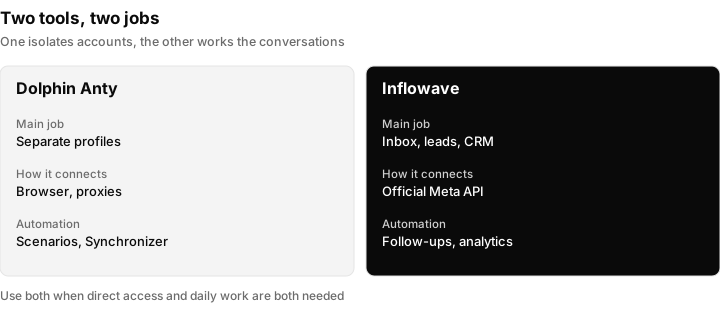
Two tools, two jobs. The browser separates accounts; the CRM works the conversations inside them.
To see the Inflowave side, look at the unified inbox and the guide to Instagram multi-account management.
Automation in Dolphin Anty
Dolphin Anty also includes several automation tools for repetitive browser tasks.
Scenarios let users build sequences of browser actions. A scenario might open a website, navigate through several pages, click specific elements, enter information or perform another predefined set of actions.

Synchronizer mirrors actions across several open profiles. For repetitive tasks that need to happen in multiple accounts, one action replaces the same sequence repeated profile by profile.

Cookie Robot handles cookie-related tasks and reduces manual work when preparing profiles.
Dolphin Anty also supports browser automation through tools such as Playwright, Puppeteer and Selenium, which opens the door to custom scripts for more advanced workflows.
Browser automation and platform rules are separate questions. A tool that can click for you is not the same as a platform allowing you to automate. Before automating anything on Instagram or another platform, check the current terms and automation policies at the source, and prefer the platform's official API where one exists for what you want to do.
Dolphin Anty pricing
Dolphin Anty offers several plans based mainly on the number of browser profiles and team requirements.
| Plan | Price | Profiles | Best for |
|---|---|---|---|
| Free | $0/month | 5 | Trying Dolphin Anty or managing a small number of accounts |
| Starter | From $10/month | 20 | Individual marketers and small projects |
| Base | $89/month | Up to 100 | Larger individual setups and small teams |
| Team | $159/month | Up to 300 | Agencies and teams |
| Enterprise | $299/month | Up to 1,000 | Large-scale multiaccounting |
The Free plan has no time limit, while paid plans increase the profile limit and add capabilities aimed at larger teams and more demanding workflows.
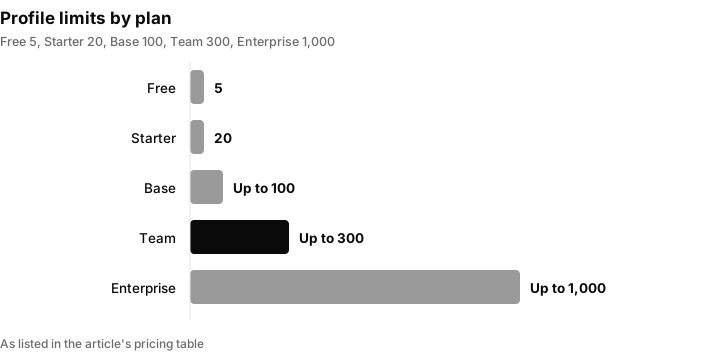
Profile limits by plan, as listed in the pricing table above. Check the vendor's own pricing page for current figures before you buy.
Prices and limits change, so confirm them on the vendor's site before budgeting. When you compare, work out the plan from the number of profiles you will need in twelve months, not today.
Which plan fits which agency
Use the profile count and the number of people as the two inputs:
| Your situation | Plan to look at first | Why |
|---|---|---|
| Testing the tool, up to 5 accounts | Free | No time limit, and enough to learn the workflow |
| A freelancer with up to 20 accounts | Starter | Fits an individual with a modest portfolio |
| A small team with up to 100 profiles | Base | Higher limit for larger setups |
| An agency with a growing roster, up to 300 profiles | Team | Listed as aimed at agencies and teams |
| A large operation, up to 1,000 profiles | Enterprise | The highest profile limit listed |
Remember that a profile is not the same as a client. A client with an Instagram account, a Facebook page and an ad account can be three profiles or one, depending on how you set things up, so count the profiles you will actually create.
A setup checklist for an agency
Run through this the first time you set up a client:
- Create a folder for the client.
- Create a profile for each account, using Quick Profile unless the account needs a specific setup.
- Assign a proxy and run the connection check.
- Name the profile using your convention and add a status and tags.
- Share the profile with the responsible team member only.
- Log in to the account and write anything unusual in the profile notes.
- Connect the account to your CRM through the official API so conversations do not depend on opening the browser.
- Add the client to your offboarding list, so access can be removed cleanly later.
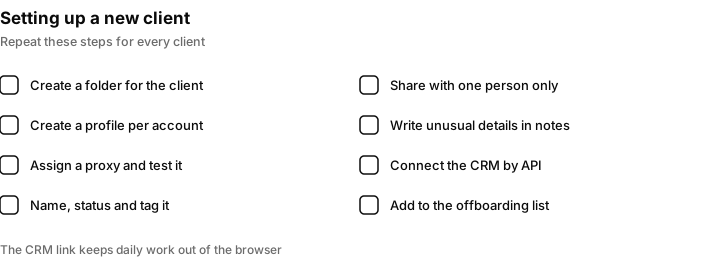
A repeatable setup for each new client. The CRM connection is what keeps daily work out of the browser.
Where the browser stops being the right tool
An antidetect browser shines at isolation and organisation. Some jobs are better done elsewhere:
- Replying to messages at scale. A shared inbox with assignment is faster than opening profiles one by one.
- Tracking leads and deals. A browser profile has no pipeline.
- Reporting to clients. Clients want results, not a list of profiles.
- Scheduled publishing. A scheduling tool that uses the official API does this without opening a browser.
- Anything an official API already supports. Prefer the API where it exists, because it is built for that job.
For a comparison of tools that fill these gaps, see the apps to manage multiple Instagram accounts guide and our GoLogin review, which covers another browser of this type.
Conclusion
Dolphin Anty focuses on the part of multiaccounting that ordinary browsers handle poorly: keeping accounts separated and making a large number of profiles manageable.
For Instagram agencies, though, browser access is only one part of the activity. Managing dozens of accounts also means handling DMs, leads, client conversations and follow-ups. Inflowave covers this side of the workflow.
That makes the combination particularly relevant for teams that have outgrown manual account switching and need both isolated browser profiles and centralized Instagram management.
Questions people ask
What is Dolphin Anty used for?
Dolphin Anty is used for multiaccounting: running many accounts on the same platform from one computer or team. Each account lives in its own browser profile with separate cookies, fingerprint settings and proxy, which keeps accounts organised and separated.
Is Dolphin Anty free?
There is a Free plan at $0 per month that lists 5 browser profiles and has no time limit. Paid plans raise the profile limit, starting from $10 per month for 20 profiles. Check the vendor's pricing page for current figures.
What is an antidetect browser?
It is a browser that lets you set up separate profiles, each with its own cookies, local storage, fingerprint settings and proxy, so accounts do not share one browser identity. It is used mainly to organise and separate many accounts on the same platform.
How many profiles can I have in Dolphin Anty?
It depends on the plan: 5 on Free, 20 on Starter, up to 100 on Base, up to 300 on Team and up to 1,000 on Enterprise, according to the pricing listed in this review. Plans can change, so confirm on the vendor's site.
Can a team share Dolphin Anty profiles?
Yes. It supports roles including administrator, team leader and user, and profile access can be shared or transferred between team members. That means you assign the profile instead of passing around a login and password.
Does Dolphin Anty manage Instagram messages and leads?
No. It isolates accounts, but it does not give you a shared inbox, lead pipeline or follow-up automation. An Instagram CRM such as Inflowave connects the accounts through Meta's official API to handle DMs, comments and leads in one place.
Can I automate tasks in Dolphin Anty?
Yes. It offers Scenarios for visual sequences of browser actions, a Synchronizer that mirrors actions across open profiles, Cookie Robot, and support for Playwright, Puppeteer and Selenium. Always check the platform's own automation rules before automating anything on it.
Is using several accounts on one platform allowed?
That depends on the platform and what you do with the accounts. Check the platform's current terms at the source, such as Meta's terms for Instagram, before you decide how to run multiple accounts. An agency managing client-owned accounts it has permission to manage is a different situation from running accounts that misrepresent who is behind them.
Do I still need Dolphin Anty if I use a CRM?
Not always. If your CRM connects each Instagram account through the official API, most daily work happens there. Some teams keep browser profiles for the occasions when they need direct access to an account, and for tasks the API does not cover.
How do I choose between Dolphin Anty and another antidetect browser?
Compare the profile limits, team roles, proxy handling, automation tools and price against your roster in twelve months, and test the free plan or trial where one exists. Our GoLogin review is a useful second opinion on a similar tool.
