
A practice does not need to automate its clinical record to save hours. The biggest wins are in the layer around it: reminders, rescheduling, intake forms, follow-ups and routing the enquiries that arrive on several channels. This guide shows how to automate that layer for a dental, chiropractic, therapy or med spa practice, what to do first, and where the compliance line sits.
A dental practice, a chiropractor, a therapist and a med spa have more in common with a marketing agency than they do with a hospital. All of them run on a small team, a full calendar and a front desk that spends most of the day chasing people who did not reply.
Most writing about healthcare software is aimed at health systems: departments, IT committees, multi-year rollouts. This is not that. This is for a practice where the person who books the appointments is also the person who chases the intake form.
The software conversation in healthcare is dominated by the clinical record. That matters, but it is not where the admin time goes. The time goes on reminders, rescheduling, intake forms, follow-ups and the handful of enquiries that arrive by phone, email, text and social message and then get lost between them.
This is a guide to automating that layer. It assumes you already have, or are choosing, a clinical system, and it deals with everything sitting around it.
The short answer
| Question | Answer |
|---|---|
| What should a practice automate first? | Appointment reminders: highest volume, lowest risk, clearest payback. |
| Does this replace our record system? | No. It sits alongside it and handles communication and coordination. |
| What is safe to put in an automated message? | Logistics: day, time, place, a link to log in. Keep clinical detail behind a login. |
| How long does the first workflow take? | An afternoon for reminders. Mapping your current process honestly takes longer. |
| What happens when a patient replies? | The reply must land in a real inbox with a person attached. |
| Is it worth it for a small practice? | Usually. A two-person front desk has no slack, and consistency is what automation provides. |
| Is it legal advice? | No. Privacy and consent rules vary, so get it reviewed. |
The rule that matters most: automate the logistics and keep clinical detail behind the login. Do that and most of the value is available with little of the exposure.
Where the record system ends
EHR implementation is the process of introducing electronic health records into a practice: selecting it, preparing and migrating the data, redesigning workflows around it, configuring the software, training staff, testing, and supporting it after launch.
The Office of the National Coordinator for Health Information Technology recommends understanding and redesigning existing workflows as part of that process, rather than dropping new software onto old habits. That advice is sound, and it points at something practices often discover late: a record system is a system of record. It is very good at holding clinical information and much less interested in whether anyone replied to the appointment confirmation you sent on Tuesday.
That gap is where front-desk hours disappear.
What actually eats the day
Ask a practice manager where the time goes and the answers are consistent:
- Repetitive administrative work that follows the same script every time
- Chasing confirmations and rescheduling no-shows
- Intake and consent forms that arrive incomplete
- Enquiries spread across phone, email, text and social messages
- Internal handoffs that rely on someone remembering to tell someone else
- Follow-ups after a visit that nobody owns
- Manual payment processing and managing uninsured patient subscriptions, which leading practices automate using dental membership plan software
None of these are clinical problems. They are communication and coordination problems, and they are the ones automation is genuinely good at. For group therapy clinics, effective behavioral health practice management also involves coordinating insurance verification, patient billing, and reimbursement workflows.
A useful exercise is to count them. Ask the front desk to tally, for one week, how often each of these happens. You are not looking for a precise figure, only for the two or three that dominate. Those are your first workflows.
Automate the workflow, not the record
The useful mental model is that automation sits alongside the clinical system rather than replacing any part of it. A workflow watches for an event, checks a condition, and takes an action.
A booking is made, so a confirmation goes out. Twenty-four hours before the appointment, a reminder goes out on the channel that patient actually uses. No response by a set point, so the slot is flagged to the front desk rather than quietly going empty. The visit ends, so a follow-up task is created and assigned to a named person.
None of that touches the clinical record. All of it removes a decision someone was otherwise making manually, forty times a day.
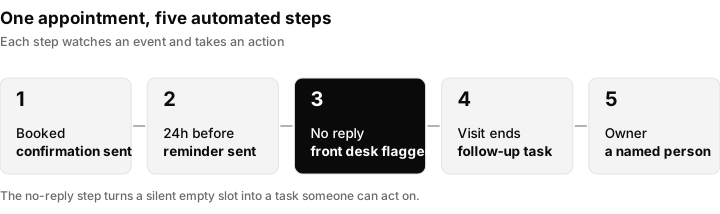
Each step watches an event and takes an action. The flag on a missing reply is what stops a quiet empty slot.
This layer is what we built Inflowave for. Triggers, conditions, CRM actions, messaging and appointment actions in one workflow, and every channel a practice takes enquiries on landing in a single inbox, so a text, an email and a social message about the same patient are not three separate conversations that three different people answer.
What we would automate first
If you are starting from nothing, the order matters. Take the workflow that is both high volume and low judgement:
- Appointment reminders. Highest volume, lowest risk, clearest payback. Start here.
- Confirmation and rescheduling. Give people a way to move an appointment without a phone call.
- Intake reminders. Chase the form before the visit, not at the desk on the day.
- Post-visit follow-up. Create the task automatically and assign it to a person, not a shared inbox.
- Enquiry routing. Get every channel into one place before you automate replies to any of them.
Leave anything requiring clinical judgement alone. The goal is to stop a human doing the work a rule can do, so the humans have time for the work only they can do.
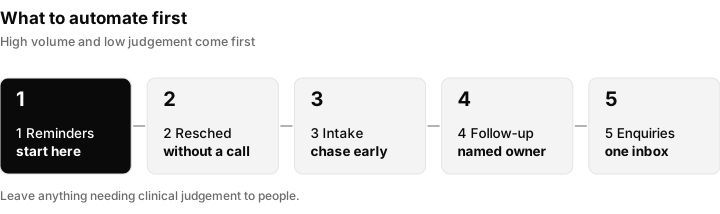
Start at step one and prove it works before moving on.
All five of those run as a single workflow in Inflowave rather than five separate tools, which is the main reason we start practices there instead of bolting a reminder service onto whatever is already in place. The fewer systems holding a piece of the process, the fewer places a patient can fall out of it.
Workflow examples you can copy
These are plain-language descriptions of workflows you can build in most automation tools. Adapt the timings to your practice.
| Workflow | Trigger | Condition | Action |
|---|---|---|---|
| Confirmation | A booking is made | None | Send a confirmation with day, time and place |
| Reminder | A set time before the appointment | The appointment is still booked | Send a reminder on the patient's preferred channel |
| No-reply flag | A set point before the appointment | No reply to the reminder | Create a task for the front desk to call |
| Intake chase | A set time before the visit | Intake form not completed | Send the form link with a short nudge |
| Post-visit follow-up | The visit is marked complete | None | Create a task assigned to a named person |
| Reschedule | A patient replies asking to move | None | Send a link to choose a new time, notify the front desk |
| New enquiry | A message arrives on any channel | Not an existing patient | Create a lead, assign an owner, send a first reply |
Sample reminder wording
Keep it short, and logistics only:
Hi [first name], this is a reminder of your appointment at [practice name] on [day] at [time]. Reply to confirm or to ask to move it, and a member of the team will get back to you.
Notice what it leaves out: the procedure, the reason for the visit, and anything about the person's health. That is deliberate, and the next section explains why.
Practice types: where each tends to start
Every practice has a different mix of problems. Use this as a starting point, then follow your own tally.
| Practice type | Common first workflow | Why it fits |
|---|---|---|
| Dental | Appointment reminders and routine recall nudges | Recurring visits where a missed reminder leaves a gap in the diary |
| Chiropractic | Reminders and rescheduling without a call | Frequent repeat appointments make rescheduling a daily load |
| Therapy and counselling | Neutral reminders and intake forms | Intake paperwork is heavy, and message wording needs extra care |
| Med spa | New enquiry routing and consultation booking | Enquiries often arrive from social and ads and need fast replies |
If you are choosing a marketing partner for a practice, see our lists of agencies for dentists and agencies for med spas, and use missed call text back to catch the enquiries that ring when nobody is free.
The compliance line
Any workflow touching health information needs evaluating for privacy, security, consent and whatever regime applies to you. In practice, that usually means being deliberate about what goes into a message.
A reminder that says "you have an appointment on Thursday at 2pm" is a scheduling message. A reminder that names a procedure is something else. The safe pattern is to automate the logistics and keep the clinical detail behind the login. Handle it that way and most of the value is available without the exposure.
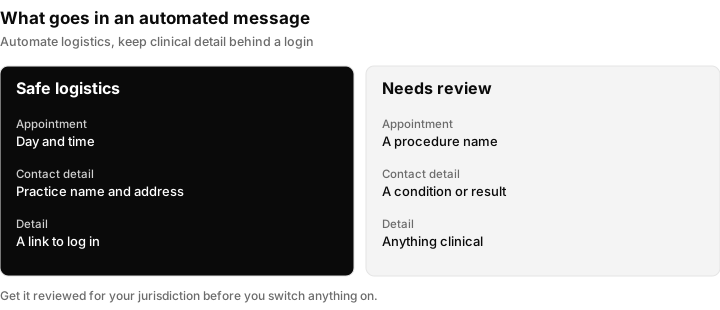
Automate the left column. Anything in the right column needs a proper review first.
This is not legal advice, and the specifics depend on your jurisdiction and your patient agreements. Get it reviewed before you switch anything on.
Questions to put to any vendor
- Where is patient information stored, and who can see it?
- What happens to message content after it is sent?
- Which agreements do you offer for handling health information in my country?
- Can I limit what goes into a message template?
- Can I delete a patient's data on request?
- How do consent and opt-out work for texts and emails?
For text messages in the United States, carriers also require business registration before you send, covered in our A2P 10DLC guide. If your vendor cannot answer the questions above plainly, treat that as an answer.
Doing the implementation properly
The practices that get value from this treat it as a workflow project rather than a software purchase.
Map what happens now. Follow one appointment end to end and write down every message, form and handoff. The bottlenecks are usually obvious once written down and invisible until then.
Ask the front desk. The people doing the work daily know which steps are pointless. They are also the people who will route around any system that makes their day worse.
Test before you switch it on. An automated reminder with the wrong merge field goes out to everyone at once. Send the first batch to yourselves.
Train on the whole flow. Staff need to understand the automation as well as the record system, particularly what happens when it does not fire. An AI image generator can also help create visual training materials for staff.
Review it quarterly. Practices change their hours, their staff and their services. Workflows written a year ago quietly stop matching reality.
The ONC guidance says much the same thing about record systems: plan, redesign the workflow, involve staff, train, and keep improving. It applies just as well to the layer around them.
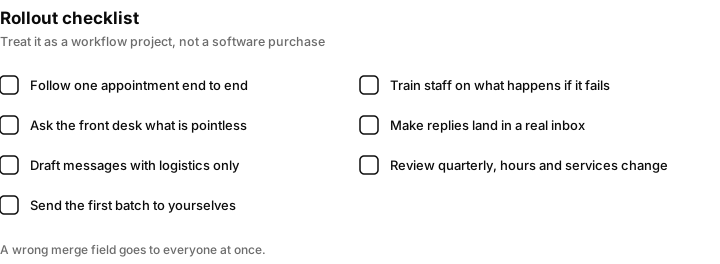
Seven steps that matter more than the choice of software.
What to measure
You do not need a big dashboard. Four numbers tell you whether the automation is earning its keep, and you can define them yourself.
| Measure | How to define it | What a change tells you |
|---|---|---|
| No-show rate | Appointments missed without notice divided by appointments booked | Whether reminders and rescheduling are working |
| Confirmation rate | Reminders answered divided by reminders sent | Whether the channel and the wording suit your patients |
| Time to first reply | Minutes from a new enquiry to the first answer | Whether routing is working |
| Forms complete before the visit | Intake forms done before arrival divided by appointments | Whether the intake chase works |
Take a baseline for a few weeks before you switch anything on, and compare after. If a number does not improve, change one thing at a time so you know which change helped.
When automation goes wrong
| Problem | Likely cause | Fix |
|---|---|---|
| Patients get a reminder with a blank name | A missing merge field or empty record | Test with sample records, add a fallback such as "there" |
| Reminders go out after the appointment was cancelled | The condition does not check that the appointment is still booked | Add the check, then re-test |
| Patients reply and nobody answers | Replies go to an unmonitored address | Route replies to a shared inbox with an assigned owner |
| The same patient gets two messages | Two workflows overlap | Review all workflows for the trigger and add a rule to stop duplicates |
| A message includes too much detail | The template was written casually | Rewrite as logistics only and have it reviewed |
| The workflow quietly stops matching reality | Hours or services changed | Review quarterly and after any change in the practice |
Is this worth it for a small practice?
Usually, yes, and the reason is not headcount. It is that a two-person front desk has no slack. When one person is on holiday, the follow-ups stop happening. Automation does not get sick, and it does not forget the Tuesday list. The smaller the team, the more the consistency is worth.
If you run several locations, the case is stronger again, because the alternative is each site inventing its own process.
Building this with Inflowave
Inflowave is built for this layer rather than for the clinical record. The workflow builder combines triggers, conditions and actions across channels, so the reminder, the no-reply flag and the follow-up task can sit in one workflow. Appointment booking lets people book from a link or a message, and reminders can go out on the channel the person actually uses. The unified inbox keeps a patient's texts, emails and social messages in one conversation, so a reply lands with a person rather than disappearing, and SMS and email sending sits in the same place.
Inflowave does not replace your clinical system and is not a compliance certification. Check your jurisdiction's rules and your agreements before you put any patient information through it. If you run this for clients rather than your own practice, our comparison of the CRMs built for agency workflows covers multi-client setups, and there is a ready-made appointment reminder template.
Questions people ask
Does this replace our record system?
No. It sits around the record system and handles the communication and coordination it was never designed for. Your clinical data stays where it is, and the automation deals with reminders, forms, follow-ups and enquiries.
Can we automate patient messages without a compliance problem?
Scheduling and logistics messages are usually straightforward. Anything naming a condition or procedure needs proper review first. Automate the logistics, keep the clinical detail behind a login, and get the wording checked for your jurisdiction before you switch it on.
How long does it take to set up?
The first workflow, appointment reminders, is an afternoon. Mapping your existing process honestly takes longer than building anything. Plan time for testing the first batch on your own team before patients receive anything.
What if a patient replies to an automated message?
That is the point at which most tools fall over. Replies should land in a real inbox with a person attached. If a reply disappears, you have built a broadcast system, not a workflow.
What is the first thing a dental practice should automate?
Appointment reminders, because they are high volume, low risk and quick to prove. Once those work, add rescheduling without a call and an intake form chase, then post-visit follow-up. Leave anything that needs clinical judgement with the team.
Which channel should reminders use?
The one the patient actually uses. Some respond to text, some to email and some to a social message. Start with the channel most of your patients already answer, and let the patient choose where they can. Check consent rules for each channel before you send.
Will automated reminders reduce no-shows?
They can, but the size of the effect depends on your practice, so measure it. Take your no-show rate for a few weeks before switching reminders on, then compare. Reminders that let people confirm or move the appointment with a reply tend to be more useful than reminders that only inform.
Can we send intake forms automatically?
Yes. Send the form link a set time before the visit, and nudge people who have not completed it. Keep the message to logistics, and make sure the form itself sits behind a secure login rather than in the body of the message.
Do we need staff training if everything is automated?
Yes. Staff need to understand what the automation does and, in particular, what happens when it does not fire. The people at the front desk are also the ones who know which steps are pointless, so involve them from the start.
How often should we review the workflows?
Quarterly, and after any change to hours, staff or services. Workflows written a year ago quietly stop matching reality, and a reminder with the wrong opening hours does more harm than none.
Is this useful for a marketing agency serving practices?
Yes. The same workflows can be built once and reused for each practice, with wording and timing adapted. Keep each practice in its own workspace so patient messages and records never mix between clients.
