
Why Your Link-in-Bio Is the Most Valuable Real Estate on Instagram
Instagram gives you exactly one clickable link in your bio. That link is the bridge between your Instagram audience and everything you sell, promote, or share off-platform - so the tool you put behind it directly decides how many followers turn into customers.
A plain URL wastes the opportunity. A link-in-bio tool creates a mini landing page with multiple links, turning one click into many possible actions: visit your site, book a call, download a lead magnet, buy a product, or join your email list. In 2026 the best link-in-bio tools go further - analytics, e-commerce, email capture, and native connections to your CRM and DM automation.
We tested 15 link-in-bio tools and ranked them by what actually matters for Instagram businesses and creators: cost, commissions, analytics, commerce, and how deeply they connect to the rest of your funnel. This guide covers both businesses/coaches who close in the DMs and creators monetizing an audience - with a "best for your situation" shortlist so you can skip to your answer.
Quick Picks: The Best Link-in-Bio Tool for Your Situation
- Best overall for Instagram businesses & coaches: Inflowave Links - free, zero commission, and the only one that connects link clicks to your DM CRM.
- Best value: Inflowave Links, included free on every Inflowave plan, Bio.link, or Solo.to.
- Best for selling digital products: Stan Store or Beacons.
- Best for selling 1:1 time / coaching calls: Inflowave Links or Pensight.
- Best-known brand / simplest link list: Linktree.
- Best for aesthetics: Milkshake or Bio.fm.
- Best for Shopify stores: Linkpop.
- Cheapest paid plan: Carrd ($19/year).
Prefer a head-to-head? See Linktree alternatives and Beacons vs Linktree.
Comparison Table: 15 Link-in-Bio Tools at a Glance
| Tool | Free Plan | Starting Paid | Commission | Analytics | CRM + DM | Commerce | Custom Domain |
|---|---|---|---|---|---|---|---|
| Inflowave Links | Yes | Free | 0% | Advanced | Yes (native) | Yes (Stripe) | Yes |
| Linktree | Yes | $5/mo | 0% (paid) | Basic | No | Yes | Paid only |
| Beacons | Yes | $10/mo | 9% free → 0% paid | Moderate | No | Yes | Paid only |
| Stan Store | No | $29/mo | 0% | Moderate | No | Yes | Yes |
| Milkshake | Yes | $7.99/mo | None | Basic | No | No | No |
| Carrd | Yes | $19/yr | None | External | No | Via embed | Yes |
| Bio.link | Yes | Low | None | Basic | No | No | Yes |
| Solo.to | Yes | Low | None | Basic | No | No | Paid |
| Linkpop | Yes | Free* | Shopify fees | Basic | No | Shopify | Via Shopify |
| Pensight | Yes | ~$25/mo | 5% free → lower | Moderate | No | Yes (sessions) | Paid |
| Bio.fm (Hopp) | Yes | ~$5/mo | None | Basic | No | Via Wix | Some regions |
| Lnk.Bio | Yes | $0.99/mo | None | Basic | No | Limited | Paid only |
| Shorby | No | $12/mo | None | Basic | No | No | Yes |
| Tap.bio | Yes | $5/mo | None | Basic | No | No | No |
| Later Link in Bio | No | $25/mo | None | Basic | No | Shopify | No |
*Linkpop is free for Shopify merchants.
The 15 Best Link-in-Bio Tools for 2026
1. Inflowave Links
Best for: Businesses, coaches, and creators who close sales in the DMs and want a free link-in-bio that connects to their CRM, DM automation, and analytics.
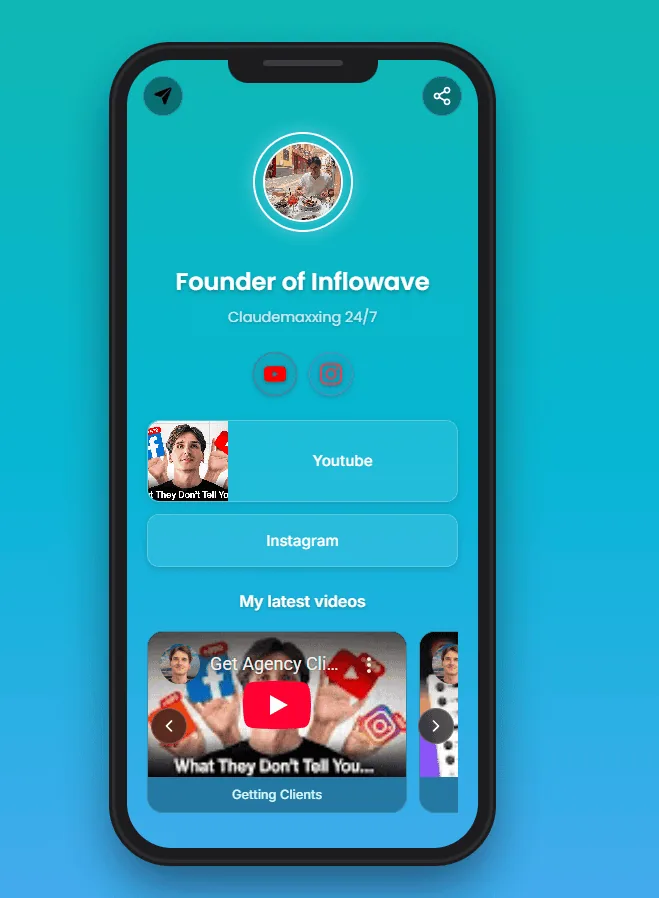
Inflowave Links is the link-in-bio module built into the Inflowave platform. It's free on every plan, takes zero commission on digital-product sales, and - uniquely - bridges a link click to your Instagram conversations. When someone taps "Book a Call," Inflowave knows it's the same person now sitting in your DM inbox, tags them by which link they came from, and can trigger an automatic follow-up.
Key features: completely free, 0% commission, 20+ themes, advanced analytics (clicks, views, sources, CTR), email/phone capture, Stripe product sales, native CRM records on every click, DM follow-up automation, custom domain, SEO-friendly pages.
Pricing: Free (included on all plans, see pricing).
Why it ranks #1: No other tool connects link clicks to DM automation and a CRM. That connection is what turns passive clicks into conversations, and conversations into sales. Create your free link page →
2. Linktree
Best for: Creators who want the most recognized link-in-bio brand and a simple, reliable link list.
The original (launched 2016), with the largest user base and deepest integration library (Spotify, Apple Music, YouTube, TikTok shop, every payment processor). Solid analytics and templates.
Pricing: Free; Starter $5/mo; Pro $9/mo; Premium $24/mo. Commission: 0% on paid plans.
Limitations: No CRM, no DM automation, email capture gated to higher tiers, and innovation has slowed. If you're monetizing hard, see our Linktree alternatives.
3. Beacons
Best for: Creators monetizing $0-$10K/mo who want tips, digital products, and email capture in one generous free plan.
Creator-focused, with a genuinely usable free tier, native tip jar, digital storefront, built-in email marketing, and clean mobile design.
Pricing: Free (9% fee); Pro $10/mo (5% fee); Business $30/mo (0% fee). Limitations: No CRM or DM automation; free-plan fees add up fast above ~$5K/mo. Full breakdown: Beacons vs Linktree.
4. Stan Store
Best for: Digital-product creators who want a frictionless mobile checkout in the bio link.
A "Shopify-lite" for creators selling templates, presets, guides, mini-courses, and coaching. Best-in-class 2-3 tap checkout, native product hosting, calendar booking, and a built-in affiliate program.
Pricing: Creator $29/mo; Pro $99/mo (14-day trial, no free plan). Commission: 0%. Limitations: You pay before you earn; no CRM or DM context.
5. Milkshake
Best for: Aesthetic, mobile-first IG creators (fashion, lifestyle, design, photography).
A mobile-only "magazine card" builder that turns your bio link into a swipeable, editorial experience that matches your grid.
Pricing: Free with branding; Pro $7.99/mo. Limitations: Mobile-only editing, no email capture, basic analytics, no commerce.
6. Carrd
Best for: Design-conscious creators who want a one-page site that looks like a custom website.
Technically a one-page website builder, but its design freedom (HTML/CSS, custom fonts, animations) and rock-bottom annual price make it a favorite for podcasters and writers.
Pricing: Free (1 site); Pro Lite $9/yr; Standard $19/yr; Plus $49/yr. Limitations: No native commerce or analytics (embed Stripe/Gumroad + Google Analytics); steeper setup.
7. Bio.link
Best for: Minimalist creators and newsletter writers who want a genuinely free, fast page with email capture.
From the Bio.fm team - clean, fast-loading, and free without nasty upsells. Native email capture on the free tier makes it a strong pick for newsletter growth.
Pricing: Free (paid tiers exist but most stay free). Limitations: Minimal by design - no tip jar, products, or CRM.
8. Solo.to
Best for: Creators who want better-than-default design without paying.
The middle ground between Bio.link's minimalism and Beacons' feature density - a strong template library, email capture, and a meaningfully full free tier.
Pricing: Free; low-cost paid tier. Limitations: Lower brand recognition, lighter integrations and analytics.
9. Linkpop (Shopify)
Best for: Creators with a Shopify store who want native product cards and mobile checkout in their bio.
Free from Shopify, with native product integration, clean design, and fast performance.
Pricing: Free for Shopify users. Limitations: Not useful without Shopify; limited beyond product display and basic links.
10. Pensight
Best for: Coaches and consultants who monetize primarily through 1:1 calls.
A booking-and-coaching platform that doubles as a "book me" bio page - excellent calendar logic for 1:1s, group sessions, courses, and memberships.
Pricing: Free (5% fee); paid from ~$25/mo. Limitations: Only makes sense if you sell 1:1 time; lower recognition. (For DM-driven coaching sales, Inflowave Links adds the conversation layer Pensight lacks.)
11. Bio.fm (Hopp by Wix)
Best for: Creators already in the Wix ecosystem who want deep design customization.
Formerly Hopp - beautiful, highly customizable templates that connect to Wix Stores.
Pricing: Free; paid ~$5-$25/mo. Limitations: Best value only inside Wix; weaker monetization and lower creator-culture recognition.
12. Lnk.Bio
Best for: Budget creators who want a simple page with a rare one-time-payment option.
Pricing: Free; Mini $0.99/mo; Unique $24.99 one-time; Pro $49.99 one-time. Limitations: Very basic - no commerce, email capture, or integrations.
13. Shorby
Best for: Marketers who want rich link previews and messenger links (WhatsApp, Telegram, Messenger).
Adds thumbnails, dynamic feeds (RSS/YouTube), A/B testing, and retargeting-pixel support.
Pricing: From $12/mo (no free plan). Limitations: No commerce, email capture, or CRM; niche use case.
14. Tap.bio
Best for: Visual creators who want card-based, story-style link pages on desktop and mobile.
Similar to Milkshake but with desktop support and multi-step "journey" cards.
Pricing: Free with branding; Plus $5/mo; Pro $12/mo. Limitations: Niche layout, lighter monetization.
15. Later Link in Bio
Best for: Existing Later users who want a shoppable visual grid matching their feed.
Turns your feed into a clickable grid; each post links to a URL, with Shopify product tagging.
Pricing: Included in Later plans (from $25/mo). Limitations: Only worth it if you already use Later; no email capture, CRM, or DM automation.
How to Choose by Type
Different goals need different tools. Filter to your shortlist before reading the full reviews.
Instagram business / agency closing in the DMs
Best fit: Inflowave Links. If your revenue flows through Instagram conversations, the bottleneck isn't clicks - it's turning DMs into booked calls. Inflowave Links is the only option that ties the bio-link click to a DM CRM so you can see which conversations become clients. Compare the full platform in Inflowave vs ManyChat.
Coach / consultant (1:1, group programs, courses)
Best fit: Inflowave Links or Pensight. Most of your revenue comes from people who DM after seeing your content. Inflowave Links connects the link to the conversation; Pensight is the alternative if calendar booking is your primary CTA.
Content creator monetizing an audience
Best fit: Beacons or Stan Store. A clean free plan that scales with tips and small products (Beacons), or a checkout built for selling digital products (Stan Store). You'll outgrow Linktree's monetization within months.
Course creator
Best fit: Stan Store or Beacons Pro. Native checkout with bundled hosting beats sending buyers to a separate Teachable link for the first $0-$50K/year.
Affiliate marketer
Best fit: Stan Store or a strong link-tracking tool. You need clean affiliate-link organization plus click tracking and revenue dashboards.
Newsletter writer (Substack, ConvertKit, Beehiiv)
Best fit: Bio.link or Beacons. Both embed an email-capture form directly on the page so visitors subscribe without clicking out - native opt-in forms convert far better than redirecting.
Podcaster
Best fit: Linkpop or Carrd. You mostly point listeners to Apple Podcasts, Spotify, and YouTube - Linkpop is free and Shopify-backed; Carrd gives more design freedom.
Aesthetic creator (fashion, lifestyle, design, photography)
Best fit: Milkshake or Bio.fm. When visual identity matters more than features, both dodge the generic "list of buttons" look that hurts conversions.
Free vs Paid: When to Upgrade
- $0-$1K/month in revenue - stay free. Inflowave Links, Bio.link, Solo.to, or Beacons free are all genuinely usable. Don't pay $29/mo before you're earning.
- $1K-$10K/month - pay for the right tool. Upgrade when transaction fees exceed a subscription (Beacons' 9% free-plan fee crosses that line around $5K/mo) or when you need CRM/attribution to scale sales conversations.
- $10K+/month - think stack, not tool. At scale, a bio link that feeds your CRM, analytics, and follow-up automation (Inflowave Links) is worth more than a prettier button list. The value is the data, not the page.
Don't Skip Analytics and Attribution
The bio link is where most businesses stop measuring - and it's exactly where the money is. At minimum, track clicks, views, and top links. Better: know which link led to an actual paying customer, not just a click.
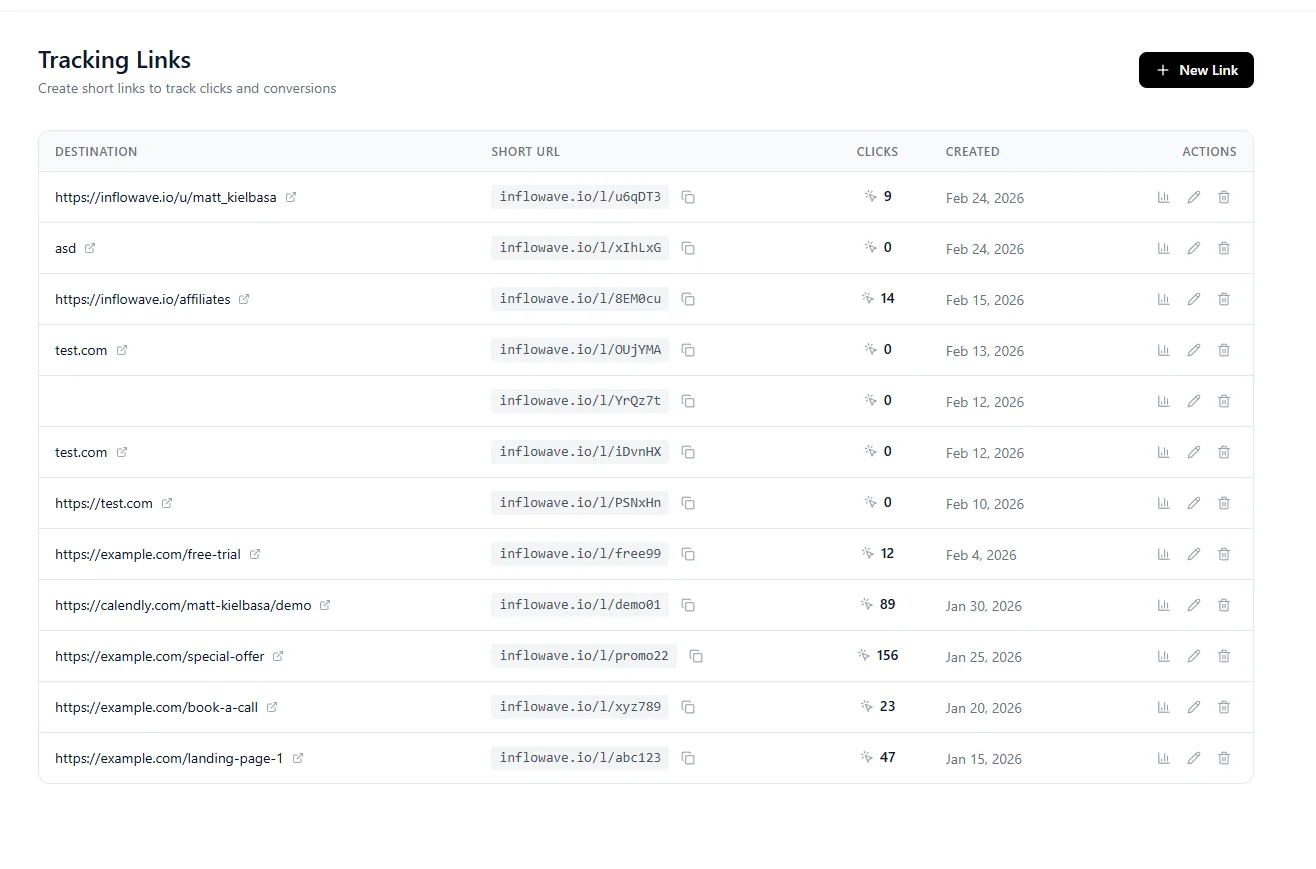
Inflowave's analytics and tracked links attribute every click back to a lead in your CRM, so you can tell that "book a call" produced three clients last month while "free guide" produced zero. Want to size up an account first? Try the free Instagram engagement rate calculator.
Related Comparisons
- 14 Best Linktree Alternatives in 2026 - free and paid, compared.
- Beacons vs Linktree (2026) - the honest head-to-head.
- Best Instagram CRM Tools - when the link is just the start of the funnel.
- Inflowave vs ManyChat - full CRM platform vs chatbot-only.
Frequently Asked Questions
What is the best free link-in-bio tool in 2026?
Inflowave Links is the most feature-rich free option - advanced analytics, zero-commission commerce, email capture, CRM records, and DM automation, all on the free tier. Bio.link and Solo.to are strong minimalist free picks, and Linktree's free plan is fine for a simple link list.
Does Linktree take a commission?
On paid plans Linktree takes 0%. Free-plan commerce is limited. For comparison, Beacons takes 9% on its free plan (0% on Business), while Inflowave Links takes 0% on every plan.
What link-in-bio is best for selling digital products?
Stan Store is purpose-built for it, with a 2-3 tap checkout and native product hosting. Beacons is the better free starting point, and Inflowave Links supports Stripe product sales with 0% commission plus CRM follow-ups.
What's the best link-in-bio for coaches and consultants?
Inflowave Links if your sales happen in the DMs - it connects the link click to the conversation and your CRM. Pensight is the alternative when calendar booking for 1:1 sessions is your main call to action.
What's the best link-in-bio for TikTok creators?
The same tools work across platforms - Beacons, Stan Store, and Inflowave Links all support TikTok. Inflowave Links additionally tracks IG, TikTok, and YouTube clicks in one dashboard, which matters if you post across all three.
Can I use one link-in-bio across Instagram, TikTok, and YouTube?
Yes. Every tool here gives you a single URL you can paste into any bio. If you want click analytics broken down by platform, choose a tool with multi-platform tracking like Inflowave Links.
What's the best link-in-bio for newsletter creators?
Bio.link or Beacons - both embed the email opt-in directly on the page so visitors subscribe without an extra click, which meaningfully lifts sign-up rates.
Can I use a custom domain with my link-in-bio?
Yes, with most paid tools (Inflowave Links, Linktree Pro, Carrd, Stan Store, Shorby). A custom domain replaces the default URL (e.g., linktr.ee/you) with your own (e.g., links.yourbrand.com), which looks more professional and builds your brand.
Do link-in-bio tools hurt SEO?
Most bio pages aren't built for SEO, but Inflowave Links and Carrd generate SEO-friendly pages that can appear in search. Either way, the bigger SEO win is attribution - knowing which links drive revenue.
How many links should I put on my page?
Keep it focused: 3-7 links. Too many cause decision paralysis. Put your single most important link (lead magnet, booking, or product) at the very top.
How do creators monetize their link-in-bio page?
Through tips/donations, digital products, affiliate links, gated/paid content, and 1:1 bookings. Beacons and Stan Store handle products and tips well; Pensight handles 1:1 sessions; Inflowave Links adds the CRM layer that turns interested clickers into tracked, followed-up leads.
The Bottom Line
Your link-in-bio is too important to leave on a basic tool that doesn't track results or connect to your business. The right pick depends on your model: Inflowave Links for the most integrated, sales-driven experience, Linktree for simple brand recognition, Stan Store or Beacons for product-led creators, and Milkshake or Bio.fm when aesthetics come first.
If you're serious about converting Instagram followers into customers, choose a tool that connects your link page to your CRM and DM automation. That connection is what turns clicks into conversations and conversations into sales.
Create your free Inflowave link page → - set it up in under 5 minutes.
Explore More
- 10 Best Stan Store Alternatives - Honest review of 10 Stan Store alternatives in 2026
- Beacons vs Linktree - Detailed Beacons.ai vs Linktree comparison - pricing, features, transaction fees, real reviews
- Feature: Link in Bio - One bio link, every destination tracked
- Feature: Trackable Links - Know which link drove the revenue
- Pricing - Plans built for Instagram businesses
\n## More on link in bio\n\n- Linktree alternatives - fourteen compared, free and paid.\n- Beacons vs Linktree - the two most common choices, side by side.\n- Milkshake vs Linktree - for creators who want a mini-site rather than a list.\n- Best link in bio tools for Instagram - the full landscape.\n- Inflowave Links - a bio link that passes the click through to a CRM instead of ending there.\n
