
You open WhatsApp Business on your phone, type in your business number, wait for the code, and get this instead:
WhatsApp is temporarily unavailable. Please try again in 1 hour.
So you wait an hour. Same message. You wait until tomorrow. Same message again.
That's because, for most businesses, the message is misleading. WhatsApp isn't down and you haven't been blocked. In most cases the number is already registered on the WhatsApp Business Platform (the "API" side that tools like Inflowave, GoHighLevel, Twilio or WATI use), and a number registered there first can't be added to the phone app. The timer resets every time you try.
This page explains how to tell which case you're in and what to do about each one. If you want the number on your phone and in Inflowave, there is a way to do that, but the order matters. That's covered in How to use the WhatsApp Business app and Inflowave on the same number.
The short answer
| What happened before you saw the message | What it means | What to do |
|---|---|---|
| The number was bought through, or connected to, a messaging platform (Inflowave, GoHighLevel, a WhatsApp API provider) | The number lives on the API. The app can't take it while it's there. | Keep using it through the platform, or take it off the API first (below). Waiting won't help. |
| You asked for the code many times in a row | Ordinary rate limit on code requests | Stop requesting codes. Wait the time shown, then try once. |
| You removed the number from the API a few minutes ago | Meta hasn't finished releasing it | Give it up to an hour, then try once. |
| None of the above | Usually an app or phone problem | Update the app, check the phone's date and time are automatic, try on Wi-Fi and mobile data. |
If you're not sure whether the first row applies, it usually does. The rest of this page assumes it does.
Why the app refuses a number that's on the API
WhatsApp has two ways to run a business number:
- The WhatsApp Business app, on one phone, typed by a person.
- The WhatsApp Business Platform (often just "the API"), where software sends and receives the messages: an inbox, a CRM, a chatbot, automations.
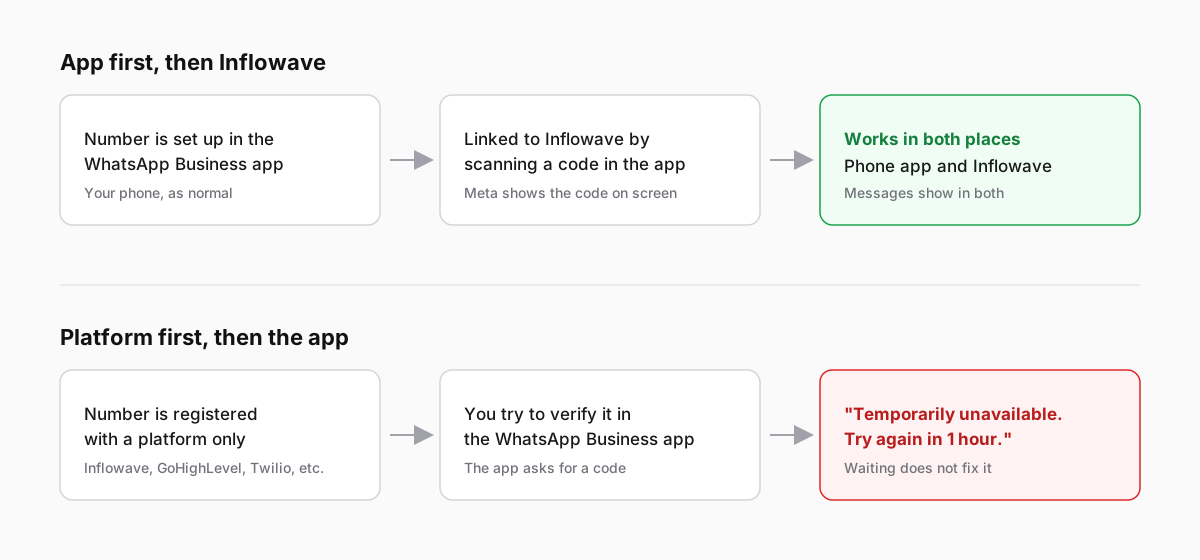
A number registered on the platform first belongs to the platform. When you try to verify it in the phone app, WhatsApp won't hand it over and shows the "temporarily unavailable" message. It doesn't tell you the real reason.
The other direction works. A number that is already in the WhatsApp Business app can be linked to a platform afterwards and keep working on the phone. Meta calls this coexistence. Your phone and your inbox then share the same number and the same chats.
So the question isn't "how do I get past the error". It's "do I want this number on my phone at all, and if so, can I start again in the right order?"
Numbers bought through Inflowave
When you buy a WhatsApp number inside Inflowave, we register it on the platform for you, so it works in Inflowave straight away with no phone and no SIM. That's the platform-first path from the diagram above. If you then try to open the same number in the WhatsApp Business app, you'll get this error.
What that means in practice:
- You don't need the phone app to use the number. Reply from the Inflowave inbox on the web or from the Inflowave mobile app. Every team member with access sees the same conversations.
- If you need the number on a phone too, talk to our support before you buy it, and we'll set it up for the app first. If you've already bought it, contact support and we'll go through moving it with you. You'll find support in the app, bottom left.
Option 1: keep it on the platform (most teams)
If the number was bought or connected for your team, the simplest answer is to leave it there. You get:
- one shared inbox, so nobody has to hold "the WhatsApp phone"
- message history saved with the contact, next to their other channels
- automations, templates and AI replies on the same number
Delete the half-finished registration in the WhatsApp Business app and carry on in Inflowave.
Option 2: you need it on the phone and in Inflowave
Do it in this order:
- Take the number off the API. If you connected it yourself, open WhatsApp Manager in Meta Business Suite, select the number and delete it. If a provider set it up, ask them to disconnect it. If it was bought through Inflowave, contact our support.
- Wait for Meta to release it. This can take up to an hour. Trying in the app during that time gives you the same error, so try once and then leave it.
- Register it in the WhatsApp Business app. Verify it with the code by text or call, as with any new number. Update the app first; Meta needs version 2.24.17 or later for the next step.
- Link it back to Inflowave using "I already have a WhatsApp number". You'll scan a code with the app, and from then on messages show in both places. The full walkthrough with screenshots is in How to use the WhatsApp Business app and Inflowave on the same number.
Two things to know before step 1:
- Messages sent through the API don't move into the phone app. Your history stays in Inflowave, but the phone starts empty.
- WhatsApp Manager may not let you delete a number straight away, for example if it sent paid messages recently. It shows when the number becomes eligible.
Option 3: you really did hit the rate limit
If the number has never been near a platform and you just tapped "resend code" several times, it is the ordinary limit on verification codes. What helps:
- Stop requesting codes. Each new request can push the wait further out.
- Wait the full time shown, then request one code.
- Make sure the phone's date and time are set automatically, and the app is up to date.
- If the code is meant to come by text and never arrives, choose "Call me" when the option appears.
Questions people ask
Will waiting 24 hours fix it?
Only if the cause was too many code requests. If the number is on the API, it will say the same thing next week.
Can I use one number on the app and the API at the same time?
Yes, if the number went into the WhatsApp Business app first and was linked to the platform afterwards. Meta calls this coexistence. A number that went onto the API first has to come off the API before it can do this.
Does deleting the number from the API lose my message history?
Messages already in Inflowave stay there. What you lose is the number's connection to the API until you link it again. The phone app won't show older API messages.
I'm on GoHighLevel, not Inflowave. Is this the same problem?
Yes. Any platform that sends WhatsApp through Meta's API registers the number the same way. Disconnect it there first.
Is my number banned?
A banned number gets a different message telling you the number is banned, with an option to request a review. "Temporarily unavailable, try again in 1 hour" isn't a ban.
Can Inflowave tell me which case I'm in?
Yes. In the client's Integrations, open WhatsApp, choose "I already have a WhatsApp number" and press Check next to your number. It tells you whether the number can be linked and what to do first.
