
The message is short and it always lands at the worst moment: "We restricted your ad account" or "Your ad account has been disabled". Campaigns stop, the client wants to know why, and the only button on the screen is a review request you may only get to use a few times. If the problem is a Page that won't show up, a failed payment or two-factor lockouts rather than a restriction, see our Meta Business Manager troubleshooting guide.
This guide covers how to work out what was actually restricted, the causes Meta acts on most often, and how to get the account back without making things worse. Most of the damage in these cases comes from what people do in the first hour, not from the original flag.
Step one: find out what was restricted
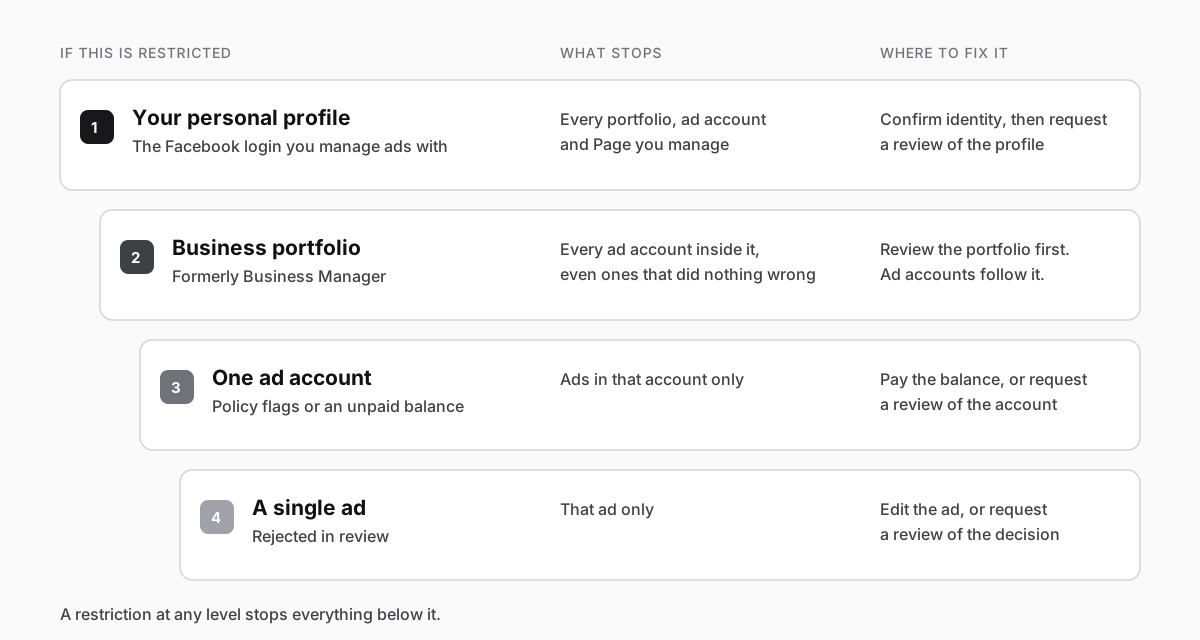
"My ad account is disabled" can mean four different things, and each has a different fix. Meta restricts at four levels, and a restriction at any level stops everything below it:
To see which one you're dealing with, open Meta Business Support Home on a computer, logged in with the profile that sees the problem. The old Account Quality link (business.facebook.com/accountquality) now takes you to the same place. The Recent account issues list shows every restricted asset you can manage, and the button next to each one tells you a lot:
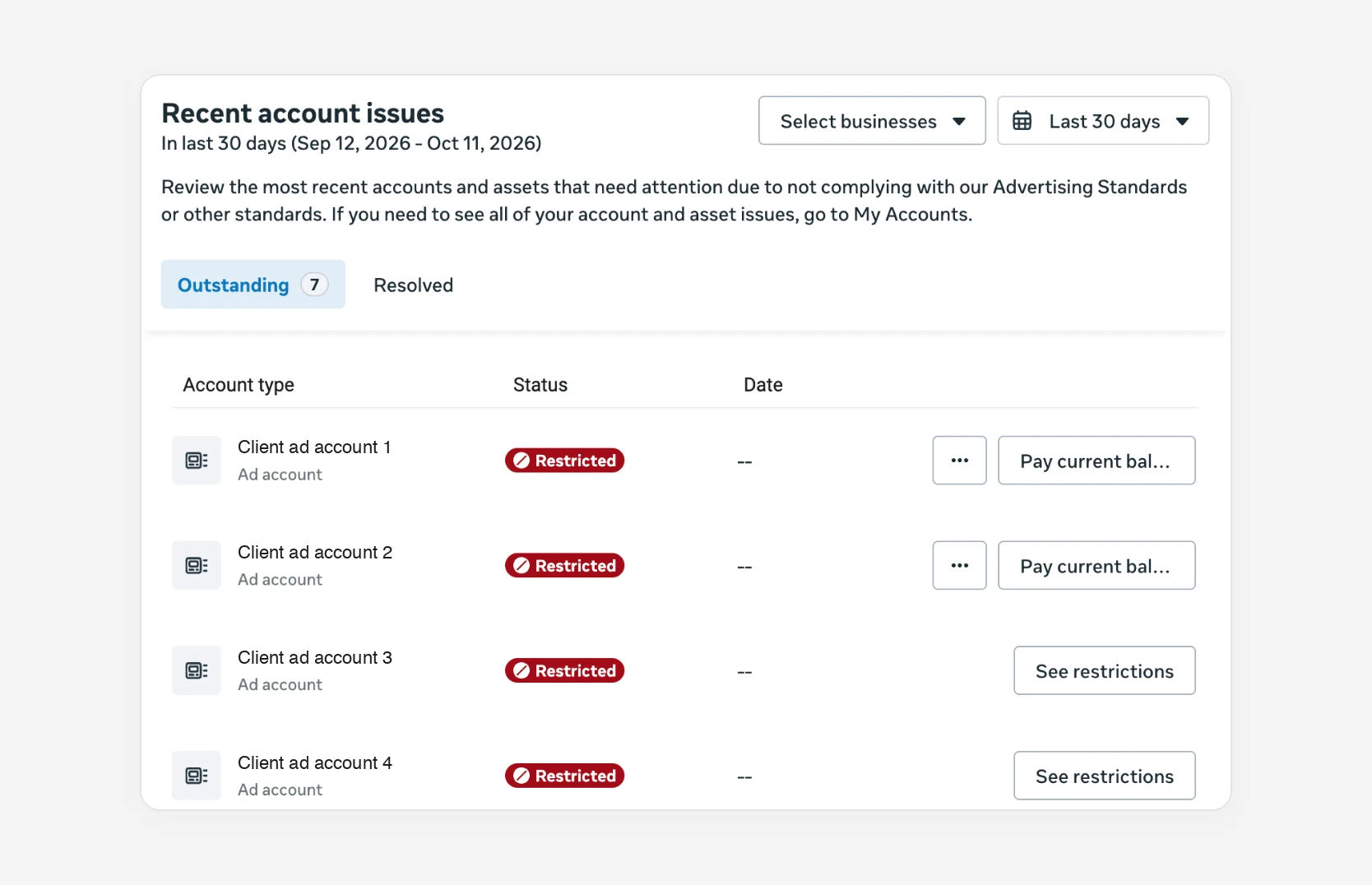
- Pay current balance: the account is blocked for money owed. An appeal won't fix this; paying will (see below).
- See restrictions: a policy decision. Open it to read the reason and whether a review is available.
Open the restriction and read Why this happened carefully. It's common to find that the ad account did nothing wrong and the restriction came from above:
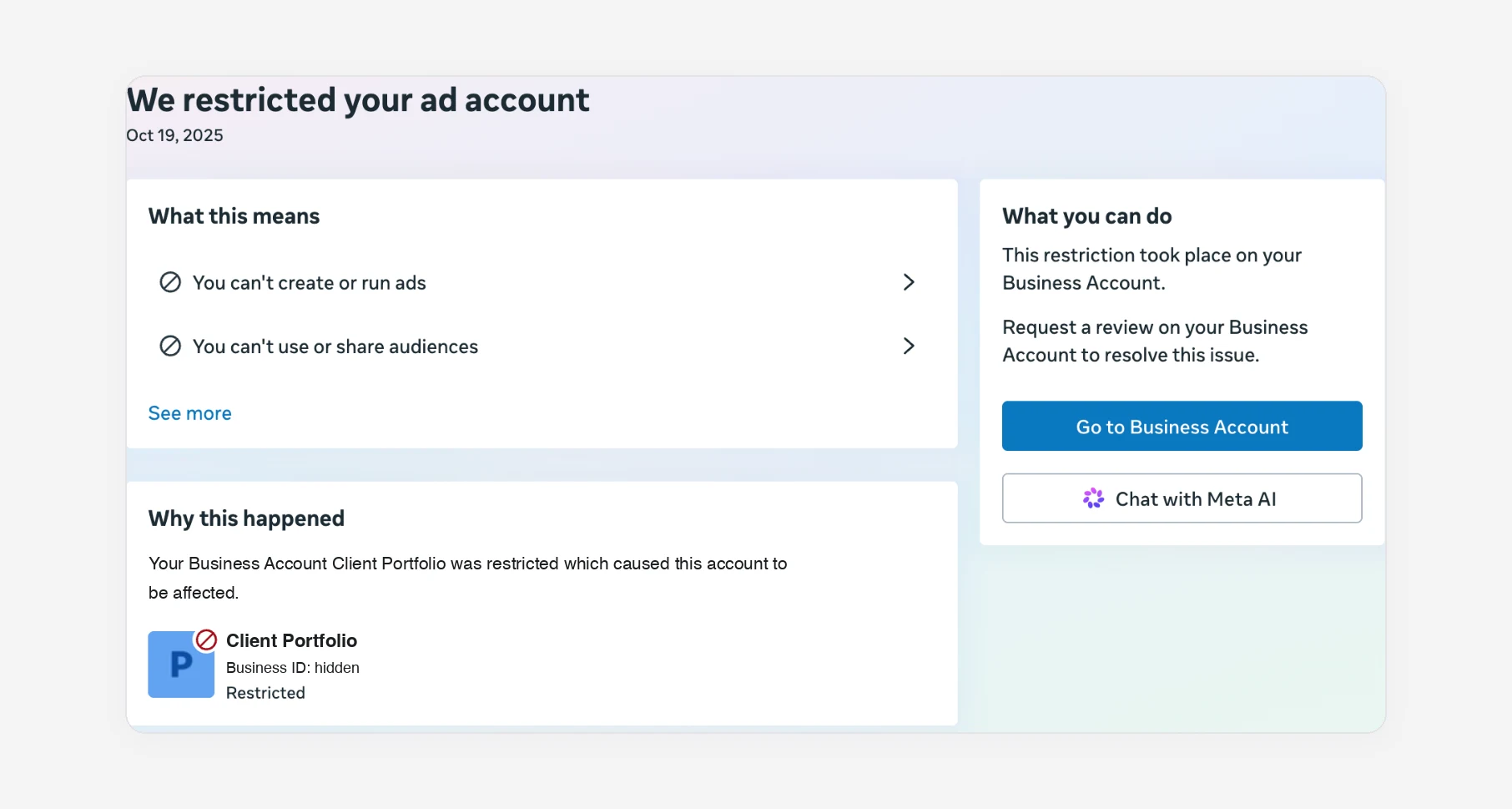
In that case, requesting a review of the ad account does nothing. Go to the portfolio (or the profile) and fix it there; the ad accounts come back with it.
Why Meta restricts ad accounts
Meta rarely gives more than a policy name. Across advertiser reports and Meta's own help articles, the same causes keep coming up:
| Cause | What it looks like | Typical trigger |
|---|---|---|
| Ad policy | Several ads rejected in a short time, then the account | Before and after images, income or health claims, landing pages that don't match the ad, sensitive personal attributes ("Are you struggling with debt?") |
| Unpaid balance | "Pay current balance" next to the account | A declined card, an expired card, a bank blocking a foreign charge |
| Suspicious activity | Restriction soon after a change, often on a new account | Spend jumping overnight, logins from new countries, admins added and removed, payment methods swapped repeatedly |
| Identity or business not verified | A prompt to confirm identity or verify the business | New admins, higher spending, regulated industries (finance, health, housing, employment) |
| Linked assets | "Your business account was restricted which caused this account to be affected" | The portfolio, a Page, or an admin's personal profile was restricted |
| Circumventing systems | Restriction after creating new accounts or reusing a banned card | Opening new ad accounts or portfolios to get around an earlier restriction |
Most policy restrictions start as rejected ads, so the cheapest fix is catching the copy before Meta does. If you build campaigns in Inflowave, the compliance check in the ad creator reads your copy against Meta's advertising policies and advertising law before you publish, flags the line that is likely to be rejected, and gives you a rewritten version you can apply in one click.
Two things make most cases worse. The first is appealing before fixing the cause, which spends one of your limited review requests on an account that still breaks the rule. The second is opening a new ad account to keep ads running. Meta treats that as circumventing its systems, which is a separate and more serious violation, and it can spread the restriction to everything connected to you.
How to get it back
If it's a payment block
- Open Billing and payments in Meta Business Suite and select the ad account.
- Pay the outstanding balance, using a different card if the first one keeps failing.
- Give it some time. Accounts blocked only for a failed payment usually come back once the balance clears, without a review.
- If the balance shows as paid and the account is still restricted, it has moved into a manual review. Request a review from Business Support Home.
Don't keep retrying a card that the bank is blocking. Repeated failures look like fraud and can turn a billing block into a policy one.
If it's a policy restriction
- Read the reason under "See restrictions". Note the policy it cites.
- Fix it first. Delete or edit the rejected ads, fix the landing page, remove anything close to the line. If the reason is identity, complete the verification before anything else.
- Request a review from the restriction page. Write plainly: what the account is for, what you changed, and why the ads comply. Meta limits how many times you can request a review and says that once a review is complete, the decision is final, so make the first one count.
- Wait without poking. Meta doesn't publish a fixed review time. Hours is common, weeks is not unusual. Don't create replacement accounts while you wait.
If you want help writing the review request, or the review button isn't there, the Meta AI assistant and the Contact support option in Business Support Home are the next step. Our guide on how to contact Meta Business Support covers which route reaches a person.
If the review button is gone
When there's no "Request review" option left, the decision is usually final for that asset. You can still:
- check that the restriction isn't on a parent asset (portfolio or profile) that does have a review option
- ask Meta support to confirm whether anything else can be done
- if it was a client's account, have the client check their own Business Support Home, because they may see options you can't
If you're an agency
Agencies get hit hardest because one person's profile touches many clients. Three habits limit the damage:
- Keep each client's ad account in the client's own business portfolio, and get access as a partner, rather than holding every client inside your agency portfolio. A restriction then stays with the client it belongs to. Our guides on Meta Business Manager agency access and getting access to a client's ad account walk through the setup.
- Have at least two admins on your portfolio, both with two-factor authentication on. If the only admin's profile is restricted, nobody can fix anything.
- Don't let a restricted client account near your other clients. No sharing audiences, pixels or Pages from it until it's resolved.
Find out before the client does
The worst version of this is learning about it from a client asking why their leads stopped. If the ad account is connected to Inflowave, the Ads screen shows Meta's own status next to every account: an unpaid balance, a restriction and its reason, or a review in progress, with a link straight to the right place in Meta. The agency owner also gets one notification and one email when an account is restricted, and the warning clears by itself when Meta lifts it.
Questions people ask
How long does a Meta ad account review take?
Meta doesn't commit to a time. Many reviews finish within a day or two, but some take weeks. Repeated review requests don't speed it up, and some advertisers report that they use up the limited number of requests.
Why was my ad account disabled for no reason?
There's almost always a reason, but it may not be on the ad account. Check the portfolio and your personal profile in Business Support Home. Also check billing: a failed payment from weeks ago can surface as a restriction.
Can I delete a disabled ad account and start a new one?
You can close an ad account, but opening a new one to keep advertising after a restriction counts as circumventing Meta's systems. It's one of the most common ways a fixable restriction becomes permanent.
Will paying for Meta Verified unlock my ad account?
No. Meta Verified can give you access to support, but it doesn't reverse a restriction or skip the review.
Someone from "Meta Business Support" messaged me with a link to fix it
That's almost certainly a scam. Real restriction notices live inside Business Support Home, Ads Manager and your Support Inbox, and Meta doesn't ask for passwords or codes in messages. More on spotting these in how to contact Meta Business Support.
