
A Google Ads audit is a structured review of an account that answers one question: is this money being spent on the right people, measured honestly, and pointed at something the business wants? You can run a useful first pass on almost any account in about 45 minutes if you check things in a fixed order: tracking first, then structure, budget, bidding, keywords, ads, targeting, landing pages, other campaign types, and account health. Start with tracking because every later answer depends on it.
This guide gives you that order with minutes per section, what each answer means, a scoring table, a findings template, the red flags that mean "stop and fix first", a one-page summary you can send a client, and wording to copy. It is written for agencies taking over accounts, but the order works for in-house marketers too.
The short answer
| Question | Answer |
|---|---|
| What is a Google Ads audit? | A review of conversion tracking, structure, budget, bidding, keywords, ads, targeting, landing pages and account health, ending in a ranked list of fixes. |
| How long does a first pass take? | About 45 minutes if you follow a fixed order. A deep audit of a large account takes longer. |
| What do I check first? | Conversion tracking. If the account is counting the wrong things, every other number is misleading. |
| When should I audit? | When you take over an account, when performance drops, before a client review, and on a regular schedule such as quarterly. |
| What access do I need? | Read-only access is enough to audit. Ask for it through a manager account so you never need the client's password. |
| How do I score it? | Mark each section OK, Needs work or Critical, then fix Critical items before anything else. |
| Can an audit tell me everything? | No. It shows what is configured and what happened, not why a customer did or did not buy. |
The rule that matters most: audit tracking before performance. A beautiful account that optimises for the wrong conversion is a faster way to waste money.
When to audit an account, and when not to
An audit is a reasoned snapshot, so run it at moments when a snapshot changes a decision.
| Moment | Why audit | What to focus on |
|---|---|---|
| New client or takeover | You inherit every previous mistake | Tracking, structure, wasted spend, account health |
| Performance drop | You need a cause before you change anything | What changed, tracking, budget, policy status, delivery |
| Before a client review | You want to present facts, not hunches | Results against the goal, wasted spend, the next three actions |
| Regular schedule, such as quarterly | Accounts drift as people add keywords and campaigns | Search terms, negatives, new campaigns, bidding |
| Before raising the budget | More money amplifies whatever is already wrong | Tracking, lost impression share, landing page |
Do not audit as a reaction to one bad day. One weak day is noise. If a campaign has stopped spending altogether, that is a delivery problem, so go to Google Ads not spending first and come back here once it is moving. For a wider look at underspend on any platform, see the ads not spending diagnosis guide.
Get access first, without asking for a password
You cannot audit what you cannot see. Ask the client to give your agency access rather than sharing a login. The cleanest setup is a manager account (often called an MCC) that links the client account, so you can switch between clients and the client keeps ownership. The full process is in Google Ads manager account (MCC), and the general approach to client permissions is in client account access for agencies.
For an audit, ask for read-only access first. You can always request more later. Also ask for these, because the account alone does not contain them:
- The goal in the client's words: calls, booked appointments, sales, or something else
- What counts as a good lead, and roughly what a customer is worth
- Access to the website analytics and tag manager, if there is one
- Any history: who ran the account before, what changed recently, and when
The 45-minute order at a glance
Work in this order. Each block has a time budget so a first pass stays a first pass.
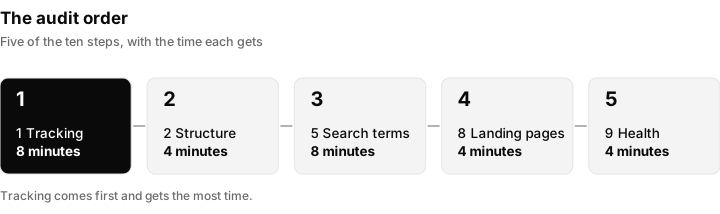
The audit runs in a fixed order. Tracking comes first because it decides whether any other number can be trusted.
| Step | Section | Minutes | The question it answers |
|---|---|---|---|
| 1 | Goals and conversion tracking | 8 | Is the account measuring what the business wants? |
| 2 | Account structure | 4 | Is the account organised so you can control it? |
| 3 | Budget and impression share | 4 | Is the budget the limit? |
| 4 | Bidding | 4 | Does the strategy match the data? |
| 5 | Keywords and search terms | 8 | Who is actually clicking? |
| 6 | Ads and assets | 4 | Are the ads eligible, relevant and complete? |
| 7 | Targeting | 3 | Are location, device, schedule and audiences sensible? |
| 8 | Landing pages and Quality Score | 4 | Does the click land somewhere that can convert it? |
| 9 | Other campaign types, billing, health | 4 | Is anything running that nobody is watching? |
| 10 | Notes and scoring | 2 | What are the top three fixes? |
The times add up to 41 minutes of looking and a few minutes of writing, which is why people call it a 45-minute review. A large account will take longer. Do not let that tempt you to skip step 1.
Step 1: Goals and conversion tracking (about 8 minutes)
Everything the account optimises, reports and bids on comes from conversion actions. If they are wrong, nothing else in the audit means much.
Open the list of conversion actions and check each of these:
- What is being counted? A form submission, a phone call, a purchase, a booked appointment. Also look for actions that should not count: page views, scroll depth or a click on a button that does not mean intent.
- Primary versus secondary. Google lets you mark each conversion action as primary or secondary. Primary actions are used for bidding and reporting in the conversions column, so only things the business truly wants should be primary. Check the current wording in the account, because labels change.
- Is it firing? Look at the status of each action. Check the current wording in Google Ads for the status labels, but the idea is simple: an action that is not recording, or has stopped recording, needs fixing.
- Are there duplicates? Two tags counting the same form submission will double every conversion and make cost per lead look half as bad as it is.
- Values. If you sell different things for different amounts, are values passed in? If every conversion has the same placeholder value, a value-based strategy has nothing to learn from.
- Enhanced conversions. This feature helps Google match conversions that would otherwise be lost. For lead businesses, see Google Ads enhanced conversions for leads.
- Offline outcomes. A form fill is not a customer. If the business closes deals by phone or in person, can sales results be sent back? The click identifier behind that is explained in what is a GCLID.
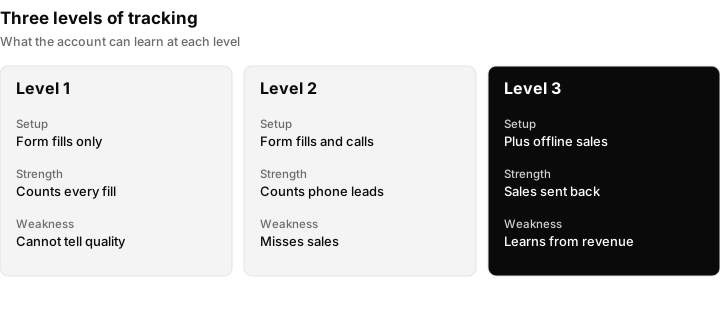
Three levels of tracking. Each step down the list means the account can learn from a better signal.
| What you see | What it means | What to do |
|---|---|---|
| No conversion actions at all | The account is flying blind | Critical: fix before anything else |
| Many actions, all primary, including page views | Bidding is optimising for noise | Make only real outcomes primary |
| Two tags counting one thing | Results are inflated | Remove the duplicate |
| Form fills only, but most revenue comes by phone | Real results are invisible | Add call tracking or offline import |
| Clean, one action per outcome, values set | Good foundation | Mark OK and move on |
A useful sanity check: compare conversions in the account to what the client says they received. If the account says 120 leads and the client received 40 enquiries, either tracking is broken or the leads are low quality. Both are findings.
Step 2: Account structure (about 4 minutes)
Structure decides how much control you have. You are not looking for a perfect design, only whether you can tell what is working.
- Campaign types. Search, Performance Max, Display, Video, Demand Gen, Shopping. List what is running and what each one is for. Check the current campaign types in Google Ads, because the list changes.
- Themes. Each campaign and ad group should be about one thing. A single ad group holding fifty unrelated keywords cannot have a relevant ad.
- Budgets. Look at how budget is shared. A shared budget across campaigns lets one campaign eat the money that another needed.
- Brand versus non-brand. Brand searches (people typing the business name) usually convert cheaply. Mixed with non-brand in one campaign, they hide how the real prospecting is doing.
- Naming. If you cannot tell what a campaign is from its name, reporting will be a guessing game for the next person too.
| Pattern | Why it matters | Fix |
|---|---|---|
| One campaign, everything inside | You cannot separate what works | Split by theme or by goal |
| Brand and non-brand together | Brand flatters the results | Separate them |
| Dozens of tiny campaigns | Each gets too little data | Consolidate where the goal is the same |
| Shared budget hiding a starved campaign | One campaign limits another | Give important campaigns their own budget |
Step 3: Budget and impression share (about 4 minutes)
Two questions: is the budget the limit, and is the account being outranked? Impression share columns answer both. They show the share of eligible impressions the campaign received, and how much was lost to budget and how much was lost to rank. Add them to the campaign view and check the current wording of the column names in Google Ads.
| Pattern | What it suggests | Next step |
|---|---|---|
| Large loss to budget, good results | The budget is too small for a campaign that works | Consider more budget, or reduce waste elsewhere |
| Large loss to rank | Bids, ad relevance or landing page are too weak to win auctions | Look at Quality Score components and bidding |
| Little lost to either, but low volume | Few people search for this | Widen the targeting or the keyword themes |
| Campaign hits the daily limit early every day | Ads stop showing for the rest of the day | Check the schedule and the budget against the goal |
Is $20 a day enough?
The honest answer is that it depends on three numbers: what a click costs, how many clicks become leads, and what a lead is worth. Here is an illustration, not a benchmark. Suppose clicks cost $2 on average and 5 in 100 clicks become a lead.
- $20 a day buys about 10 clicks.
- 10 clicks at 5 percent is about half a lead a day.
- Over 30 days that is $600, about 300 clicks and about 15 leads, so roughly $40 per lead.
If a lead is worth well over $40 to the business, the budget can work. If clicks cost $8 in that market, the same $20 buys 2 or 3 clicks a day and the account may never gather enough data to learn. Check your own click cost and conversion rate before judging a budget. The same arithmetic is what you put in front of the client.
Step 4: Bidding strategy against data volume (about 4 minutes)
Automated bidding strategies learn from conversions. They need enough of them. Check each campaign's strategy against how many conversions it actually records.
- A campaign with a conversion goal but almost no conversions may not give automation enough to learn from. Check the current guidance in Google Ads for how much data each strategy needs, because the wording changes.
- A target set too tight (a cost per conversion far below what the market allows) can stop a campaign from showing at all. Compare the target to the actual cost per conversion over the last 30 days.
- Manual bidding with no one managing it is often a leftover from an old setup.
- Changes during a learning period. Frequent edits to targets, budgets or conversions can keep a campaign unsettled. Look at the change history for how often the account is touched.
| Situation | Typical problem | What to do |
|---|---|---|
| Automated strategy, tiny conversion count | Not enough signal | Consider a simpler strategy or a conversion that happens more often |
| Strict target, little spend | Target is below what the market allows | Compare target to actual and relax it |
| Recent strategy change | Results are settling | Hold off judging until it has had time |
| Optimising for the wrong conversion action | Bids chase the wrong outcome | Return to step 1 |
If spend has dried up, the cause is often one of these. The diagnosis order for that is in Google Ads not spending.
Step 5: Keywords, match types and search terms (about 8 minutes)
This is where most wasted money lives, and the search terms report is the fastest way to find it. It lists the actual searches that triggered your ads.
- Open the search terms report for the last 30 days, sorted by cost. Look at the top spenders.
- Mark what is irrelevant. Job seekers, free-stuff hunters, students, competitors' customers, the wrong service, the wrong location.
- Compare to the keyword list. Are the real searches close to what you meant to buy? A big gap usually means match types are too loose.
- Check negatives. Is there a negative keyword list at all? Are obvious exclusions in place?
- Check match types. Broad match can be useful with good conversion data and a firm set of negatives, and costly without them. Look at what the account has and whether the searches it brings in fit.
- Keywords with spend but no results. Sort by cost and look at the ones with clicks and no conversions. They are candidates to pause, but only after tracking is confirmed healthy.
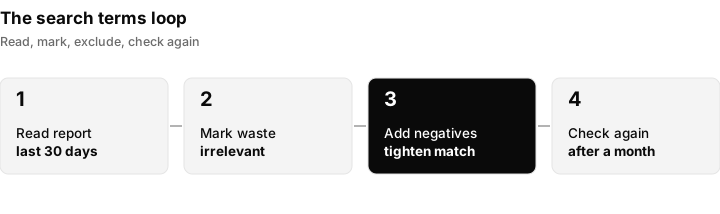
The search terms loop: read the report, add negatives, and check the same report again after a month.
| What you find | What it means | Action |
|---|---|---|
| Many irrelevant searches among the top spenders | Waste | Add negatives, tighten match types |
| Searches match the keywords closely | Targeting is tight | Look for growth elsewhere |
| High-spend keyword, no conversions, tracking healthy | Candidate for pausing | Check the landing page and intent before cutting |
| No negative keywords anywhere | Nobody has ever pruned | Start a list from the search terms report |
| Good searches the account barely shows for | Missed opportunity | Check lost impression share and bids |
Treat the findings with some care. Do not delete a keyword because it has no conversions this month if the account only gets a handful of conversions in total. Judge on enough data, and say in the report how much data you used.
Step 6: Ads and assets (about 4 minutes)
Check that ads are approved, relevant and complete.
- Status. Look for ads with a policy status issue. If something is disapproved or limited, see Google Ads account suspended for the wider account-level view, and read the policy message inside the account for the specific ad. Check the current policy wording at the source.
- Responsive search ads. Most search ads are built from several headlines and descriptions that Google combines. Check how many are filled in, whether they say different things and whether the ad strength rating (Google's own measure) is shown. Treat ad strength as a hint, not a goal in itself. An ad that rates well but says nothing specific will still underperform.
- Pinned text. Pinning can protect a legal line or brand name, but too much pinning stops the system testing combinations.
- Assets. Sitelinks, callouts, call buttons, location and structured snippets add space and information. Check the current asset types in Google Ads. Missing assets are a cheap fix.
- Relevance. Does the ad say what the keyword asked for, and does it match what the landing page says?
- Coverage. At least two different ads per ad group lets you compare messages.
| What you find | Meaning | Action |
|---|---|---|
| Disapproved or limited ads | Not showing, or showing less | Read the message, fix or appeal |
| Few headlines, all similar | Little for the system to test | Add distinct angles |
| No assets | Smaller, less useful ads | Add the main asset types |
| Ad promises something the page does not | Wasted clicks | Align the ad and the page |
Step 7: Targeting (about 3 minutes)
Targeting mistakes are quiet because the account still spends.
- Locations. Check the target areas and the location option. Google gives a choice between reaching people in your locations and people who show interest in them. For a business that serves one area, the wider option can bring clicks from people who will never visit. Check the current wording of these options in Ads Manager.
- Excluded locations. Are areas you do not serve excluded?
- Devices. Compare performance by device. If calls matter and the page is poor on mobile, say so.
- Schedule. Are ads running at times nobody can answer the phone? Compare the schedule to staff hours.
- Languages. Do the language settings match the audience and the ad text?
- Audiences. Are audiences used for observation or for narrowing? Narrowing a small campaign can cut reach to almost nothing.
Step 8: Landing pages and Quality Score (about 4 minutes)
A click is only worth what the page does with it. Open the actual page on a phone.
- Does it match the ad? The first screen should confirm the promise in the ad.
- Can someone act? A clear button or form near the top, a phone number that can be tapped, no maze.
- Speed and mobile. Load it on mobile data. A slow page loses people before they read a word.
- Trust. Real details, real business name, clear contact information.
- Tracking tags. Is the conversion tag on the confirmation step, and does the page keep the click identifier through redirects?
- Campaign links. If the account uses tagged URLs, check they are consistent. See UTM parameters.
Quality Score is a diagnostic shown at keyword level. It is built from three parts: expected click-through rate, ad relevance and landing page experience. Add those columns and look for the part marked below average. It is not a number to chase for its own sake, but a weak component tells you where the problem is.
| Weak component | Likely cause | Fix |
|---|---|---|
| Expected click-through rate | Ad is not compelling for that search | Rewrite the ad around the search |
| Ad relevance | Keyword and ad do not match | Tighter ad groups |
| Landing page experience | Page is slow, unclear or off-topic | Improve or change the page |
Step 9: Performance Max, other campaign types, billing and health (about 4 minutes)
Look at everything else running in the account, because it is easy to forget what you did not build.
- Performance Max. Check how many asset groups exist, whether they have a full set of assets and whether the final URL settings match what the client wants to promote. Review the options for expanding to other pages and for excluding brand terms. These features change, so check the current options in Google Ads before advising.
- Display and Video. Are they there on purpose? Display can eat budget with weak traffic if nobody reviews placements.
- Search partners and extra networks. Check the network settings on search campaigns and whether results justify them.
- Billing. Is the payment method valid and the account in good standing? Look at the account's billing summary and any messages.
- Account health. Look for warnings, policy notices or restrictions on the account. If there is a suspension or a restriction, go to Google Ads account suspended.
- Delivery. If a campaign shows a status that explains why it is not serving, use Google Ads not spending.
- Users and access. Who has access to the account? Remove old agency or staff users who no longer need it.
Step 10: Score it
Give every section one of three marks. Using words rather than colours keeps the report readable for anyone, including people who print in black and white.
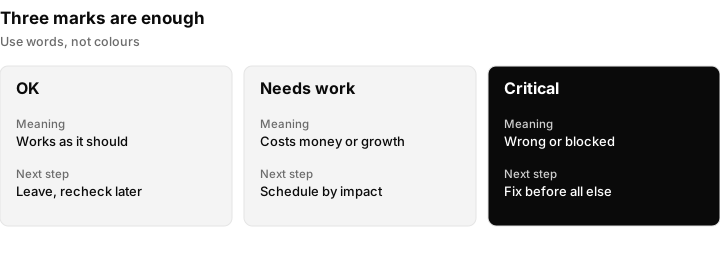
Three marks are enough. Critical means fix it before touching anything else.
| Mark | Meaning | What happens next |
|---|---|---|
| OK | Works as it should, nothing to change now | Leave alone, recheck next audit |
| Needs work | Costs money or limits growth, but the account still functions | Schedule the fix, in order of impact |
| Critical | The account is measuring the wrong thing, wasting a large share of spend, or blocked | Fix first, before other changes |
Then rank the findings by two things: how much money or opportunity is at stake, and how long the fix takes. The top three go into the summary.
Red flags that mean stop and fix first
Some findings should interrupt the audit, because carrying on makes everything you measure after them less reliable.
- No conversion tracking, or tracking that is clearly wrong. Nothing downstream can be trusted.
- Duplicate conversion counting. Reported results are inflated.
- Ads disapproved or the account restricted. Nothing may be serving. See Google Ads account suspended.
- Billing problem. A failed payment can stop the account at once.
- Landing page broken or missing. Every click is wasted.
- A location setting sending the budget to places the business does not serve.
- Nobody on the client side can say what a good lead is. Without a definition, you cannot judge any result.
Turn findings into actions
A list of problems is not an audit. A clear finding states what you saw, why it matters and what you will do. Use this template for each finding.
| Section | Finding | Evidence | Mark | Action | Effort | Expected effect |
|---|---|---|---|---|---|---|
| Tracking | Two tags count each form submission | Conversions are about double the client's count | Critical | Remove duplicate tag, confirm with a test submission | 30 minutes | Honest cost per lead |
| Search terms | Many irrelevant searches among the top spenders | Search terms report, last 30 days | Needs work | Add negatives and tighten match types | 1 hour | Less waste |
| Ads | One ad per ad group | Ad group view | Needs work | Write a second ad with a different angle | 1 hour | Something to compare |
Fill in the evidence column honestly. A finding with a screenshot or a date range is believed. A finding with an opinion is argued with.
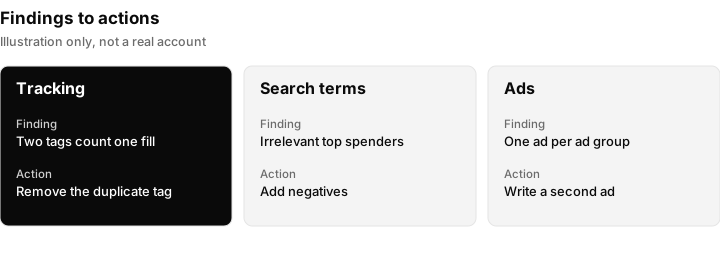
Every finding needs an action next to it. Illustration only: the findings shown are examples, not results from a real account.
The one-page client summary
Clients rarely read a forty-line spreadsheet. Give them one page.
- The goal as we understand it. One sentence in the client's words.
- What is working. Two or three real strengths. Starting with these keeps the conversation honest, not defensive.
- What we found. The top three findings, each with a plain explanation and what it costs or limits.
- What we will do, in order. Three actions with a rough time for each.
- What we need from you. For example access, a definition of a good lead, or sales results.
- What happens next. When you will report back.
Copy-paste wording you can adapt:
We reviewed your Google Ads account against your goal of booked appointments. Tracking is the first thing to fix, because the account currently counts two things for every form submission, so results look better than they are. Once that is corrected we will remove the search terms that are not relevant to your service and set up a second version of each ad so we can see which message works. We will report back on the first changes in two weeks. To do this we need a list of the enquiries that became customers, so we can tell Google which clicks were worth having.
When you must tell a client something unwelcome, keep to what you saw, what it means in money or opportunity, and what happens next. For example: "About a fifth of last month's spend went on searches that had nothing to do with your service. That is the first thing we will remove." Replace the fifth with your own number from the search terms report and do not quote a figure you did not measure.
What an audit cannot tell you
An audit is honest about its limits.
- Why people did not buy. The account shows clicks and conversions, not conversations, prices or follow-up speed.
- Lead quality, unless outcomes come back. A form fill that never turns into a sale looks the same as one that does, until sales data is connected.
- Competitors' actions. You can see where you lose auctions, not why a competitor is winning them.
- The future. A good account can still have a bad month, and a bad account can have a lucky one.
- Anything in a different channel. The audit covers one account. People also see the business on social media, in search results and on review sites.
If the problem sits after the click (slow replies, a weak sales call, a confusing quote), no amount of account tuning fixes it. Say so in the summary.
A sibling task: auditing Meta ads
Many agencies audit Meta (Facebook and Instagram) in the same sitting. The logic is similar: tracking first, then structure, budget, audiences, creative and landing pages. The differences are in the details. Meta is built around audiences and creative rather than search terms, so the equivalent of the search terms review is looking at placements, audiences and fatigue in ads. Google searchers are expressing intent; Meta audiences are interrupted while doing something else. For the Meta side, start with how to run Facebook ads, and for reports see Meta ads reporting for agencies.
What Inflowave does and does not do here
Be clear about the boundary. Inflowave does not audit Google Ads accounts, and it does not manage, change or report on Google Ads campaigns. It cannot make an ad spend and it does not fix delivery problems. Use Google Ads itself, and the steps above, for the audit.
What Inflowave does is help with the part an audit cannot see: what happened to the lead afterwards. It records leads, pipeline and revenue from any source, so a lead that came from a Google ad can be followed through to a sale. That gives you the evidence for step 1, because you can compare the leads Google claims with the leads and deals the business actually has. See pipeline for how deals are tracked, and tracking links for tracking where visitors came from.
For ads that Inflowave does connect to, such as Meta and TikTok, Facebook Ads and ad reporting shows spend alongside the leads and deals it produced. Reporting on TikTok is shallower than on Meta. Analytics reports spend against the same leads, pipeline and revenue as organic sources, with client reports filtered by client, connected account and date range. For agencies, agency reporting and client reporting software for agencies explain how to present that to clients.
In short, Inflowave helps you see what each client's leads and revenue look like in one place and notice problems sooner. It does not replace the audit.
A schedule for keeping accounts healthy
| How often | Check | Time |
|---|---|---|
| Weekly | Spend against budget, new disapprovals, search terms from the last week | 10 minutes |
| Monthly | Conversions against the client's own count, impression share, changes made | 20 minutes |
| Quarterly | The full audit in this guide | 45 minutes or more |
| After any big change | Tracking, delivery and budget | 15 minutes |
Questions people ask
What is a Google Ads audit?
A Google Ads audit is a structured review of an account. It checks conversion tracking, structure, budget, bidding, keywords, ads, targeting, landing pages and account health, and ends with a ranked list of fixes. The point is to decide what to change first, not to produce a long report.
How long does a Google Ads audit take?
A first pass on a small or medium account takes about 45 minutes if you follow a fixed order. A large account, or one with several campaign types, takes longer. Allow extra time to write the summary for the client.
What should I check first in a Google Ads audit?
Check conversion tracking first. If the account counts the wrong things, or counts the right things twice, every other number is misleading. Only after tracking is sound should you move on to structure, budget and the rest.
Is $20 a day good for Google Ads?
It depends on what a click costs, how many clicks become leads and what a lead is worth. As an illustration, if clicks cost $2 and 5 in 100 become leads, $20 a day gives about half a lead a day, around $40 per lead. In a market with much dearer clicks, $20 buys only a few clicks. Use your own numbers.
Is there a certification for Google Ads?
Yes. Google offers certifications through its Skillshop learning platform. The list of current certifications and their requirements changes, so check Skillshop for what is available now. A certificate shows you know the platform, but it does not replace running audits on real accounts.
How often should I audit a Google Ads account?
Audit when you take over an account, when performance drops, before a client review, and on a regular schedule such as quarterly. Between full audits, a short weekly and monthly check catches most problems early.
Do I need the client's login to audit their account?
No, and you should avoid asking for it. Ask for access through a manager account, with read-only access for the audit. This keeps the client in control and gives you a clean record of who can see what.
What is the most common problem found in audits?
There is no reliable single answer, so check your own accounts. Common findings include tracking that counts the wrong things, loose match types with few negatives, location settings that reach the wrong people, and campaigns running that nobody remembers setting up.
What is a good Google Ads audit checklist?
A good one is ordered, with a mark for each section, evidence for each finding and an action next to it. The ten steps in this guide are a working checklist: tracking, structure, budget, bidding, search terms, ads, targeting, landing pages, other campaigns and health, then scoring.
Why are my Google Ads disapproved?
Ads are disapproved when they break a policy, and the account tells you which one. Open the ad's status, read the stated reason, fix the ad or the page, and request a review if that option is offered. Check the current policy wording on Google's help pages, because rules and wording change.
Can the same audit work for Facebook ads?
The logic carries over: tracking first, then structure, budget, audiences, creative and landing pages. The details differ, because Meta has no search terms report and relies on audiences and creative. Use a separate checklist for it, and start with how to run Facebook ads.
What if the audit finds nothing wrong but results are still poor?
Look after the click. Slow follow-up, a weak sales conversation, pricing or a page that confuses people can all sink an account that looks healthy. Compare leads in the account with real deals in the business, and talk to whoever answers the enquiries.
