
When Google Ads is not spending, the cause is almost always one of a short list: the account cannot be billed, the ads are not approved, the budget or bids are too low or too tight, the targeting leaves almost nobody to show to, or the campaign has nothing to learn from yet. Check them in that order, because the first checks take two minutes and fix the most cases. Do not touch bids or budgets until you know the account is billing and the ads are approved.
This guide gives you the 12 checks in the order to run them, what each answer means, a decision table for when you are in a hurry, the extra checks for each campaign type, and the wording to send a client who asks why nothing is happening.
The short answer
| Question | Answer |
|---|---|
| What most often stops Google Ads spending? | Billing or approval. A payment that cannot be charged, a suspended account or disapproved ads stop delivery completely, and they are the fastest to check. |
| How do I know the ads are really not showing? | Read the campaign status and the Impressions column for a date range that starts after your last change. Zero impressions is a delivery problem. Impressions without clicks is a relevance problem. |
| Is low spend always a fault? | No. A daily budget is a ceiling, not a target. A small local campaign with few searches can spend less than its budget and be working as designed. |
| What does "Eligible (Limited)" mean? | The campaign can run, but something restricts it, such as a low budget, narrow targeting or a policy issue. Click the status to read the reason Google gives. |
| Will a bigger budget fix it? | Only if the status says the campaign is limited by budget. If ads are unapproved, unpaid or matching no searches, more budget changes nothing. |
| Can Inflowave make my ads spend? | No. Inflowave does not manage or report Google Ads. It records the leads, pipeline and revenue they produce. |
The rule that saves the most time: work from the account outward. Billing, approval, budget, bids, targeting, keywords, quality, campaign type, tracking. Changing three things at once leaves you unable to tell which one worked.
Check 1: confirm the ads are really not delivering
Many "not spending" reports turn out to be something else: spend is normal but lower than the client hoped, ads show but nobody clicks, or the date range hides the real picture. Read these columns together: Status (Eligible, Eligible (Limited), Paused, Under review, Disapproved, limited by budget, or a billing message; check the current wording in Google Ads), Impressions, Clicks and Cost.
| What you see | What it means | Go to |
|---|---|---|
| No impressions, status paused, under review or disapproved | The ads are not allowed to run | Checks 2 and 3 |
| No impressions, status eligible | Eligible but never matching or never winning | Checks 4 to 8 |
| Impressions, no clicks | Ads show but are not chosen | Check 8 |
| Clicks, spend below budget | Working, limited by demand or bids | Checks 4 to 6 |
| Clicks and spend, no leads | Delivery is fine, the issue is conversions | Check 11 |
The date range trap. Today's figures are incomplete and cost data can lag. If you changed something yesterday, "last 30 days" blends old and new behaviour. Set the range to start after your last change and compare it with the same number of days before. Also check that no filter hides paused campaigns, and that you are in the right client account. If every campaign stopped on the same day, suspect billing or a policy action on the account.
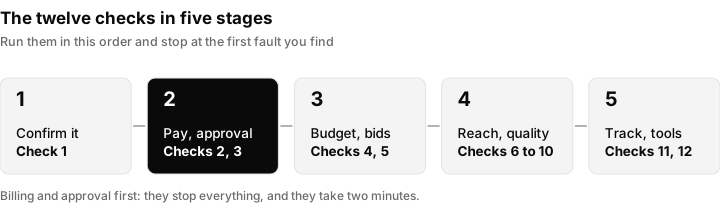
The twelve checks in the order to run them. The first two stages fix most cases and cost nothing to check.
Check 2: billing, payment and account status
A failed payment stops delivery for the whole account. In the billing and payments area, look for an expired or declined payment method, an overdue payment message, a payment method that needs verifying again, an unpaid invoice or a reached credit limit on invoiced accounts, and the wrong payments profile attached after someone created a new one. Check the current wording in the billing section, because page names change. Ads may take a while to return after a payment clears, so wait for impressions before you say they are back. On manual payment accounts, delivery stops when the balance runs out.
Suspension is different from a payment problem. A message that the account is suspended or a policy was violated is a policy action. Read what to do when your Google Ads account is suspended before requesting a review, because a rushed appeal can make things worse.
Who owns billing? The most common sudden stop in agency work is a client who pays Google directly, whose card expired, while the agency has no billing access. Agree at onboarding who pays, who receives the notifications and who has billing access. The manager account guide covers access levels.
Check 3: ad and asset approval
An ad that is not approved does not show. Open the ads view in each ad group, and the assets view for Performance Max, and read the approval status. The usual states are under review, approved, approved (limited) and disapproved. Google's help pages describe expected review times, so check the current wording instead of relying on a number from an article.
For a disapproved ad, click the status and read the policy reason. Common categories are misleading claims, restricted content, a landing page that does not work or does not match the ad, trademark use and editorial problems. Fix the reason, then edit and resubmit. Appeal only if you believe the decision was wrong. Do not copy a rejected ad into a new campaign to get around a decision, since that can escalate to an account-level problem.
Open the exact final URL in a private window on a phone. A page that is down, slow or redirecting somewhere unexpected causes disapprovals and hurts quality. Also look one level below the campaign: it can contain approved ads and still show nothing if its only approved ad sits in a paused ad group.
Check 4: budget, shared budgets and how daily budgets behave
A daily budget is the average you are willing to spend per day. Google documents that on one day it may spend more than the daily budget, up to about twice the amount, while keeping the monthly total within the daily budget multiplied by the average number of days in a month. Check the current explanation in Google's help. For a client, a day over budget is normal, and a day well under is not automatically a fault.
A budget can hold back delivery quietly:
- Limited by budget. The status or a recommendation says the campaign would show more with a higher budget. This is the one case where raising the budget is the right fix.
- Shared budgets. Several campaigns draw on one pool, so one can take most of it. Open the budget and see which campaigns share it.
- Budget too low for the click price. If one click costs close to the daily budget, the campaign gets only a handful of auctions a day.
A budget is a ceiling, not a target. If the campaign is not limited by budget, raising it will not make it spend. It can only spend more when there are more auctions it is eligible and willing to bid in.
Check 5: bids and the bidding strategy
If budget is not the limit, ask whether the campaign is willing to pay enough to win auctions. This is where most "eligible but silent" campaigns end up.
| Bidding setup | How it can stop spend | What to check |
|---|---|---|
| Manual CPC | Bids below what auctions cost, so the ad rarely wins | Compare the bid with the average cost per click |
| Target CPA | The target cost per lead is below what the market allows, so the system declines most auctions | Compare the target with the cost per lead you have really achieved |
| Target ROAS | The required return is higher than the campaign can deliver | Compare with the real return, then lower it in steps |
| Maximise conversions or value | Little or no conversion data to learn from | See Check 11 |
| Maximise clicks with a bid limit | The cap is below the market price | Raise or remove the cap |
A tight target is a very common silent killer. The system is trying to hit your number, and if the number is impossible it gets there by not bidding.
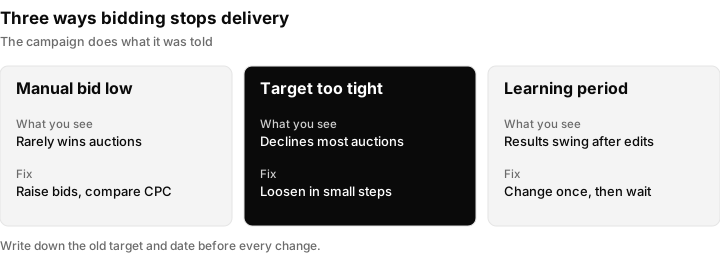
Three ways bidding stops delivery. In each case the campaign is doing what it was told, and the setting is what needs to change.
The learning period. After you create a campaign or make a significant change to its budget, bidding strategy or targets, automated bidding recalibrates and results can swing. Check Google's current guidance on what counts as significant and how long to wait.
To change a target safely: write down the current value and the date, loosen it by a small step, wait for the learning period, then compare the same number of days before and after. If spend still does not move, go back to the other checks instead of loosening further.
Check 6: targeting that is too narrow
An ad cannot spend if almost nobody is eligible to see it. Look for stacking, where several narrow settings combine to leave a tiny audience.
| Setting | How it can be too narrow |
|---|---|
| Locations | A small radius or a single postcode with few searches. Also check whether you target people in the location or people interested in it. |
| Location exclusions | An exclusion that removes more than intended. |
| Ad schedule | Ads only on certain hours or days. |
| Devices | A large negative adjustment, or a device removed. |
| Audiences | Targeting mode on a small list instead of observation mode. Check the current labels. |
Widen one setting at a time and note the date. If widening the location brings impressions, the market was too small. That is a finding to report to the client, not a fault to hide.
Check 7: keywords, match types and search terms
For Search campaigns, no matching keyword means no auction.
- Very low search volume. Older versions of Google Ads used a "Low search volume" status for keywords. Google has replaced it with other statuses, so check the current wording. The meaning is unchanged: too few searches.
- Match types that are too tight. Exact match triggers only on close variants. A few exact phrases give few impressions.
- Negative keywords that block everything. Read the negative lists attached to the campaign, including shared lists, for words that also appear in your own keywords. One common word added by mistake can silence a campaign.
Read the search terms report. If it is empty, the keywords are not matching. If it is full of irrelevant terms, the match types are too loose and spend is going to the wrong people.
Illustration, not a result: a plumber targeting one town with only one long exact match phrase gets almost no impressions despite a healthy budget, because few people search that exact wording locally. Adding phrase match versions and reading the search terms report for a week shows the real demand.
Check 8: ad quality, ad rank and ad strength
If the campaign is eligible, bidding sensibly and matching searches but still gets little, the ads may be losing on quality. Ad rank depends on your bid, the quality of the ad and landing page, the expected effect of assets and the context of the search. Check Google's own description of ad rank for the current wording.
- Ad strength in a responsive search ad is guidance, not a guarantee. A better rating does not promise more impressions.
- Landing page: does it match the ad, load fast on a phone and make the next step obvious?
- Lost impression share, where the column is available, shows whether you lose to budget or to rank. Lost to rank means better ads and pages, not a bigger budget.
Check 9: campaign type specifics
| Campaign type | Specific reasons it may not spend |
|---|---|
| Search | Keyword and match limits, negatives, narrow targeting, disapprovals, low bids. Checks 3 to 8. |
| Performance Max | Asset groups with disapproved or missing assets, conversion goals with no data, tight targets, final URL expansion and exclusions limiting where traffic can go. Check Google's current Performance Max guidance. |
| Shopping | Product feed problems, and for Display or Demand Gen, rejected assets and narrow audiences. Items disapproved in the merchant account will not show, and the feed may not be syncing. |
For Performance Max, check that each asset group has every asset type it needs and that none are disapproved. A new campaign with a strict target and no conversion history is the classic slow starter.
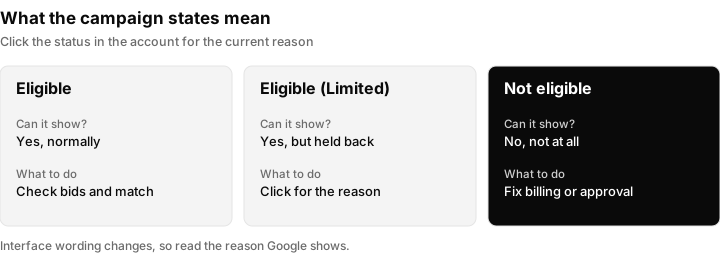
How to read the main campaign states. Wording in the interface changes, so click the status in the account to see the current reason.
Check 10: a new account or a new campaign
Slow spend at the start is often normal. New ads are in review and cannot deliver until approved. Automated bidding is still learning. Some accounts are asked to verify identity or business details before ads run, so check the current wording in the account and Google's help. A quiet season can also mean few searches. Confirm approval and billing, then give the campaign a review period you chose in advance. Changing something every day resets the learning.
Check 11: conversion tracking and goals
A campaign can deliver impressions and still behave badly if it has nothing to optimise toward. Bidding that aims for conversions needs conversion data, and without it the system may hold back.
- Which conversion actions are in the campaign's goals, and does any of them never fire?
- Does the tag fire when you test it with the real page and form?
- Are the right actions set as primary for bidding? Check the current wording.
Two things make lead tracking much stronger. Capture the click ID so a lead can be matched to its ad click: see what a GCLID is. Then send lead details back so Google can match more conversions: see enhanced conversions for leads. Tagging links with UTM parameters helps you follow traffic in your own records. Fixing tracking is a spend fix as well as a reporting fix.
Check 12: the built-in diagnostics
- Ad Preview and Diagnosis. Enter a search term, location and device, and the tool tells you whether the ad would show and, if not, why. Use it instead of searching for your own ad on Google. Check the current name and location in Google Ads.
- Recommendations tab. It can flag budget limits, disapprovals or missing assets, but some suggestions raise spend, so investigate before accepting.
- Change history. If spend stopped on a certain day, look at what changed in the days before. A colleague, a client or an automated rule altering a target, budget or location is a frequent culprit.
- Notifications. Google emails about payment, policy and approval. Make sure a real person reads them.
Is there a problem with Google Ads today? Outages that affect every advertiser are rare. Check Google's own status page, and see whether your other accounts behave normally. If only one account is affected, the cause is in that account.
The decision table: symptom to likely cause
| Symptom | Most likely cause | First action |
|---|---|---|
| Everything stopped on one day | Billing or account status | Check payments and notifications |
| One ad group is silent | Disapproved ad or keywords too narrow | Check approval and search volume |
| Status says limited by budget | Budget below demand | Raise the budget or narrow targeting |
| Eligible, almost no impressions | Bids or targets too tight, or targeting too narrow | Checks 5 and 6 |
| Impressions but few clicks | Ads or landing page not relevant | Check 8 |
| Clicks, no leads | Tracking or landing page | Test the form and the tag |
| New campaign, slow start | Review and learning | Confirm approval, wait the set period |
| Performance Max silent | Asset approval, goals or targets | Check each asset group |
For agencies: checking every client every day
Agencies find out about underspend too late because nobody looks until the monthly report. A short routine catches it.
- Link client accounts to your manager account so you see them together. The manager account guide explains setup and permissions.
- Each day, sort clients by spend against budget and look at any well below. Ask whether it is a fault or a quiet day.
- Open any campaign with zero impressions for the day and read its status reason.
- Scan notifications for payment and policy messages, and keep a change log per client.
For a wider review use the Google Ads audit checklist, and for the same problem on other platforms see the ads not spending diagnosis guide and Facebook ads not spending.
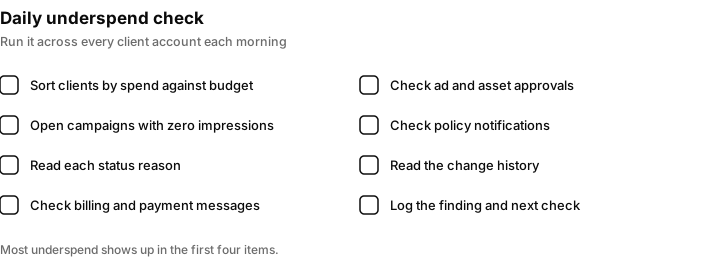
A short daily routine for an agency. Most underspend is found in the first four items.
What to tell the client
Clients want to know what is wrong, what you are doing and when it will change. Copy and adapt these.
Billing: "Your ads stopped on Tuesday because Google could not charge the card on the account. Please update the payment method in the billing section, or send us the new details. Ads normally return soon after payment clears, and we will confirm once they are showing."
Target too tight: "The campaign is running but spending less than the budget because the cost per lead target is lower than the current market price. We recommend loosening it in steps and leaving it for a set period so Google can learn. The risk is a higher cost per lead, which we will report openly."
New campaign: "The campaign started on Monday. At first Google reviews the ads and the system learns what works, so the numbers are not a fair guide yet. We will review it on a date we agree and tell you what we see."
Always say what you checked, what you changed and when you will look again.
How Inflowave helps with Google Ads leads
Inflowave does not manage or report Google Ads. It cannot fix a delivery problem, change a bid or budget, or make an ad spend. Those happen inside Google Ads.
What it does help with is the lead side. Inflowave records leads, pipeline and revenue from any source, so a lead that came from a Google ad can be followed through the pipeline to a closed sale. That supports Check 11, because the real question is whether the leads Google sends become customers. Analytics reports spend against the same leads, pipeline and revenue, with cost per lead and return on ad spend, and client reports can be filtered by client, connected account and date range. Seeing each client's leads in one place makes a drop in lead volume easy to spot, which is often the first sign ads stopped. See the agency reporting use case and client reporting software for agencies. Meta ad reporting and controls are described on the Facebook ads feature page, which also notes that TikTok reporting is shallower than Meta.
To be clear about the limits: Inflowave will not tell you why a Google campaign is not spending and does not replace the checks above. Use it to see what the leads become, and Google Ads itself to fix delivery.
Questions people ask
Why is my Google Ads campaign not spending?
Usually billing, approval, budget, bids or targeting. Check them in that order: payment method and account status, ad approval, the budget and its status, the bidding strategy and targets, then location, schedule and device settings. Zero impressions means the ads are not entering auctions at all.
How do I know if my Google Ads are showing?
Look at the Impressions column for a date range after your last change, and use the Ad Preview and Diagnosis tool. Impressions above zero mean the ad is showing to someone, even if you cannot find it yourself by searching.
Why can't I access Google Ads?
It is usually a sign-in or permission issue: the wrong Google account, an expired invitation, a removed user or a verification problem. Ask the account owner to confirm your email still has access, or accept the invitation again. A suspended account can also limit what you can do.
Is there a problem with Google Ads today?
Outages that affect all advertisers are rare. Check Google's own status page for Google Ads and see whether other accounts you manage behave normally. If only one account is affected, the cause is almost always in that account.
How do I reset Google Ads?
You cannot reset an account. People usually mean one of three things: restarting a campaign (pause it, fix the settings, enable it again), starting with a fresh structure (build new campaigns and pause the old ones), or recovering a suspended account, which has its own guide.
Why did Google spend more than my daily budget?
Google documents that on any one day it can spend more than the daily budget, up to about twice the amount, while keeping the monthly total within the daily budget multiplied by the average days in a month. Check the current explanation in Google's help before quoting it to a client.
What does Eligible (Limited) mean in Google Ads?
It means the campaign can run, but something restricts it, for example a low budget, narrow targeting, a bidding limit or a policy issue. Click the status in the account to read the specific reason Google shows.
Why is my ad not showing even though it is approved?
Approved only means the ad is allowed to run. It still has to match a search, win the auction and sit inside your targeting, schedule and budget. Check bidding targets, narrow location or schedule settings, match types and negative keywords.
Why is Performance Max not spending?
Check that every asset group has approved assets, that conversion goals are recording, that the target is not too strict and that the budget is realistic. A new campaign with no conversion history often starts slowly. Check Google's current Performance Max guidance.
Can Inflowave fix my Google Ads not spending?
No. Inflowave does not manage or report Google Ads and cannot make an ad spend. It records the leads, pipeline and revenue from any source, so you can follow a lead from a Google ad to a sale and notice when lead volume drops.
