
If your TikTok ads are active but not spending, the cause is almost always one of ten things, and you can find it by checking them in a fixed order: the delivery status, the account and payment, ad review, the budget and schedule, the bid, the audience, the creative, the learning phase, the optimisation event and pixel, and the age of the account. Start at the top and stop at the first thing that is wrong, because the early checks are the cheap ones and the late checks only matter once the early ones pass.
"Active" in TikTok Ads Manager only means the ad is switched on. It does not mean the ad is allowed to run, funded, approved, or competitive in the auction. This guide gives you the order to check things in, what each result means, what to change, what to leave alone, and the wording to send a client while you fix it.
The short answer
| Question | Answer |
|---|---|
| Why is my TikTok ad active but not spending? | Switched on is not the same as delivering. Something upstream is blocking it: payment, review, schedule, a bid that is too low, an audience that is too small, or a creative that loses the auction. |
| What do I check first? | The delivery status on the ad, ad group and campaign. It usually names the blocker in plain words. |
| How long should I wait before worrying? | Check the current guidance in TikTok Ads Manager and the help centre. A new ad can sit in review or take a while to start, so judge by status, not by the clock. |
| Is a cost cap the problem? | Often. A cost cap or bid cap set below what the auction needs will quietly starve the ad. Check the current bid options and test lowest cost. |
| Will editing the ad help? | Sometimes, but big edits can restart learning. Change one thing at a time and note the time. |
| Does a new account spend slowly? | It can. A new account has no history, so expect to give it clean conversion data and some patience. |
| Can software make the ad spend? | No. A CRM or reporting tool can show you the underspend sooner. It cannot change how the auction treats your ad. |
The rule that matters most: never change five things at once. Work down the list, change one thing, wait for delivery to react, and write down what you changed. If you cannot say which change fixed it, you will not know what to do next time.
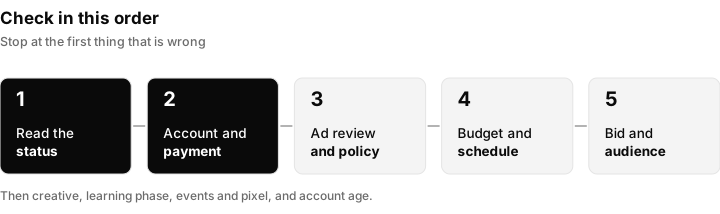
Work through the checks in this order. The first four are quick and catch most cases.
Step 1: read the delivery status before you touch anything
Open TikTok Ads Manager and look at the status column at the campaign, ad group and ad level. Check all three levels, because an ad can be fine while its ad group is not. The status is TikTok telling you why an ad is or is not running, and it is the fastest clue you have.
The exact words change over time, so check the current wording in Ads Manager. The common groups are these.
| Status group | What it usually means | What to do |
|---|---|---|
| Active and delivering | The ad is eligible and has been shown | Nothing. If spend is still low, move to bid and audience. |
| In review or pending | The ad has been submitted and has not yet been approved | Wait for review. Do not keep editing, because each edit can send it back for another look. |
| Not approved or rejected | The ad failed a review check | Read the reason, fix the creative or landing page, and resubmit. See step 3. |
| Learning | The ad group is still gathering the data it needs to settle | Leave it alone. See step 8. |
| Limited or learning limited | The ad group is not getting enough of the right events to learn well | Widen the audience or change the optimisation event. See steps 6 and 9. |
| Paused, off, or scheduled | Something is switched off, or the start time has not arrived | Check the toggles at all three levels and the schedule. |
| Account or payment issue | Billing or the account itself is blocking delivery | Fix this first. See step 2. |
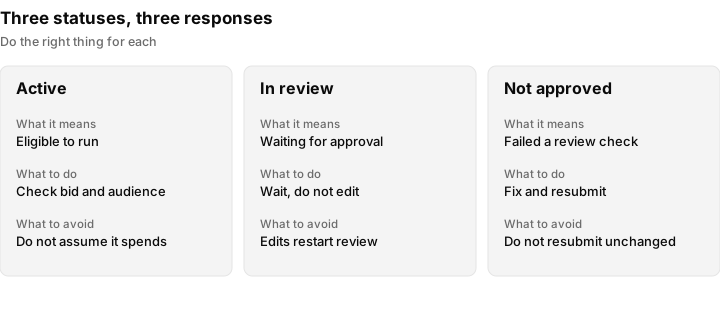
Three statuses people confuse most often, and the right response to each.
One more thing to check at this stage: the campaign, the ad group and the ad must all be switched on. It sounds too simple to matter, and it is the cause more often than anyone admits. A paused ad group inside an active campaign shows green at the top and spends nothing underneath.
Step 2: account and payment
If the account cannot pay, nothing runs, and the ad can still show as active. Check these in order.
- Account status. Look for any notice at the top of Ads Manager about the account being restricted, under review or disabled. If you see one, follow the instructions in the notice and the help centre before changing anything else.
- Payment method. Confirm a valid payment method is on file and has not expired or been declined. Cards that were fine last month can fail after a bank re-issues them.
- Prepayment or automatic payment. TikTok accounts can use different payment setups. Some require money to be added before ads run, and some charge after spend. Check the current payment options in Ads Manager and which one this account uses. With a prepaid balance, a zero balance stops delivery quietly.
For agencies, there is a second account layer. Ads normally sit in an ad account that belongs to a Business Center, and your agency usually works in it through partner access or assigned roles. If the client's payment method is the problem, only someone with the right role can fix it. Find out who that is before you promise a fix. The access setup is covered in client account access for agencies.
Check money first, always. An account with a failed payment looks exactly like an account with a bidding problem. Rule it out in two minutes before you spend two hours on the rest.
Step 3: ad review and policy
Every TikTok ad goes through review. A small number sit in review for a while, some are rejected, and some are approved and later flagged again after an edit.
- In review. Nothing is wrong. Wait, and avoid edits that would restart the review.
- Not approved. Open the ad and read the reason given. It normally points to the creative, the text, the landing page or the product category.
- Approved but not spending. Approval only means the ad is allowed to run. It says nothing about whether it wins in the auction.
Common reasons ads get stopped are claims that cannot be backed up, restricted categories, and a landing page that does not match the ad or does not load. Read the current advertising policies in TikTok's help centre before building ads in stricter categories.
If an ad is rejected and you think the rejection is a mistake, use the appeal option in Ads Manager and explain, in plain words, why the ad follows the policy. Do not resubmit the same ad over and over. A repeated pattern of rejections can also make an account harder to run, so fix the cause. For the Meta equivalent, see why Meta ads get rejected.
Step 4: budget and schedule
Budgets and schedules produce a lot of silent underspend. Check these.
| Setting | What can go wrong | What to check |
|---|---|---|
| Daily or lifetime budget | A lifetime budget with a long schedule spreads thinly and can look like underspend on any given day | Compare the budget with the number of days it must cover |
| Budget too small | A budget below what the bid needs gives the auction too little room to deliver | Compare the budget with the cost you expect for one result. Check the current minimums in Ads Manager. |
| Start time | The ad group is set to start later than you think | Read the start date and time |
| Time zone | The account time zone differs from yours, so "9 am" is not when you expect | Check the account time zone in settings |
| Dayparting | A schedule restricted to certain hours or days leaves most of the week empty | Look for a custom schedule on the ad group |
Step 5: bidding
Bidding is where "active but not spending" most often hides. The idea is simple: the platform runs an auction every time someone could see an ad, and your bid is how much you are willing to pay for the result you want. If your limit is lower than what the auction needs, you do not win, you do not spend, and nothing looks wrong.
Check the current bid options in Ads Manager, because the names and the options available depend on the objective and can change. In general terms there are two kinds.
- Lowest cost. You give the platform a budget and let it find the most results it can. It has the most freedom, and it is the easiest to get spending.
- A capped bid. You set a limit, either on the average cost per result (often called a cost cap) or on the bid for each auction (a bid cap). The platform will only spend where it can stay under your limit.
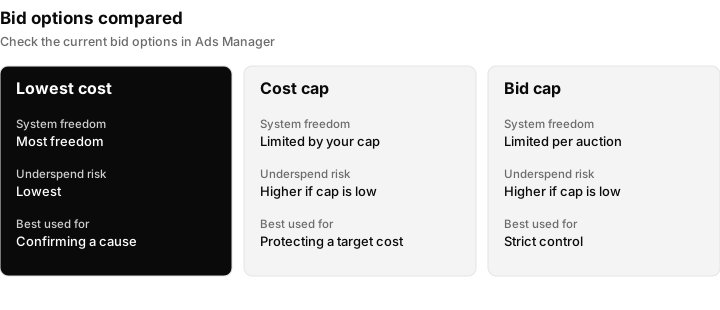
A capped bid is the most common cause of silent underspend. Lowest cost is the best way to confirm the cause.
The quick test: if you suspect the cap, duplicate the ad group, set it to lowest cost with the same audience and creative, and see whether it spends. If it does, the old cap was the blocker. If it does not, the cause is somewhere else, and you have saved yourself a long argument about bids.
Do not read this as "lowest cost is always better". A cap protects you from paying too much. The point is to set the cap from the cost your client can actually afford per result, check it against what recent results really cost, and accept that a very tight cap will buy very little.
Step 6: audience size and targeting
An audience that is too narrow gives the auction too few people to show the ad to, and delivery stalls even with a good bid.
Check these things.
- Stacked restrictions. Age, location, interests, behaviours and languages all cut the audience down. Each one is reasonable on its own, and together they can leave a tiny pool.
- Estimated audience size. Ads Manager shows an audience size indicator or estimate while you build. If it shows a very narrow range, widen the targeting. Check the current wording in Ads Manager.
- Custom audiences. An audience built from a customer list or from pixel traffic may be small, may not have finished building, or may have too few matched people to deliver. Check the size and the status of the list.
TikTok's system generally does well with broader targeting and good creative, because the creative does a lot of the finding. If you are unsure, widen the audience in steps and see whether spend rises. Widen one thing at a time so you know what helped.
Step 7: creative quality and fatigue
If everything above is fine, the next question is whether the ad is good enough to win. In the auction the platform estimates how likely people are to watch, react and act, and it favours ads people want to see. A weak ad gets shown less, so it spends less, however high the budget is.
What tends to work on TikTok, and what tends to fail:
| Works better | Fails more often |
|---|---|
| A video made for TikTok, shot vertically | A repurposed landscape ad or a slideshow of stock images |
| A strong first moment that makes people stop scrolling | A slow logo opening or a long intro |
| A native, person-led look | A polished TV-style ad |
| Fresh creative when the old one is tired | The same video running for months |
Check the aspect ratio and length against the current ad specifications in the TikTok help centre.
Creative fatigue is when an ad stops working because the same people have seen it too often. The fix is new creative, not a bigger budget.
Spark Ads use an existing organic TikTok post, yours or a creator's, as the ad. A creator's post needs their permission through an authorisation code they generate for you (check the current steps in the TikTok help centre). If a Spark Ad is not spending, check the authorisation first (expired, revoked or entered in the wrong ad account) and then whether the post is still public.
Step 8: the learning phase
After you launch an ad group, or change it in a significant way, the system enters a learning phase. During this time it is testing who to show the ad to and what it costs, so delivery and cost are less stable. TikTok publishes a threshold for how many optimisation events an ad group needs to move out of learning. Check the current figure in the TikTok help centre, because it can change and it depends on the setup.
What this means in practice:
- Be patient with a new ad group. Early results are noisy. Judging a campaign on its first day is how good campaigns get switched off.
- Do not edit during learning. Significant changes, such as the budget by a large amount, the audience, the optimisation event or the creative, can restart learning. Each restart costs you data. Check the current help page for which edits reset learning.
- Make fewer, bigger changes, not many small ones. Change one setting, then leave it long enough to see what happened.
- Stuck in learning or learning limited. The ad group is not getting enough of the chosen event. The usual fixes are a bigger budget, a wider audience, fewer ad groups splitting the same budget, or an optimisation event that happens more often (for example an earlier step in the funnel).
Step 9: the optimisation event, pixel and events
The ad group optimises toward an event, such as a purchase, a lead or a click. If the system cannot see that event, it has nothing to learn from, and delivery suffers.
Check these:
- Is the event firing at all? In Events Manager or the pixel diagnostics, see whether the event is being received. Check the current wording in Ads Manager.
- Is it the right event? Optimising for a rare event, like a purchase, on a small budget starves the learning. Optimising for a more common event, like a view of a key page, gives the system more to work with, though it may bring lower quality traffic.
- Pixel or Events API. A pixel placed in a browser misses people who block tracking. Sending events from the server too (the Events API) gives a more complete picture. Check the current setup guide in the TikTok help centre.
- Landing page. Confirm the pixel is on the page where the action happens and that the page loads fast on a phone.
- Test it yourself. Click your own ad, complete the action on a phone, and check that the event shows up.
Step 10: a new account with no history
A brand new account has no spend history and no conversion data, so the system knows very little about it. That alone can slow down the start, and it makes everything above more important.
- Start simple. One campaign, one or two ad groups, broad targeting, lowest cost, and the most common useful event.
- Give it clean data. Make sure the pixel is working before the first dollar is spent.
- Do not judge the first few days. Look at the trend once the ad group has had a fair chance.
If the account is new and was created for a client, also check the account setup is complete: business details, payment, Business Center link and the right user roles. An account that is half set up can behave oddly.
Running this for clients as an agency
When you run TikTok ads for clients, underspend becomes a service problem as well as a technical one. A client who sees a monthly budget not being spent will ask questions long before you have found the cause.
Set up access properly. TikTok ad accounts usually belong to a Business Center. Your agency should be added as a partner, or given the right roles on the client's account, so you can see and fix things without borrowing a login. The approach is the same one covered in client account access for agencies. Check the current steps and role names in TikTok Business Center.
Run a daily underspend check. Every morning, compare yesterday's spend with the daily budget for each client. A five minute check catches a failed card or a rejected ad within a day instead of at month end.
Report on results, not only spend. Spend alone does not tell a client whether the money did anything. For the approach to client reporting, see Meta ads reporting for agencies and cost per outcome for Meta ads, which use the same logic of tying spend to outcomes. If you also run ads on other platforms, the general diagnosis order is in the ads not spending guide, and the Meta version is in Facebook ads not spending.
What to tell the client
Clients mostly want three things: to know you have noticed, to know what you are doing about it, and to know when to expect an update. Short, calm and specific works best. Adapt these to your own voice.
When you first spot it:
"Quick update: spend on your TikTok campaign is below what we planned. We are checking the account status, payment and ad review first, and I will confirm what we find by the end of the day."
When it is a normal learning period:
"The campaign is still in its early learning stage, which is normal after a launch or a change. We are leaving it alone for now so we do not reset it, and I will review it on [day] with real numbers."
Do not promise a date by which spend will recover, and do not blame the platform before you have checked the account. If you do not yet know the cause, say what you have ruled out.
What Inflowave helps with, and what it does not
Inflowave cannot make an ad spend. It does not fix a payment problem, approve an ad, change how the auction treats your bid or rebuild a creative. Those happen in TikTok Ads Manager and in the client's Business Center.
What it does help with is seeing the problem sooner and connecting spend to outcomes for each client. Inflowave connects to TikTok and covers advertisers, campaigns, ad groups, ads, reporting, audiences, pixels and Business Center tasks. Be realistic about depth: the TikTok reporting is shallower than the Meta reporting. You will still do most of the real diagnosis inside TikTok itself. The details of what is available are on the Facebook and Instagram ads feature page, which also describes the TikTok coverage.
Where it is useful for an agency:
- Spend and leads side by side. Ad spend is reported against the same leads, pipeline and revenue as your other sources, so a low-spend day can be compared with how many leads came in. See the analytics feature.
- One place per client. Ad accounts are kept per client and workspace, so you can review each client without switching between logins.
- Cost per lead and return on ad spend. Once leads are in the CRM, you can see cost per lead and return on ad spend against the revenue they produced, which is what clients actually care about.
- Any source, not only TikTok. Leads, pipeline and revenue are recorded from any source, so a lead from any channel can be followed through to a sale.
What it does not do: it will not tell you why TikTok is not delivering, it does not replace the checks in this guide, and it does not remove the need to look at the account every day.
A checklist to print for your team
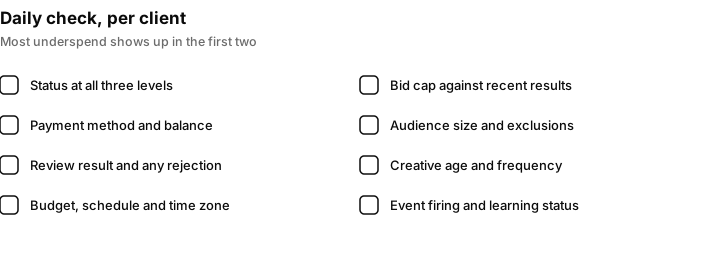
A daily check for every client account. Most underspend is caught in the first two items.
Questions people ask
Why is my TikTok ad active but not spending?
Active only means the ad is switched on. Something else is usually blocking delivery: a payment problem, a review issue, a schedule, a bid cap that is too low, an audience that is too small or a creative that loses the auction. Read the delivery status first, then work down the checks in this guide in order.
How long does it take for TikTok ads to start spending?
It varies. A new ad has to pass review first, and a new ad group then goes through a learning stage where delivery is less steady. Check the current guidance in the TikTok help centre rather than relying on a fixed number of hours. If an ad shows a clear blocker in its status, fix that rather than waiting.
Why are my TikTok ads not getting impressions?
No impressions usually means the ad is not eligible to run or cannot win any auctions. Check the status, payment, review result, schedule and start time first, then whether a bid cap is too low or the audience too narrow.
Why is my TikTok ad stuck in the learning phase?
The ad group is not getting enough of the chosen optimisation event to settle. The common fixes are a larger budget, a broader audience, fewer ad groups sharing the same budget, or an event that happens more often. TikTok publishes the threshold, so check the current figure in the help centre.
Why is my boosted post or Promote not spending?
The same causes apply: payment, review, a small audience, a low budget or a weak post. A boosted post also depends on the post itself, so a video that people skip will get little delivery. Check the promotion status and the account balance, and try a stronger video.
Does editing my ad reset the learning phase?
Significant edits can. Changes to the budget by a large amount, the audience, the optimisation event or the creative can send the ad group back into learning. Check the current help page for which edits count, make one change at a time and leave it alone afterwards.
Why was my TikTok ad not approved?
Ads are rejected for reasons such as claims that cannot be backed up, restricted content or categories, a landing page that does not match the ad or a page that does not load. Open the ad, read the stated reason, fix it and resubmit, or use the appeal option if you believe the decision is wrong.
What if my TikTok ads account is disabled?
Read the notice in Ads Manager and follow the official steps and appeal route. Do not create duplicate accounts to get around it, because that can make things worse. Fix the cause named in the notice and keep proof of ownership and payment ready.
Is a cost cap the reason my ads are not spending?
It is one of the most common reasons. If the cap is lower than what the auction needs, you simply do not win. Duplicate the ad group, set it to lowest cost with the same audience and creative, and see whether it spends. Check the current bid options in Ads Manager.
How do I promote on TikTok without spending money?
You cannot run paid ads for free, but you can grow organically by posting videos, using trends and sounds, working with creators and replying to comments. That is separate from paid advertising. The two work well together, since a good organic post can later be used as a Spark Ad.
