When ads are not spending, the cause is almost always one of eight things, and they should be checked in a fixed order: the account, approval, the on/off switches, the audience, cost controls, the auction, the learning phase and conversion tracking. An ad spends only when it passes every one of those gates, so the fastest fix is to walk the gates from the top and stop at the first one that fails. Guessing, or changing five settings at once, is what turns a ten minute problem into a ten day one.
This guide gives you that order for Meta, Google, TikTok and LinkedIn, a table of where to look on each platform, a daily check an agency can run across every client, and three short messages you can paste to a worried client. Every platform has its own menus and wording that change often, so where a name or a threshold matters we say to check the current wording in the platform rather than quote a number that may be out of date.
The short answer
| Question | Answer |
|---|---|
| Why is my ad active but not spending? | It is failing one of eight gates: account, approval, switches, audience, cost controls, auction, learning or tracking. Check them in that order. |
| What is the most common cause? | The boring ones: a payment or account problem, an ad still in review, or a budget, schedule or end date that is not what you think. Check these before touching creative. |
| How long does it take for ads to start spending? | It depends on the platform, the review queue and the size of the audience. Some ads begin within hours, others need longer. Check the platform help page before you panic, and look at the status first. |
| Is it normal for ads to underspend? | Sometimes. Platforms may spend less than the daily budget on a quiet day and more on a busy one. A steady, large gap is a signal to investigate, a single quiet day is not. |
| Should I change settings while I wait? | Change one thing at a time and write it down. Several edits at once make it impossible to know what worked, and on some platforms edits restart learning. |
| How much should I spend on ads? | It depends on what a result costs, how many results the platform needs to learn, and the goal. Work backwards from the cost of a lead or sale you can afford, not from a round number. |
| Can a CRM make an ad spend? | No. A CRM cannot fix delivery. It can show spend and leads per client in one place so you catch underspend sooner. |
The rule that matters most: diagnose in order and change one thing at a time. The first failed gate is the cause until proven otherwise, and every edit you make must be logged so you can undo it.
Three words that get mixed up: underspend, not delivering, overspend
People say "not spending" for three different situations, and each one has a different cause and a different message to the client.
| Situation | What you see | Usual direction of the cause |
|---|---|---|
| Not delivering | Zero or almost zero impressions. The ad is on but nobody sees it. | Account, approval, switches, audience too small or blocked, bids too low to enter the auction |
| Underspending | Impressions and spend happen, but well below the budget, day after day | Audience, cost controls, auction competitiveness, creative the platform does not favour |
| Overspending | Spend runs above what you expected for a day | Normal budget flexibility on some platforms, a budget edit, or a change in how a campaign is set up. Check the platform's own rules on daily budget flexibility |
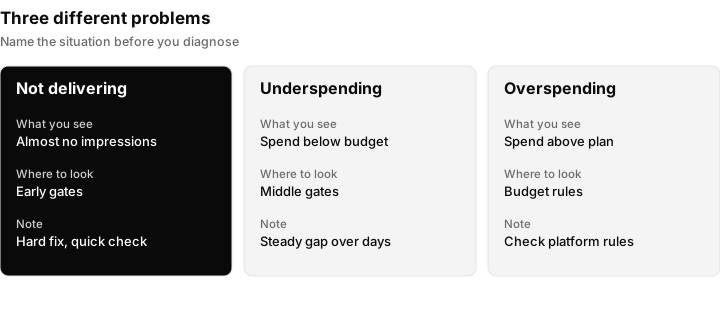
Name the situation before you start. Zero delivery points at the early gates, a steady shortfall points at the middle gates.
Say which one you have in the first line of your note to the client. "No delivery" and "slightly under pace" are very different conversations.
The spend funnel: eight gates in order
Think of delivery as a funnel with eight gates. An ad has to get through every one to spend money. The order matters because earlier gates are quicker to check and more likely to be the problem, and because a failure early on makes the later gates irrelevant. Optimising creative when the card on the account has been declined is a classic waste of a day.
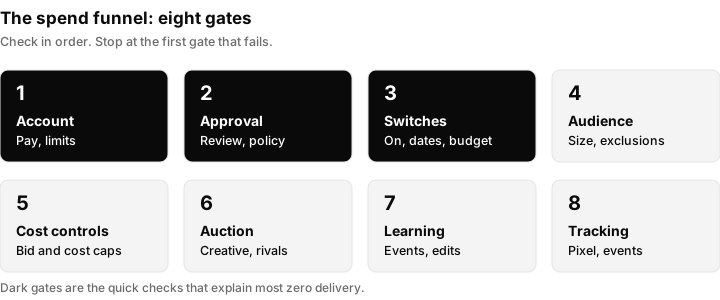
Walk the gates from 1 to 8 and stop at the first one that fails. Gates 1 to 3 take minutes to check and explain most zero delivery cases.
Gate 1: the account gate
Before anything about the ad, check the ad account itself. Every platform will refuse to spend if the account is not in good standing.
- Payment. Is there a valid payment method on the account, and has the last charge succeeded? A failed or declined payment is one of the most common reasons a healthy campaign stops.
- Spending limits. Accounts can have an account spending limit or a billing threshold. Check whether one has been reached, and whether it was set by you, the client or the platform.
- Restrictions or suspension. Look for a notice at the top of the account. Disabled and restricted accounts do not deliver. If you see one, go straight to what to do when a Facebook ad account is disabled or what to do when a Google Ads account is suspended.
- Access and permissions. Are you looking at the right account with enough permission to see its status? Agencies lose time reading a different ad account to the one that is actually running. See client account access for agencies and, for Meta, how to give access to a Facebook Page and ad account.
- Business verification or identity steps. Some accounts are asked to verify the business or the advertiser. For Meta, see Meta business verification and Meta Business Manager troubleshooting.
If gate 1 fails, nothing else you change will matter until it is resolved. Escalate it to the client or the platform at once, because it often needs the account owner.
Gate 2: the approval gate
Every platform reviews ads before they run. An ad that is still waiting, or that was rejected, cannot spend.
- Look at the ad status, not only the campaign status. A campaign can read as active while every ad inside it is in review or rejected.
- Read the exact reason on a rejection. It names a policy area, and the fix depends on the policy. Our guide to why Meta ads get rejected walks through the common ones.
- Remember that edits can send an ad back to review. A small text change on a live ad may mean it waits again.
- Review times vary and the platforms change them. Check the current wording on the platform's help page rather than assuming a number.
An ad in review is not a mistake and needs no fix, only patience and a note to the client. A rejected ad needs a changed ad or an appeal. Do not recreate the same ad again and again, because repeated policy problems can count against the account.
Gate 3: the switch gate
This gate is the one people feel silly about afterwards, so check it early and check it properly. Every level has its own switch, and all of them must be on.
| Level to check | What to confirm |
|---|---|
| Campaign | Switched on, not paused, not scheduled for the future |
| Ad set, ad group or equivalent | Switched on, with a start date that has passed and an end date that has not |
| Ad | Switched on and approved |
| Budget | A budget actually set at the campaign or ad set level, and not zero |
| Schedule | Ad scheduling or dayparting not limiting the ad to hours that have already passed |
| Time zone | The account time zone matches what you assume. A campaign "starting at midnight" may start at another time of day than you think |
Two things catch agencies out. A duplicated campaign often arrives switched off or with an old end date. And a budget edit made in one place can be overridden by a different level of budget somewhere else. Open the ad level, not just the campaign list.
Gate 4: the audience gate
If the account is fine, the ad is approved and everything is on, ask whether anyone can actually be reached.
- Audience too small. A tightly defined audience may simply not contain enough people to spend a budget. Most platforms show an estimated audience size or a warning. Check the current wording in the platform.
- Exclusions stacking up. Several exclusion lists, such as past customers, existing leads and website visitors, can remove almost everyone. Check the combined effect, not each list on its own.
- Location and language. A small geography, a radius around one address, or a language setting that does not match the audience can shrink reach to almost nothing.
- Placements. If a campaign is limited to one placement, a surface with little inventory can cap delivery. Wider placements usually give the platform more room.
- Demographic and interest layering. Age, gender, interests, job titles and company filters multiply together. Each one looks reasonable alone.
- Retargeting pools. Remarketing to a website audience only spends if enough people are in the audience. A new pixel or tag, or a low-traffic site, means the pool starts small.
On LinkedIn, B2B targeting by job title, company size or seniority can produce a very small audience quickly, so check the audience size panel before launch.
Gate 5: the cost-control gate
Cost controls tell the platform what it may pay. If they are tighter than the market, the platform will not spend, and it reports nothing wrong. This is the classic cause of an ad that is "active but not spending".
- Bid cap or cost cap. A cap of what the platform may pay for an auction or a result. Too low, and the ad loses every auction it enters.
- Target cost per result or target return on ad spend. A very ambitious target makes the platform hold back rather than spend at a cost it thinks will miss the target.
- Minimum return or manual bidding. A manual bid that was fine last month can be uncompetitive now.
- Budget too small for the goal. If a result costs more than the daily budget, the platform may find it hard to deliver at all.
The test is simple and reversible. Note the current control, loosen it by a modest amount or switch to the platform's default bidding for a short, logged test, and watch whether delivery starts. If it does, you have found the gate. Then decide with the client whether the goal or the limit should move. See cost per outcome in Meta ads for how to think about what a result should cost.
Gate 6: the auction gate
Every impression is won in an auction. An ad can be approved, on, targeted at a decent audience and priced sensibly, and still lose.
- Competition. Busy seasons, a competitor launching a big push, or a crowded audience raise the price of attention. Your ad may need to pay more or target differently.
- Creative and relevance. Platforms favour ads that people respond to. A weak ad, a poor hook or a mismatch between ad and landing page can lead to fewer wins. Look at click-through rate and engagement for clues.
- Landing page experience. A slow page or a page that does not match the promise can hurt delivery on some platforms. Check the current guidance in the platform help.
- Seasonality and events. Holidays, sales periods and news events change both competition and audience behaviour.
- Recent history. A new account or a new campaign has no track record. An account that has had many rejections may be treated more cautiously.
Fixes here are creative and targeting work: new angles, clearer offers, a sharper audience. They are slower than the earlier gates, which is why you check them later. For Meta-specific automation that can help the platform find buyers, see Meta Advantage Plus.
Gate 7: the learning gate
Many campaigns go through a learning phase while the platform works out who responds. During this time delivery can be uneven and slow, and the wrong edits make it worse.
- Enough events to learn. Platforms need a certain volume of the result you optimise for. If the optimisation event is rare, such as a purchase on a low-traffic store, learning is slow or never completes. Check the current requirement in the platform.
- Edits that reset learning. Significant changes to budget, targeting, bids or creative can restart learning. Repeated edits mean the campaign never settles. This is the reason for the one-change-at-a-time rule.
- New account ramp. A brand new account or a long-paused one may start slowly and need some days to build up.
- A better event to optimise for. If purchases are too rare, optimising for an earlier step, such as a lead or an add to cart, gives the platform more signals. This is a strategy decision, so talk to the client.
Patience is the main tool at this gate. Decide in advance how long you will leave it before making a change, write that date down, and stick to it.
Gate 8: the signal gate
The last gate is about what the platform can see after the click. If conversion tracking is broken, the platform cannot learn who converts and may deliver badly or stop spending on a campaign optimised for conversions.
- Pixel, tag or conversions API installed and firing. Confirm the events fire on the right pages. For Meta, see the Meta Pixel Helper and event match quality.
- Events attached to the campaign goal. The conversion you optimise for must be an event the account actually receives.
- Duplicate or missing events. Double counting and missing events both distort learning.
- Click identifiers and offline data. For Google, see what a GCLID is and enhanced conversions for leads. For lead ads, check that leads reach your system, as in Facebook lead ads not syncing to a CRM.
- UTM parameters. Consistent UTM parameters let you tie spend to leads in reporting.
A tracking fault rarely stops delivery on its own the first day, so this gate is checked last. But a campaign that has spent for weeks and then slows to a crawl is a classic tracking or learning story.
Where to look on each platform
The gates are the same everywhere. The names change. Use this as a map, and check the current wording in the platform before you tell a client what a status means.
| Gate | Meta | Google Ads | TikTok | |
|---|---|---|---|---|
| 1. Account | Account status and billing in Ads Manager and Business Settings | Account status, payment and billing summary | Account status and payment in TikTok Ads Manager | Account status and billing in Campaign Manager |
| 2. Approval | Delivery column and ad status, "In review" or "Rejected" style states | Ad status and policy details on the ad | Ad status and review messages | Campaign status and review messages |
| 3. Switches | Campaign, ad set and ad toggles, schedule and dates | Campaign, ad group and ad status, dates, ad schedule | Campaign, ad group and ad toggles, schedule | Campaign group, campaign and ad status, schedule |
| 4. Audience | Audience size indicator at ad set level | Targeting and audience settings, estimated reach where shown | Audience size indicator at ad group level | Audience count panel at campaign level |
| 5. Cost control | Bid strategy and cost controls at ad set level | Bid strategy and its targets | Bid strategy and cost controls at ad group level | Bidding type and bid amounts |
| 6. Auction | Delivery messages, relevance and engagement signals | Status messages and the bid or budget limited states | Delivery and creative performance | Delivery and engagement signals |
| 7. Learning | Learning phase and a limited learning state | Learning status shown on some bid strategies | Learning stage status | Check the current wording in Campaign Manager |
| 8. Signal | Events Manager and the Pixel Helper | Conversions and tag status | Events Manager and pixel status | Insight Tag and conversion tracking |
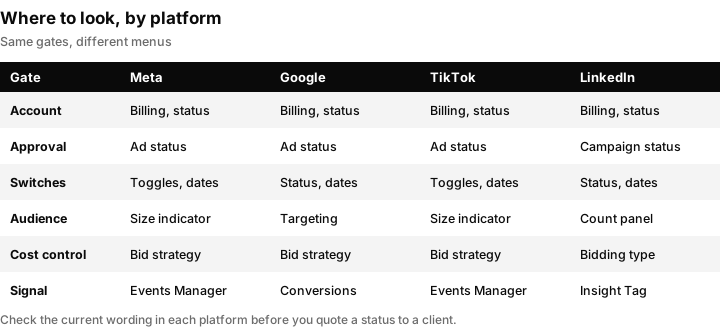
The same gate lives in a different menu on each platform. Learn the gate once and look up the menu.
For platform-specific walkthroughs, use the matching guides: Facebook ads not spending, Instagram ads not delivering, Google Ads not spending and TikTok ads not spending. For a wider account health review, use the Google Ads audit checklist.
How long to wait before changing anything
There is no single number that is right for every account, and platforms change their guidance, so treat any figure you see in a forum with suspicion. A sensible approach:
- Check the hard gates first. Gates 1 to 3 are facts, not judgement. If one fails, fix it now, there is nothing to wait for.
- Allow for review and the first delivery. A new ad may be in review and then begin slowly. Check the current review guidance in the platform and set your own checkpoint.
- Allow for learning. If the campaign is in learning, leave it alone until the platform says otherwise or until your agreed checkpoint.
- Agree the checkpoint with the client in writing. "We will review on Thursday morning and make one change if spend is still below pace" is a better promise than "we are watching it".
Waiting is not doing nothing. Use the waiting time to check the evidence at each gate and to record what you saw.
The one-change rule and the change log
When delivery is poor the temptation is to touch everything. Resist it.
Change one thing at a time, log it, and give it time. If you change the budget, the audience and the creative together and spend recovers, you do not know why. If it does not recover, you do not know what to undo.
A change log can be a shared note per client with four columns.
| Date and time | What changed | Why | Result at the next checkpoint |
|---|---|---|---|
| Fill in | Fill in | The gate you believe failed | Fill in |
Keep it where the whole team can see it. It protects you when a client asks what happened, and it stops two people from fixing the same thing in opposite directions.
Running the check across every client: an agency procedure
One client with a problem is a task. Forty clients is a process. The goal is to find underspend the same day, not when the client emails.
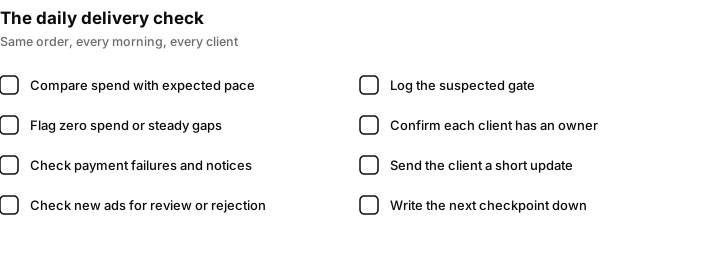
A short daily routine, run in the same order every morning, catches most delivery problems before the client notices.
The daily check
- Open every live account and compare yesterday's spend with the expected pace for that client.
- Flag any account with zero spend, or a steady gap against pace, for the diagnosis order above.
- Check for payment failures and account notices.
- Check the status of every new or edited ad for review or rejection.
- Record anything flagged in the client's change log, with the gate you suspect.
- Send the client message if the problem will last into a second day.
An alert rule idea
Define "expected pace" for each campaign as its daily budget (or the agreed share of the monthly budget) and set a simple rule: if spend is below a set share of expected pace by a set time of day, flag the account. Choose the share and the time with your team, based on how your clients' accounts normally behave, not from a figure you read online. A rule like this can be a spreadsheet, a dashboard filter or a platform's own automated rule. For Meta, see Facebook ads automated rules.
Who owns it
Give every client one named owner for delivery checks, and a named backup. Without an owner, everyone assumes someone else saw the red flag.
When to escalate to the platform
Escalate to platform support when the hard gates pass but the campaign still does not deliver, when an account is restricted without a clear reason, or when a rejection looks wrong. Bring the account ID, the campaign and ad IDs, the dates, the status you see and the log of what you changed. A clear case is answered faster than a vague one. If you manage many accounts, a manager account such as a Google Ads manager account (MCC) keeps access in one place.
Access before the problem
Most delays come from not having access when something breaks. Agree access, billing contacts and who can approve a change when you onboard the client. See client account access for agencies and Facebook ad account agency access.
What to tell the client: three messages to copy
Clients worry about spend that is not happening, and silence makes it worse. Send one of these early, in plain words. Edit the names and details.
1. We have seen it and are looking at it
Hi [name], we noticed that your [platform] ads have not spent as expected today. We are working through the checks now and will update you by [time]. Nothing is needed from you at this point.
2. We found the cause
Hi [name], we found why your ads were not spending: [one plain sentence, for example, the ad was waiting for review / a payment on the account was declined / an end date had passed]. We have [fixed it / asked the platform to review it]. We expect delivery to [resume / be confirmed] by [time] and will check again then.
3. It needs something from you, or it is resolved
Hi [name], to get your ads running we need you to [specific action, for example, update the payment method / approve access / confirm the offer]. Here is how: [link or steps]. Once that is done we will confirm that spend has started. (Or: your ads are now spending as expected. We will keep an eye on them and report on Friday.)
Keep each message to the point. Name the cause in one sentence, say what you did, and say when you will next update. Avoid platform jargon the client has to look up.
Reporting delivery problems honestly
If a delivery problem cost the client days of spend, say so in the next report: which gate failed, how long it lasted and what changed. See Meta ads reporting for agencies, client reporting software for agencies and client dashboard for agencies.
Spotting delivery problems sooner with Inflowave
Inflowave is a CRM for agencies. It does not fix delivery problems and it cannot make an ad spend. What it does is put the numbers in one place so you notice sooner.
- Meta reporting. Inflowave reports on campaigns, ad sets and ads, with impressions, clicks, spend, click-through rate, cost per click and cost per thousand impressions, plus leads, cost per lead and return on ad spend. It links ad spend to the leads and deals that spend produced, and ad accounts are scoped per client and workspace. It can also change budgets, pause and resume campaigns, and run ad rules that you can approve, reject or undo under account guardrails. See Facebook and Instagram ads in Inflowave.
- TikTok. Inflowave supports advertisers, campaigns, ad groups, ads, reporting, audiences, pixels and Business Center tasks. TikTok reporting is shallower than the Meta reporting.
- Google Ads. Inflowave does not manage or report on Google Ads campaigns. It records leads, pipeline and revenue from any source, so a lead that came from Google can still be followed to a sale.
- Analytics. Spend sits next to the same leads, pipeline and revenue as organic sources, with cost per lead, return on ad spend and revenue by traffic source. Client reports can be filtered by client, connected account and date range. See analytics in Inflowave and the agency reporting use case.
In practice, that means you can see spend and leads for each client side by side, spot an account whose spend has gone flat, and tell a delivery problem from a lead-handling problem. It does not replace the eight gates: you still check the ad platform to find out which one failed. To follow a lead from click to sale, see tracked links in Inflowave and the pipeline.
Questions people ask
Why is my ad active but not spending?
An ad can read as active and still fail a gate that the status does not show. Check, in order, the account (payment, limits, restrictions), approval of the individual ad, the dates and budget at every level, the audience size, any bid or cost cap, the competition in the auction, the learning phase and conversion tracking. The first gate that fails is your cause.
Why are my ads not delivering at all?
Zero delivery points to the early gates: a payment or account problem, an ad still in review or rejected, a campaign or ad set that is off or outside its dates, or an audience that is empty after exclusions. Check these before you touch creative, because they are quick to confirm and quick to fix.
How long does it take for ads to start spending?
It depends on the platform, the review queue and the size of your audience, and the platforms change their guidance. Some ads start within hours, others take longer. Check the ad status first and the current review guidance in the platform help, then agree a checkpoint with the client rather than waiting indefinitely.
Why are my ads not getting impressions?
Impressions come from winning auctions, so the usual causes are an audience too small to reach, a bid or cost cap set too low, a weak ad that loses to competitors, or an ad that is not approved. Check audience size and cost controls first, then look at the creative.
Is it normal for ads to underspend?
Occasionally, yes. Platforms can spend less than the daily budget on a quiet day, so one low day is not a fault. A steady shortfall across several days is worth investigating through the eight gates, starting with cost controls, audience and learning.
How much should I spend on ads?
There is no fixed answer. Start from what a lead or a sale is worth to the business and what you can afford to pay for it, then check the budget gives the platform enough chances to learn at that cost. A budget well below the cost of a single result usually struggles to deliver.
Should I raise my budget if my ad is not spending?
Usually not, because the budget is rarely the limit. If the platform cannot spend what you already allow, a larger budget changes nothing, and a big change can restart learning. Find the failed gate first, and increase the budget only when the campaign is spending its current one.
Can a bid cap or cost cap stop my ads spending?
Yes. If the cap is lower than what the auction demands, the ad keeps losing and nothing spends, often without any error message. Test by loosening the control modestly or switching to default bidding for a short, logged period.
Do edits to a live campaign slow delivery?
They can. Significant changes to budget, targeting, bids or creative may send an ad back to review or restart the learning phase. Make one change at a time, log it, and avoid repeated edits during learning.
Why did my ads stop spending when they worked before?
Look for what changed: a payment that failed, an end date or schedule, a rejected edit, a cost control that no longer fits the market, a seasonal jump in competition, or broken tracking. Compare the account today with your change log, and start again at gate 1.
When should I contact platform support?
Contact support when the account, approval and switch gates all pass but delivery stays flat, when a restriction has no clear reason, or when a rejection looks mistaken. Bring account and campaign IDs, dates, the exact status you see and your change log.
What should I tell my client when ads are not spending?
Tell them early, in one plain sentence, what you know, what you are doing and when you will update. Use the three messages in this guide: we are looking, we found the cause, and here is what we need or here is the result.