
"Instagram ads not delivering" almost always means one of three things: the ad is not allowed to run yet (review, a payment problem, a disconnected or restricted Instagram account), the ad is allowed but has nothing to run on (an off switch, a schedule, a budget or an audience that is too small), or the ad is running but losing every auction. The status label tells you which group you are in, and the order in which you check things should follow it.
This guide explains what "Not delivering" really means next to "Inactive", "In review" and "Learning", then walks through the causes that are specific to Instagram: boosted posts versus Ads Manager, the link between the Instagram account, the Page and the ad account, Reels and Stories formats, partnership ads, and the account permissions an agency needs. It ends with wording you can send a client. For the account-level and bid causes that Facebook and Instagram share, see Facebook ads not spending. For the full cross-platform method, see the ads not spending diagnosis guide.
The short answer
| Question | Answer |
|---|---|
| What does "Not delivering" mean? | The ad is not currently being shown to anyone. The label alone does not say why. Hover over or open the status in Ads Manager to see the reason. |
| Is it the same as "Inactive"? | No. Inactive usually means something is switched off (the ad, its ad set or its campaign). Not delivering often means it is on but blocked or unable to run. |
| What are the most common causes? | A review that has not finished, a payment or account limit, an ad set or campaign that is off or scheduled for later, a disconnected Instagram account, and an audience or placement that is too narrow. |
| Does a boosted post behave differently? | It can. A boost from the app has far fewer settings, so the causes are fewer, but you also have fewer ways to fix it. |
| Why does it work on Facebook but not Instagram? | Usually the placement, the Instagram account connection, or a format that does not fit Reels or Stories. |
| Who has to fix it? | Often the client, because the Instagram account, the Page or the payment method belong to them. |
| How long should I wait? | Check the current review times in Ads Manager and Meta's help pages. Do not change budgets or audiences while an ad is still in review. |
The rule that matters most: read the status reason before you change anything. Raising a budget on an ad that is stuck in review, or rebuilding an ad whose Instagram account came unlinked, wastes a day and often resets learning for no gain.
What "Not delivering" actually means
Ads Manager shows a delivery status on every campaign, ad set and ad. The labels are easy to confuse, and they mean quite different things. Meta changes the exact wording from time to time, so check the current wording in Ads Manager, but the groups below are stable.
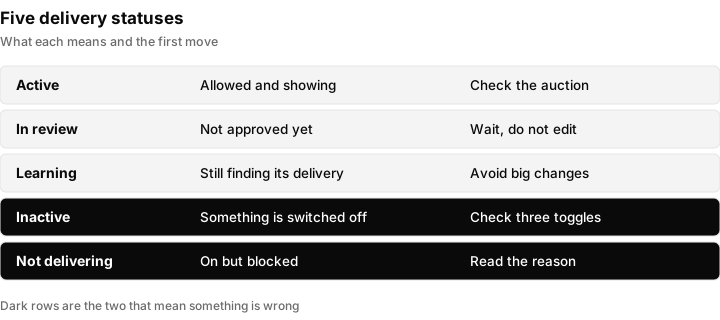
The five labels agencies see most often. Only two of them mean something is wrong, and they need different fixes.
| Status | What it means | What to do first |
|---|---|---|
| Active | The ad is allowed to run and is being shown. | Nothing. If spend is still low, move to the auction causes below. |
| In review | The ad has been submitted and has not been approved yet. | Wait. Do not edit, because editing can restart the review. |
| Learning | The ad set is running and the system is still finding where to show it. | Wait and avoid big changes. Check the current learning rules in Meta's help pages. |
| Inactive | The item is switched off, or something above it (ad set or campaign) is off. | Check the three toggles and the schedule. |
| Not delivering | The item is on, but is not being shown for a reason shown in the status. | Open the status reason and follow the cause list below. |
Two points trip people up. First, an ad can show Active while its campaign has a problem higher up, so always read the status at all three levels: campaign, ad set and ad. Second, "Not delivering" is a symptom, not a diagnosis. Two ads can show it for completely different reasons, one waiting on review and one limited by the account.
Boosted post or Ads Manager: which one are you looking at?
Instagram ads come from two places, and the first question to ask a client is "did you boost it from the app, or did we build it in Ads Manager?"
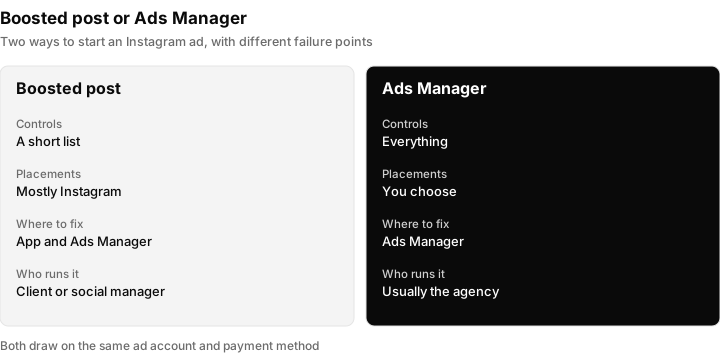
A boost is quick and has fewer things to go wrong. An Ads Manager campaign has more controls and more failure points.
| Boosted post (from the app) | Ads Manager campaign | |
|---|---|---|
| Where it starts | The Instagram app, on an existing post | Ads Manager, built from scratch or from a post |
| Settings you control | A short list: goal, audience, budget, duration | Everything: placements, schedule, bidding, optimization, tracking |
| Placements | Mostly Instagram, set by the boost flow | Instagram only, Facebook and Instagram, or your own selection |
| Where you see the status | In the app, and also in Ads Manager under the connected ad account | Ads Manager |
| Typical failure | Post not eligible, payment method missing, review pending | Any of the causes in this guide |
| Who tends to run it | The client or a social media manager | The agency |
If the boost never started, the cause is usually one of three things: the post is not eligible to be promoted, the payment method is missing or declined, or the post is still in review. Ask for a screenshot of the boost screen, because the app often states the reason in a line of small text.
The diagnosis order for Instagram ads
Work down this list in order (the placement and audience step covers the last of your checks). Each step costs a minute or two and removes a whole family of causes.
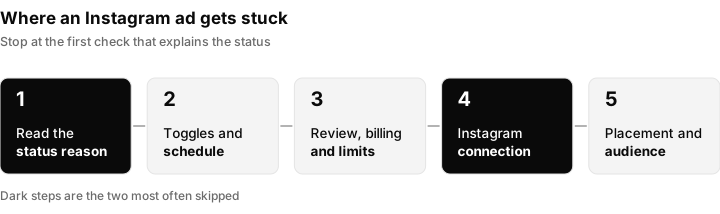
Five groups of checks in order. Stop at the first one that explains the status.
Step 1: Read the status reason
Open the ad, the ad set and the campaign. Look for the reason line beside "Not delivering" or "Inactive". It will point to review, payment, account, schedule, audience or something else. This one reading often ends the investigation.
Step 2: Check the three toggles and the schedule
Make sure the campaign, the ad set and the ad are all switched on. Then check the start date, end date and any ad schedule. An ad set scheduled to start tomorrow, or an end date that has passed, shows as not delivering and looks like a fault when it is not.
Step 3: Check review and account status
If the ad is in review, wait. If it was rejected, the reason is in the notification, and the fix is a policy fix, not a delivery fix. See why Meta ads get rejected. If the whole ad account is restricted or disabled, nothing will deliver. See Facebook ad account disabled.
Step 4: Check payment and account limits
A declined card, an outstanding balance or a spending limit stops delivery across the account. In Ads Manager, open the billing area and read the current state. A spending limit set long ago by someone else is a classic hidden cause on client accounts. The wording and options change, so check the current wording in Ads Manager.
Step 5: Check the Instagram connection
This is the step that is unique to Instagram, and it is covered in full in the next section. Confirm the Instagram account is still connected to the Page and available to the ad account, and that your agency has permission to use it.
Step 6: Check placement, format, audience and the auction
Only when steps 1 to 5 pass, look at placements, creative fit, audience size and the auction (sections below).
The Instagram account connection
An Instagram ad needs an Instagram identity. If that link breaks, the ad either stops delivering on Instagram or falls back to showing under the Page's name, depending on how it was set up. The checks are the same for a client or for your own account.
- Professional account. To promote content, the Instagram account generally needs to be a professional account (business or creator) rather than a personal one. Check the current requirements in Instagram and Meta's help pages.
- Connected to the Page. The Instagram account should be connected to the Facebook Page the ad uses. A change of Page admin, a removed link or a new Page can quietly break this.
- Available to the ad account. The Instagram account must be added to the Business Portfolio, and the ad account must be allowed to use it. If it was added to a different Business Portfolio, your ad account cannot see it.
- Your agency's permission. The person or partner running the ads needs access to the Instagram account, not only to the Page and the ad account. See the section on agency access below.
- Not restricted. An Instagram account that is restricted, limited for violating rules, or temporarily locked can stop ads that use it. If the client cannot post normally, the ad is unlikely to deliver.
Open the ad, look at the identity section, and confirm the correct Page and Instagram account are selected. If the Instagram account is missing from the dropdown, the problem is permission or connection, not the ad.
Placements: Instagram only, or Instagram and everything else?
Instagram ads can run in several places, such as the feed, Stories, Reels and Explore. Whether those are on depends on how the ad set was built.
- Automatic placements. Meta chooses where to show the ad across its apps. This gives the system the most room, but the ad has to fit every place it might appear. Check the current guidance in Meta's help pages.
- Instagram only. If you restrict the ad set to Instagram, you reduce the number of auctions it can enter. That is fine for a large audience and a decent budget, and a problem for a small audience.
- Manual placements. If someone turned off Stories or Reels because a creative did not fit, the remaining placements may be too few or too expensive to spend the budget.
If the same ad delivers on Facebook but not on Instagram, treat that as a placement or Instagram connection problem, not a general budget problem.
Reels and Stories: format problems that stop delivery
Reels and Stories are tall, full-screen formats. A creative made for a square or wide feed post can be rejected for those placements or shown poorly.
- Aspect ratio. Tall formats use a vertical ratio, and the feed uses square or slightly tall ratios. Check the current specifications in Meta's ad specs page for exact sizes.
- Safe zone. The top and bottom of a Story or Reel are covered by the interface. Text or a call to action placed there is hidden. Keep key text away from the edges.
- Music and audio. Music in a Reel or a boosted post can be limited by rights. If a post uses licensed audio, the ad may not be eligible or may be muted. Check Meta's current rules for music in ads.
When the ad preview shows a warning for a specific placement, fix the creative for that placement or turn the placement off. A warning ignored at build time becomes "Not delivering" a day later.
Partnership ads and branded content
Some ads run from another account's post, such as a creator's. These are often called partnership ads or branded content ads. They add a step that ordinary ads do not have.
- The creator has to give permission for their post to be used in the ad. Until they do, the ad cannot run.
- The permission can expire or be withdrawn. If a creator removes it, the ad stops.
- Disclosure labels for paid partnerships can also apply. See FTC influencer disclosure for agencies for the advertiser's side of that.
If an ad built on a creator's post is not delivering, ask the creator whether the approval is still in place before you touch the campaign.
Account, payment and limits
A declined card, an unpaid balance, a spending limit or a restriction on the ad account, Business Portfolio or Page affects every Instagram and Facebook ad at once. A pending verification request can do the same, see Meta business verification. For permission problems, see Meta Business Manager troubleshooting. If the ad account is disabled, follow Facebook ad account disabled and, if you need a person at Meta, contact Meta Business support.
Audience and creative eligibility
Instagram has a smaller reachable audience than a broad Facebook setup, so a tight one hurts faster. A tiny radius around one shop, stacked age, interest and exclusion filters, or excluding a list that is most of the audience can leave almost nobody eligible. Open the audience size indicator and widen before you raise spend, because a bigger budget on a tiny audience buys repetition, not reach.
A popular post can still be unpromotable. Content that breaks advertising policy, restricted categories such as housing, employment, credit, health or politics, copyrighted music, and deleted or edited posts can all block an ad. Check Meta's current advertising standards and music rules for your case. If one post cannot be boosted, build a new ad from the creative in Ads Manager, which usually shows the reason more clearly than the app.
A decision table: what you see and what to do
Use this table once you have read the status reason.
| What you see | Likely cause | First fix |
|---|---|---|
| Not delivering, ad in review | Review has not finished | Wait. Do not edit the ad |
| Not delivering, ad rejected | Policy problem | Fix the creative or copy, then resubmit |
| Inactive on the ad set | Ad set or campaign is off | Switch on all three levels |
| Not delivering, scheduled for later | Start date in the future | Correct the schedule |
| Not delivering, account problem shown | Payment, limit or restriction | Fix billing or the restriction first |
| Delivers on Facebook, not on Instagram | Instagram connection or placement | Check the identity and placement settings |
| Boost never started | Post not eligible or payment missing | Read the boost screen, or rebuild in Ads Manager |
| Active, very low spend | Audience, bid or budget limit | Widen audience, check bid and budget |
| Partnership ad stopped | Creator approval ended | Ask the creator to approve again |
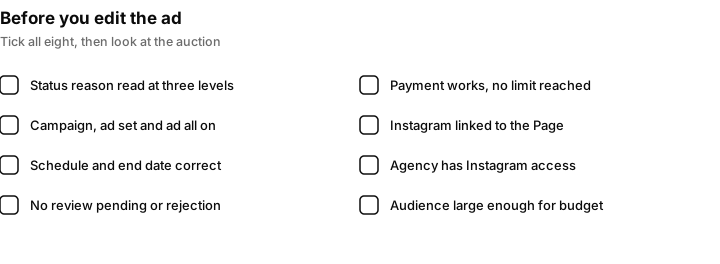
Eight quick confirmations. If you can tick all eight, the problem is the auction, not the setup.
Why the ad is Active but spending almost nothing
Here the status is fine and the money is not moving, which is the auction side shared with Facebook. The usual causes are a budget too small for the audience, a cost cap or bid cap lower than the auction asks for, weak creative, a saturated audience, or an ad set that keeps restarting learning because of edits. See the bid and budget section of Facebook ads not spending, the general method in how to run Facebook ads, and Meta Advantage Plus for how automated placements change delivery.
Connecting client Instagram accounts as an agency
Many delivery problems on agency accounts are really access problems. The Page, the ad account and the Instagram account can each be owned by a different person, and each needs its own permission.
- Ask who owns each asset. Page, ad account, Instagram account and payment method. Write it down.
- Get the right access for each. Use partner access in the client's Business Portfolio where possible, so the client keeps ownership. The steps are in how to give access to a Facebook Page and ad account and Facebook ad account agency access.
- Include the Instagram account. Many clients grant Page and ad account access and forget Instagram. Ask them to add the Instagram account to the Business Portfolio and share it with your agency.
- Confirm the Instagram account type. If it is a personal account, the client needs to switch it to a professional account first.
- Test with a small draft. Create a draft ad and confirm the Instagram account appears in the identity section before you build the full campaign.
- Record it. Save a screenshot of the working setup in the client's file, so the next person can tell what changed.
For the wider process of getting and keeping access, see client account access for agencies. If you also use Instagram direct messages in your funnel, the Instagram messaging API article covers the separate connection that needs.
What to tell the client
Clients do not want a lecture on delivery. They want to know what is wrong, what you need from them and when it will be fixed. Here is wording you can adapt.
When the ad is in review:
"Your Instagram ad has been submitted and is waiting for Meta's review. This is normal. We are not changing anything while it is in review, so we do not restart the process. We will confirm as soon as it is approved."
When the Instagram connection is the cause:
"Your ad is ready, but it cannot run on Instagram because your Instagram account is no longer connected to the Page or the business account it uses. Could you open your Instagram settings and add us as a partner on the account? We have sent you the steps. It takes about five minutes."
When a creator has to approve:
"The ad uses a post from [creator]. Instagram needs them to approve that post for advertising before it can run. Could you ask them to confirm the approval? Once they do, we will switch it back on."
Always say what you checked, what you found and what you need, in that order. A message that names the cause builds more trust than a promise that "we are looking into it".
How Inflowave helps when ads under-deliver
Inflowave does not fix delivery problems and cannot make an ad spend. Review, billing, account restrictions and the Instagram connection all sit inside Meta, and you fix them there.
What it does help with is seeing the problem sooner and seeing what it cost you. Inflowave's Meta ads reporting shows campaigns, ad sets and ads for Facebook and Instagram with impressions, clicks, spend, CTR, CPC and CPM, and links the spend to the leads and deals it produced. Ad accounts are kept separate by client and workspace, so one client's numbers are not mixed with another's. That makes it easier to spot a client whose spend has dropped to nothing while the others are normal, and to show the client what the spend produced once it resumes.
Inflowave can also change budgets, pause and resume campaigns, and run ad rules that you approve, reject or undo under account guardrails. Those are tools for managing campaigns that are running, not for forcing a blocked ad to deliver. With analytics you can compare spend with leads, pipeline and revenue, and report cost per lead and return on ad spend by client. The agency reporting use case shows how that fits into client reports.
What Inflowave does not do: approve an ad, remove a restriction, reconnect an Instagram account, fix a declined card or change Meta's rules.
Questions people ask
Why are my Instagram ads not delivering?
The most common reasons are a review that has not finished, a payment or account limit, an ad set that is off or scheduled for later, a broken Instagram account connection, and an audience or placement that is too narrow. Read the status reason in Ads Manager first, because it usually names the cause.
Why does my ad say "Not delivering"?
It means the item is not being shown at the moment, and the label alone does not say why. Open the status in Ads Manager and read the reason beside it. The cause can be at the ad, ad set, campaign or account level, so check all of them.
What is the difference between "Not delivering" and "Inactive"?
Inactive usually means something is switched off, such as the ad, its ad set or its campaign. Not delivering usually means it is on but cannot run for a reason such as review, payment or an account issue. The fix is different, so read the reason.
Why are my Instagram ads not working even though they are approved?
Approval only means the ad is allowed. It can still be blocked by payment or account limits, a schedule, a disconnected Instagram account, or an audience and budget that cannot win auctions. Check the account, the Instagram connection and the audience size next.
How do I check if my Instagram ad has been approved?
Open Ads Manager and look at the ad status, and check the notifications and the account quality page for any rejection. For a boosted post, look in the Instagram app and in Ads Manager for the connected ad account. Check the current wording in Ads Manager, because the labels change.
Why is my Instagram boosted post not spending?
Usually the post is not eligible, the payment method is missing or declined, or the boost is still in review. Read the message on the boost screen, and if it is not clear, rebuild the ad in Ads Manager where the reason is easier to see.
Why does my ad work on Facebook but not on Instagram?
Look at placements and the Instagram connection. Instagram may be turned off, the creative may not fit Reels or Stories, or the Instagram account may be disconnected from the Page or ad account. Confirm the identity section of the ad shows the right Instagram account.
Why is my Instagram ad stuck in review?
Reviews can take longer at busy times or when an ad is flagged for a closer look. Check the current review times in Meta's help pages, avoid editing the ad while it waits, and if it is stuck far beyond that, contact Meta support with the ad ID.
What is the 5-3-1 rule for Instagram?
It is a content-posting rule of thumb used by some social media teams and is not a rule about ad delivery. It has no effect on whether an ad runs. For a non-delivering ad, work through the status reason and the checks in this guide instead.
Can Inflowave fix an ad that is not delivering?
No. Inflowave cannot approve an ad, remove a restriction or make an ad spend. It helps you see spend and leads per client in one place, so you notice an under-delivering account sooner, and it can pause, resume and adjust campaigns that are running.
