
Facebook ads that are switched on but not spending almost always come down to one of a short list of causes: the ad is not actually eligible to run (payment, account limit, review, schedule), or it is eligible but not winning auctions (budget too small for the bid, a bid or cost cap set too low, an audience too narrow, weak creative). Check them in that order, because the first group is fast to confirm and the second group takes judgment. Do not edit anything until you know which group you are in.
This guide gives you the order Meta Ads Manager problems are best diagnosed in, a table that maps what you see on screen to the likely cause, the changes you should and should not make, how long to wait before worrying, and wording you can paste to a client. It applies to Facebook and Instagram placements, because both run through Meta Ads Manager.
The short answer
| Question | Answer |
|---|---|
| What do I check first? | The Delivery column in Ads Manager at campaign, ad set and ad level. |
| Most common causes? | A failed payment, an account spending limit, an ad in review or rejected, a future start date, a bid or cost cap set too low, and an audience that is too small. |
| Is "Active" the same as spending? | No. Active only means switched on. It can still win no auctions. |
| Will raising the budget fix it? | Only if budget is the cause. A payment, review, cap or audience problem ignores it. |
| Should I duplicate the campaign? | Not first. A duplicate inherits the same account, audience and bid settings. |
| When do I contact Meta support? | When account, review, dates, bid and audience checks are clean and a few days pass with no spend. |
The rule that matters most: work from the outside in. Account first, then ad review, then schedule and budget, then audience, then bid, then creative.
Step 1: Is it actually not delivering?
In Ads Manager, find the Delivery column and read it at campaign, ad set and ad level. The ad set status matters most, because budget, audience and bid live there. Labels change, so check the current wording in Ads Manager.
- Active. Switched on and eligible. This alone does not mean it is spending.
- In review. Waiting for approval. It will not spend until it passes.
- Learning. The system is still exploring. Spend is normal but results swing.
- Learning limited. Not enough results for the system to settle. Spend may still happen.
- Not delivering. Something is stopping it. Click the status for the reason.
- Rejected or disapproved. See why Meta ads get rejected.
- Scheduled. The start date has not arrived.
- Any switch off. If the campaign, ad set or ad is off, everything below it stops.
A message such as "your campaign hasn't delivered enough since it started" is a prompt to run these checks, not a diagnosis. Two quick checks first: set the date range to the last 7 days (early in the day, "today" can legitimately show near zero), and confirm you are looking at the right ad account.
Step 2: Account level problems
If the account cannot charge a payment method or has hit a limit, nothing below it can spend.
- Payment method. Open billing and look for a failed payment, an expired card or a declined charge. Update the method and clear any outstanding amount.
- Payment threshold. Meta bills when spend reaches a threshold or on a set date. If that charge fails, delivery can pause. Check the current wording in Billing for how it works on your account.
- Account spending limit. An admin may have set a total limit. When it is reached, ads stop. Check the current wording in the account settings.
- Account status. Look at account quality. An account can be restricted, under review or disabled. If disabled, see Facebook ad account disabled.
- Business and access. Check the payment method is attached to the right account, you have the right role and the Page is connected. See Meta Business Manager troubleshooting and Meta business verification.
- Currency and time zone. Budgets use the account currency and the "day" follows the account time zone, so a confusing report can be a time zone difference.
Step 3: Ad review and approval
New or edited ads go through review and do not spend while in review. A rejected ad never will until you fix and resubmit it.
- Open the ad and read the review status and any notice in account quality.
- If rejected, read the stated reason and see why Meta ads get rejected for the usual patterns.
- If it passed but delivery is zero, check the Page and Instagram account attached. A disconnected or restricted Page can stop ads.
- Check the landing page works on mobile.
Review times vary: check the current wording in Ads Manager and Meta's business help before telling a client how long it takes. The old "20 percent text rule" about text on images is not something to rely on from memory. Check the current advertising policy.
Step 4: Schedule and budget
An approved, funded ad can still do nothing because of a date or a number.
| Check | What to look for | What it causes |
|---|---|---|
| Start date | A future date or time | Status shows scheduled, no spend until then |
| End date | Already passed | The ad set has finished |
| Daily or lifetime budget | A lifetime budget with a short or odd window | Spend is spread across the dates, so it can look like underspend |
| Ad scheduling | Only certain hours | Ads only enter auctions in those hours |
| Budget level | A campaign budget set while you edited the ad set budget | Your edit may have no effect |
Meta aims to spend a daily budget on average over time, so a single day can come in under or somewhat over the number. Check the current wording in Meta's help pages before promising a client exact daily spend. A budget that is too small usually makes spend slow rather than zero. If spend is zero, look for a switch, a date or a limit before the number.
Step 5: Audience too narrow or overlapping
If the audience is very small, the ad set can struggle to get impressions. Common causes are location, age, interests and exclusions stacked together, a custom audience that is too small once matched, exclusions that remove almost everyone, and two of your own ad sets targeting the same people so that one takes the delivery. Open the ad set, read the estimated audience size indicator (check the current wording in Ads Manager, since it is an estimate), and broaden one filter at a time while watching what changes.
Illustration, not a statistic: a local dentist ad set limited to a 5 km radius, one narrow interest and three exclusions has very little room. Dropping the interest can turn it into one that spends.
Step 6: Bid strategy and cost controls
Bid and cost settings are the most common cause of "everything is green and nothing spends". If the limit is below what the auction needs, the system will not buy the impression.
- Highest volume (lowest cost). No cap. The setting least likely to stall.
- Cost per result goal (cost cap). If the auction costs more than your goal, spend is low or zero.
- Bid cap. A cap that is too low loses nearly every auction.
- ROAS goal. An unrealistic target can cause low or no delivery.
The pattern: decent budget, approved ad, healthy audience, status Active, spend near zero. Open the ad set and read the bid strategy. To test safely, note the current cap and budget, raise the cap well above target (or switch to no cap) for a short test, and see if delivery picks up within a few hours. If so, the cap was the cause, and you can step back toward a sustainable number.
Do not guess a cost cap from a blog post. The right number comes from your own account's recent cost per result. See cost per outcome in Meta ads.
Step 7: Creative and relevance
Meta's auction does not only reward the highest bid. It also considers how likely people are to respond. An ad nobody engages with becomes more expensive to deliver and can lose enough auctions that it seems to stop. Signs: impressions with a very low click-through rate, a reach cost that climbs while engagement falls, or negative feedback on the ad.
Leave the old ad alone and add one or two new ads in the same ad set with a clearly different hook, image or video and a single call to action, then let delivery decide. See how to run Facebook ads for the basics of a strong first campaign.
Step 8: The learning phase and edits that reset it
New ad sets go through a learning phase while the system works out who is likely to give the result you asked for. An ad set that does not get enough results shows Learning limited. Meta has published a rough number of results needed to leave learning, but it changes, so check the current wording in Ads Manager and Meta's help pages rather than quoting one.
Common causes of Learning limited: a budget too small for the cost of the result, too many ad sets splitting a small budget, an optimisation event that happens rarely (a purchase on a low traffic site), and frequent edits. Large budget changes, a new audience, a new event or bid strategy, and new ads can send an ad set back into learning. Check the current list in Meta's help pages.
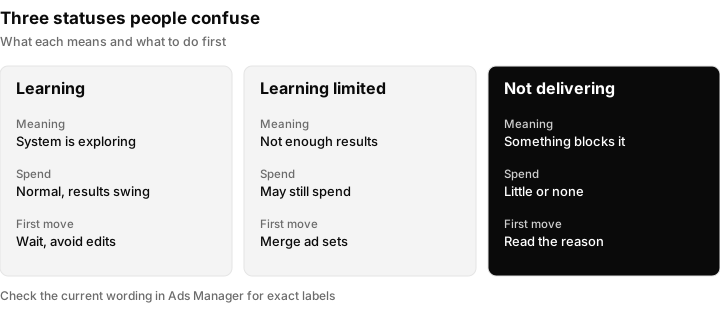
The three statuses people confuse. Learning is normal, Learning limited is a structure problem, and Not delivering means something is blocking the ad.
Step 9: New ad accounts and the ramp-up
A new ad account, Page or pixel often starts slowly with no wrong setting. The system has no history, new accounts may have lower early limits and extra checks, and first ads can be reviewed closely. Check the current wording in Billing and Account Quality for what applies. Set up payment and the Page properly, start with one clear objective, avoid constant edits and give it time. If you are taking over a client's existing account, see client account access for agencies.
Step 10: Advantage+ and campaign budget optimization
Uneven spend is not always a bug. When a campaign budget is shared across ad sets, or Advantage+ options are on, the system moves money to where it expects the best result. One ad set can take most of the budget, one ad can take most of an ad set, and a new ad set can get little because older ones have history. First confirm whether the low-spend part is actually broken (rejected, off, capped) or just losing the comparison. If it is losing, accept it or give it its own campaign. Check the current wording in Ads Manager for spend controls, and see Meta Advantage+. Do not delete the idle ad set: the system may be right that it is weaker.
Step 11: Tracking and optimisation event problems
Ads optimised for a result that never gets recorded deliver badly. Use Meta Pixel Helper to see whether the pixel loads and the right event fires, confirm that event is the one the ad set optimises for, and check event match quality. For lead ads, leads that reach Meta but never reach your CRM are a separate failure: see Facebook lead ads not syncing to CRM, connect Facebook lead ads to a CRM and Meta conversion leads. A tracking fault rarely makes spend exactly zero; it makes spend low, erratic or wasted.
Step 12: How long to wait before worrying
A working habit, not Meta policy: in the first hours, check that review finished and status is Active, and do not judge spend. Within the first day or two, leave an approved, funded ad in learning alone and fix only what is clearly broken. After a few days with no spend, run the full checklist, especially bid cap, audience size and account limits. If everything is clean, collect evidence and consider Meta support. Check the current wording in Meta's help pages for official review and learning timelines before quoting any to a client.
What you see, likely cause, what to do
| What you see | Likely cause | What to do |
|---|---|---|
| Status "In review" | Ad awaiting approval | Wait. Do not duplicate. Check status again later. |
| Status "Rejected" or "Disapproved" | Policy issue | Read the reason, fix the cause, resubmit once. |
| Status "Scheduled" | Start date in the future | Check the start date and time zone. |
| Campaign Active, ad set not delivering | Ad set switch, end date or limit | Open the ad set and read the reason shown. |
| Everything Active, spend is zero | Failed payment, account limit or restricted account | Check Billing and Account Quality first. |
| Active, tiny spend, no cap set | Audience too small or budget too low for the auction | Widen the audience, then review budget. |
| Active, tiny spend, cost cap or bid cap set | Cap below what the auction needs | Raise or remove the cap for a test, then step back. |
| Learning limited | Too few results for the budget and structure | Merge ad sets, raise budget share, or use a more frequent event. |
| One ad set spends, others do not | Budget being shifted by campaign level optimisation | Check whether the weak ad sets are broken or just losing. |
| Spend, clicks, but no leads recorded | Tracking or form problem | Check Pixel Helper and lead delivery, not delivery settings. |
| New account, nothing for a day | Ramp-up and trust checks | Confirm payment and review, then wait. |
| Everything clean for days | Possible platform issue | Collect evidence and contact support. |
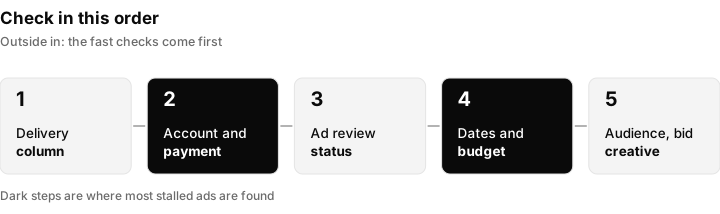
The diagnosis order. Each step is quicker to check than the one after it, so work left to right and stop at the first thing that is wrong.
The first ten minutes checklist
When someone says "my ads are not spending", run this before opening any setting you might break.
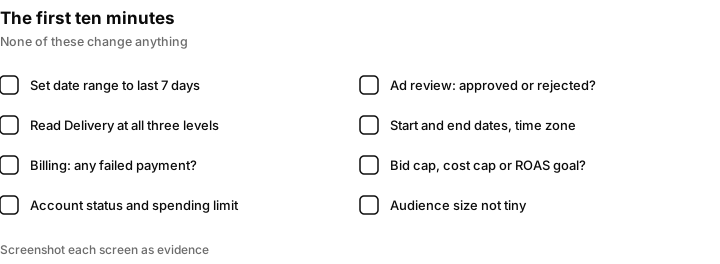
Eight checks that take about ten minutes and cover most cases. None of them changes anything.
Do not do this
- Do not panic-edit. Changing budget, audience, creative and bid in the same hour hides the cause and can reset learning. Change one thing, then wait.
- Do not duplicate in a loop. Duplicates inherit the account, audience and bid. If a payment problem or a cap blocked the original, it blocks the copy too.
- Do not raise the budget without checking the bid. If a cap or goal is the block, more budget does nothing.
- Do not delete the idle ad set. It may be waiting on review or losing a shared budget comparison.
- Do not call it fixed until you see spend. Status colours are not delivery. Look at the spend column.
- Do not trust old rules. Text percentage rules, minimum budgets and learning thresholds change. Check the source.
If you run ads for clients: checking many accounts fast
An agency with 20 client ad accounts cannot read the delivery column of each one every morning. A short routine makes underspend show up before the client notices.
- List the expected daily spend per client, from the plan you agreed: client, account, expected daily spend, owner.
- Check yesterday's spend against it every morning. Anything under about half the expected amount goes on the list. (The half is a working threshold you can set yourself, not a Meta figure.)
- Run the first-ten-minutes checklist on each name on the list.
- Record the cause in one line. Patterns appear quickly, such as one client whose card keeps failing, or one buyer who sets caps too low.
- Note when delivery resumed and what fixed it. Accounts far above plan need the same attention as accounts far below.
Facebook ads automated rules explains rules that can notify you when spend drops, and Meta Ads reporting for agencies covers client-readable reports.
When to escalate to Meta support
Escalate when you can show that payment is healthy, there is no limit or restriction, ads are approved and Active at all three levels, no cap is limiting, the audience is a reasonable size, and several days have passed with no meaningful spend. Gather screenshots of the Delivery column, billing, account status and ad set settings, with the account ID and dates. Support responds to specifics: "approved ad set, no cap, reasonable audience, zero impressions for three days, payment cleared" gets looked at. Check the current wording in Meta Business Help for the support options on your account. If access is the blocker, see Facebook ad account agency access.
What to tell the client
Clients want to know what is wrong, what you are doing and when they will see results. Copy and adapt these.
Cause not yet known: "Your campaign is live but is not spending yet. I am working through the standard checks on payment, approval, schedule and audience, and will update you by the end of the day with the cause and the fix."
Payment cause: "Your ads paused because the card on the ad account was declined. Please update the payment method in billing and I will confirm once spend resumes."
Setting cause: "The campaign was limited by a cost control I had set too tightly. I have loosened it and am watching the first day of spend."
Escalation: "Everything on our side checks out, so I have raised a ticket with Meta with screenshots. I will update you when they reply."
Never promise a delivery time that Meta has not stated, and never blame the platform until you have run the checks.
How Inflowave helps with ads that are not spending
Inflowave is the CRM an agency runs its clients on, and it does not fix delivery. It cannot approve an ad, clear a payment, raise a spending limit or make an ad spend. The actual diagnosis and the fix happen in Meta Ads Manager.
What it does help with is seeing the problem sooner and seeing what the spend produces. Meta reporting in Facebook Ads in Inflowave shows campaigns, ad sets and ads with impressions, clicks, spend, CTR, CPC and CPM, plus leads, cost per lead and return on ad spend. Because ad accounts are scoped per client and workspace, an agency can look at each client's spend and leads in one place instead of opening every ad account separately, and a client whose spend has dropped is easier to spot.
Inflowave links ad spend to the leads and deals it produced, with pipeline value and revenue, so you can tell the difference between an ad that is not spending and an ad that is spending but not producing leads. Those need different fixes. It can also change budgets, pause and resume campaigns, and run ad rules that can be approved, rejected or undone under account guardrails. Its analytics report spend alongside leads, pipeline and revenue from every source, filtered by client, connected account and date range. Leads from any source, including Google, can be recorded and followed to a sale. For client-facing views, see agency reporting.
What it does not do: it does not diagnose why Meta is not delivering, it does not bypass Meta review or limits, and it does not guarantee that a change you make in Ads Manager will start delivery. TikTok reporting exists but is shallower than the Meta reporting.
Related guides on other platforms
The same outside-in order works elsewhere. See Instagram ads not delivering, Google Ads not spending, TikTok ads not spending and the ads not spending diagnosis guide.
Questions people ask
Why are my Facebook ads active but not spending?
Active only means the ad is switched on. It can still be blocked by a failed payment, an account spending limit, an ad in review, a future start date, a bid or cost cap set below what the auction needs, or an audience too small to find anyone. Read the delivery reason at ad set level and work through the checks in order.
Why are my Facebook ads not taking payment?
Usually the card was declined or expired, or the account reached its payment threshold and the charge failed. Open billing, look for a failed charge, update the method and clear anything outstanding. Check the current wording in Billing for how thresholds work.
Why is my boosted post not spending money?
A boosted post faces the same review, payment, audience and budget checks as any ad. The common reasons are the post still being in review, a very small audience, a small budget, or a payment problem.
How long does it take for Meta ads to start spending?
After approval, spend usually starts quickly, but a new campaign or new ad account can be slow while the system learns. Give it a day or two without editing, and check the current wording in Meta's help pages for official timelines.
Why is my new Meta ad account not spending?
New accounts have no history, may have lower early limits and extra checks, and their first ads can be reviewed closely. Confirm payment, Page connection and approval, then avoid constant edits and give it time.
What does Learning limited mean?
The ad set is not getting enough of the result it is optimised for, so the system cannot settle. It is a structure problem, not a block. Merge ad sets that split a small budget or choose a more frequent optimisation event.
What is the 20 percent rule on Facebook ads?
It was an old guideline about how much text could appear on an ad image. Do not treat it as the current rule. Check Meta's current advertising policy and keep the image clear with a short message.
Can a bid cap or cost cap stop my ads spending?
Yes. If the cap or goal is below what the auction needs, the system will not buy impressions. Raise the cap or switch to no cap for a short test. If delivery picks up, the cap was the cause.
Why is one ad set spending and the others are not?
With a shared campaign budget or Advantage+ options, the system moves money to where it expects the best result. Check whether the low-spend ad set is blocked or simply losing the comparison.
Why are my Meta ads not performing?
That is a different question from not spending. If ads spend but produce few leads, look at creative, offer, landing page, tracking and audience. See cost per outcome in Meta ads.
