
Disclosure first, because the rest of this only works if you trust the numbers: Inflowave makes an agency CRM that competes with respond.io, and Inflowave is on this list. That is a reason to check every figure here against the linked pricing page, which is why each one is linked. It is also the reason the cost model below is built so that you can run it yourself and get an answer that is not us. Of the seven scenarios at the end, six do not recommend Inflowave.
Every price in this article was checked against the vendor's own live pricing page on 15 September 2026, and every price carries its billing basis. Where a vendor's own page would not render a figure, the number has been removed rather than sourced elsewhere.
Respond.io is a capable product: an omnichannel conversation platform built around WhatsApp, Instagram, Messenger and TikTok, aimed at businesses handling high inbound chat volume. If you are a single brand with one inbox and one team, it does the job and you probably should not switch.
Agencies are a different shape. You are one team operating five, fifteen or fifty inboxes that belong to other companies, each needing its own numbers, its own reporting and a wall between it and the client next door. That structural difference is where the friction starts, and it is the only useful basis for comparison.
The short answer
| Question | Answer |
|---|---|
| Who should stay on respond.io? | A single brand with one inbox and one team. Switching costs about two months and gains nothing. |
| Why do agencies look for alternatives? | Multiple Workspaces start on Advanced at $279/month, and contacts are metered above Growth, so a client's ad spend moves your bill. |
| Cheapest credible option we could verify? | Chatwoot. Business at $39/agent/month billed annually, or self-hosted under an MIT licence. |
| Best if email is central and volume is high? | Front, because nothing is metered. |
| Best if the pipeline matters as much as the inbox? | Kommo, with a six-month minimum term. |
| Best if WhatsApp is the whole service? | Wati, with the price checked on its own page. |
| Where does Inflowave fit? | Several clients, DM-led, with contact metering as the reason to leave. Pro at $297 has 5 seats, so eight people means Max at $497. |
Price the whole bill, not the subscription. For a DM-led agency the Meta WhatsApp fees can be larger than every subscription in this article, and the platform you choose barely changes them.
What respond.io actually costs an agency
Published pricing (respond.io/pricing, checked 15 September 2026):
| Plan | Price | Seats included | Extra seat | Monthly active contacts | MAC overage |
|---|---|---|---|---|---|
| Starter | $79/month, billed monthly | 5 | $12/month | Unlimited | n/a |
| Growth | $159/month, billed monthly | 10 | $20/month | Starts with 1,000 | $12 per 100 |
| Advanced | $279/month, billed monthly | 10 | $24/month | Starts with 1,000 | $15 per 100 |
| Enterprise | Custom | Unlimited | Included | Custom | Custom |
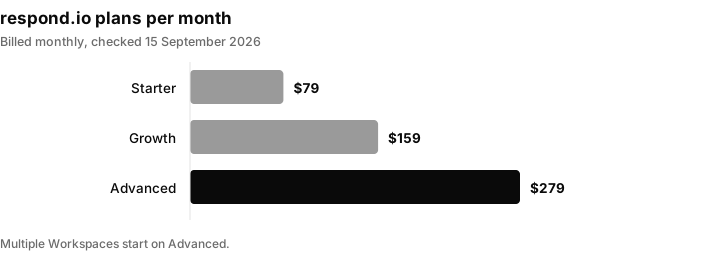
respond.io monthly prices, billed monthly, checked 15 September 2026. The realistic agency entry point is Advanced.
Three things in that table matter more than the headline price.
Workflows and the API start on Growth. Starter includes AI Prompt and AI Assist, team and custom inboxes, the mobile app, basic reports and 2FA. Broadcasts, workflow automation, AI Agents and the Developer API begin at Growth. If your model depends on automated follow-up, $79 is not your price.
Multiple Workspaces start on Advanced. For an agency, workspace separation is not a feature, it is the product. The realistic agency entry point is $279/month.
Contacts are metered above Growth. Note the inversion: Starter has unlimited monthly active contacts and no automation, while the two plans that can automate meter contacts from 1,000. A single client running a decent ad campaign can add several hundred dollars of overage in a month before anyone notices. That is the most common reason agencies start looking, because it makes your cost a function of your client's ad spend rather than your own team size.
The six things to compare
Fix your criteria before you look at logos. These six decide the outcome, and no marketing page leads with any of them.
- Does the pricing meter on contacts, conversations, seats, or none of those? Volume metering transfers your client's spend risk onto your P&L. Seat metering is predictable but punishes agencies running lots of part-time VAs and setters.
- Can one login hold genuinely separate client workspaces? Not tags, not folders. Separate data, separate numbers, separate reporting, so a VA on client A cannot see client B.
- Does routing survive a person leaving? Conversations owned by a departed contractor need bulk reassignment with history intact, or handover becomes a manual export job.
- Is reporting per-client or per-account? You need to hand a client a report containing only their numbers without rebuilding it by hand each month.
- What happens when a client leaves? Offboarding should be a supported action, not a support ticket and a CSV.
- Who owns the WhatsApp number and the Meta assets? If the platform holds the number inside its own Business Manager, your client's asset is hostage to your vendor relationship. This is the criterion that costs the most to get wrong and the one nobody checks.
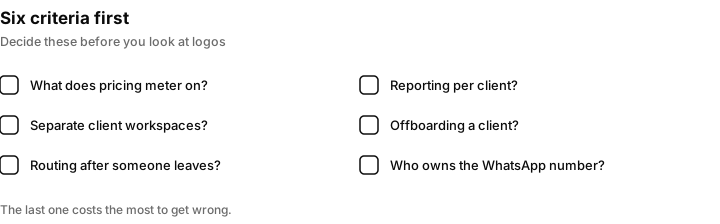
Fix these six before you look at logos. The last one costs the most to get wrong and is the one nobody checks.
The alternatives, with verified numbers
Trengo
The closest structural analogue to respond.io in Europe: an omnichannel team inbox across email, WhatsApp, Instagram, Facebook and more. Boost is €299/month with 10 users and Pro is €499/month with 20 users on annual billing; month to month those are €349 and €599 (trengo.com/pricing, checked 15 September 2026).
Trengo meters conversations rather than contacts. Boost includes 6,000 conversations a year, Pro includes 18,000, and extra conversations are €15 per 100 on annual billing and €18 per 100 month to month. Extra users are €25 on Boost and €40 on Pro on annual billing, €30 and €50 month to month.
Suits: European agencies with predictable volume and a large team, where Pro's 20 included seats do most of the work. Does not suit: agencies whose volume spikes with client campaigns. Conversation metering has the same structural problem as contact metering, and 18,000 a year is only 1,500 a month.
Front
A shared inbox and ticketing product rather than a chat-first one, priced purely per seat. The figures on the pricing page sit under a "Billed Annually, Save 24%" toggle, so they are annual-commitment rates: $25/seat/month billed annually up to 10 seats on Starter, $65/seat/month billed annually up to 50 seats on Professional, $105/seat/month billed annually on Enterprise (front.com/pricing, checked 15 September 2026). Month to month is roughly a quarter more, and the page states the saving rather than printing the monthly figure, so get it in writing before you budget against it. Omnichannel messaging, multiple workspaces, SSO and SCIM all begin on Professional.
Suits: agencies where email is the main channel, collaboration is the main problem, and message volume is high relative to headcount. Because nothing is metered, Front is one of the few options here whose bill does not move when a client doubles their ad spend. Does not suit: agencies with a lot of low-cost seats. At $65 per seat billed annually, ten VAs is $650/month before a single message is sent, and more than that if you will not commit for a year.
Chatwoot
The open source option. The repository is MIT licensed (github.com/chatwoot/chatwoot), so self-hosting carries no per-seat licence cost. Hosted pricing is per agent per month, billed annually: a free Hacker tier limited to 2 agents and 500 conversations a month, Startups at $19/agent/month, Business at $39/agent/month, Enterprise at $99/agent/month (chatwoot.com/pricing, checked 15 September 2026). WhatsApp and Instagram begin on Startups. Automation rules begin on Business.
Suits: technically capable agencies that want to cap software cost, and anyone whose clients have data residency requirements. Self-hosting converts a recurring per-seat cost into a fixed server cost, which is a different shape of P&L entirely. On the hosted tier it is also, on raw price, the cheapest credible option we could verify in this article. Does not suit: agencies without an engineer. Self-hosted Chatwoot is a real system to run, upgrade and back up, and hosted pricing is annual, so the cheap monthly figure is a twelve-month commitment.
Kommo
A messaging-first CRM rather than an inbox with a CRM bolted on, at $25, $35 and $45 per user per month for Base, Advanced and Pro, every one of them billed for a minimum six-month term paid upfront rather than billed monthly (kommo.com/pricing, checked 15 September 2026). Channels are tiered: Base includes 1 WhatsApp number and 1 Instagram account with each additional user unlocking one more channel, Advanced includes 3 of each, Pro is unlimited.
Kommo states a minimum subscription period of 6 months, and monthly payment is not offered.
Suits: agencies where the deal pipeline matters as much as the inbox, and where per-user pricing tops out at $45 with no volume meter at all. The channel tiering maps onto client count, which is unusual and useful. Does not suit: anyone who wants to trial month to month, and anyone with more than a handful of clients on anything below Pro.
SleekFlow
Pro at US$109/month and Premium at US$279/month, both billed monthly with an annual option at 20% off, both including 10 user accounts, starting at 500 and 1,000 monthly active contacts respectively (sleekflow.io/pricing, checked 15 September 2026). The MAC overage rate was not published on the pricing page at the time of checking, so ask before you sign.
Suits: WhatsApp-heavy agencies in Asia-Pacific markets, where SleekFlow's regional presence is strongest, at a lower entry price than respond.io. Does not suit: anyone leaving respond.io because of contact metering. This is the same meter with a different logo, and with an overage rate you cannot check in advance.
Wati
WhatsApp only, which is either the point or the problem. Growth includes 3 users and no additional users; Pro includes 5 users with extras at $24/user/month; Business includes 5 users with extras at $69/user/month, and all three are quoted on annual billing with a higher month-to-month rate (wati.io/pricing, checked 15 September 2026). Message charges are additional and vary by category and country.
We are not printing plan prices for Wati. The pricing page renders its figures through client-side script and would not return them on any read we made on 15 September 2026, and the third-party trackers that do quote numbers disagree with each other by a wide margin. Every plan carries a listed price on the page rather than custom pricing, so the figures exist. Open the page yourself, set the billing toggle to the term you actually want, and read them there.
Suits: agencies whose entire service is WhatsApp broadcast and support for a small number of clients, where 5 included users on Pro covers the team. Does not suit: anyone running Instagram DMs, and anyone with a large low-cost team, where $69 per extra user on Business becomes the dominant line item.
Inflowave
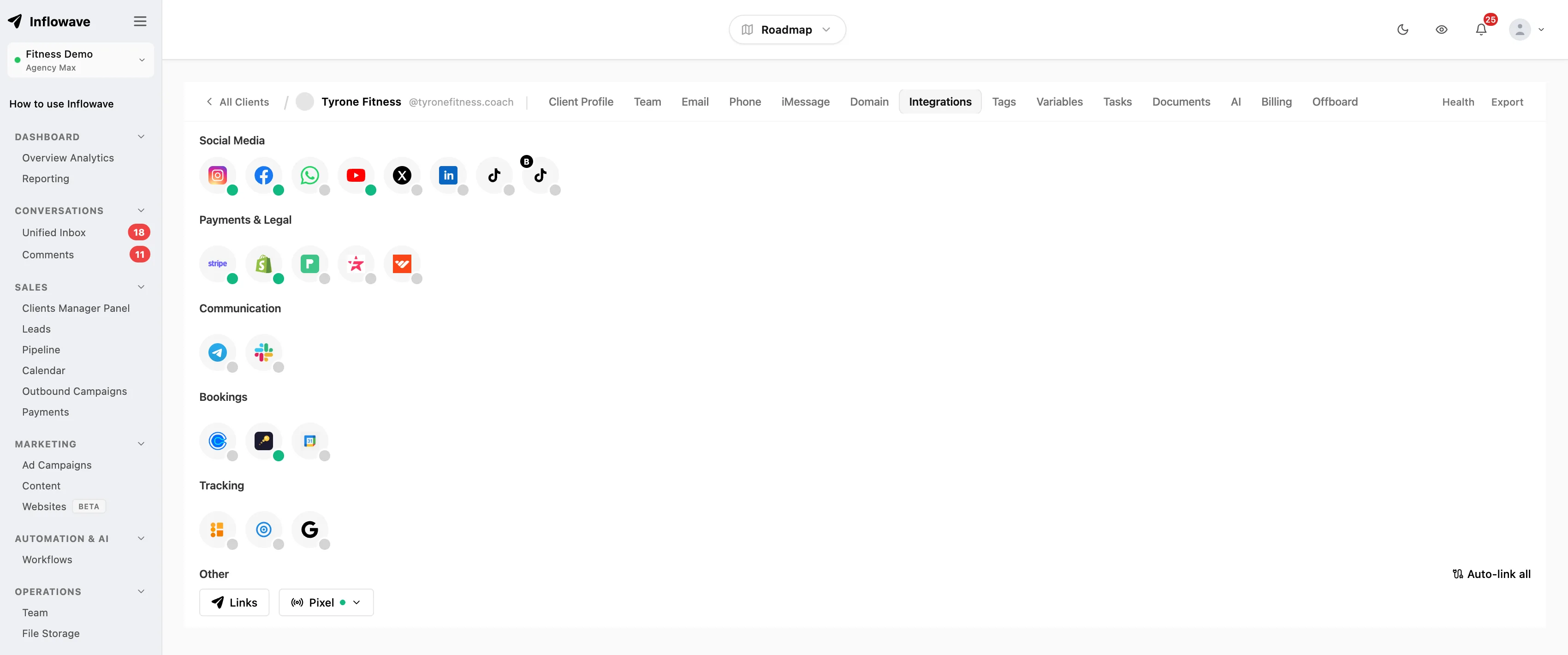
Ours. Prices on client workspaces and team members rather than on contacts, but the caps are real and worth reading before you assume it is the cheap option. All four are billed monthly (inflowave.io/pricing, checked 15 September 2026):
| Plan | Price | Social accounts | Client workspaces | Contacts | Team seats |
|---|---|---|---|---|---|
| Business | $149/month | 1 | 1 | 1,000 | 1 |
| Pro | $297/month | 10 | 10 | 10,000 | 5 |
| Max | $497/month | 50 | 50 | Uncapped | Uncapped |
Channels are Instagram DMs, Facebook Messenger, WhatsApp Business, SMS, email and voice.
Two honest limits. Pro gives you 5 team seats and a 10,000 contact ceiling, so an agency with eight people or a large database is on Max at $497 regardless of client count. And Influencer and Business are single-workspace, single-social-account plans, which means they are not agency plans at all despite Business costing $149.
Suits: agencies running inbound DM volume across several clients who want per-client separation and per-client reporting in one login, and whose bill should move when they sign a client rather than when a client raises their ad budget. Does not suit: single-brand businesses, where respond.io or Chatwoot is cheaper and simpler. Also does not suit an agency under 1,000 monthly active contacts with ten people in the inbox, where respond.io Advanced at $279 gives you 10 seats against Inflowave Pro's 5.
A real cost model
Subscription comparisons are where agencies get this wrong, because two of the three cost layers are invisible on a pricing page. Model all three.
Take a concrete agency: 6 clients, 8 people in the inbox, 5,000 monthly active contacts across all clients. That is a mid-sized DM-led shop, not an enterprise. Using the verified numbers above:
| Platform | Plan | Base | Seats | Volume | Monthly total |
|---|---|---|---|---|---|
| Chatwoot (hosted) | Business | $39/agent, billed annually | 8 × $39 = $312 | none metered | $312, billed annually |
| Kommo | Pro | $45/user, six-month minimum term | 8 × $45 = $360 | none metered | $360, six-month minimum |
| Inflowave | Max | $497, billed monthly | included | none metered | $497 |
| Front | Professional | $65/seat, billed annually | 8 × $65 = $520 | none metered | $520, billed annually |
| respond.io | Advanced | $279, billed monthly | 10 included | 4,000 MAC over × $15/100 = $600 | $879 |
| Trengo | Pro | €499, billed annually | 20 included | 5,000 conversations vs 1,500 included, 3,500 × €15/100 = €525 | €1,024, billed annually |
Wati is absent from that table because we could not read its plan prices off its own pricing page, and a cost model built on a number we cannot cite is worse than a gap. Price it yourself if WhatsApp is your only channel, because on included users it is likely to come in under everything above.
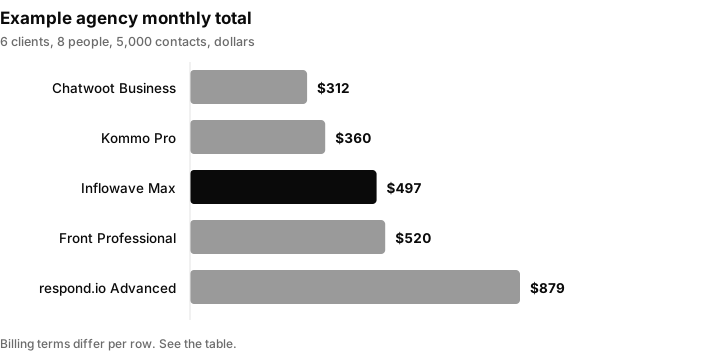
Monthly totals from the table for the example agency. Trengo at 1,024 euros is not drawn because it is in euros. Billing terms differ per row.
Three readings of that table, none of which flatter us.
On raw subscription cost we are third of six. Chatwoot Business and Kommo Pro are genuinely cheaper for this agency. If cost is your single criterion, stop reading and go and price Chatwoot. Note also that two of the three cheapest rows buy their price with a commitment: Chatwoot's is a twelve-month one and Kommo's is six months paid upfront, while the Inflowave and respond.io rows are month to month.
The seat-priced options invert as the team grows. Add four more VAs and Front goes to $780 and Chatwoot to $468, while Inflowave Max and respond.io Advanced do not move on headcount at all. Seat pricing is only cheap while your team is small.
The metered options invert as the clients succeed. The respond.io and Trengo rows are the only ones that move when a client turns their ad spend up, and they move without warning. Model those rows at your worst month, not your average one.
The third layer: WhatsApp per-message fees
No vendor on this list controls this, and every one of them passes it through.
Since 1 July 2025 the WhatsApp Business Platform bills per message rather than per conversation. Meta's documentation states that you are charged when a template message is delivered, across marketing, utility and authentication categories; service messages became free for all businesses on 1 November 2024, and non-template replies inside an open customer service window are free, as are messages inside 72-hour free entry point windows (developers.facebook.com/docs/whatsapp/pricing). Meta publishes per-country rates through an interactive calculator (whatsappbusiness.com/products/platform-pricing) rather than a static table, and rate changes land quarterly on 1 January, April, July or October.
We are not quoting a per-message rate here, because Meta does not publish one you can cite without going through the calculator for your specific market, and every third-party figure we found disagreed with the next one. Look yours up and put it in this formula:
Meta bill = (delivered marketing templates × marketing rate) + (delivered utility templates × utility rate) + (delivered authentication templates × authentication rate)
The arithmetic is what matters. Our six-client agency sending 2,000 marketing templates per client per month is 12,000 delivered messages. Run that through the formula and the answer is 12,000 × your rate. At an illustrative one cent it is $120 and irrelevant; at an illustrative ten cents it is $1,200, which is larger than every subscription in the table above. Those two figures are arithmetic on made-up rates, not quoted rates, and the gap between them is exactly why the platform comparison is the small half of the decision.
Three practical consequences:
- Marketing templates carry no volume discount in Meta's model, while utility and authentication do. Reclassifying a message from marketing to utility, where it genuinely is one, is usually a bigger saving than changing vendor.
- The rate follows the recipient's country code, not yours. An agency with clients selling into three countries has three rate cards.
- A per-contact platform fee bills you a second time for volume Meta already billed you for. That is the actual argument against contact metering, and it is an argument about double billing rather than about price level.
The same passthrough logic does not apply on Instagram and Messenger, where the constraint is time rather than money. Meta's policy gives businesses up to 24 hours to respond to a user, with message tags and a Human Agent tag allowing a manual response within a 7-day period (developers.facebook.com/docs/messenger-platform/policy/policy-overview). Whatever you migrate to must make that 24-hour window visible to the people working the inbox, or you will lose conversations to it regardless of the logo on the login screen.
How to run the switch without losing conversations
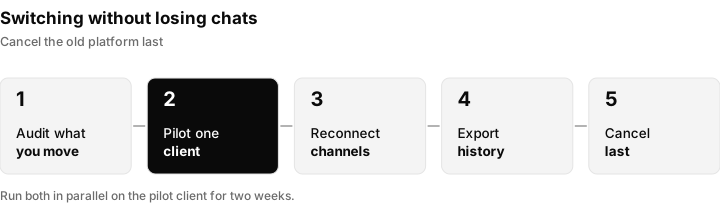
The order that protects conversations. Cancelling the old platform is deliberately the last step.
Migration is where most platform changes actually fail, and the failure is almost always operational rather than technical. Budget two months, not two weeks.
Week 0: audit what you are actually moving. Count the WhatsApp numbers, the connected Instagram and Facebook assets, the live automations and the open conversations per client. Most agencies discover here that two or three automations do all the work and the other forty are dead. Write down which Business Manager owns each WhatsApp number, because that single fact determines whether the migration is a form or a negotiation.
Move one client first, and not your smallest. Pick your second-most-important client. A small client does not generate enough volume to surface the problems you are trying to find. Run both platforms in parallel on that one account for two weeks with the old platform still receiving, so you always have a fallback that is one DNS-free click away.
Reconnect channels in the right order. WhatsApp Business API numbers migrate between providers through a process that has downtime; do it on the client's lowest-volume day and tell them beforehand. Instagram and Messenger reconnect through Meta OAuth and are fast, but the old platform must release the page first, or the connection fails with a permissions error that looks exactly like a bug in the new platform and is not. More than one migration has been abandoned at that error.
Move the number, not just the integration. If the outgoing vendor holds the WhatsApp Business Account inside its own Business Manager, you are asking a company you are leaving to release your client's asset. Start that request in week 0, in writing, and escalate early. This is the single step with no technical workaround.
Export conversation history before you cancel, not after. Most platforms cut API access at the end of the billing period, and support will not reopen it. If you need transcripts for compliance or for a client handover, pull them while the account is live, per client, into a file the client could be handed tomorrow.
Rebuild automations by hand. There is no import path between any two platforms on this list. Take the opportunity to delete the sequences nobody has looked at in a year rather than faithfully recreating them. Rebuild in priority order and leave the new automations switched off until the parallel-run client has been clean for a week, otherwise a duplicate send goes out from both platforms at once and the client sees it before you do.
Re-do your A2P registration if SMS is involved. US carrier registration is a separate process with its own lead time and its own rejection reasons, and it does not transfer with the platform. Our A2P 10DLC registration guide covers it.
Agree the handover with the client in writing. New number if any, new consent language if any, the date, and a plain statement of who owns the WhatsApp Business Account at the end of it. Do this per client even when the client does not ask, because the agency that cannot answer that question on request is the one that loses the account.
Cancel last. Overlap one full billing cycle. Paying twice for one month is cheaper than any single lost conversation with a client's buyer.
Which one to pick
Read this against the six criteria, not as a ranking. The criterion that decides it is the one in bold.
| Your situation | Pick | Watch out for |
|---|---|---|
| High volume, low headcount, email central | Front | Per seat cost grows with a large team |
| Cost is binding and you have an engineer | Chatwoot | Self-hosting is a real system to run |
| WhatsApp is the whole service | Wati | Check the price on its own page |
| Pipeline matters as much as the inbox | Kommo | Six month minimum term |
| Large stable team in Europe | Trengo | Conversation count must stay near 1,500 a month |
| One brand, one inbox | Stay on respond.io | Nothing to gain by switching |
| Several clients, DM-led, leaving over contact metering | A workspace priced platform such as Inflowave | Seat and contact caps on each plan |
The same guidance in more detail:
- Volume is high and headcount is low, email is central: Front. Nothing is metered, so a client's good month does not become your bad one, and the collaboration tooling is the strongest here.
- Cost is the binding constraint and you have an engineer: Chatwoot. Self-hosted it is a server bill; hosted, Business at $39/agent/month billed annually is the cheapest credible option we could verify in this article. We are not going to pretend otherwise.
- WhatsApp is the entire service and you have a handful of clients: Wati, with the price checked on its own page before you commit. Pro includes 5 users and the single-channel limit is not a limit if you only use one channel, but we could not verify a figure to quote you.
- The pipeline matters as much as the inbox and you can commit six months: Kommo. Per-user pricing capped at $45 per user per month with no volume meter, and channel tiering that tracks client count.
- Large stable team, predictable volume, Europe: Trengo. The 20 included seats on Pro do real work, provided your conversation count genuinely stays near 1,500 a month.
- One brand, one inbox, high volume: stay on respond.io. Switching costs you two months and gains you nothing.
- Several clients, DM-led, and contact metering is why you are leaving: a workspace-priced platform, of which Inflowave is one. Check the seat and contact caps against your team before assuming Pro at $297 is your tier; at eight people it is not.
For related comparisons, see Kommo alternatives, the best WhatsApp CRM for agencies on our own site and the head to head with respond.io versus an AI first Instagram DM tool.
For the wider question of what your agency should be building around any of these tools, see how to grow a marketing agency. If WhatsApp specifically is the channel you are optimising, the best WhatsApp CRM for agencies goes deeper, and GoHighLevel alternatives covers the adjacent all-in-one category. If the switch is also a chance to tidy your process, the client onboarding checklist is the document to fix first.
Using Inflowave when you leave respond.io
If your reason for leaving is that contact metering ties your bill to a client's ad spend, a workspace-priced platform changes the shape of the bill. Inflowave prices on client workspaces and team members rather than contacts, with each client in its own workspace so data, numbers and reporting stay separate. The channels are Instagram DMs, Facebook Messenger, WhatsApp Business, SMS, email and voice, in a unified inbox.
Be clear about the limits before you move: Pro at $297 gives 5 team seats and a 10,000 contact ceiling, so an agency with eight people or a large database is on Max at $497. Business and Influencer are single-workspace plans, not agency plans. And as the cost model shows, on raw subscription cost Chatwoot and Kommo are cheaper for the example agency. If you do move, follow the migration steps above, start the WhatsApp number ownership request in week 0, and see the best Instagram CRM for agencies for how the Instagram side compares.
Questions people ask
What is respond.io used for?
Respond.io is used to manage customer conversations across multiple messaging channels in one inbox. Its own site lists WhatsApp, TikTok, Instagram and Facebook, plus WhatsApp Business Calls, Messenger Calls and VoIP. Businesses use it to route inbound chats to team members, automate replies through workflows, run broadcasts and report on conversation volume. It is positioned for sales, marketing and support teams handling high inbound message volume rather than for outbound cold outreach.
Is respond.io a CRM?
Not in the traditional sense. It stores contacts and conversation history and can hold custom fields against a contact, but it is built around the inbox rather than around a deal pipeline, forecasting and revenue reporting. Many teams run it alongside a CRM and sync between the two using the Developer API, which its pricing page places on the Growth plan and above. If pipeline management is your primary requirement, a messaging-first CRM such as Kommo is a closer fit.
How much does respond.io cost per month?
Checked 15 September 2026, on monthly billing: $79/month for Starter with 5 users, $159/month for Growth with 10 users, $279/month for Advanced with 10 users, and custom pricing for Enterprise. An annual option is offered at up to 20% less. Growth and Advanced start at 1,000 monthly active contacts, with overage at $12 per 100 on Growth and $15 per 100 on Advanced. Additional users are $12/month on Starter, $20/month on Growth and $24/month on Advanced. Multiple Workspaces begin on Advanced, which is the realistic starting tier for an agency.
Is Respondio a free tool?
No. The published pricing page lists no free tier, and the cheapest paid plan is Starter at $79/month billed monthly. The site offers a free trial through a "Start Free Trial" button, but the trial duration is not stated on the pricing or home page, so confirm it before planning around it. If you specifically need a permanently free option, Chatwoot's Hacker tier is $0 for up to 2 agents and 500 conversations a month.
What is the cheapest respond.io alternative for an agency?
On the prices we could verify, hosted Chatwoot Business at $39 per agent per month billed annually, or self-hosted Chatwoot, is the cheapest credible option. It needs a twelve-month commitment when hosted and an engineer when self-hosted, so price it against the full cost of your team and not just the headline.
Where is respond.io from?
The company is headquartered in Kuala Lumpur, Malaysia. It was founded in 2017, originally in Hong Kong, and previously operated as Rocketbots before rebranding to respond.io. This matters more than it sounds for agencies: support hours, billing currency and the regional strength of a vendor's WhatsApp Business Solution Provider relationships all follow from where a company is based and where its customer base sits.
What is respond ai?
There is no separate product called respond ai. The AI capability is built into respond.io itself, and its pricing page splits it across tiers: AI Prompt and AI Assist are included from Starter, while AI Agents begin on Growth. In practice AI Assist helps a human draft or improve a reply, whereas AI Agents are configured to handle conversations autonomously. Confusion with the name is common because the company was formerly called Rocketbots.
Why is WhatsApp API so expensive?
Because most of the cost is Meta's, not the software vendor's. Since 1 July 2025 the WhatsApp Business Platform bills per delivered template message rather than per conversation. Rates vary by category, marketing being the most expensive and the only one with no volume discount, and by the recipient's country calling code. Vendors pass this through and some add a markup or a per-contact fee on top, so the same message volume can cost very different amounts depending on which platform you route it through. Meta publishes current rates through its own pricing calculator, which is the only figure worth budgeting against.
Sources
All pricing pages checked 15 September 2026.
- Respond.io pricing: https://respond.io/pricing
- Respond.io company information: https://respond.io/about
- WhatsApp Business Platform pricing, Meta for Developers: https://developers.facebook.com/docs/whatsapp/pricing
- WhatsApp Business Platform pricing calculator: https://whatsappbusiness.com/products/platform-pricing/
- Messenger Platform messaging policy, Meta for Developers: https://developers.facebook.com/docs/messenger-platform/policy/policy-overview
- Chatwoot pricing: https://www.chatwoot.com/pricing
- Chatwoot MIT licence: https://github.com/chatwoot/chatwoot/blob/develop/LICENSE
- Trengo pricing: https://trengo.com/pricing
- Front pricing: https://front.com/pricing
- Kommo pricing: https://www.kommo.com/pricing/
- SleekFlow pricing: https://sleekflow.io/pricing
- Wati pricing: https://www.wati.io/pricing/
- Inflowave pricing: https://inflowave.io/pricing
Vendors change plans frequently. Verify against the linked pages before committing.
