
If you are shopping for a CRM with a built-in power dialer, the question is rarely "which one dials fastest". It is: when the call ends, does the outcome, the recording and the next step land on the deal record by themselves, or does a rep have to type them there?
The short version: a CRM with a built-in power dialer is one where the call queue, the call itself, the recording and the outcome all live on the same contact record, with no connector in between. Pick by architecture and by how many lines are open per agent, not by the label "power dialer".
Below is a comparison of the CRMs in this category, checked against each vendor's own live pricing page on 15 September 2026. The architecture argument, which is what decides whether the tool survives contact with a busy dial day, comes underneath it.
The short answer
| Question | Answer |
|---|---|
| What is a CRM with a built-in power dialer? | A CRM where dialing is a feature of the CRM itself, so the call, recording and outcome are written to the contact record without a connector. |
| What is a power dialer? | A dialer that works through a queue one call at a time per agent, moving to the next number automatically. |
| How is it different from a predictive dialer? | A power dialer opens one line per agent. Predictive and parallel dialers open more lines than agents, which brings abandonment rules into play. |
| Which CRMs are native? | In this comparison, Close and Inflowave have the dialer as a feature of the CRM. Others pair a CRM with calling add-ons or a second product. |
| What should I check first? | Whether the dialer is on the plan you are pricing, how many lines per agent, and whether the call list is a live query. |
| Is it legal? | Calling a list of known contacts one line at a time is not the restricted automatic dialing category in the US, but consent, do-not-call and abandonment rules still apply. Not legal advice. |
| Best choice for agencies? | One that separates numbers, lists and recordings per client at the record level, which is a data model property, not a filter. |
The rule that matters most: the question is not which dialer dials fastest. It is whether the outcome, the recording and the next step land on the record by themselves, or a rep has to type them there.
CRMs with a built-in power dialer, compared
Every price below is the vendor's own published list figure, or its published starting figure where that is all the vendor shows, read from the vendor's own pricing page on 15 September 2026, with its billing basis stated in the row. Where a vendor does not publish a figure we can read, no number is quoted. Pricing changes; re-check before you budget.
| CRM | Dialer status | Price at the tier that carries calling | Call list source | Per-client isolation for agencies |
|---|---|---|---|---|
| Close | Native Power Dialer, excluded from Solo and Essentials | Growth $109 per user billed monthly, $99 per user billed annually; Scale $149 per user billed monthly, $139 per user billed annually. Solo ($19 per user billed monthly, $9 per user billed annually) and Essentials ($49 per user billed monthly, $35 per user billed annually) have no Power Dialer | Live Smart View (a saved CRM filter), rechecked every 5 minutes or less | No client or sub-account layer |
| HubSpot Sales Hub | Calling included from Starter, metered by a pooled minute allowance | Professional $100 per seat billed monthly, $90 per seat billed annually, with 3,000 minutes per account per month; Enterprise shown as "Starts at $150/mo/seat" on an annual commitment, next to a Talk to Sales button and no month-to-month figure, with 12,000 minutes per account per month. Starter $20 per seat billed monthly, $7 per seat billed annually, includes 500 minutes per account per month; Free includes none | Sequences and task queues | No client layer; portals are separate subscriptions |
| Salesforce Sales Cloud | Sales Dialer is a separately licensed capability, not listed on the public pricing page | Starter Suite $25 per user per month, billed monthly or annually; Pro Suite $100, Core $195, Advanced $395 and Max $550 per user per month, each billed annually. Sales Dialer pricing is not published, so confirm with your account team | Call lists and cadences | Requires configuration; no agency model out of the box |
| Zoho CRM | Built-in calling from Standard; deeper dialing sits in Zoho Voice, a second product | Zoho's own pricing pages served us local-currency figures rather than USD on both the CRM and the CRM Plus page, so no dollar figure is quoted here. Check zoho.com in your own currency | CRM views, with Voice as a paired product | No agency sub-account model |
| Pipedrive | Calling available; power dialing depends on tier and add-ons | Pipedrive's pricing page blocks automated checks, so no price is quoted here. Verify on pipedrive.com | CRM filters | No agency sub-account model |
| Microsoft Dynamics 365 Sales | Outbound calling requires additional licences, per Microsoft's own footnote; conversation intelligence is included, with a base capacity that varies by product purchased | Sales Professional $65, Sales Enterprise $105, Sales Premium $150, each per user per month, paid yearly | Sequences | Enterprise tenanting, not agency sub-accounts |
| Freshsales | Built-in phone from Growth, but calls and numbers are paid for with prepaid phone credits bought separately from the seat price | Growth $9, Pro $39, Enterprise $59, each per user per month, billed annually | CRM views | No agency sub-account model |
| Inflowave | Native power dialer inside the CRM, no separate dialer licence | Business $149, Pro $297, Max $497 per month, billed monthly per account rather than per seat, each with a seven day free trial. Seats: 1 on Business, 5 on Pro, uncapped on Max. Contacts: 1,000 on Business, 10,000 on Pro, uncapped on Max | Live CRM filter sent to the dialer as a session | Yes. sub_account_id and client_id are on every call row. Client workspaces: 1 on Influencer, 1 on Business, 10 on Pro, 50 on Max |
Two things that table does not capture.
First, the telephony-first vendors sit outside it on purpose. RingCentral, Dialpad, Aircall, Kixie and PhoneBurner are phone systems that connect to your CRM. Aircall says so in its own page title: "Power Dialer Software with CRM Integration." That is honest positioning. On raw telephony, they carry capabilities most of the CRM-native dialers in the table above do not advertise: number provisioning at scale, international coverage, and in PhoneBurner's case unlimited calling bundled into the seat price rather than metered. Their cost is that the CRM record is downstream of a connector.
Second, "power dialer" is not a fixed technical term in the market. Kixie sells both a single-line Power Dialer and a separate, higher Multi-Line PowerDialer plan. Its pricing page describes that Multi-Line plan as "PowerDial up to 4 lines simultaneously", while its Power Dialer feature page advertises "Auto-dial up to 10 numbers in parallel". Same vendor, same phrase, two different line counts. So the phrase alone tells you nothing about whether one line or ten are open. Ask the vendor how many concurrent lines per agent, because that answer, not the label, decides which compliance rules apply to you.
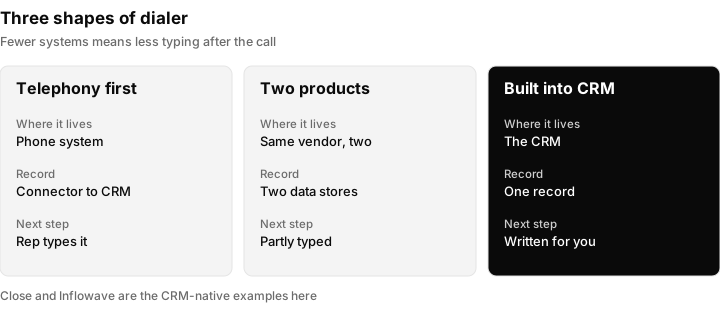
The shape of the product decides who writes the outcome. The more systems involved, the more the rep types by hand.
Native power dialer vs bolted-on: why the architecture decides
A rep working a queue of eighty numbers produces five things per call: who was called, what happened, how long it lasted, the recording, and what should happen next.
In a two-system setup, the phone system reliably has the first three. The recording usually stays in the phone vendor's archive with a link pushed across. The fifth, what happens next, is not data a phone system can produce at all, because it depends on the pipeline stage, the workflow and the rest of that person's history. So it becomes a note a rep types after hanging up.
That note is where outbound quietly dies. It is the one step in the chain with no system behind it, so it competes for the rep's time with the next dial, and it is on the heaviest dialing days that it has the least time to win.
There are three shapes on the market:
- Telephony first, CRM by integration. RingCentral, Dialpad, Aircall, Kixie, PhoneBurner. Strongest telephony, weakest record ownership.
- Two products from one vendor. Zoho Voice with Zoho CRM. Zoho's own Power Dialer page says Zoho Voice "can seamlessly integrate with our CRM solution". Read that literally: two products, integrating. Better than shape one, because the same company maintains both ends. Still two data stores and two things that can be separately misconfigured.
- The dialer is a feature of the CRM. Close and Inflowave. One write, one record, no connector.
Close is the strongest example of shape three and deserves the credit. Its Power Dialer runs off a Smart View, a saved CRM filter, and Close's documentation notes the dialer rechecks that view "every 5 minutes or less" for leads entering or leaving the query. That is the right design: the call list is a live query, not a CSV exported on Monday.
What a built-in power dialer writes back to the CRM
"It is built in" means nothing until you can see what it writes. Here is Inflowave's, with the data disclosed rather than described.
The queue is a filter over the CRM, not an upload. Filter leads by pipeline stage, source, tag, industry, status, last contact date or any custom field, then send that segment to the dialer as a session. Internally that creates a dial session with a name, creator, source filter and idempotency key, plus one queued item per number. The idempotency key is what stops a double click from queueing the same eighty people twice.
Calls are placed through Twilio, and each writes a call log row carrying the Twilio call identifier, direction, from and to numbers, status, duration, price, start, answer and end timestamps, and any error code.
The row that matters carries lead_id, client_id, sub_account_id and employee_id. Not a copy of the lead's name. The actual foreign keys. Recording and transcription attach to that same call log, with transcripts stored as ordered segments (sequence number, speaker label, text, confidence, language) rather than one blob, which is what makes it possible to ask who said a thing rather than only whether it was said.
Inflowave production sample of 2,319 logged calls, 156 dial sessions and 985 queued items, to 15 September 2026:
- 2,117 of 2,319 calls are attached to a lead record; 2,295 carry a workspace; 1,905 attribute to a specific team member.
- 513 of 985 queue items have been worked; 263 of those carry a recorded outcome (connected, meeting booked, callback, not interested, voicemail, no answer, wrong number).
- 129 recordings and 3,001 transcript segments across 384 distinct calls.
- 50 of 2,319 calls carry an answering machine detection result. The capability is live and configured per call, but most calls to date were placed without it. Treat it as available rather than proven at volume.
- 17 callback follow-up records exist. A working path, lightly used.
These are one platform's numbers on one date, not an industry benchmark.
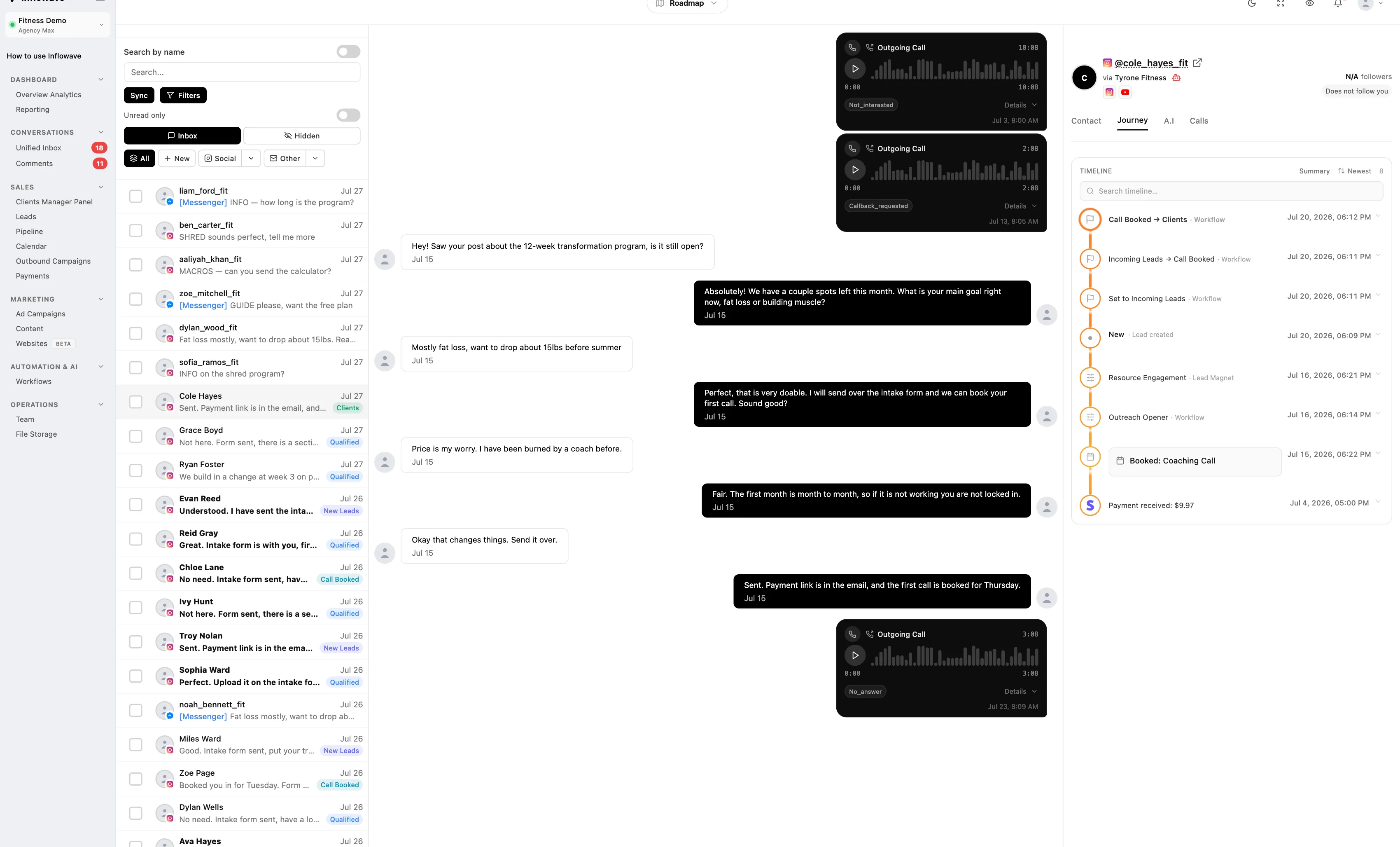
That is the argument in one frame. The calls are not in a separate call log tab. They are in the conversation, in order, between the messages, with the recording playable in place and the outcome on the call itself.
For agencies, sub_account_id and client_id on every call row are what make multi-client outbound safe. Numbers, caller ID, lists and recordings stay inside the client they belong to. That is a data model property rather than a UI filter, which is the difference between separation and the appearance of it. Workspace counts are capped by plan: 1 on Influencer, 1 on Business, 10 on Pro, 50 on Max.
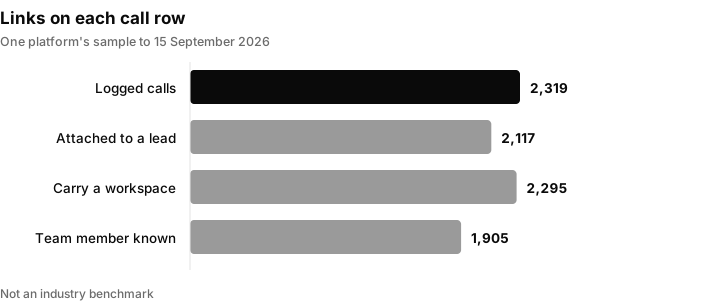
Out of 2,319 logged calls in one platform's sample on one date, how many carry each link. These are one platform's numbers, not an industry benchmark.
The limits, stated plainly
It is a power dialer in the one-line sense. One call at a time per agent. It is not a predictive or parallel dialer. If your model depends on multiple lines per agent, look at a contact centre platform or a vendor like Kixie instead. There is no free tier, though every paid plan, Influencer included, carries a seven day free trial. Automatic downstream tagging from call outcomes exists in the data model but is not something to buy on today.
How a call moves through a CRM-native dialer
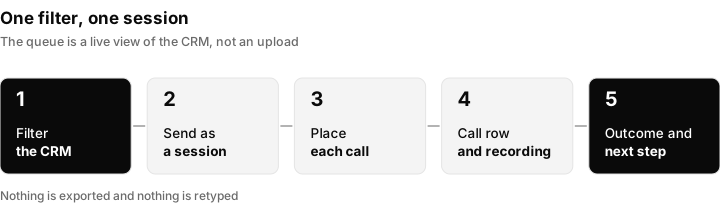
One filter, one session, one record. Nothing is exported and nothing is retyped.
Walk through it as a rep would:
- Build the list as a filter. Choose a pipeline stage, source, tag, industry, status, last contact date or custom field.
- Send the segment to the dialer as a session. Each number becomes a queued item.
- Work the queue. One call at a time, with the lead's history on screen.
- Let the call write itself. The call log row carries the lead, client, workspace and team member.
- Pick the outcome. Connected, meeting booked, callback, not interested, voicemail, no answer or wrong number.
- Move on. The next number is already loaded.
Power dialer compliance: the question nobody puts on the pricing page
Under the Telephone Consumer Protection Act, the restricted category is an automatic telephone dialing system. In Facebook v. Duguid the Supreme Court held that to qualify, a device "must have the capacity either to store a telephone number using a random or sequential number generator, or to produce a telephone number using a random or sequential number generator." A dialer working through a list of known contacts from your own CRM is not generating numbers randomly or sequentially.
The rule that actually bites is the abandonment limit, and it is aimed at dialing more lines than you have agents. Federal regulations prohibit abandoning more than three percent of telemarketing calls answered live by a person, measured over a 30 day period per campaign, and define a call as abandoned "if it is not connected to a live sales representative within two (2) seconds of the called person's completed greeting."
That is the real decision line, and it is about concurrency rather than headcount. If one agent is on one line, the agent is already there when the call connects and abandonment is structurally impossible. The moment you open multiple lines per agent, whether the vendor calls it predictive, parallel or a multi-line power dialer, you own an abandonment rate you have to measure and stay under. None of this is legal advice, and consent, do-not-call obligations and the Telemarketing Sales Rule still apply to what you dial and when.
A seven day trial plan for any CRM dialer
Do not judge a dialer from a demo. Run the same short test on each shortlisted tool:
| Day | Test | What a good result looks like |
|---|---|---|
| 1 | Check the plan: is the dialer on the tier you would buy? | The feature appears on the price page for that tier |
| 2 | Build a call list from a CRM filter | The list updates when a lead's status changes |
| 3 | Work twenty calls | The rep types nothing between calls |
| 4 | Open one finished call on the contact record | Recording, duration and outcome are on the record |
| 5 | Search a word from a transcript | You find it from the CRM search box, not in the phone vendor's archive |
| 6 | Try it as a second client (agencies) | Numbers, lists and recordings stay inside the first client |
| 7 | Ask the vendor how many concurrent lines per agent | A plain number, in writing |
Write the answers in a table and compare tools on the same rows.
What to check before switching to a CRM with a dialer built in
Is the dialer on the plan you are actually pricing? Close excludes its Power Dialer from Solo and Essentials. HubSpot includes no calling minutes on Free, and its Starter allowance of 500 minutes is shared across the whole account rather than given to each seat. Salesforce does not publish Sales Dialer pricing at all. Check the tier, not the feature page.
How many lines per agent? This decides your compliance posture, and the words "power dialer" do not answer it.
Is the call list a live query or an export? If you export a CSV, your queue is stale the moment a lead replies.
Where do the recording and transcript live? In the phone vendor's archive with a link, or on the contact record where the search box is? Search a transcript by keyword during a trial and see which system you end up in.
How are numbers and caller ID separated per client? For an agency this decides whether the tool survives past your first few accounts. Ask whether separation is enforced on the record or applied as a filter in the interface.
What happens to the next step? If the answer is "the rep writes a note", you are buying a phone system.
If you want calls placed and qualified without a rep on the line, that is a different tool that sits alongside rather than instead: see the AI voice agent and AI cold calling. For the conversation data rather than the dialing, read call recording. For the wider motion, outbound sales and what is cold calling. Inflowave's own power dialer page has the feature detail.
Power dialing in Inflowave: where it fits
Inflowave's power dialer is built into the CRM rather than licensed as a separate product, and it is a one-line power dialer: one call at a time per agent. It fits agencies and sales teams that want the recording, transcript and outcome on the contact record, with per-client separation through the workspace and client IDs on every call row. It does not fit models that rely on multiple lines per agent. The power dialer feature page has the feature detail, and the related guides on what an auto dialer is, power dialer versus predictive dialer and the best auto dialer software cover the wider category.
CRM power dialer FAQ
Which CRM has the best dialer feature?
It depends on concurrency and on who owns the record. If you want one line per agent with the recording, transcript and outcome on the contact record and no connector to maintain, a CRM-native power dialer such as Close or Inflowave is the shorter path. Supervisor tooling is not the dividing line: Close lists call coaching with listen, whisper and barge on its Scale plan. If you need heavy number provisioning or multi-country coverage, a dedicated telephony vendor such as RingCentral or PhoneBurner integrated into your CRM is stronger on those specific capabilities, at the cost of the record living downstream of a connector.
Is a dialer a CRM?
No. A dialer places and manages outbound calls. A CRM stores the contact, the history and the deal. They are separate categories frequently sold together, which is where the confusion comes from. A CRM with a built-in dialer is a CRM that includes dialing as a feature. A dialer with CRM integration is a phone system that writes into a CRM it does not own.
Does Salesforce have a dialer?
Yes. Salesforce offers Sales Dialer as a calling capability used alongside Sales Cloud rather than a standalone product. It is not listed on the public Sales Cloud pricing page, which on 15 September 2026 showed Starter Suite at $25 per user per month billed monthly or annually, and Pro Suite at $100, Core at $195, Advanced at $395 and Max at $550 per user per month, each labelled billed annually. Confirm Sales Dialer licensing and cost with your account team before budgeting.
What CRM software has a calling feature?
Every CRM compared above offers calling in some form: Salesforce, HubSpot, Zoho, Pipedrive, Microsoft Dynamics 365 Sales, Freshsales, Close and Inflowave. The distinction worth drawing is between click-to-call, which dials one number you clicked, and power dialing, which works continuously through a queue without the rep touching anything between calls. A CRM can offer the first without offering the second, and several above gate queue-based dialing behind a higher tier or a separate licence, so check for it specifically.
Are power dialers illegal?
No, and the legal line is fairly clear. Under the Telephone Consumer Protection Act, the restricted category is an automatic telephone dialing system, which the Supreme Court in Facebook v. Duguid defined as equipment that stores or produces numbers using a random or sequential number generator. Calling a list of known contacts from your CRM is neither. What does carry regulatory weight is abandonment, which becomes your problem once you dial more lines than you have agents. Consent rules, do-not-call obligations and the Telemarketing Sales Rule still apply.
Is Power Dialer free?
Not generally. Inflowave does not offer a free tier for it, though every paid plan, Influencer included, carries a seven day free trial. Beyond that, the billing models genuinely differ, so check which one you are signing. PhoneBurner bundles unlimited calling into the seat price, listed at $140 per user per month billed annually on 15 September 2026. HubSpot meters minutes instead, and the allowance is pooled per account rather than per seat: 500 minutes per account per month on Starter, 3,000 on Professional and 12,000 on Enterprise. Close excludes its Power Dialer from Solo and Essentials entirely. Assume nothing about whether minutes are included until the pricing page says so.
What are the best power dialers?
Rather than a ranking, sort by architecture. PhoneBurner, RingCentral, Aircall, Dialpad and Kixie are telephony first and strongest on call quality and supervisor tooling; Kixie is also the one to look at if you want parallel lines, since its Multi-Line PowerDialer plan, which sits above its single-line Power Dialer, is listed on its pricing page at up to 4 lines simultaneously, with its Power Dialer feature page advertising up to 10 numbers in parallel. Close and Inflowave are CRM first and strongest on keeping the outcome, recording and next step on one record, with Inflowave adding per-client workspace isolation for agencies. Zoho splits the difference by pairing Zoho Voice with Zoho CRM. Pick the category that matches your concurrency and your record-ownership needs first, then compare vendors inside it.
What is the difference between a power dialer and a predictive dialer?
A power dialer places one call at a time per agent and moves to the next number automatically. A predictive or parallel dialer opens more lines than there are agents, which is why abandonment rules come into play. Ask any vendor how many concurrent lines per agent a plan allows.
Does a power dialer record calls to the contact record?
It depends on the product. In a CRM-native dialer the recording and transcript attach to the same call log as the contact. In a phone system connected to a CRM, the recording usually stays in the phone vendor's archive with a link pushed across.
