
Your Instagram profile link is just your username on the end of Instagram's address:
That's the whole thing. If you know your username, you already know your link. The steps below show where to copy it in the app and on a computer, how to clean up the long version the app hands you, and the two mistakes that break a profile link after you've shared it.
If you only have a name or a handle and want the exact link for any public account, our free Instagram URL finder builds and checks it for you.
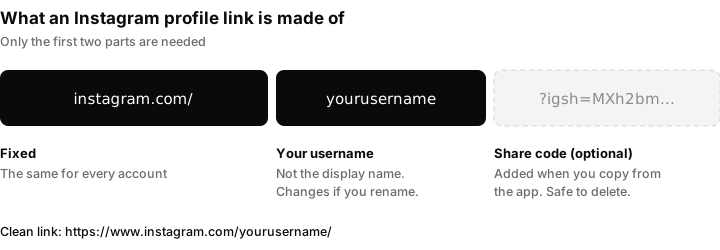
The part after the question mark is optional. Delete it and the link still works.
The short answer
| Where you are | How to get your link |
|---|---|
| Instagram app (iPhone or Android) | Profile tab, tap Share profile, then Copy link |
| Computer (instagram.com) | Click Profile in the left menu, copy the address from the browser bar |
| Anywhere, from memory | Type instagram.com/ followed by your username |
| Someone else's profile | Open their profile, tap the three dots at the top right, then Copy profile URL or Share this profile |
How to find your Instagram profile link on iPhone or Android
The app works the same way on both phones.
- Open Instagram and tap your profile picture in the bottom right corner to go to your profile.
- Under your bio, tap Share profile. A card with your QR code opens.
- Tap Copy link. The link is now on your clipboard, ready to paste into a message, an email or another app.
The copied link usually looks like this:
https://www.instagram.com/yourusername?igsh=MXh2bmF0dGVz...
Everything from ?igsh= onwards is a share code Instagram adds so it can see how links get passed around. You don't need it. Delete it before you put the link anywhere permanent, such as a website, an email signature or a printed card, so you're left with https://www.instagram.com/yourusername.
If you don't see a Share profile button, your app is probably out of date. Update it, or use the from-memory method below, which always works.
How to find your Instagram profile link on a computer
- Go to instagram.com and log in.
- Click Profile in the menu on the left (it shows your profile picture).
- Click the browser's address bar and copy what's there.
The address is your profile link, already in its clean form: https://www.instagram.com/yourusername/. Nothing to trim.
How to build the link yourself from your username
This is the fastest method and it doesn't need the app at all.
- Find your exact username. It's the name at the top of your profile in the app, the one without spaces (for example
matt.kielbasa, not "Matt Kielbasa"). - Put it on the end of
https://www.instagram.com/.
So the username bakery_on_main becomes https://www.instagram.com/bakery_on_main/.
A few things to know when you type it by hand:
- Use the username, not the display name. The bold name under your profile picture can contain spaces and emoji. The link uses only the username.
- Capital letters don't matter.
instagram.com/Bakery_On_Mainandinstagram.com/bakery_on_mainopen the same profile. - Dots and underscores do matter.
bakery.on.mainandbakery_on_mainare two different accounts. Copy them exactly. - Check it before you send it. Paste the link into a browser. If you land on "Sorry, this page isn't available", there's a typo in the username.
How to get the link to someone else's Instagram profile
In the app:
- Open their profile.
- Tap the three dots (⋯) at the top right.
- Tap Copy profile URL. On some versions this sits under Share this profile instead.
On a computer, open their profile and copy the address from the browser bar, the same as for your own.
If you only know their handle, build the link the same way: https://www.instagram.com/ plus their username. Our Instagram URL finder does this for you and confirms the profile exists, which saves sending someone a dead link.
Two things that break a profile link after you've shared it
1. Changing your username. Your link is your username, so a new username means a new link. The old link stops pointing at you, and after a while someone else can register the old username and inherit every place you posted it: your website, your printed menus, your email signature. If you rename, update the link everywhere you've used it.
2. Pasting the share code into permanent places. The ?igsh= tail is tied to one share. It still opens your profile today, but it's long, it looks spammy in a printed or written context, and it carries tracking you don't need. Keep the clean version for anything that lasts.
A private account doesn't break the link. People who open it see your name, picture and bio, and they can send a follow request, but your posts stay hidden until you approve them.
The link that opens a DM instead of your profile
If you run a business account and want people to message you, there is a second kind of link:
https://ig.me/m/yourusername
Tapping it opens a direct message conversation with your account instead of your profile page. It works well on a website contact page, in an email, or behind a "Message us on Instagram" button, because it skips the step where someone has to find the message button on your profile.
When those messages start coming in from several places at once, they're easy to lose. Inflowave puts Instagram DMs in one unified inbox alongside your other channels, so every enquiry that link brings in gets answered. That matters most for agencies running several client accounts.
Where to put your Instagram link
- Your website. In the footer or on the contact page, using the clean link.
- Your email signature. The clean link, or an icon that points to it.
- Other social profiles. Most platforms have a website or links field in the bio.
- Print. For flyers, menus and packaging, use the QR code from the Share profile card instead of a link. People scan it with their phone camera and it opens your profile directly.
- Link in bio tools. If you want one link that leads to several destinations, see our guide to Linktree alternatives.
FAQ
What is my Instagram profile URL?
It's https://www.instagram.com/ followed by your username, for example https://www.instagram.com/yourusername/. You can copy it from the Share profile button in the app or from the browser address bar on instagram.com.
How do I copy my Instagram link on iPhone?
Go to your profile, tap Share profile, then Copy link. Delete the part that starts with ?igsh= if you want a clean link.
Why does my Instagram link have "igsh" in it?
It's a share code the app adds to links you copy from it. It's safe to delete, and the link works the same without it.
Does my Instagram link change if I change my username?
Yes. The link is your username, so a new username gives you a new link and the old one stops working for your account.
Can I find someone's Instagram link from their username?
Yes. Add the username to the end of https://www.instagram.com/. Our Instagram URL finder builds the link and confirms the account exists.
How do I make a link that opens an Instagram DM?
Use https://ig.me/m/yourusername. It opens a message conversation with that account instead of the profile page.
