
To create a Meta business portfolio (the new name for Business Manager) and an ad account from scratch, the client or you sign in at business.facebook.com, choose the option to create a business portfolio, enter the business name, then open Business Settings, go to Accounts, then Ad accounts, and choose to create a new ad account. After that you add a payment method, and the client shares the Page and ad account with your agency so you can connect them to Inflowave. The whole job is a handful of screens. Most of the trouble comes from doing it under the wrong name or the wrong owner.
This guide is for agencies whose client has nothing yet: no Business Manager, no ad account, sometimes not even a clean Facebook Page. It walks through who should own what, the exact order to do things in, how to hand access to your agency, and how to connect it all to Inflowave at the end. Meta changes its screens often, so where a button name may differ we tell you what to look for instead of guessing.
The short answer
| Question | Answer |
|---|---|
| What is a business portfolio? | The container that holds a business's Pages, Instagram accounts, ad accounts and the people who work on them. It used to be called Business Manager. |
| Who should create it? | The client, using their own business name. The agency then joins as a partner. |
| Where do I start? | business.facebook.com, signed in with a Facebook profile. |
| Then the ad account? | Business Settings, then Accounts, then Ad accounts, then add a new one. Pick the name, time zone and currency carefully. |
| Is a payment method needed? | Yes, before ads can run. Meta's help pages say you need one on the ad account. |
| How does the agency get in? | The client adds your agency's business portfolio ID as a partner and shares the Page and ad account. |
| What about Inflowave? | Connect Facebook from Inflowave and tick the Page, the business portfolio and the ad account. |
The one rule: the client should own the business portfolio and the ad account, and the agency should be a partner. If you build it inside your own portfolio, the client's ad history and payment setup are stuck with you, and the day you part ways it becomes a dispute.
What you are actually creating
People mix up four things that Meta keeps separate. Getting them straight first saves a lot of confusion later.

- Personal Facebook profile. The login of a real person. Meta's help page says you create a portfolio while signed in with a Facebook profile or a managed Meta account.
- Business portfolio. The container for business things. Our guide Meta business portfolio explained covers what it does in depth, so we keep this guide to the how.
- Facebook Page and Instagram account. The public faces of the business. Ads run as these.
- Ad account. Where campaigns, billing and spend history live.
Before you start: a short checklist
Ten minutes of preparation prevents most of the problems in the next sections. Ask the client for these before anyone opens Meta.
| Item | Why it matters |
|---|---|
| The business's public name, spelled exactly | Meta's help page says the portfolio name should match the business's public name and cannot contain special characters. |
| A business email the client can open | If you sign in with a Facebook profile, Meta emails that address so you can confirm it. |
| The client's own Facebook login | The person who creates the portfolio becomes its owner. It should be the business owner, not a freelancer. |
| The time zone and currency the client will be billed in | These are chosen when the ad account is created. We could not confirm whether they can be changed later, so treat them as fixed. |
| A card or other payment method belonging to the business | Meta's help pages say a payment method must be on the ad account before ads run. |
| Your agency's business portfolio ID | The client needs it to add you as a partner later. Meta says portfolio IDs are in Settings of the portfolio. |
| A phone with two-factor login ready | Meta requires two-factor authentication to be on for the portfolio before you can share assets with a partner. |
Also check whether the client already has a portfolio they forgot about. Meta's help page says one person can personally create up to 2 business portfolios, and there is no limit on how many a person can belong to. An old one may hold a Page or ad account. Look first, because each asset can belong to only one portfolio, and an asset already sitting in an old portfolio has to be dealt with there. If you find one, our guide on Meta Business Manager troubleshooting helps untangle it.
The whole path in one picture

Step 1: create the business portfolio
These steps follow Meta's Business Help Center article, Create a business portfolio in Meta Business Suite. Have the client do them, or sit beside them on a call.
- Go to business.facebook.com and sign in with the client's Facebook profile.
- Find the dropdown menu below Home in the top left and choose the option to create a business portfolio. Meta's current wording is "Create a business portfolio". If you do not see it, look for any button or menu entry that mentions creating a new portfolio or business.
- Enter the business name. Use the public name of the business, with no special characters.
- If you are signed in with a Facebook profile, Meta also asks for your first and last name and the business email.
- Click the create button. The label may read Create or Create portfolio.
- Open the confirmation email Meta sends to the business email and confirm the address. Do not skip this, because an unconfirmed email can stall later steps.
When you land back in Business Suite or Business Settings, the portfolio exists. It is empty for now. Meta also notes that a brand new portfolio or ad account may not have access to every advertising feature, so do not be surprised if some options are missing at first. We do not know exactly which features are held back or for how long, because Meta does not publish a list.
Do it with the client's login, not yours. The person who creates the portfolio is its first owner. If your personal profile creates it, you hold the keys, and handing them over later means extra steps for both sides.
Should you verify the business now?
Not at this moment. Business verification is a separate, free check that Meta runs on the legal details of the business. It matters for some features, and Meta's developer pages say an unverified portfolio may need to be verified before certain things can be used. Do the creation steps first, then follow our guide to Meta business verification when the client can supply their legal name, address and documents. We do not repeat those steps here.
Step 2: create the ad account
An important note on sourcing. Meta's own help page, How to Create an Ad Account in Meta Ads Manager, could not be read in full when we wrote this guide. The steps below combine what Meta's pages say about payment and permissions with the steps that several independent guides agree on. Where Meta's screens differ, trust the screen.
- Open Business Settings for the client's portfolio. It is reachable from business.facebook.com.
- In the left menu, open Accounts, then Ad accounts.
- Click Add. A window titled "Add an ad account" offers three choices. Pick "Create a new ad account".
- Enter the ad account name. Use something an accountant would recognise, such as the business name followed by the word ads.
- Choose the time zone and currency. Think before you click. We could not confirm whether they can be changed afterwards, so assume they cannot and match the client's real billing currency and local time zone.
- When asked who the account is for, choose the option for the client's own business if the client is creating it in their own portfolio. The choices read something like "My business" or "Another business or client".
- Read the confirmation screen. Meta says ad accounts can't be removed from a business portfolio once they're added, so check the name and portfolio before you go on.
- Accept Meta's terms and click the button to create the ad account.
- Meta may offer to add payment details now, or let you finish and do it later.
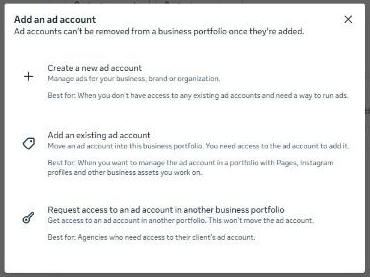
Three ways an ad account can reach a portfolio
| Option | What it means | When to use it |
|---|---|---|
| Create a new ad account | Meta makes a fresh account inside the portfolio. | The client has never advertised. This guide. |
| Add an existing ad account | Claim an existing ad account the business already owns, using its ID. | The client boosted posts before and has an old account with history. |
| Request access to an ad account | Ask the owner of an existing account to let you work in it. | An agency joins an account that lives in someone else's portfolio. |
Meta says each asset can belong to only one portfolio. If the client already has an ad account from past boosted posts, claiming it with the second option keeps their history and is usually better than starting over. Ask first.
How many ad accounts can a new portfolio have?
Several guides report that a new portfolio starts with a low limit, often one ad account, and that Meta raises it over time. We do not know the exact numbers or the rules for raising them, and Meta does not appear to publish a fixed schedule in the pages we could read. If you need more than one account for a client, create the first, run it properly, and check the screen for what Meta currently allows.
Step 3: add a payment method
Meta's guide How to pay for your Meta ads and its related pages say you need a payment method on the ad account before you can run ads. The general path is Payment settings in Ads Manager, then adding a payment method and following the prompts. Meta may ask you to re-enter your password.
- Who can add it. Meta says people with only advertiser-level access cannot add or edit a payment method. An admin of the ad account has to do it. That is another reason the client should be the admin.
- Cards and PayPal. If the client uses a card or PayPal and their bank supports recurring payments, Meta says the account is set up for automatic billing.
- Bank account. Direct debit through online banking exists, but Meta says it is not available in every country and cannot be added while the account has unsettled charges.
- One primary method. An ad account has one primary payment method for all of its campaigns. If a client wants different cards for different campaigns, Meta suggests separate ad accounts.
- Prepaid balances. Some regions use manual payments, where you add money to a balance instead.
Never put your agency's card on a client's account without a written agreement. Spend, refunds and disputes then become your problem. If you do fund ads for a client, agree in writing who pays Meta and who pays you.
Step 4: give your agency access
With the portfolio and ad account built, the client now adds your agency. Meta's article Give a partner access to business assets in your business portfolio describes it. The client needs full control of their portfolio, your agency needs its own portfolio, and two-factor authentication must be on.

What your agency does first
- Open Settings in your own business portfolio and find the business portfolio ID. Meta says portfolio IDs are in Settings of the portfolio, and has a help article titled "Find your business portfolio ID".
- Send that ID to the client, along with a short message saying what you need access to.
What the client does
- Go to Settings in Meta Business Suite for their portfolio.
- In the Users section of the left menu, click Partners. If Partners is missing, the person may not have full control of the portfolio.
- Click Add, then choose "Give a partner access to your assets".
- Enter your agency's business portfolio ID and click Next.
- Choose the assets to share, such as the Page, the Instagram account and the ad account, and pick the level of access.
- Click Assign assets. Meta notes that another person with full control may need to approve the action.
| Access level | What the partner can do (per Meta) | Good for |
|---|---|---|
| Full control | Manage everything on the asset. Cannot share it with another business, because only the owner can. | An agency running ads end to end and connecting tools. |
| Partial access | Only chosen tasks, such as creating content, managing ads or answering messages. | A freelancer who only needs one job done. |
This matters for Inflowave. When we cover connecting a Page, our own guide says Facebook can only hand over what your profile can fully control. Partial access on the Page may stop you from connecting it, so ask for full control of the Page and the right ad account permission. The longer treatment is in Meta Business Manager agency access and Facebook ad account access for agencies.
Step 5: connect it to Inflowave
Once the Page and ad account are shared with you, the connection takes a few clicks. The detail below is taken from our guide on how to give access to a Facebook Page and ad account, which also lists every fix if something is missing.
- Open the client's workspace in Inflowave and go to the Facebook connection, then click to connect or reconnect Facebook.
- Sign in with the Facebook profile that has the access. Facebook shows a window asking to connect an app named Social Media Connector, which is the connection Inflowave uses.
- Click Edit access (older screens say Edit settings or Edit previous settings) rather than continuing straight through.
- On the Pages step, select the client's Page, or choose to opt in to all current and future Pages.
- Also tick the business portfolio and the ad account. Anything you do not tick stays hidden from Inflowave.
- Save, go back to Inflowave and refresh the list. The Page and ad account should now appear.
If you cannot tick it, no setting in Inflowave will fix it. The client has to grant access in Meta first. Then reconnect.
With the connection live, you can run the client's Facebook and Instagram ads from the client's own workspace and keep each client separate from the others. For the wider onboarding routine, see the agency client onboarding checklist, and for what Inflowave offers agencies, the agencies page.
Who should own what: three setups compared
| Setup | Upside | Downside |
|---|---|---|
| Client owns the portfolio and ad account, agency is a partner | Clean ownership. Client keeps history if you leave. | Needs a little client effort and two-factor login on their side. |
| Agency builds everything inside its own portfolio for the client | Fast, no client effort. | Meta says an ad account can't be removed from a portfolio once it is added. Moving on later is painful, and a restriction on one client can touch your whole portfolio. |
| Client has an old account, agency requests access | Keeps past ad history. | Depends on the old owner. Old accounts may be tangled or restricted. |
Common mistakes and how to avoid them
- Choosing the wrong currency or time zone. Slow down on that screen. We could not confirm whether it can be fixed later, and guides report that a new portfolio can have only a few ad accounts.
- Creating the portfolio under a personal profile that the client will not use. If that person leaves, nobody can manage it. Use the owner's own login.
- Skipping the email confirmation. Meta sends one when you sign in with a Facebook profile. Confirm it.
- Using a business name with special characters. Meta's page says it cannot contain them.
- Giving partial access and expecting a full connection. Tools like Inflowave need full control of the Page.
- Forgetting two-factor authentication. Meta requires it before you can share assets with a partner. Switch it on early.
- Not checking for an existing portfolio. A forgotten one can already hold the Page, which blocks adding it to a new one.
- Running ads with no payment method. Delivery cannot start until one is on the account.
If anything goes wrong with the account after it is live, such as a restriction, read what to do when a Facebook ad account is disabled.
A quick checklist to finish
- Client created the portfolio with their own login and a matching business name.
- Business email confirmed.
- Two-factor authentication on.
- Ad account created with the right name, time zone and currency.
- Payment method added by an ad account admin.
- Your agency added as a partner with the Page, Instagram account and ad account assigned.
- Business verification started when the client has their documents.
- Facebook connected in Inflowave with the Page, portfolio and ad account ticked.
Questions people ask
Is a Meta business portfolio the same as Business Manager?
Yes, in practice. Meta's current help pages use the name business portfolio and Meta Business Suite, while older articles say Business Manager. The idea is the same: one container for Pages, Instagram accounts, ad accounts and people.
Is it free to create a business portfolio and an ad account?
Meta's help pages we read do not mention a fee for creating either one. You pay Meta only for the ads you run. We cannot promise this never changes, so check the screens as you go.
Can I create the portfolio for my client myself?
You can, but it is better if the client does it with their own login. The creator becomes the first owner. If you must create it, plan to move ownership to the client early and never use your agency's legal details for it.
How many business portfolios can one person create?
Meta's help page says you can personally create up to 2, with no limit on how many portfolios you can belong to. If a client wants a second business, a different person may need to create it.
Can I create the ad account without a Facebook Page?
I don't know. The pages we could read do not say. In practice you need a Page to run ads, so set up the Page in the same session and add it to the portfolio.
Can I delete an ad account or move it to another portfolio?
Meta's own "Add an ad account" window says ad accounts can't be removed from a business portfolio once they're added, and Meta says each asset belongs to only one portfolio. Treat adding one as a one way door and check the confirmation screen. If you really need a change, ask Meta support, see our guide on how to contact Meta business support.
Do I need business verification before I can run ads?
Not necessarily to start. Meta's developer pages say some uses require a verified portfolio, and verification can unlock more. Read our business verification guide and check what your client's use needs.
Why can't I see the Partners option in Settings?
Meta says that if you do not see Partners, you may not have full control of the portfolio. Ask the owner to give you full control or to do the step themselves.
Why doesn't the client's Page or ad account show up in Inflowave?
Almost always one of two things: you did not tick it when Facebook asked, or your profile lacks full control. Reconnect, click Edit access and tick everything, and if a box will not tick, the owner must grant access first.
How long does the whole setup take?
I don't know a reliable figure. Creating the portfolio and ad account is a handful of screens. Delays usually come from waiting on the client's email confirmation, two-factor setup and approvals, plus verification if you pursue it.
What if the client already has an ad account in another portfolio?
Do not create a new one blindly. Ask the owner to share it with your agency as a partner, or use the request access option so they can approve it. Starting fresh loses the account's history.
Who pays Meta for the ads?
Whoever's payment method is on the ad account. For a client-owned account that should be the client's card or bank, unless you agree otherwise in writing.
