
Most lists of Kommo alternatives are published by the alternatives themselves. This one is written for the person doing the buying: an agency owner who runs pipelines and messaging on behalf of other people's businesses, and who needs to know what the switch actually costs, what breaks on the way out, and which tool fits which shape of agency.
Kommo is a good product for what it is. It is a sales pipeline CRM built around messengers, and if you are one business with one team selling through WhatsApp and Instagram, it does that job cleanly. The friction starts when you are not one business. An agency is one team operating five, fifteen or fifty pipelines that belong to other companies, each needing its own numbers, its own reporting and a wall between it and the client next door. Kommo's pricing model and its channel limits are both built around the first shape, not the second.
This article covers what Kommo charges, the three specific places agencies hit a wall, six alternatives with published prices, and the parts of a migration that actually eat the week.
The short answer
| Question | Answer |
|---|---|
| What is the best Kommo alternative for agencies? | It depends on the constraint that is biting. Bitrix24 for seat cost, Zoho Bigin for a simple pipeline, Close for calling, Salesflare for automatic data capture, Freshsales for the cheapest full CRM tier, and a client based tool such as Inflowave if you run other people's businesses. |
| Why do agencies outgrow Kommo? | Billing is a six month minimum, every user must be on the same plan, and channel capacity is tied to seat count. |
| Does Kommo bill monthly? | No. The minimum subscription period is six months. |
| What is the real cost of a switch? | The subscription is only part of it. Message history, WhatsApp number re-registration, template re-approval and rebuilt automations take the time. |
| Are WhatsApp fees included in any CRM price? | No. Meta's per-template fees are charged on top by whoever provides the connection. |
The rule that matters most: compare the number you will actually pay in year one, not the figure on the pricing page. It is usually two to three times higher once billing minimums, plan rules, add-ons and message fees are included.
What Kommo costs, before you compare anything
Published pricing at the time of writing, taken from kommo.com/pricing:
| Plan | Price | Billed | Leads per user | AI credits per user | Channel limits |
|---|---|---|---|---|---|
| Base | $25 per user/month | $150 per user for 6 months | 2,500 | 750/month | 1 WhatsApp number and 1 Instagram account. Each additional user unlocks one more channel |
| Advanced | $35 per user/month | $210 per user for 6 months | 5,000 | 1,250/month | 3 WhatsApp numbers and 3 Instagram accounts. Additional channels unlocked per extra user after the limit |
| Pro | $45 per user/month | $270 per user for 6 months | 10,000 | 2,250/month | Unlimited WhatsApp numbers |
| Enterprise | Custom | Custom | Custom | Custom | Custom |
Four things in that table matter more than the headline per-seat rates, and none of them are what the comparison posts lead with.
There is no monthly billing. Kommo's own pricing FAQ says it plainly: "Monthly payment is not currently available. The minimum subscription period is 6 months." So the real number you write a cheque for on Base is $150 per seat, and on Pro it is $270 per seat. A six-person team on Pro is $1,620 up front. That is not a criticism of the price, it is a cashflow fact that changes how you should evaluate it. If a client churns in month two, you have already paid for months three to six.
Everyone has to be on the same plan. From the same FAQ: "Every user on the account needs to be on the same plan." For most businesses this is irrelevant. For an agency it is the single most expensive line in the model. If you need Pro so that one client's setup gets unlimited WhatsApp numbers, then your part-time VA, your bookkeeper and your designer are all on Pro too. You cannot put two closers on Pro and eight setters on Base.
Channel capacity is coupled to seat count. On Base you get one WhatsApp number and one Instagram account, and "each additional user unlocks 1 more channel". On Advanced you get three of each, with further channels unlocked per extra user. This is the mechanism that quietly forces agencies upward. You do not add seats because you hired someone. You add seats because you signed a client who needs their own number.
Automation is not on the entry plan. Pipeline automation, broadcasting and no-code bots start on Advanced. Booking pages, campaign ROI tracking and the sales and marketing analytics start on Pro. If your agency's model depends on automated follow-up, which is most of them, Base is not your real price.
AI credits do not roll over. Kommo's FAQ confirms credits "are renewed monthly on your billing date" and that "unused credits do not carry over". Credits are allocated per seat and pooled, so a quiet month subsidises nothing.
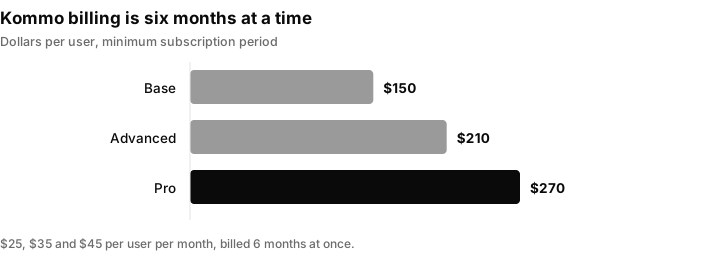
Kommo has no monthly option, so the cheque you write is for six months per seat. Pro for a six person team is $1,620 up front.
The subscription is never the whole bill
Whatever you pick, if WhatsApp is a serious channel then the platform fee is only part of what you pay. WhatsApp Business Platform messaging is metered by Meta on top of whatever your CRM charges, and passed through by whoever provides your connection.
Twilio, as one example of a provider that publishes its numbers, charges "$0.005 per message, inbound or outbound" as its own handling fee and passes Meta's per-template fee through on top, with utility and authentication templates "starting at $0.0034/message" (twilio.com WhatsApp pricing). Twilio also notes that during the 24 hour customer service window opened by a customer-initiated message, Meta does not charge for utility templates or free-form replies, but marketing and authentication templates are still billed.
The practical consequence for an agency is that your messaging cost scales with your client's campaign volume, not with your team size. Before you compare any two CRMs on seat price, work out roughly how many template-initiated conversations you will start per client per month, because that number can easily exceed the software bill. This is also why "unlimited messages included" claims are worth reading twice. Nobody absorbs Meta's per-template fee for you indefinitely.
Six things an agency should compare, and nobody's pricing page mentions
Fix your criteria before you look at a single product page. In practice these six decide the outcome.
- Does the price meter on seats, on records, or on the organisation? Per-seat pricing punishes agencies with lots of low-cost VAs and setters. Flat per-organisation pricing punishes small teams with heavy needs. Record caps punish anyone doing lead generation at volume.
- Can one account hold genuinely separate client workspaces? Not tags and not folders. Separate data, separate pipelines, separate reporting, so a VA assigned to client A cannot browse client B.
- Does a plan upgrade apply to everyone? If seats cannot be mixed, your cheapest person costs the same as your most expensive one.
- Is reporting per-client or per-account? You need to hand a client a report containing only their numbers, without rebuilding it by hand every month.
- What happens when a client leaves? Offboarding should be a supported action with a clean data export, not a support ticket and a CSV.
- Who owns the WhatsApp number and the Meta assets? If the platform holds your client's number inside its own Business Manager, your client's asset is attached to your vendor relationship rather than to them.
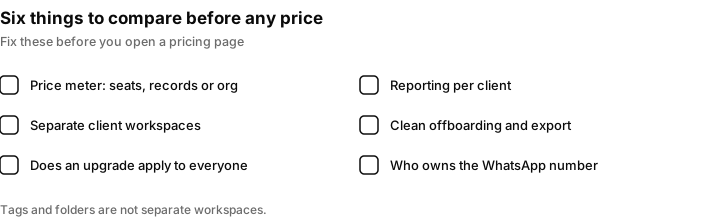
Fix these six criteria first. They decide the outcome more than the headline price.
The alternatives, with published numbers
Every price below was taken from the vendor's own pricing page. Currencies and tiers change, so treat these as a starting point and re-check before you sign.
Bitrix24, if per-seat pricing is the thing hurting you
Bitrix24 is the clearest structural opposite to Kommo. It charges per organisation, not per user. Basic is US$69 per month billed monthly or US$49 billed annually and includes 5 users. Standard is US$144 monthly or US$99 annually and includes 50 users. Professional is US$289 monthly or US$199 annually and includes 100 users (bitrix24.com/prices). WhatsApp integration and sales pipelines appear on Basic; sales automation, call tracking, booking and the analytics tools appear on Professional.
At 100 included users, Professional works out to roughly two dollars per user per month, which Bitrix24 states directly on the page. For an agency running fifteen VAs and setters, that is the single biggest cost difference available in this list.
Who it suits: agencies with a large, cheap headcount and a tolerance for a dense interface. Who it does not suit: teams of three who want something that feels light. Bitrix24 is a large product and the surface area is the price you pay for the seat economics.
Zoho Bigin, if you want a pipeline and nothing else
Bigin is Zoho's deliberately small CRM. Express is US$9 per user per month, or US$7 per user per month billed yearly, and includes 3 team pipelines, 50,000 records, email and WhatsApp Business integration, 30 automations, mass email with insights, customisable dashboards and one booking page (bigin.com/pricing). Additional pipelines, records, automations and booking pages are sold as add-ons.
Who it suits: agencies who only need a pipeline with messaging attached and are happy to keep reporting elsewhere. At seven dollars a seat it is the cheapest way off Kommo without losing WhatsApp. Who it does not suit: anyone who needs many pipelines. Three pipelines does not stretch far when each client wants their own.
Close, if calling is half the job
Close is a sales CRM with the phone built in rather than bolted on. Published seat prices are Solo at $19 per user per month or $9 annually, Essentials at $49 or $35, Growth at $109 or $99, and Scale at $149 or $139 (close.com/pricing). Workflows start on Growth. Role-based access, lead visibility rules and the predictive dialer start on Scale.
The detail that matters for agencies is buried in the add-ons: additional organisations cost $50 per month each, with Growth and Scale customers receiving one free secondary organisation. That is an explicit, priced answer to the multi-client question, which very few CRMs give you at all. Calling and SMS are usage-based on top, with Close stating that most outbound calls cost around $0.02 per minute and numbers start at about $1 per month.
Who it suits: agencies where the pipeline runs on outbound calls and the CRM has to be a dialer first. Who it does not suit: cost-sensitive teams with many seats. At $99 a seat on Growth, ten people is $990 a month before usage.
Freshsales, if you want the cheapest full CRM tier
Freshsales publishes Growth at $9 per user per month billed annually, Pro at $39, and Enterprise at $59 (freshworks.com/crm/pricing). Growth includes the Kanban view, contact lifecycle stages, chat, email and phone, email templates, custom fields and basic workflows. Contact scoring, sales sequences and territory management start on Pro. Branded documents are a $19 per user per month add-on and the Freddy AI Agent is priced at $49 per 100 sessions.
Who it suits: agencies that want a conventional CRM with basic automation included at the entry tier, and who want AI priced as a metered add-on rather than as an unavoidable part of the seat.
Salesflare, if data entry is the actual problem
Salesflare's pitch is that it fills itself in. Growth is $39 per user per month, or $29 billed annually, and includes automatic capture of contact and company data from emails, signatures and social profiles, automatic logging of meetings and calls, email and website-visit tracking, a LinkedIn and email sidebar, and personalised email campaigns. Pro is $64 per user per month, or $49 annually, and adds multi-step email workflows, custom dashboards and, importantly, user permissions: "Restrict what your team can see, edit or delete. Give them access to specific pipelines only" (salesflare.com/pricing).
That permissions line is the agency-relevant one. Per-pipeline access control is the minimum viable version of client separation, and it is on Pro rather than Growth.
Who it suits: small, senior agency teams where the CRM keeps going stale because nobody logs anything. Who it does not suit: anyone whose primary channel is WhatsApp or Instagram DM rather than email.
Inflowave, if the multi-client structure is the reason you are looking
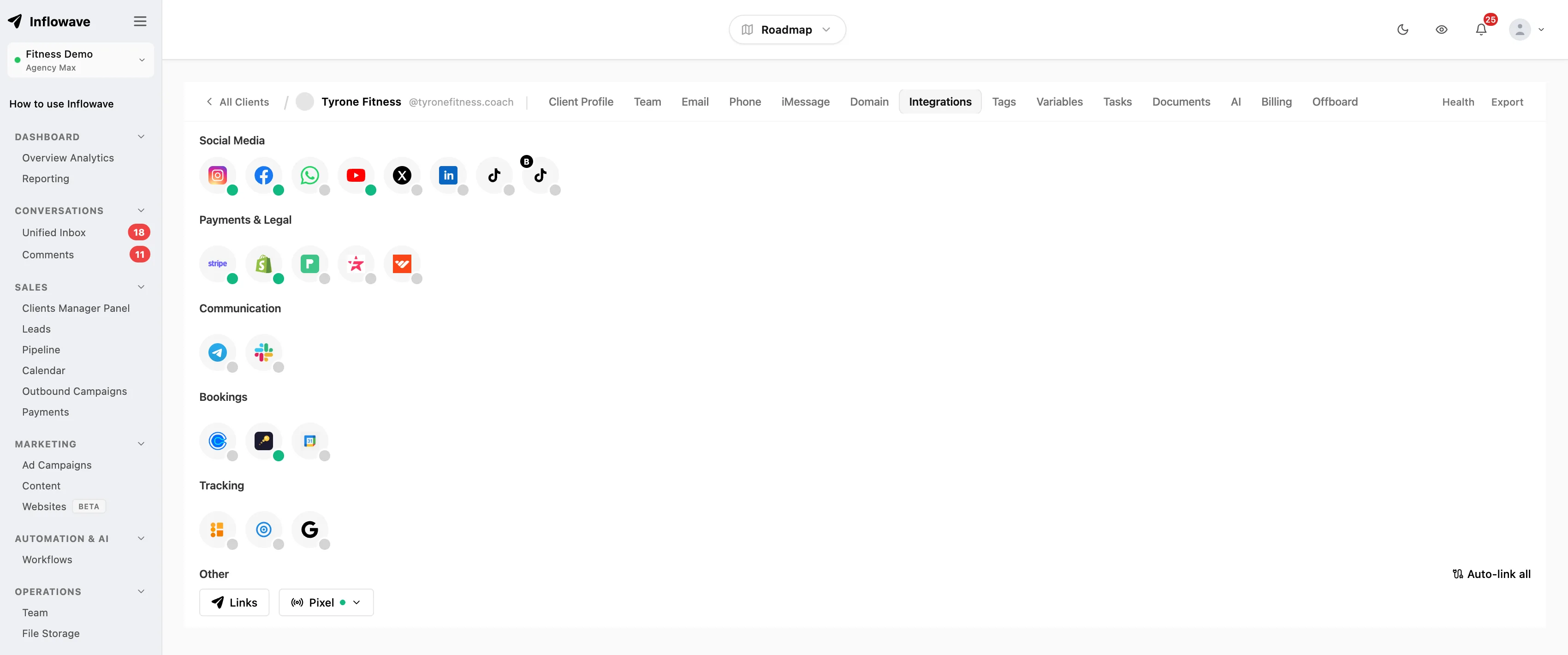
Inflowave is built around the shape of the problem rather than around a single inbox. Clients are first-class objects with their own integrations, their own pipelines, their own team assignments and their own reporting, under one login. Channels connect per client rather than per seat, which is the specific coupling that makes Kommo expensive for agencies. Offboarding is a supported action on the client record rather than a manual export.
We are obviously not a neutral party here. The honest framing is this: if your problem with Kommo is price, Bitrix24 or Bigin will fix it more cheaply. If your problem is that you are running other people's businesses inside a tool designed for one business, that is the thing Inflowave is for. Pricing is on the Inflowave pricing page.
A worked cost example: a 15 person agency
To make the seat economics concrete, here is the monthly equivalent for 15 users, calculated from the published figures quoted above. It uses annual billing where a vendor offers it, and it leaves out usage fees such as calling, SMS and WhatsApp template charges. Features differ across the plans, so this is a comparison of the meter, not of what you get.
| Tool and plan | Published price used | Monthly equivalent for 15 users |
|---|---|---|
| Kommo Pro | $45 per user/month, billed 6 months at a time | $675 |
| Close Growth | $99 per user/month annually | $1,485 |
| Salesflare Growth | $29 per user/month annually | $435 |
| Freshsales Growth | $9 per user/month annually | $135 |
| Zoho Bigin Express | $7 per user/month annually | $105 |
| Bitrix24 Professional | US$199 per month annually, 100 users included | $199 |
For Kommo the amount paid up front for 15 seats on Pro would be 15 times $270, which is $4,050 for six months. The cheapest lines in the table are cheap for a reason, so check what each plan includes before you treat the numbers as equivalent.
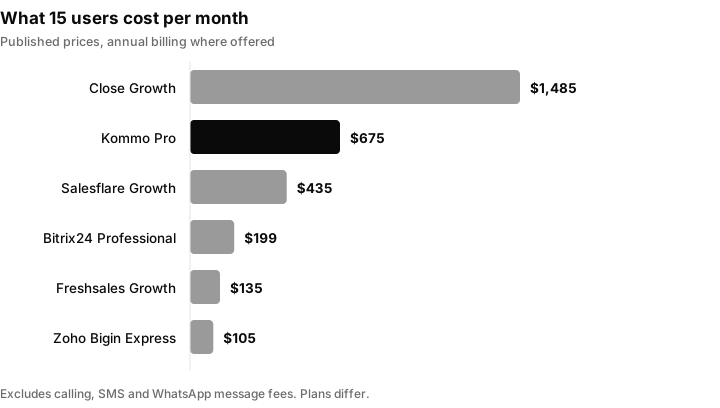
The meter matters more than the headline price. Per organisation pricing at 199 dollars is a different category of spend from per seat pricing at 99 dollars a seat.
Side by side
| Tool | Meter | Entry price | Multi-client mechanism | Native WhatsApp |
|---|---|---|---|---|
| Kommo | Per user, minimum 6 months up front | $25 per user/month | Channel limits tied to seat count | Yes |
| Bitrix24 | Per organisation | US$49/month annually, 5 users | Not a stated feature of the plan tiers | Yes, from Basic |
| Zoho Bigin | Per user | US$7 per user/month annually | 3 team pipelines on Express, more as add-ons | Yes |
| Close | Per user, plus usage | $9 per user/month annually (Solo) | Additional organisations at $50/month each | Not a stated channel |
| Freshsales | Per user | $9 per user/month annually | Territory management on Pro | Not a stated channel on Growth |
| Salesflare | Per user | $29 per user/month annually | Per-pipeline permissions on Pro | Not a stated channel |
| Inflowave | Per account | See pricing page | Clients as first-class objects | Yes |
Two columns deserve a caveat. "Multi-client mechanism" reflects what each vendor states on its own pricing page, not what is achievable with enough configuration; most of these tools can be bent into a multi-client shape with custom fields and discipline. And "native WhatsApp" means the vendor lists it as an included channel, not that the per-message fees described earlier go away.
The migration, and the parts that actually cost time
Every comparison article ends at the price table. The week you lose is after that. In rough order of pain:
Conversation history is the hard part, not contacts. Contacts and deals export cleanly almost everywhere, because they are rows. Message threads usually do not, because they are not modelled the same way in two systems. Decide early whether you are moving history or archiving it. Archiving is faster, cheaper and usually fine, as long as you export before you cancel and you keep the export somewhere a client can be shown it if they ask.
The WhatsApp number has to be released and re-registered. A WhatsApp Business Platform number can only be connected to one platform at a time. Migrating means disconnecting it from the old provider and registering it on the new one, and there is a window in which nobody can message that number. Schedule that window deliberately, tell the client, and do it on the quietest day of their week. Do not do five clients in one afternoon.
Template messages have to be re-approved. Message templates are approved against the WhatsApp Business Account, so moving providers generally means resubmitting and waiting. Rebuild and submit them before you cut over, not after. If you also run SMS in the US, the same principle applies to your campaign registration, which we covered in the A2P 10DLC registration guide.
Automations do not port, they get rebuilt. No two automation builders share a data model. Take the migration as an opportunity to audit what is actually running. In most agency accounts, a third of the automations are dead, a third are duplicated per client, and a third are load-bearing. Rebuild the load-bearing third and delete the rest.
The billing term outlasts the decision. If you are on Kommo's six-month minimum, you will very likely be paying for both systems for a period. Budget for the overlap rather than trying to time the cutover to the renewal date, because a rushed migration into a hard deadline is how client data gets lost.
Reporting continuity breaks the first client review. Whatever you move to, the first monthly report after a migration will not reconcile against the last one, because the two systems count things differently. Say so in advance, in writing, before the client notices. Our client reporting guide covers what to standardise so the second month onwards is comparable.
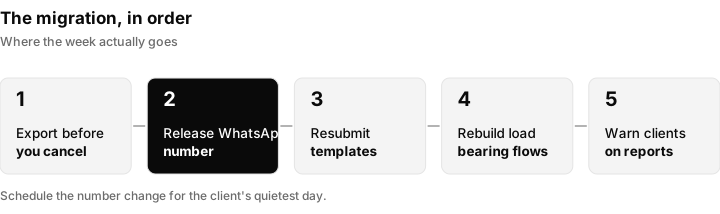
The migration in five steps. The WhatsApp window and the first report after the move are the two that catch people out.
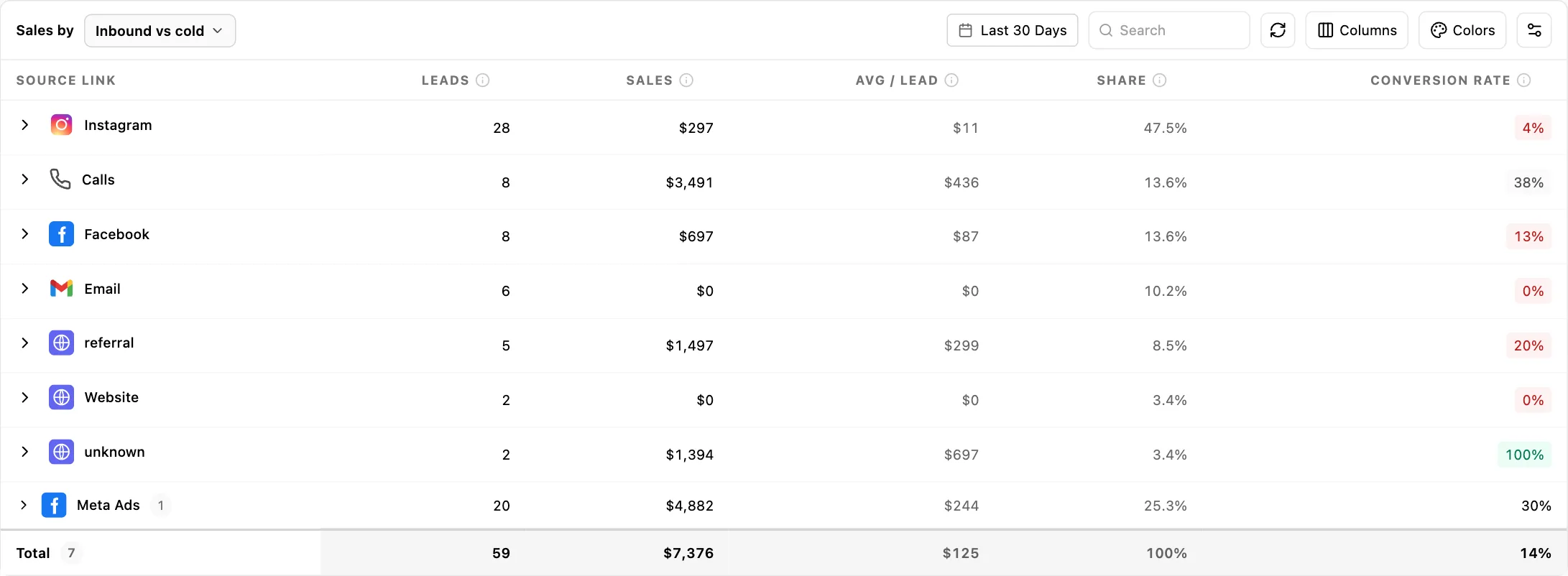
Where Inflowave fits when you shortlist
Seen against the six criteria above, this is what we can say about Inflowave without overclaiming.
| Criterion | What Inflowave does |
|---|---|
| Pricing meter | Per account, not per seat. See the pricing page for current figures. |
| Separate client workspaces | Clients are first-class objects with their own integrations, pipelines, team assignments and reporting, under one login. |
| Channels | Connected per client rather than per seat. |
| Offboarding | A supported action on the client record, not a manual export. |
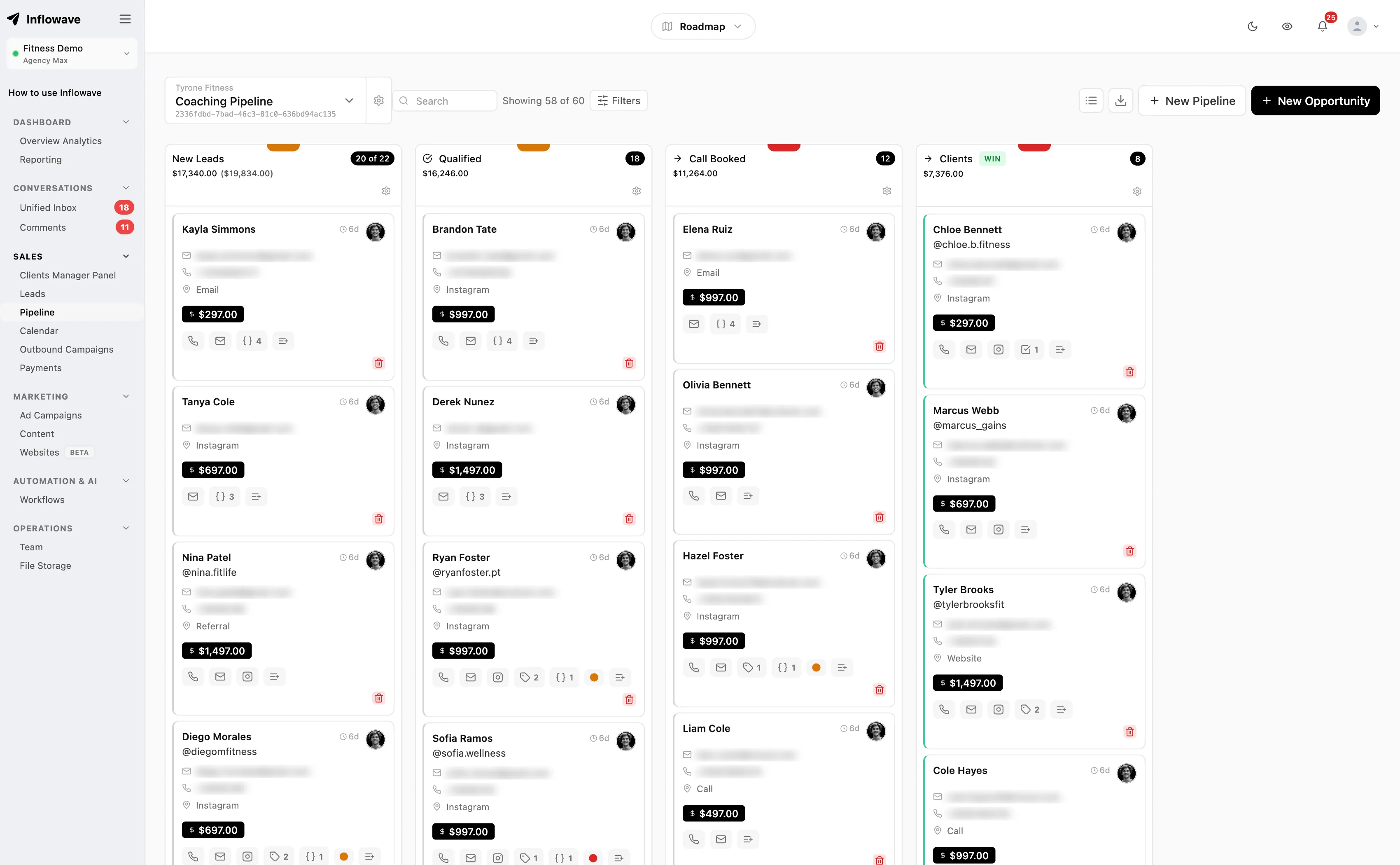
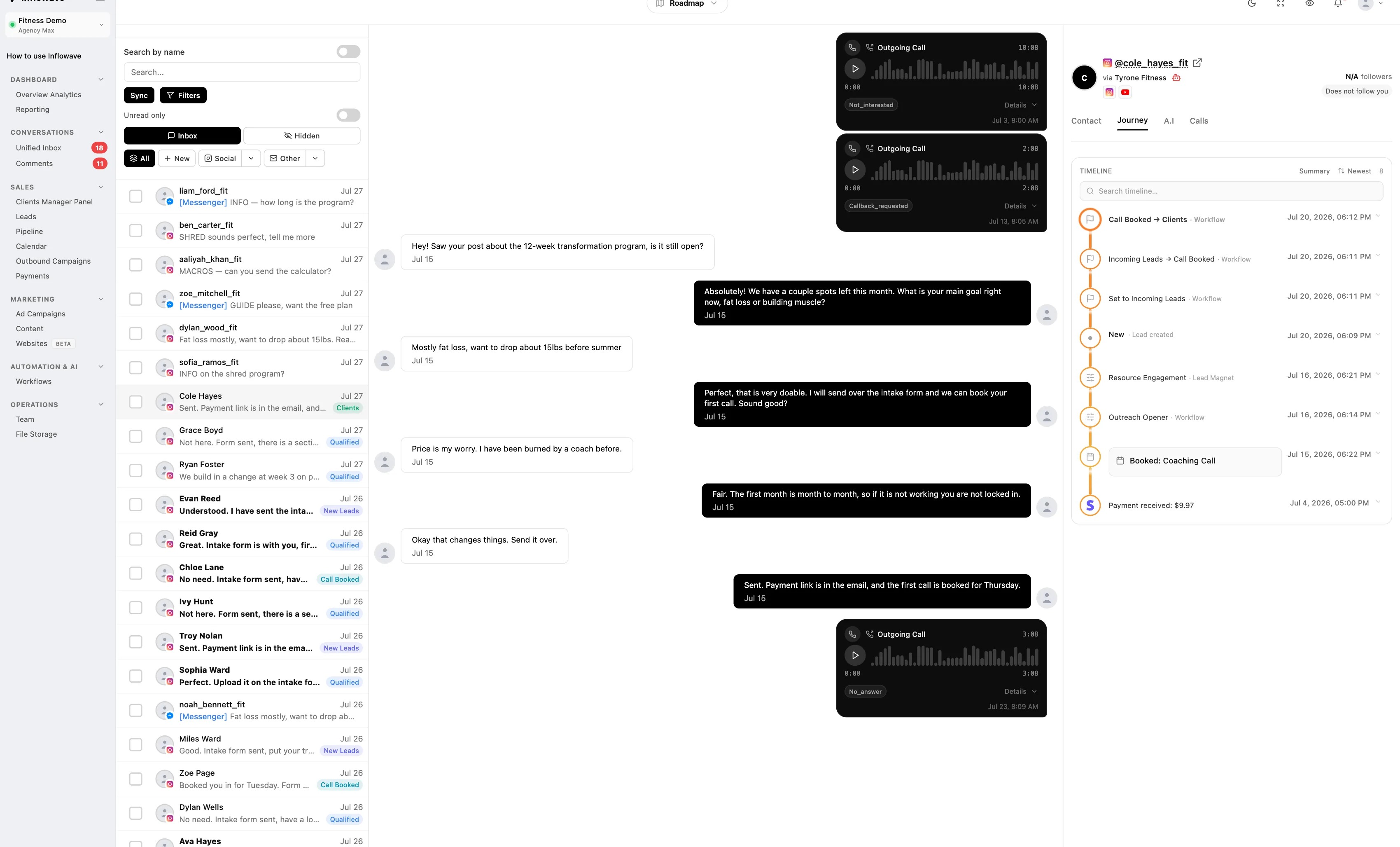
| Reporting | Per client. The inbox, pipeline and analytics screens shown above are the ones an account manager would use. |
We are not a neutral party. If your problem is price per seat, a per organisation tool will be cheaper. If your problem is structure, the agency CRM approach is the thing to test. Looking at how the pipeline and the unified inbox work per client is the quickest way to decide.
How to actually choose
Pick the constraint that is biting, and let it decide.
- Seat cost is the problem. Bitrix24. Flat per-organisation pricing with 50 or 100 users included is a different category of spend, and nothing else here comes close on that axis.
- You only need a pipeline with WhatsApp attached. Zoho Bigin at seven dollars a seat.
- Calling is the pipeline. Close, and use the priced additional-organisation model for client separation.
- The CRM keeps going stale. Salesflare, and budget for Pro so you get per-pipeline permissions.
- You want a conventional CRM at the lowest full-featured tier. Freshsales Growth.
- You are running other people's businesses in a single-business tool. That is a structural problem, not a pricing one, and no amount of custom fields solves it. Look at tools built around a client object, including ours.
One last piece of advice that applies whichever way you go. Before you sign anything, run the number you will actually pay in year one, including the billing minimum, the seats you cannot mix, the add-ons that unlock the feature you are buying it for, and a realistic estimate of per-message fees at your clients' current volume. That number is usually two to three times the figure on the pricing page, and it is the only one worth comparing across vendors.
For the wider picture on building an agency that does not depend on any single tool, see our guide on how to grow a marketing agency, the best CRM for marketing agencies comparison, and the agency client onboarding checklist for the process side of taking on a client in whatever system you land on.
Questions people ask
Is Kommo a good CRM?
For a single business selling through WhatsApp and Instagram, yes. It is a pipeline CRM built specifically around messengers, with an inbox, pipeline automation from the Advanced plan and bots included rather than sold separately. The complaints tend to come from two groups: agencies, because channel limits are coupled to seat count and every user must sit on the same plan, and teams that wanted monthly billing, because the minimum subscription period is six months paid up front.
How much does Kommo CRM cost?
Kommo publishes three self-serve tiers plus Enterprise. Base is $25 per user per month, Advanced is $35 and Pro is $45. Because there is no monthly option and the minimum term is six months, the amounts you actually pay up front are $150, $210 and $270 per user respectively. Enterprise pricing is custom. Extra AI credit packages and paid third-party marketplace integrations are the main optional additions.
How much does CRM software typically cost?
Published per-seat prices across the tools in this article range from about $7 to about $139 per user per month, with entry tiers clustering between $9 and $49 and automation usually starting one tier above the cheapest. Per-organisation pricing is the outlier: Bitrix24 lists US$99 per month annually for 50 included users. Always calculate the annual commitment rather than the monthly sticker, since most of these discount heavily for annual billing.
Why is CRM software so expensive?
Usually because the price you compared was not the price you pay. Three things inflate it. Automation, permissions and reporting typically sit a tier above the entry plan, so the advertised price does not include the feature you are buying it for. Per-seat pricing multiplies across people who barely use the tool, especially if plans cannot be mixed. And metered costs on top, such as WhatsApp template fees or per-minute calling, scale with your clients' volume rather than your headcount.
Which CRM is best for integrating with WhatsApp?
There is no single answer, because it depends on how many numbers you need. Kommo, Bitrix24 and Zoho Bigin all list WhatsApp Business integration on their entry tiers. The differentiator for agencies is how many separate numbers a plan allows and whether that limit is tied to seat count. Whichever you choose, the platform fee is separate from Meta's per-template messaging fees, which are charged on top by whoever provides the connection.
Is there a free CRM for WhatsApp?
Several CRMs offer a free tier, and Bitrix24 lists a free plan that includes CRM, tasks and chat. However, free tiers generally do not include the WhatsApp Business Platform connection, which is where the cost sits. Bitrix24 lists WhatsApp integration from the Basic plan upward rather than on Free. Separately, the WhatsApp Business app on a phone is free but is not an API connection, so it cannot be shared across a team through a CRM inbox.
How do you connect WhatsApp to a CRM?
Through the WhatsApp Business Platform. You need a Meta Business account, a phone number that is not currently registered to the consumer WhatsApp app, and a provider to host the connection, which is often the CRM itself. You register the number, verify the business, then submit message templates for approval before you can start conversations outbound. A number can only be connected to one platform at a time, which is why switching CRM means releasing and re-registering it.
What are the four types of CRM?
CRM tools are conventionally grouped into operational, analytical, collaborative and strategic. Operational covers the day-to-day pipeline, contact and automation work that most of the tools in this article do. Analytical covers reporting and segmentation. Collaborative covers shared inboxes and handover between teams. Strategic covers long-term account and relationship planning. Most commercial products blend the first three; the categories are more useful for working out which part of the job a tool is weakest at than for shortlisting.
Sources
- Kommo pricing for plan prices, billing terms, lead limits, AI credit allocations and channel limits
- Kommo refund policy for cancellation terms
- Bitrix24 pricing for per-organisation plan prices and included user counts
- Zoho Bigin pricing for Express plan price, pipeline and record limits
- Close pricing for seat prices, additional organisation cost and usage-based calling rates
- Freshsales pricing for Growth, Pro and Enterprise prices and add-on costs
- Salesflare pricing for Growth and Pro prices and the Pro permissions feature
- Twilio WhatsApp pricing for per-message handling fees, Meta template fee pass-through and the customer service window
